
iOS 搜尋框實作教學:UISearchController 完整用法
編輯:iOS 開發綜合
最近在開發一款天氣預報 App,需要實作城市搜尋功能,順手把 UISearchController 的用法整理成一篇筆記。
先說結論:iOS 8.0 以上可以直接使用 UISearchController,幾行程式碼就能在 UITableView 中加上搜尋框;而在更早的版本中,則必須搭配 UISearchBar 與 UISearchDisplayController 才能完成同樣的事。
一、初始化
- (void)viewDidLoad {
    [super viewDidLoad];
    self.searchController = [[UISearchController alloc] initWithSearchResultsController:nil];
    self.searchController.searchResultsUpdater = self;
    self.searchController.dimsBackgroundDuringPresentation = false;
    [self.searchController.searchBar sizeToFit];
    self.tableView.tableHeaderView = self.searchController.searchBar;
}
這裡傳入 nil 表示「直接在原本的列表上篩選」。若想把結果顯示在另一個獨立控制器上,則要傳入該控制器實例。另外,使用 UISearchController 必須採用 UISearchResultsUpdating 協議,並實作其唯一方法。
二、執行篩選
系統提供了 NSPredicate 這個類別來做匹配與篩選,其中 CONTAINS[c] 的 c 代表 caseInsensitive,也就是不分大小寫:
- (void)updateSearchResultsForSearchController:(UISearchController *)searchController {
    [self.searchList removeAllObjects];
    NSPredicate *searchPredicate = [NSPredicate predicateWithFormat:@"SELF CONTAINS[c] %@",
                                    self.searchController.searchBar.text];
    self.searchList = [[self.dataList filteredArrayUsingPredicate:searchPredicate] mutableCopy];
    dispatch_async(dispatch_get_main_queue(), ^{
        [self.tableView reloadData];
    });
}
三、依狀態切換資料源
透過 searchController 的 active 屬性判斷搜尋框是否處於啟用狀態,再決定列表要讀原始資料還是篩選結果:
- (NSInteger)tableView:(UITableView *)tableView numberOfRowsInSection:(NSInteger)section {
    return self.searchController.active ? self.searchList.count : self.dataList.count;
}

- (UITableViewCell *)tableView:(UITableView *)tableView cellForRowAtIndexPath:(NSIndexPath *)indexPath {
    static NSString *ID = @"cell";
    UITableViewCell *cell = [tableView dequeueReusableCellWithIdentifier:ID];
    if (!cell) {
        cell = [[UITableViewCell alloc] initWithStyle:UITableViewCellStyleDefault reuseIdentifier:ID];
    }
    cell.textLabel.text = self.searchController.active ? self.searchList[indexPath.row]
                                                       : self.dataList[indexPath.row];
    return cell;
}
四、離開時清理
- (void)viewWillDisappear:(BOOL)animated {
    [super viewWillDisappear:animated];
    if (self.searchController.active) {
        self.searchController.active = NO;
        [self.searchController.searchBar removeFromSuperview];
    }
}
效果如下:
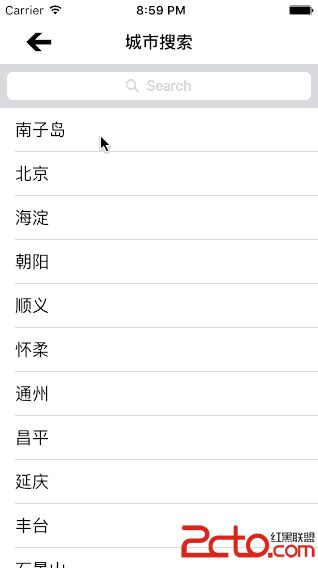
整體來說,UISearchController 把搜尋框的 UI、焦點管理與資料回呼都封裝好了,開發者真正需要動腦的只有「怎麼篩選資料」這一段。如果搜尋邏輯較複雜(例如需要拼音比對或模糊匹配),把 NSPredicate 換成自訂的過濾方法即可。