
Objective-C 與 iOS 開發實用小技巧大整理(39 則)
這篇是日常開發中累積的小技巧合集,涵蓋陣列遍歷、動畫、字串樣式、網路判斷、裝置資訊到生命週期等各個層面,適合當作随手可查的速查表。
一、陣列遍歷的三種方式
Objective-C 中常見的遍歷方式有 for 迴圈、for-in 快速遍歷與 NSEnumerator 列舉器三種。要注意的是:若為可變陣列且迴圈中會改變長度,就不要使用 for-in。
NSArray *array = @[car1, car2, car3];

// 1. 傳統 for 迴圈
for (int i = 0; i < array.count; i++) {
    NSLog(@"%@", [array objectAtIndex:i]);
}

// 2. 快速遍歷
for (Car *obj in array) {
    NSLog(@"%@", obj);
}

// 3. 列舉器
NSEnumerator *enumerator = [array objectEnumerator];
id obj = nil;
while (obj = [enumerator nextObject]) {
    NSLog(@"%@", obj);
}

// 列舉器 Block 寫法
[moduleArray enumerateObjectsUsingBlock:^(id _Nonnull obj, NSUInteger idx, BOOL * _Nonnull stop) {
    // 將 stop 設為 YES 可提前中斷
}];
二、用 [obj class] 取得類別並動態建立物件
把 Class 放進陣列,再依索引動態 instantiation,是實作「工廠模式」的簡潔寫法:
+ (instancetype)creatBtn:(BtnType)type {
    Class myclass[] = {[mybuton_SJX class], [mybuton_YX class]};
    mybuton *btn = [[myclass[type] alloc] init];
    return btn;
}
三、UIImageView 播放動畫
images = @[[UIImage imageNamed:@"1.jpg"], [UIImage imageNamed:@"2.jpg"], [UIImage imageNamed:@"3.jpg"]];
self.iv.animationImages = images;
self.iv.animationDuration = 12;
self.iv.animationRepeatCount = 0;  // 無限循環
[self.iv startAnimating];
四、蝴蝶飛過的動畫效果
用 animatedImageNamed:duration: 讓圖片自身播放多幀動畫,再開一個 NSTimer 定時改變 center,就能做出橫向飄移的效果:
iv = [[UIImageView alloc] initWithFrame:CGRectMake(0, 30, 41, 43)];
iv.image = [UIImage animatedImageNamed:@"butterfly_f" duration:0.6];
[self.view addSubview:iv];

timer = [NSTimer scheduledTimerWithTimeInterval:0.1 target:self selector:@selector(changePos) userInfo:nil repeats:YES];

- (void)changePos {
    CGPoint curPos = iv.center;
    int y = arc4random() % 10 - 4;
    if (curPos.x > [UIScreen mainScreen].bounds.size.width) {
        iv.center = CGPointMake(0, 30);   // 從左側重新進入
    } else {
        iv.center = CGPointMake(curPos.x + 4, curPos.y + y);
    }
}
五、讓按鈕尺寸貼合背景圖
UIImage *backImg = [UIImage imageNamed:@"back_white"];
UIButton *btn = [[UIButton alloc] initWithFrame:CGRectMake(0, 0, backImg.size.width, backImg.size.height)];
[btn setImage:backImg forState:UIControlStateNormal];
[btn addTarget:self action:@selector(backClick) forControlEvents:UIControlEventTouchUpInside];
六、自製轉場動畫
用 addChildViewController 加上 CATransition,可以做出類似 navigation push 的滑入效果:
CATransition *animation = [CATransition animation];
[animation setDuration:0.3];
[animation setType:kCATransitionPush];
[animation setTimingFunction:[CAMediaTimingFunction functionWithName:kCAMediaTimingFunctionEaseInEaseOut]];
[animation setSubtype:kCATransitionFromRight];
[self.navigationController.view.layer addAnimation:animation forKey:nil];
七、撥打電話
三種情境要注意:飛行模式下系統會詢問是否關閉;沒有 SIM 卡也會提示;正常情況下 App 會進入背景並跳出撥號畫面。
[[UIApplication sharedApplication] openURL:[NSURL URLWithString:@"tel://4008-230-950"]];
八、導航欄標題改成圖片
UIImageView *imageView = [[UIImageView alloc] initWithFrame:CGRectMake(0, 0, ViewWidth * 0.3, 22)];
imageView.image = [UIImage imageNamed:@"tapmoney"];
self.navigationItem.titleView = imageView;
九、產生 QR Code
twoDimensionCode.image = [QRCodeGenerator qrImageForString:@"www.baidu.com" imageSize:400];
十、設定圓角與邊框
view.layer.borderColor = [[UIColor blackColor] CGColor];
view.layer.borderWidth = 0.5;
view.layer.cornerRadius = 5;
view.layer.masksToBounds = YES;
十一、NSAttributedString 進階樣式
可同時設定字色、字距、字型與大小,其中 NSKernAttributeName 就是控制字距的關鍵:
NSAttributedString *attriStr = [[NSAttributedString alloc] initWithString:@"Today's earn"
    attributes:@{NSForegroundColorAttributeName : [UIColor whiteColor],
                 NSKernAttributeName : @(-1.3f),
                 NSFontAttributeName : [UIFont fontWithName:@"Gill Sans" size:1.8 * NormalFont]}];
十二、計算字串實際尺寸
CGSize size = [middleLabel.text boundingRectWithSize:CGSizeMake(ViewWidth * 0.7, NormalFont * 3)
    options:NSStringDrawingUsesLineFragmentOrigin | NSStringDrawingUsesFontLeading
    attributes:@{NSFontAttributeName : middleLabel.font} context:nil].size;
十三、隱藏底部 TabBar
vc.hidesBottomBarWhenPushed = YES;
十四、同一段文字用兩種顏色
本質上是對指定 range 追加屬性:
NSString *jointext = [NSString stringWithFormat:@"%@%@", joinstr, text];
NSMutableAttributedString *attributeString = [[NSMutableAttributedString alloc] initWithString:jointext];
[attributeString addAttributes:textDic range:NSMakeRange(joinstr.length, text.length)];
十五、移除列表分隔線與選取效果
_tableView.separatorStyle = UITableViewCellSeparatorStyleNone;
cell.selectionStyle = UITableViewCellSelectionStyleNone;
十六、畫出波浪線
用 UIBezierPath 的 addQuadCurveToPoint 連續疊加二次曲線即可:
for (int i = 0; i < 50; ++i) {
    [aPath moveToPoint:CGPointMake(0 + frame.size.width / 50 * i, height)];
    [aPath addQuadCurveToPoint:CGPointMake(frame.size.width / 50 * (i + 1), height)
                   controlPoint:CGPointMake(frame.size.width / 100 + frame.size.width / 50 * i, height - 5)];
}
十七、取得 IP 與 MAC 位址
需引入 <ifaddrs.h>、<sys/socket.h>、<net/if_dl.h> 等標頭。IP 透過 getifaddrs 遍歷介面鏈表並比對 "en0";MAC 則以 sysctl 搭配 NET_RT_IFLIST 取得。
+(NSString *)getIPAddress {
    NSString *address = @"error";
    struct ifaddrs *interfaces = NULL;
    if (getifaddrs(&interfaces) == 0) {
        for (struct ifaddrs *temp_addr = interfaces; temp_addr != NULL; temp_addr = temp_addr->ifa_next) {
            if (temp_addr->ifa_addr->sa_family == AF_INET) {
                if ([[NSString stringWithUTF8String:temp_addr->ifa_name] isEqualToString:@"en0"]) {
                    address = [NSString stringWithUTF8String:
                               inet_ntoa(((struct sockaddr_in *)temp_addr->ifa_addr)->sin_addr)];
                }
            }
        }
        freeifaddrs(interfaces);
    }
    return address;
}
補充:近年 iOS 基於隱私考量,已無法取得真正的 WiFi MAC 位址,回傳值會是固定字串,這一點在新專案中要特別留意。
十八、漸層色圖片
用 CAGradient 相關的 Core Graphics API 建立 CGGradientRef,再呼叫 CGContextDrawLinearGradient 繪製:
CGContextDrawLinearGradient(context, gradientRef,
                            CGPointMake(0, 0),
                            CGPointMake(0, frame.size.height), 0);
十九、讓某個 cell 不可選取
實作 willSelectRowAtIndexPath 並回傳 nil 是最徹底的做法:
- (NSIndexPath *)tableView:(UITableView *)tv willSelectRowAtIndexPath:(NSIndexPath *)path {
    return rowIsSelectable ? path : nil;
}
二十、給 UIImageView 加上點擊 Block
@interface CustomImageView : UIImageView
@property (nonatomic, copy) void (^touchImage)();
@end

@implementation CustomImageView
- (id)initWithFrame:(CGRect)frame {
    self = [super initWithFrame:frame];
    if (self) self.userInteractionEnabled = YES;
    return self;
}
- (void)touchesBegan:(NSSet *)touches withEvent:(UIEvent *)event {
    if (self.touchImage) self.touchImage();
}
@end
二十一、只影響當前頁的導航欄顯示
- (void)viewWillAppear:(BOOL)animated {
    [super viewWillAppear:animated];
    self.navigationController.navigationBarHidden = YES;
}
- (void)viewWillDisappear:(BOOL)animated {
    [super viewWillDisappear:animated];
    self.navigationController.navigationBarHidden = NO;
}
二十二、tabBarItem 的圖片與文字間距
[nc.tabBarItem setTitlePositionAdjustment:UIOffsetMake(0, -4)];
二十三、為文字加上底線
[attributedStr addAttribute:NSUnderlineStyleAttributeName
                       value:[NSNumber numberWithInteger:NSUnderlineStyleSingle]
                       range:NSMakeRange(0, attributedStr.length)];
二十四、自訂導航欄標題樣式
NSDictionary *navbarTitleTextAttributes = @{
    NSForegroundColorAttributeName : KDefaultTitleViewTitleColor,
    NSFontAttributeName : KDefaultTitleViewTitleFont
};
[[UINavigationBar appearance] setTitleTextAttributes:navbarTitleTextAttributes];
二十五、斷網偵測
引入 Reachability 後即可判斷網路狀態:
Reachability *reach = [Reachability reachabilityWithHostName:@"www.baidu.com"];
if ([reach currentReachabilityStatus] == NotReachable) {
    // 提示使用者並中止後續請求
    return;
}
二十六、動態滾動到指定 cell
[_tableView scrollToRowAtIndexPath:[NSIndexPath indexPathForRow:_messageArray.count - 1 inSection:0]
                  atScrollPosition:UITableViewScrollPositionNone
                          animated:YES];
二十七、設定行間距
NSMutableParagraphStyle *paragraphStyle = [[NSMutableParagraphStyle alloc] init];
[paragraphStyle setLineSpacing:lineSpace];
[attributedString addAttribute:NSParagraphStyleAttributeName
                         value:paragraphStyle
                         range:NSMakeRange(0, [attributedString length])];
二十八、簽到動畫
用舊式 beginAnimations 反覆遞迴改變 transform,讓圖示持續旋轉:
self.checkImageView.transform = CGAffineTransformMakeRotation(self.angle * (M_PI / 180.0f));
[UIView commitAnimations];
// endAnimation 中 angle += 10 後再次呼叫 startAnimation
二十九、城市名稱依拼音排序
關鍵在於:漢字開頭的字串需先用 pinyinFirstLetter 取出首字母,再依首字母分組;由於 NSDictionary 無序,分組後還要把 key 另外排序輸出。
letterPoint = [str UTF8String];
if (!(*letterPoint > 'a' && *letterPoint < 'z') && !(*letterPoint > 'A' && *letterPoint < 'Z')) {
    char letter = pinyinFirstLetter([str characterAtIndex:0]);
    letterPoint = &letter;
}
NSString *firstLetter = [[NSString stringWithFormat:@"%c", *letterPoint] uppercaseString];
三十、撥 mail/電話/簡訊/開啟網址
// 郵件
[[UIApplication sharedApplication] openURL:[NSURL URLWithString:@"mailto://admin@hzlzh.com"]];
// 電話
[[UIApplication sharedApplication] openURL:[NSURL URLWithString:@"tel://8008808888"]];
// 簡訊
[[UIApplication sharedApplication] openURL:[NSURL URLWithString:@"sms://800888"]];
// 瀏覽器
[[UIApplication sharedApplication] openURL:[NSURL URLWithString:@"https://www.hzlzh.com"]];
若希望通話結束後自動返回 App,可用 UIWebView 載入 tel 連結;另有 telprompt:// 這種私有 scheme,但可能無法通過審核。openURL 只能帶號碼,無法預填簡訊內容;若需要帶內容,得改用 MessageUI.framework 的 MFMessageComposeViewController 並實作其代理。預設簡訊介面顯示英文,在 .xib 的 Localization 中補一組 Chinese 即可。
三十一、判斷是否首次啟動
if (![[NSUserDefaults standardUserDefaults] boolForKey:@"firstStart"]) {
    [[NSUserDefaults standardUserDefaults] setBool:YES forKey:@"firstStart"];
    NSLog(@"第一次啟動");
}
三十二、判斷電信商
透過 CoreTelephony 的 CTCarrier 取得 mobileNetworkCode 即可比對,例如 00、02、07 對應中國移動。
三十三、NSData 同步請求
可搭配 NSDataReadingMappedIfSafe 參數,讓系統把檔案映射進行程位址空間而非全量載入記憶體,有效降低記憶體壓力。另外,若 URL 含中文必須先做百分比編碼:
NSURL *url = [NSURL URLWithString:[self.curTaskData.urlstring stringByAddingPercentEscapesUsingEncoding:NSUTF8StringEncoding]];
三十四、View 與 Window 的座標轉換
centerPoint = [self convertPoint:centerPoint toView:appDelegate.window];
三十五、ViewController 生命週期
loadView 與 viewDidLoad 的差別在於:前者被呼叫時 view 尚未建立,後者則已建立完成。loadView 只會被呼叫一次,viewDidLoad 則可能因 view 被重新載入而多次觸發。完整流程如下:
init → loadView → viewDidLoad → viewWillAppear → viewDidAppear → viewWillDisappear → viewDidDisappear → viewWillUnload → viewDidUnload → dealloc
三十六、App 啟動原理與 UIWindow
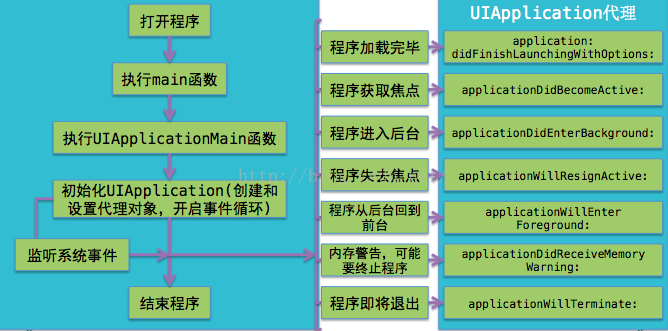
所有行動系統都有個致命缺點:App 容易被打斷。來電、鎖屏都可能讓 App 進入背景甚至被終止。這些系統事件由 UIApplication 通知其 delegate 處理,包括生命週期事件、系統事件與記憶體警告。取得 UIWindow 的三種方式:
[UIApplication sharedApplication].windows 可取得所有 UIWindow(鍵盤其實就住在另一個 UIWindow 裡);.keyWindow 是當前接收鍵盤與非觸碰事件的視窗,同一時刻只會有一個;view.window 則取得某個 view 所屬的 UIWindow。
三十七、調整 Cell 內文字位置
- (void)layoutSubviews {
    [super layoutSubviews];
    int cellHeight = self.frame.size.height;
    int cellWidth = self.frame.size.width;
    self.textLabel.frame = CGRectMake(0, 10, cellWidth, cellHeight - 10);
}
三十八、拉伸圖片但保留圓角
UIImage *aImage = [[UIImage imageNamed:@"xxx.png"] stretchableImageWithLeftCapWidth:3 topCapHeight:3];
原圖邊框內的 3 像素不參與拉伸,中間部分才依需要延展,如此可避免圓角變形。
三十九、自訂 UINavigationBar
改左右按鈕的 tintColor、換成自訂 UIButton 當 UIBarButtonItem,或繼承 UINavigationBar 並在 drawRect 中畫入背景圖,三種層次可依需求選擇:
- (void)drawRect:(CGRect)rect {
    if (navigationBarBackgroundImage)
        [navigationBarBackgroundImage drawInRect:rect];
    else
        [super drawRect:rect];
}