
iOS 第三方登錄實戰:QQ、微信、新浪微博接入全流程
三方登錄幾乎是每個 App 的標配。這裡把 QQ、微信、微博三家的接入要點整理在一起,包含工程配置、代碼接入與常見報錯處理。
一、QQ 登錄
第一步,登錄騰訊開放平台(connect.qq.com)創建一個應用,拿到 APP ID 與 APP KEY。
第二步,下載對應的 iOS SDK。
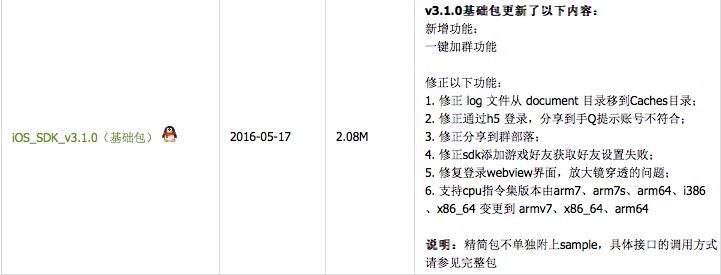
第三步,參考官方的 iOS SDK 調用說明完成環境搭建。
1. 導入 SDK 並配置工程
把下載好的 SDK 拖入工程:
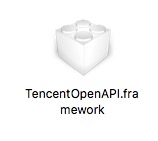
添加所需的依賴庫:
Security.framework
SystemConfiguration.framework
CoreGraphics.Framework
CoreTelephony.framework
libiconv.tdb
libsqlite3.tdb
libstdc++.tdb
libz.tdb
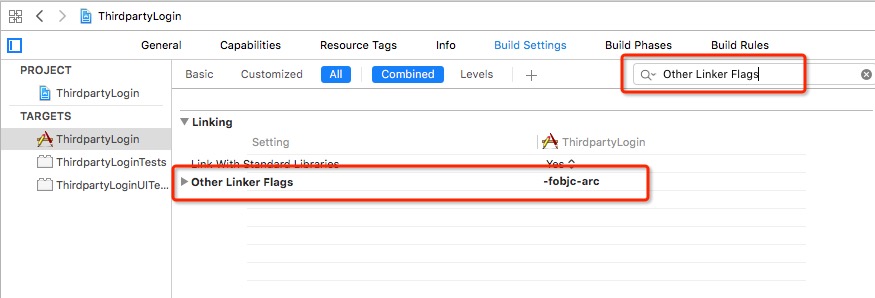
在 Build Settings 的 Linking 區域,為 Other Linker Flags 添加 -fobjc-arc(若 SDK 是 ARC 編譯且工程為 MRC 时需要該標記;具體以官方文檔為準):
2. 添加項目代碼
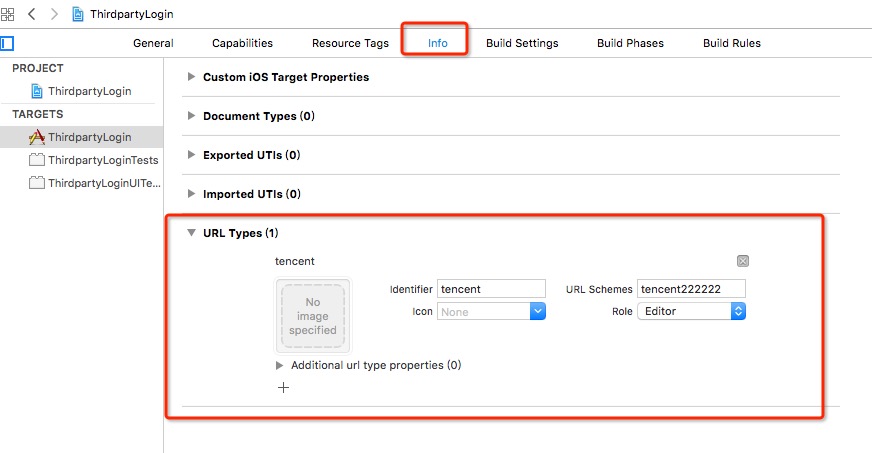
先添加 URL Schemes,規則是 tencent + APP ID:
在 Info.plist 中配置 ATS:

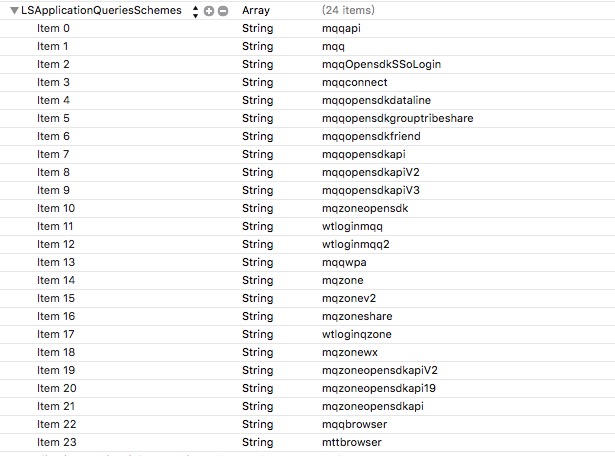
再添加 LSApplicationQueriesSchemes 白名單,否則無法正確判斷 QQ 是否安裝:
LSApplicationQueriesSchemes
mqqapi
mqq
mqqOpensdkSSoLogin
mqqconnect
mqqopensdkdataline
mqqopensdkgrouptribeshare
mqqopensdkfriend
mqqopensdkapi
mqqopensdkapiV2
mqqopensdkapiV3
mqzoneopensdk
wtloginmqq
wtloginmqq2
mqqwpa
mqzone
mqzonev2
mqzoneshare
wtloginqzone
mqzonewx
mqzoneopensdkapiV2
mqzoneopensdkapi19
mqzoneopensdkapi
mqqbrowser
mttbrowser
添加後的配置如下圖:
最後在 AppDelegate.m 中接入:
#import "AppDelegate.h"
#import <TencentOpenAPI/TencentOAuth.h>
#import <TencentOpenAPI/QQApiInterface.h>

@interface AppDelegate () <TencentSessionDelegate>
@property (nonatomic, strong) TencentOAuth *tencentOAuth;
@end

@implementation AppDelegate

- (BOOL)application:(UIApplication *)application didFinishLaunchingWithOptions:(NSDictionary *)launchOptions {
    // 初始化 SDK
    _tencentOAuth = [[TencentOAuth alloc] initWithAppId:@"222222" andDelegate:self];

    // 設置應用需要用戶授權的 API 列表
    NSArray *_permissions = [NSArray arrayWithObjects:@"get_user_info",
                             @"get_simple_userinfo",
                             @"add_t",
                             nil];

    // 調用 SDK 登錄
    [_tencentOAuth authorize:_permissions inSafari:NO];

    [_tencentOAuth accessToken];
    [_tencentOAuth openId];

    return YES;
}

// 登錄成功
- (void)tencentDidLogin {
    NSLog(@"登錄完成");
    if (_tencentOAuth.accessToken && 0 != [_tencentOAuth.accessToken length]) {
        // 記錄登錄用戶的 OpenID、Token 以及過期時間
        NSLog(@"%@", _tencentOAuth.accessToken);
    } else {
        NSLog(@"登錄不成功,沒有獲取 accessToken");
    }
}

// 非網絡錯誤導致登錄失敗
- (void)tencentDidNotLogin:(BOOL)cancelled {
    if (cancelled) {
        NSLog(@"用戶取消登錄");
    } else {
        NSLog(@"登錄失敗");
    }
}

// 網絡錯誤導致登錄失敗
- (void)tencentDidNotNetWork {
    NSLog(@"無網絡連接,請設置網絡");
}

// 處理來至 QQ 的請求
- (void)onReq:(QQBaseReq *)req {
    NSLog(@"----req %@", req);
}

// 處理來至 QQ 的響應
- (void)onResp:(QQBaseResp *)resp {
    NSLog(@"----resp %@", resp);
}

// 處理 QQ 在線狀態的回調
- (void)isOnlineResponse:(NSDictionary *)response {
}

- (BOOL)application:(UIApplication *)application openURL:(NSURL *)url sourceApplication:(NSString *)sourceApplication annotation:(id)annotation {
    return [TencentOAuth HandleOpenURL:url];
}

- (BOOL)application:(UIApplication *)application handleOpenURL:(NSURL *)url {
    return [TencentOAuth HandleOpenURL:url];
}

@end
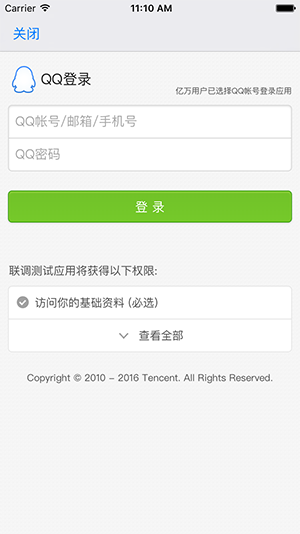
效果圖:
3. 錯誤處理
集成時常見的一類錯誤是授權配置無效:
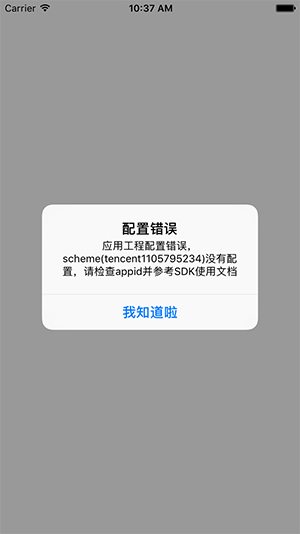
常見原因是在開放平台註冊了應用並拿到 APP ID,但尚未通過審核。此時可以換用騰訊官方提供的測試 APP ID 222222 先驗證流程是否通暢:
// 初始化 SDK
_tencentOAuth = [[TencentOAuth alloc] initWithAppId:@"222222" andDelegate:self];
只要 URL Schemes 與 APP ID 這兩處配置正確,登錄流程就能跑通。
二、微信登錄
第一步,登錄微信開放平台創建應用,獲取 AppID 與 AppSecret。
第二步,下載 iOS SDK。
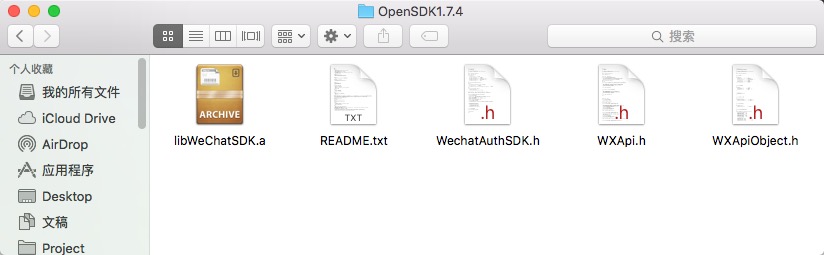
1. 導入 SDK 並配置工程
把 SDK 拖入工程後添加依賴庫:
SystemConfiguration.framework
libz.tdb
libsqlite3.0.tdb
libc++.tdb
Security.framework
CoreTelephony.framework
CFNetwork.framework
已經添加過的庫不必重複添加。
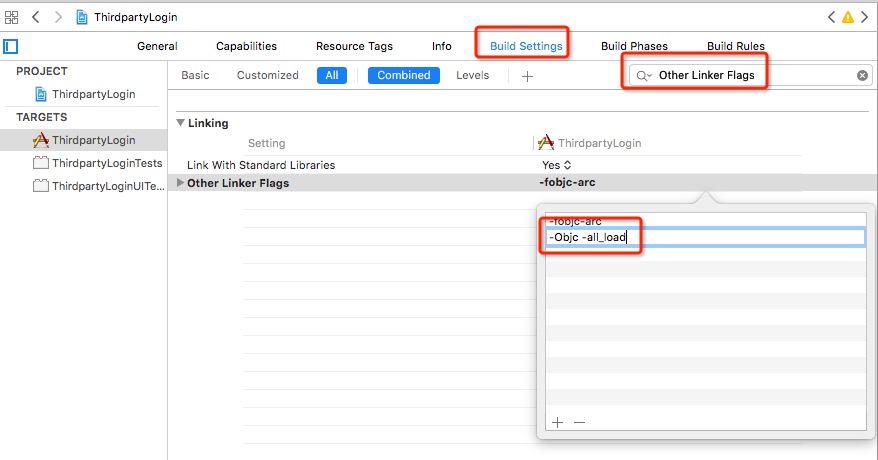
在 Build Settings 的 Other Linker Flags 中加入 -ObjC -all_load:
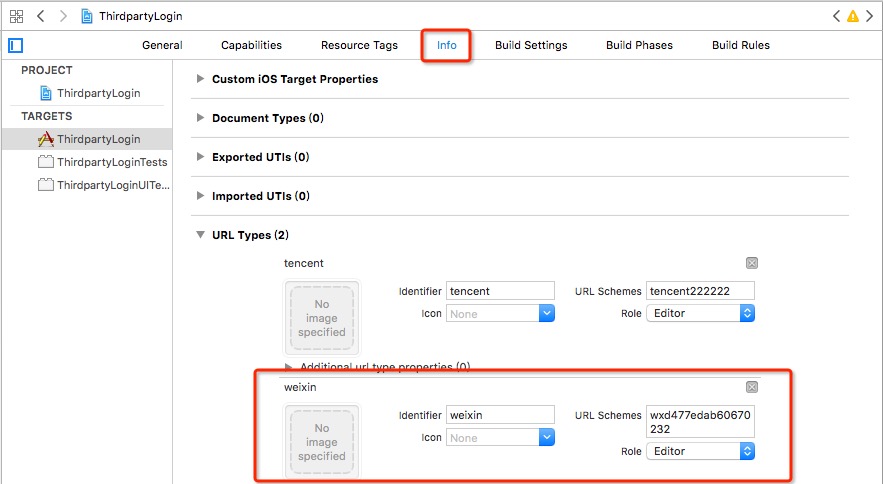
選中 Target → Info → URL Types,添加 URL scheme,值填你註冊的應用 ID:
2. 添加相關代碼
在 AppDelegate.m 中導入頭文件並添加協議:
#import "WXApi.h"

@interface AppDelegate () <WXApiDelegate>
@end
註冊微信 SDK:
- (BOOL)application:(UIApplication *)application didFinishLaunchingWithOptions:(NSDictionary *)launchOptions {
    [WXApi registerApp:@"wxd477edab60670232"];
    return YES;
}
處理授權後的頁面回跳。項目中若同時集成了多家三方登錄,需要按 scheme 前綴分發:
- (BOOL)application:(UIApplication *)application openURL:(NSURL *)url sourceApplication:(NSString *)sourceApplication annotation:(id)annotation {
    if ([[url scheme] hasPrefix:@"tencent"]) {
        return [TencentOAuth HandleOpenURL:url];
    } else if ([[url scheme] hasPrefix:@"wx"]) {
        return [WXApi handleOpenURL:url delegate:self];
    }
    return YES;
}

- (BOOL)application:(UIApplication *)application handleOpenURL:(NSURL *)url {
    if ([[url scheme] hasPrefix:@"tencent"]) {
        return [TencentOAuth HandleOpenURL:url];
    } else if ([[url scheme] hasPrefix:@"wx"]) {
        return [WXApi handleOpenURL:url delegate:self];
    }
    return YES;
}
在需要觸發登錄的按鈕方法中發起授權請求:
SendAuthReq *req = [[SendAuthReq alloc] init];
req.scope = @"snsapi_message,snsapi_userinfo,snsapi_friend,snsapi_contact";
req.state = @"xxx";
[WXApi sendAuthReq:req viewController:self delegate:nil];
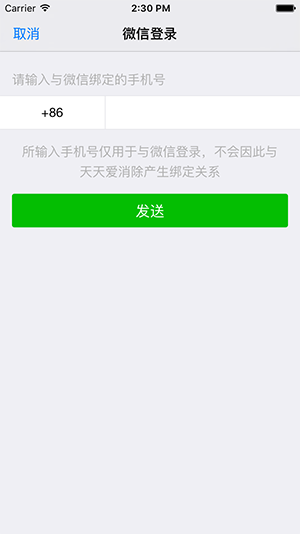
效果圖:
三、新浪微博登錄
第一步,登錄新浪微博開放平台創建應用,獲取 App Key 與 App Secret。
第二步,下載 iOS SDK。
1. 導入 SDK 並配置工程
把 SDK 拖入工程:
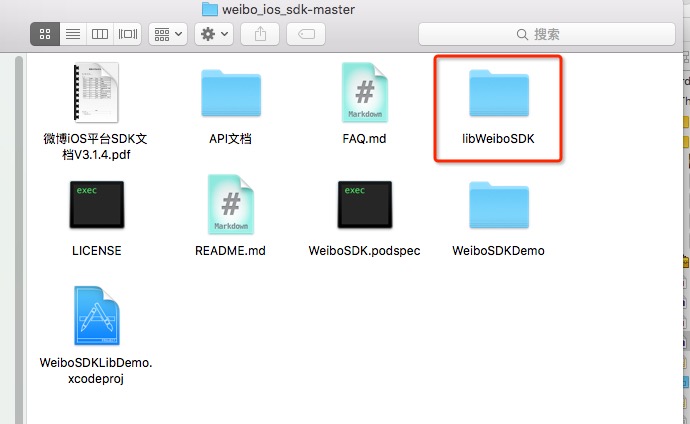
引入靜態庫後需要在 Target → Build Settings → Linking 的 Other Linker Flags 中添加 -ObjC(已添加過則不必重複)。
添加依賴庫:
QuartzCore.framework
ImageIO.framework
SystemConfiguration.framework
Security.framework
CoreTelephony.framework
CoreText.framework
UIKit.framework
Foundation.framework
CoreGraphics.framework
libz.tdb
libsqlite3.tdb
添加 URL Schemes:
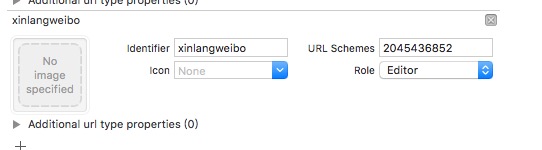
2. 添加相關代碼
在 AppDelegate.m 中添加頭文件與協議:
#import "WeiboSDK.h"

@interface AppDelegate () <WeiboSDKDelegate>
@end
註冊與回跳處理:
- (BOOL)application:(UIApplication *)application didFinishLaunchingWithOptions:(NSDictionary *)launchOptions {
    [WeiboSDK registerApp:@"2045436852"];
    return YES;
}

- (BOOL)application:(UIApplication *)application openURL:(NSURL *)url sourceApplication:(NSString *)sourceApplication annotation:(id)annotation {
    if ([[url scheme] hasPrefix:@"tencent"]) {
        return [TencentOAuth HandleOpenURL:url];
    } else if ([[url scheme] hasPrefix:@"wx"]) {
        return [WXApi handleOpenURL:url delegate:self];
    } else {
        return [WeiboSDK handleOpenURL:url delegate:self];
    }
}

- (BOOL)application:(UIApplication *)application handleOpenURL:(NSURL *)url {
    if ([[url scheme] hasPrefix:@"tencent"]) {
        return [TencentOAuth HandleOpenURL:url];
    } else if ([[url scheme] hasPrefix:@"wx"]) {
        return [WXApi handleOpenURL:url delegate:self];
    } else {
        return [WeiboSDK handleOpenURL:url delegate:self];
    }
}
在需要觸發登錄的按鈕方法中發起授權:
WBMessageObject *message = [WBMessageObject message];
message.text = @"測試使用";
WBSendMessageToWeiboRequest *request = [WBSendMessageToWeiboRequest requestWithMessage:message];
[WeiboSDK sendRequest:request];
注意:新浪微博登錄必須使用真機測試,模擬器無法完成授權跳轉。
小結:三家接入的共同套路
把上面的內容抽象一下,三方登錄的接入無非四步:在開放平台註冊應用拿到 AppID;導入 SDK 並配齊依賴庫與 Other Linker Flags;配置 URL Scheme(用於授權後回跳)以及必要的 ATS 與白名單;在 AppDelegate 中完成註冊與 URL 分發,在業務頁面發起授權請求。多傢伙共存時,回跳分發按 scheme 前綴判斷是最省事的做法。