
iOS 10 適配與 Xcode 8 相容問題大掃描
從 iOS 9 邁向 iOS 10,加上 Xcode 8 的種種變動,開發者勢必得踩過一輪適配的坑。本文彙整了註釋失效、雜訊日誌、字體適配、通知變革、隱私權限等常見問題,逐一附上解法。
程式碼註釋失效
這是因為蘋果為了解決 Xcode Ghost 問題,把插件一併屏蔽了。
解法:打開終端執行 sudo /usr/libexec/xpccachectl,然後必須重啟電腦才會生效。
值得一提的是,Xcode 8 已內建開啟註釋的功能,位置可在選單中找到。命令鍵 + / 的快捷鍵失效,同樣可用上述命令修復。
屏蔽雜亂無章的 Bug 日誌
升級 Xcode 8 後,新建工程都會打印一堆看不懂的日誌,例如:
subsystem: com.apple.UIKit, category: HIDEventFiltered, enable_level: 0, persist_level: 0, default_ttl: 0, info_ttl: 0, debug_ttl: 0, generate_symptoms: 0, enable_oversize: 1,
屏蔽方法:Xcode 8 中進入 Edit Scheme → Run → Arguments,在 Environment Variables 裡添加字典:
(name) OS_ACTIVITY_MODE = (value) Disable
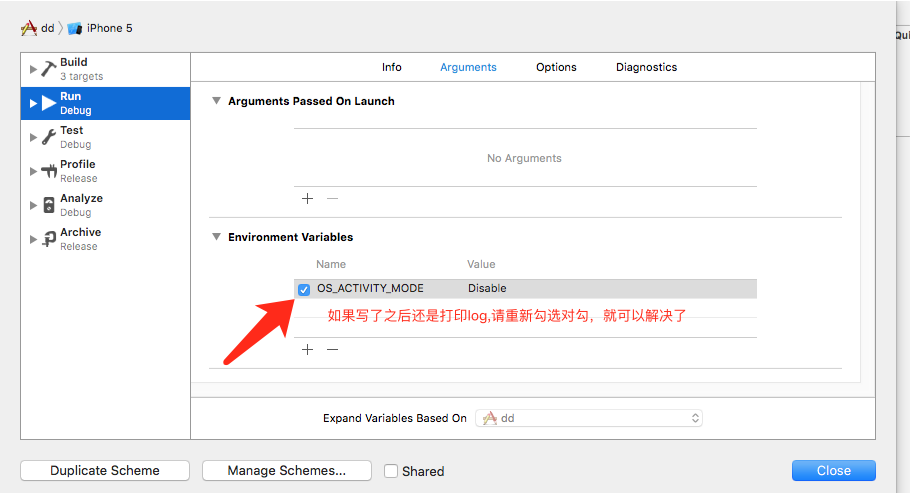
此外,在設定日誌選項時,可以透過 Arguments 參數打印出 App 的加載時長,包括整體加載與動態庫加載等。做法是在 Environment Variables 中加入 DYLD_PRINT_STATISTICS 並設為 YES,控制台便會打印加載時長。
考量到在 Xcode 8 加入上述內容後,真機調試可能異常,建議自定義一個巨集來做日誌輸出:
#ifdef DEBUG
#define DDLOG(...) printf(" %s\n",[[NSString stringWithFormat:VA_ARGS]UTF8String]);
#define DDLOG_CURRENT_METHOD NSLog(@"%@-%@", NSStringFromClass([self class]), NSStringFromSelector(_cmd))
#else
#define DDLOG(...) ;
#define DDLOG_CURRENT_METHOD ;
#endif
字體適配問題
iOS 9 之前用 preferredFontForTextStyle 設定的字體能完整顯示,但到了 iOS 10 卻發現顯示不全,必須重新適配。原因是 .app 會隨手機系統字體大小而變化了。
最簡單粗暴的方法,就是不讓它跟著系統字體變:
myLabel.font = [UIFont preferredFontForTextStyle: UIFontTextStyleHeadline];
// UIFont 的 preferredFontForTextStyle: 意思是指定一個樣式,讓字體大小符合用戶設定的字體大小。
// 是否隨 UIContentSizeCategory 變化而自動更新字體
label.adjustsFontForContentSizeCategory = YES;
此外,字體變大後原有 frame 也需要適配——原本兩個字的寬度是 24,現在卻需要 27 才能完整顯示。
iOS 10 的通知變革
1. 所有相關通知統一到了 UserNotifications.framework 框架中。
2. 增加了撤銷、更新,中途還可修改通知內容。
3. 通知不再是簡單的文本,可以加入視頻、圖片,自定義通知展示等。
4. 相比舊版,iOS 10 的通知更好用、更易管理,並進行了大規模優化,對開發者是一大福音。
5. iOS 10 對權限問題也做了優化,本地與遠程通知集成在同一個方法中,申請權限變得更簡單。
所有推送平台,無論極光還是其他,要收到推送,這個開關必須打開:
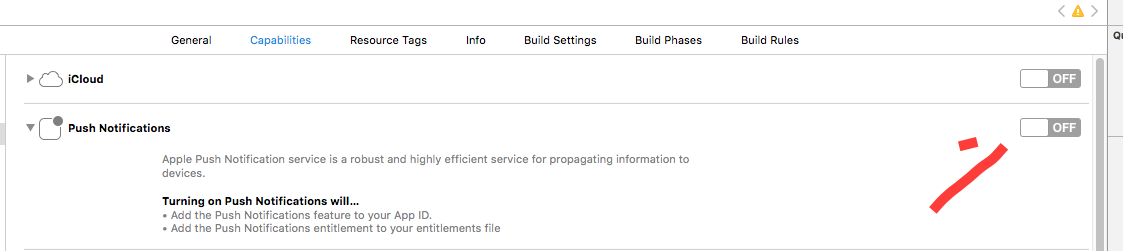
iOS 10 中,應用在前台收到通知的處理:
(void)userNotificationCenter:(UNUserNotificationCenter *)center willPresentNotification:(UNNotification *)notification withCompletionHandler:(void (^)(UNNotificationPresentationOptions))completionHandler {
// 應用在前台收到通知 NSLog(@"========%@", notification);
}
推送代理方面,iOS 10 收到通知不再走 [application: didReceiveRemoteNotification:],而是推出新的代理方法,統一接收與處理各類通知(本地或遠程):
(void)userNotificationCenter:(UNUserNotificationCenter *)center didReceiveNotificationResponse:(UNNotificationResponse *)response withCompletionHandler:(void (^)())completionHandler {
// 點擊通知進入應用 NSLog(@"response:%@", response);
}
顏色問題
iOS 10 官方建議使用 sRGB,因為它性能更好、色彩更豐富。UIColor 類新增了兩個 API:
+ (UIColor *)colorWithDisplayP3Red:(CGFloat)displayP3Red green:(CGFloat)green blue:(CGFloat)blue alpha:(CGFloat)alpha NS_AVAILABLE_IOS(10_0);
- (UIColor *)initWithDisplayP3Red:(CGFloat)displayP3Red green:(CGFloat)green blue:(CGFloat)blue alpha:(CGFloat)alpha NS_AVAILABLE_IOS(10_0);
判斷系統版本
判斷系統版本是常用操作,尤其現在大家都要適配 iOS 10,問題就來了。答案如下:
// 值為 1
[[[[UIDevice currentDevice] systemVersion] substringToIndex:1] integerValue]
// 值為 10.000000
[[UIDevice currentDevice] systemVersion].floatValue
// 值為 10.0
[[UIDevice currentDevice] systemVersion]
所以判斷系統版本最好用後兩種方法。順帶一提,floatValue 這個方法也不靠譜(似乎在 8.3 版本輸出的是 8.2),因此建議大家使用 [[UIDevice currentDevice] systemVersion] 這個方法。
Swift 判斷如下:
if #available(iOS 10.0, *) {
print("iOS 10.0");
} else { };
HTTPS 問題
iOS 9 中預設禁止非 HTTPS 的網路,我們可以把 NSAllowsArbitraryLoads 設為 YES 來禁用 ATS。但 iOS 10 從 2017 年 1 月 1 日起不再允許用這個方法跳過 ATS,也就是強制使用 HTTPS,否則提交 App 可能會被拒。不過我們可以透過 NSExceptionDomains 針對特定域名開放 HTTP,較易通過審核。
隱私權限
iOS 10 對隱私權限更加嚴格,若不設定就會直接崩潰。目前很多人遇到的崩潰問題,一般解法都是在 info.plist 加入對應的 Key-Value:
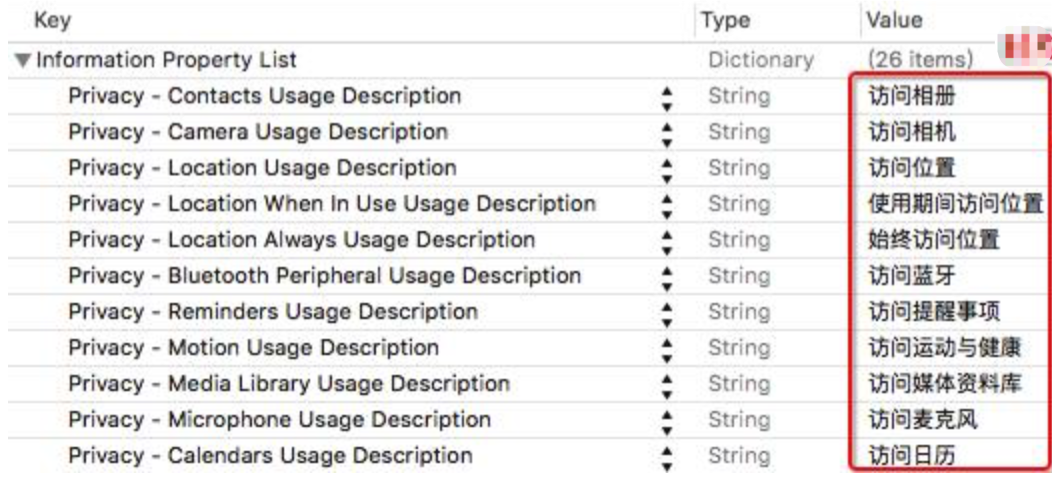
NSPhotoLibraryUsageDescription — App 需要您的同意,才能訪問相冊
NSCameraUsageDescription — App 需要您的同意,才能訪問相機
NSMicrophoneUsageDescription — App 需要您的同意,才能訪問麥克風
NSLocationUsageDescription — App 需要您的同意,才能訪問位置
NSLocationWhenInUseUsageDescription — App 需要您的同意,才能在使用期間訪問位置
NSLocationAlwaysUsageDescription — App 需要您的同意,才能始終訪問位置
NSCalendarsUsageDescription — App 需要您的同意,才能訪問日歷
NSRemindersUsageDescription — App 需要您的同意,才能訪問提醒事項
NSMotionUsageDescription — App 需要您的同意,才能訪問運動與健身
NSHealthUpdateUsageDescription — App 需要您的同意,才能訪問健康更新
NSHealthShareUsageDescription — App 需要您的同意,才能訪問健康分享
NSBluetoothPeripheralUsageDescription — App 需要您的同意,才能訪問藍牙
NSAppleMusicUsageDescription — App 需要您的同意,才能訪問媒體資料庫
iOS 10 調用相冊若 Crash,會看到這樣的提示:This app has crashed because it attempted to access privacy-sensitive data without a usage description. The app's Info.plist must contain an NSPhotoLibraryUsageDescription key with a string value explaining to the user how the app uses this data.
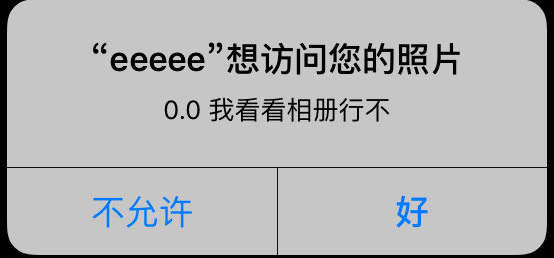
意思是 App 缺少取得敏感資料的權限描述,需要在 info.plist 加入名為 NSPhotoLibraryUsageDescription 的值來解釋用途。加入對應鍵值後:

再次點擊獲取圖片資源時,就會彈出權限詢問,不再崩潰:
其他常見的隱私描述:Privacy - Microphone Usage Description(麥克風)、Privacy - Contacts Usage Description(通訊錄)、Privacy - Camera Usage Description(攝像頭)、Privacy - NSSiriUsageDescription(Siri)、Privacy - Bluetooth Peripheral Usage Description(藍牙)、Privacy - Reminders Usage Description(提醒事項)、Privacy - Motion Usage Description(運動與健康)、Privacy - Media Libaray Usage Description(媒體資源庫)、Privacy - Calendars Usage Description(日歷)。
控件尺寸獲取問題
xib 設定好固定尺寸,在程式碼中獲取控件尺寸卻變成 (0,0,1000,1000)。
UIView 中要從 - (void)updateConstraints 或 - (void)drawRect:(CGRect)rect 獲取控件尺寸:
(void)updateConstraints
{
[super updateConstraints];
}
(void)drawRect:(CGRect)rect
{
[super drawRect:rect];
}
UIViewController 中則要從 - (void)viewDidLayoutSubviews 獲取:
(void)viewDidLayoutSubviews
{
[super viewDidLayoutSubviews];
}
Xcode 8 使用 Xib awakeFromNib 的警告
Xcode 8 之前,用 Xib 初始化時寫 - (void)awakeFromNib {} 沒什麼問題,但在 Xcode 8 會出現警告:

若不想看到這個警告,明確加上 [super awakeFromNib]; 即可。
隱藏狀態欄功能失效
升級到 iOS 10.0 後,查看全屏圖片時,需要在 Present 之前給要 present 的 view controller 設置 modalPresentationCapturesStatusBarAppearance = true:
TestViewController *testVC = [[TestViewController alloc] init];
testVC.modalPresentationCapturesStatusBarAppearance = true;
[self presentViewController:testVC animated:YES completion:nil];
// iOS 10 狀態欄的設置
- (UIStatusBarStyle)preferredStatusBarStyle {
return UIStatusBarStyleDefault;
}
UITextContentType
// The textContentType property is to provide the keyboard with extra information about the semantic intent of the text document.
@property(nonatomic,copy) UITextContentType textContentType NS_AVAILABLE_IOS(10_0); // default is nil
iOS 10 為 UITextField 添加了 textContentType 枚舉,用來指示文本輸入區域所期望的語義。透過此屬性,可以告訴鍵盤與系統使用者預期輸入的內容,例如在填寫郵箱確認時指定 textContentTypeEmailAddress。當系統掌握這類資訊後,能在某些情況下自動選擇合適的鍵盤,並提升鍵盤修正與主動整合體驗。
UIScrollView 自帶刷新功能
iOS 10 之後,只要繼承 UIScrollView 就支援刷新功能:
@property (nonatomic, strong, nullable) UIRefreshControl *refreshControl NS_AVAILABLE_IOS(10_0) __TVOS_PROHIBITED;
ImagePickerController.cameraViewTransform 問題
(本條更新於:2016-09-21)許多人反映自定義相機出現問題,cameraViewTransform 不能用了。網上關於此的資料不多,這裡提供一個參考辦法:透過監聽 AVCaptureSessionDidStartRunningNotification 來解決。
- 上一篇文章: Swift 3.0 遷移實戰:iOS 10 適配升級的踩坑與心得總結
- 下一篇文章: iOS 流媒體開發:滑動手勢控制音量、亮度與播放進度