
深入解析 WatchKit Framework:架構、生命週期與核心 API
前言
WatchKit 是 Apple 為開發者打造的 Apple Watch 應用開發框架,官方專題頁面(https://developer.apple.com/watchkit/)提供了兩個示例 Demo,能幫助你快速理解 WatchKit 的整體構建方式。
Watch App 的架構
每一個 Apple Watch App 都與 iOS Extension 一樣,必須依附一個主體 App。它由兩部分組成:Watch App 與 WatchKit Extension。
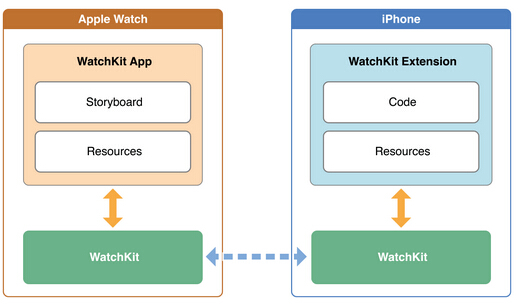
其中,Watch App 位於使用者的 Apple Watch 上,目前只允許包含 Storyboard 文件與資源文件,並不包含任何代碼。而 WatchKit Extension 位於使用者 iPhone 上安裝的對應 App 內,承載著我們需要實現的代碼邏輯與其他資源。這兩部分之間正是透過 WatchKit 來完成連通與通訊。
WatchKit 的核心類
WatchKit 為開發者提供了構建 Apple Watch App 所需的各類接口,其中最上層的類繼承自 NSObject:
WKInterfaceController WKUserNotificationInterfaceController WKInterfaceDevice WKInterfaceObject WKInterfaceButton WKInterfaceDate WKInterfaceGroup WKInterfaceImage WKInterfaceLabel WKInterfaceMap WKInterfaceSeparator WKInterfaceSlider WKInterfaceSwitch WKInterfaceTable WKInterfaceTimer
WKInterfaceController 是開發 Watch App 的核心類,其地位相當於我們熟悉的 UIViewController。每個 Watch App 在構建時,至少需要一個 WKInterfaceController 實例作為入口,可在 Storyboard 上透過 Main Entry Point 設定。當使用者啟動 App 時,Watch OS 會開始加載 Storyboard,我們為每個 WKInterfaceController 設定的響應事件,會在使用者觸發時於 WatchKit Extension 中響應,我們也能像往常一樣 push、pop、present 目標控制器。
生命週期
WKInterfaceController 同樣擁有自己的生命週期,以下 API 對應不同狀態:
- (instancetype)initWithContext:(id)context; - (void)willActivate; - (void)didDeactivate;
當 Watch OS 加載 App 的 Storyboard 時,iPhone 端也會同步加載對應的 WatchKit Extension。
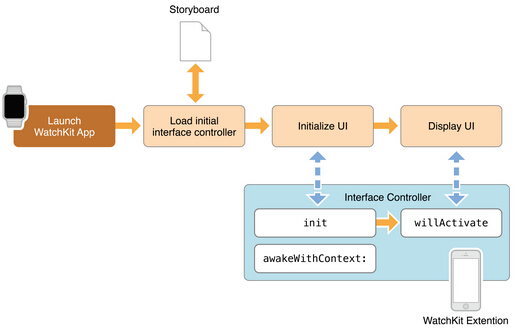
當 Watch OS 開始初始化 Storyboard 中的 UI 時,iPhone 端會生成對應的 WKInterfaceController 並響應 initWithContext:;當 Watch OS 顯示已加載的 UI 時,響應 willActivate;當使用者切換頁面或停止使用時,則響應 didDeactivate。
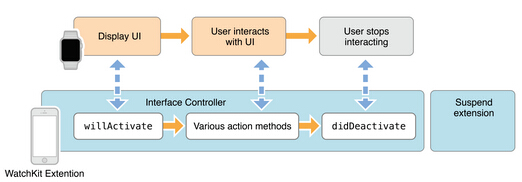
這三個 API 對應了 Watch OS 加載視圖控制器的三個狀態,我們應在自定義類中加以實現:
initWithContext: 在此加載數據或更新 StoryBoard 中已添加的 interface objects。
willActivate 在此更新 interface objects 或處理其他事件。
didDeactivate 在此清理任務或數據;此處對 interface objects 的更新會被系統忽略。
頁面跳轉
WKInterfaceController 目前提供兩組 API 進行頁面跳轉:
- (void)pushControllerWithName:(NSString *)name context:(id)context - (void)popController; - (void)popToRootController; - (void)presentControllerWithName:(NSString *)name context:(id)context; - (void)presentControllerWithNames:(NSArray *)names contexts:(NSArray *)contexts; - (void)dismissController; - (void)becomeCurrentPage;
Push、Pop、Present、Dismiss 的行為與 UIViewController 類似,我們可依據程序上下文狀態來控制跳轉目標。使用時有四點值得注意:
Push 與 Present 的第一個參數是 Storyboard 中為 WKInterfaceController 設定的 identifier 字符串。WatchKit Extension 透過這些 API 向 Watch OS 傳遞消息,真正的 UI 加載渲染在 Watch 端完成。
popToRootController 會跳轉到 Storyboard 中 Main Entry Point 對應的控制器。
presentControllerWithNames 可以一次 present 一組控制器,它們會以 page control 的形式展示。
becomeCurrentPage 在頁面以 page control 形式呈現時,可用來切換當前 page。
另一組 API 則用於在 Storyboard 中預先設定好的 Triggered Segues 場景:
- (id)contextForSegueWithIdentifier:(NSString *)segueIdentifier; - (NSArray *)contextsForSegueWithIdentifier:(NSString *)segueIdentifier; - (id)contextForSegueWithIdentifier:(NSString *)segueIdentifier inTable:(WKInterfaceTable *)table rowIndex:(NSInteger)rowIndex; - (NSArray *)contextsForSegueWithIdentifier:(NSString *)segueIdentifier inTable:(WKInterfaceTable *)table rowIndex:(NSInteger)rowIndex;
當我們在設計階段就明確知道下一個目標控制器時,可直接在 Storyboard 中設定 Triggered Segues,Selection 同樣支援 Push 與 Model 兩種跳轉方式,並可透過上述 API 完成跳轉間的數據傳遞。
響應交互事件
WKInterfaceObject 中的 Button、Slider、Switch 等控件可與使用者交互。我們如往常一樣在 WKInterfaceController 中實現標記為 IBAction 的 Action,再連接到 Storyboard。特別之處在於,當控制器包含 WKInterfaceTable 實例時,只需實現默認的 - (void)table:(WKInterfaceTable *)table didSelectRowAtIndex:(NSInteger)rowIndex 方法,即可響應每一行的點擊,比傳統 UITableView 的實現更為簡潔。
Glance
Glance 是 Watch App 上的新概念,主要用於給使用者提供短時提醒。我們可透過 Storyboard 創建 Glance interface Controller,它在 WatchKit Extension 中同樣繼承自 WKInterfaceController,享有相同的生命週期。值得注意的是,Glance 可以與使用者交互:當使用者點擊 Glance 頁面時,會跳轉到 Watch App。此處可在自定義的 GlanceInterfaceController 中使用 - (void)updateUserActivity:(NSString *)type userInfo:(NSDictionary *)userInfo 傳遞數據,例如在 Initial Interface Controller 中實現 - (NSString *)actionForUserActivity:(NSDictionary *)userActivity context:(id *)context 方法,跳轉到目標頁面。
Notification 與 WKUserNotificationInterfaceController
當主體 App 支援通知時,Apple Watch 便能顯示這些通知。Watch OS 提供了默認的通知樣式;當使用者點擊通知進入 App 時,Initial Interface Controller 中的 - (void)handleActionWithIdentifier:(NSString *)identifier forRemoteNotification:(NSDictionary *)remoteNotification 或 - (void)handleActionWithIdentifier:(NSString *)identifier forLocalNotification:(UILocalNotification *)localNotification 會被響應,我們可借此獲取通知內容並跳轉到目標頁面。此外,我們也可透過 Storyboard 創建 Notification interface Controller 以實現自定義通知界面,它繼承自 WKUserNotificationInterfaceController,可透過 - (void)didReceiveRemoteNotification:withCompletion: 或 - (void)didReceiveLocalNotification:withCompletion: 獲取通知並設定完成回調。
Menu
我們可透過 Storyboard 為界面添加 Menu:
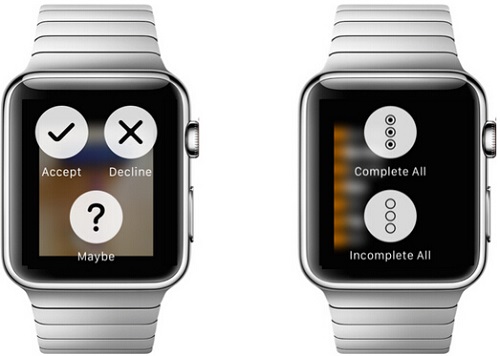
除了 Storyboard,也能透過 WKInterfaceController 的以下 API 在上下文環境中動態添加 Item:
- (void)addMenuItemWithImage:(UIImage *)image title:(NSString *)title action:(SEL)action; - (void)addMenuItemWithImageNamed:(NSString *)imageName title:(NSString *)title action:(SEL)action; - (void)addMenuItemWithItemIcon:(WKMenuItemIcon)itemIcon title:(NSString *)title action:(SEL)action; - (void)clearAllMenuItems;
WKInterfaceObject
WKInterfaceObject 負責界面元素,目前 Apple 公開了 11 個具體子類來呈現各種類型的元素。它與以往的 UIView 不同:WKInterfaceObject 只負責在 WatchKit Extension 與 Watch App 之間傳遞事件,具體的 UI 渲染在 Watch App 中完成。Watch App 的布局方式與 iOS App 完全不同——我們無法指定視圖的具體坐標,也不能使用 AutoLayout,只能以「行」為基本單位進行布局;若一行中要顯示多個元素,則需透過 WKInterfaceGroup 在行內進行列布局。
WKInterfaceTable
WKInterfaceTable 是目前 WatchKit 中最複雜的界面元素。我們可透過 Storyboard 在當前控制器中添加 Table,每個 Table 默認包含一個 Table Row Controller,其作用相當於過去的 Cell,但繼承自 NSObject。rowType 對應 Storyboard 中 Row Controller 的 identifier:
- (void)setRowTypes:(NSArray *)rowTypes; - (void)setNumberOfRows:(NSInteger)numberOfRows withRowType:(NSString *)rowType;
我們可透過 - (id)rowControllerAtIndex:(NSInteger)index 取得某一行對應的 Row Controller。以下是一段初始化 Table Rows 的示例:
- (void)loadTableRows { [self.interfaceTable setNumberOfRows:self.elementsList.count withRowType:@"default"]; // Create all of the table rows. [self.elementsList enumerateObjectsUsingBlock:^(NSDictionary *rowData, NSUInteger idx, BOOL *stop) { AAPLElementRowController *elementRow = [self.interfaceTable rowControllerAtIndex:idx]; [elementRow.elementLabel setText:rowData[@"label"]]; }]; }也能使用以下 API 動態增刪 Rows:
- (void)insertRowsAtIndexes:(NSIndexSet *)rows withRowType:(NSString *)rowType; - (void)removeRowsAtIndexes:(NSIndexSet *)rows;
WKInterfaceDevice
這是一個單例類,可取得當前 Apple Watch 的部分信息:
@property(nonatomic,readonly) CGRect screenBounds; @property(nonatomic,readonly) CGFloat screenScale; @property(nonatomic,readonly,strong) NSLocale *currentLocale; @property(nonatomic,readonly,copy) NSString *preferredContentSizeCategory;
此外,它還提供了一組緩存圖片的方法,以便後續繼續使用:
- (void)addCachedImage:(UIImage *)image name:(NSString *)name; - (void)addCachedImageWithData:(NSData *)imageData name:(NSString *)name; - (void)removeCachedImageWithName:(NSString *)name; - (void)removeAllCachedImages;
已緩存的圖片可透過 WKInterfaceImage 的以下 API 直接讀取:
- (void)setImageData:(NSData *)imageData; - (void)setImageNamed:(NSString *)imageName;
WatchKit 允許每個 App 最多緩存 20MB 圖片,超出上限時會從最舊的數據開始刪除,為新數據騰出空間。
總結
以上筆記基本涵蓋了 WatchKit Framework 的主要 API 知識點。目前提供的 API 功能相對有限,主要集中於信息顯示與通知接收,多媒體及傳感器相關的 API 尚未開放,令人期待蘋果後續的更新。