
iOS 上機筆試真题解析:VFL、CoreData、循環引用與 MVVM 一網打盡

題目
用命令行為名為 Test-你的姓名拼音 的工程接入 CocoaPods,新建 3 個 ViewController,完成以下要求:
在一個 UITableViewController 中列出所有問題,單擊每一行進入新頁面顯示問題與答案。
- 什麼是 VFL?「H:[_aImageView(==50)]-10-[_aButton]」是什麼含義?
- NSPersistentStoreCoordinator、NSManagedObjectContext 與 NSManagedObject 三者關係?
- ARC 下何時用 strong、何時用 weak?如何避免循環引用?
- 把 MRC 項目轉為 ARC 應遵循什麼規則?
- Objective-C 如何進行內存管理?哪些情況會導致崩潰?你的看法與解法?
- GCD 如何簡化線程編程?
- Extensions 有哪些類型,各自能完成什麼功能?
- 如何衡量 ViewController 的規模?
- MVVM 是什麼?特點與解決了哪些問題?
- 用 UIScrollView 實現圖片循環切換。
- 用 UICollectionView 實現圖片數據綁定,每行兩列。
參考思路
1. 用命令行接入 CocoaPods
pod init
pod install
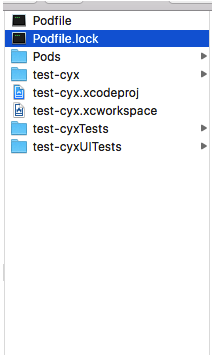
等待 Updating 完成後,打開 test-cyx.xcworkspace。
下面只寫思路,不追求代碼完整。
2. 第一題:搭建列表
把十道題目以「題目-答案」鍵值對形式存進 plist,支持從文件讀取;再依 MVC 思想把字典數組轉為模型數組,而非直接面向字典開發。
M:定義 Test 類,兩個屬性 testName(題目)與 testContext(答案)。
V:創建 PageViewController,向外暴露 text 屬性用於展示。
C:在 TableViewController 中用 KVC 完成字典轉模型,並在選中行時把模型傳給詳情頁。
- (void)tableView:(UITableView *)tableView didSelectRowAtIndexPath:(NSIndexPath *)indexPath {
    PageViewController *page = [[PageViewController alloc] init];
    page.text = self.text;
    [self.navigationController pushViewController:page animated:YES];
}
3. 試題解析(個人理解,靠譜之處歡迎指正)
VFL 與約束字符串:VFL(Visual Format Language)是蘋果為簡化手寫 Auto Layout 而設計的表達方式。該行表示水平方向的約束——aImageView 寬度固定 50,與 aButton 間距 10。實戰中我更常用 Masonry,可讀性更好。
CoreData 三件套:NSPersistentStoreCoordinator 是持久化協調器,NSManagedObjectModel 描述數據模型,NSManagedObjectContext 管理數據內容。CoreData 依據 Model 決定如何把底層持久化數據映射為 NSManagedObject。就個人實踐而言,數據持久化更常用 FMDB 直接操作 SQLite——CoreData 是在 SQLite 之上再封一層,性能並不佔優。
strong / weak 與循環引用:ARC 由編譯器自動在合適位置插入引用計數增減。自定義的 OC 對象屬性通常用 strong,UI 控件一般用 weak(因為已被父控件的 subviews 數組強引用)。循環引用指兩個或多個對象互相強引用導致誰都無法釋放,效果類似死鎖;解法是把其中一方改為 weak。最常見的場景是 block 中引用 self,例如使用 AFN 時:
__weak typeof(self) weakSelf = self;

[[AFHTTPSessionManager manager] GET:CYXRequestURL parameters:params success:^(NSURLSessionDataTask * _Nonnull task, id _Nonnull responseObject) {
    NSLog(@"請求成功");
    // 字典轉模型
    weakSelf.menus = [CYXMenu objectArrayWithKeyValuesArray:responseObject[@"result"]];
    [weakSelf.tableView reloadData];
} failure:^(NSURLSessionDataTask * _Nonnull task, NSError * _Nonnull error) {
    NSLog(@"請求失敗 原因:%@", error);
}];
MRC 轉 ARC:Xcode 提供了自動轉換工具(Edit › Convert › To Objective-C ARC),可選擇轉換範圍。暫不支持 ARC 的文件需手動添加 -fno-objc-arc 編譯標記。
內存管理與崩潰:App 若連續收到多次內存警告仍未處理,會被系統終止。應對方式是在 didReceiveMemoryWarning 中釋放可重建的資源(如非關鍵的緩存圖片)。
GCD 簡化了什麼:相比 pthread / NSThread,GCD 把線程的創建與生命周期交給系統管理,開發者只需描述「要做什麼」和「放在哪個隊列」,不必操心線程本身。
Extensions 類型:Today、Share、Action、Photo Editing、Storage Provider、Custom Keyboard 等,功能可顧名思義。
如何衡量 ViewController 的規模:可以從代碼行數、業務邏輯複雜度,以及是否承擔了過多數據加工職責來判斷。後者往往是信號——該把邏輯下沉到 ViewModel 或 Service 了。
MVVM:Model-View-ViewModel,是從 MVC 衍生的 View 層架構模式。特點是把數據加工從 Controller 移到 ViewModel,Controller 只專注數據調配,ViewModel 負責加工並通過通知機制驅動 View 更新。目標很明確:為 Controller 減負。
4. UIScrollView 無限輪播
核心思路是只放 3 個 UIImageView(左中右),始終讓中間那張處於可見區域,滑動結束後根據當前頁重新排布三張圖並把偏移量重置回中間,从而实现「無限」的視覺效果。
#import "CYXInfiniteScrollView.h"

static int const ImageViewCount = 3;

@implementation CYXInfiniteScrollView

- (instancetype)initWithFrame:(CGRect)frame {
    if (self = [super initWithFrame:frame]) {
        UIScrollView *scrollView = [[UIScrollView alloc] init];
        scrollView.showsHorizontalScrollIndicator = NO;
        scrollView.showsVerticalScrollIndicator = NO;
        scrollView.pagingEnabled = YES;
        scrollView.bounces = NO;
        scrollView.delegate = self;
        [self addSubview:scrollView];
        self.scrollView = scrollView;

        for (int i = 0; i < ImageViewCount; i++) {
            UIImageView *imageView = [[UIImageView alloc] init];
            [scrollView addSubview:imageView];
        }

        UIPageControl *pageControl = [[UIPageControl alloc] init];
        [self addSubview:pageControl];
        _pageControl = pageControl;
    }
    return self;
}

#pragma mark - 內容更新
- (void)updateContent {
    // 依當前頁安排左右三張圖,並對下標做環形處理
    for (int i = 0; i < self.scrollView.subviews.count; i++) {
        UIImageView *imageView = self.scrollView.subviews[i];
        NSInteger index = self.pageControl.currentPage;
        if (i == 0) {
            index--;
        } else if (i == 2) {
            index++;
        }
        if (index < 0) {
            index = self.pageControl.numberOfPages - 1;
        } else if (index >= self.pageControl.numberOfPages) {
            index = 0;
        }
        imageView.tag = index;
        imageView.image = self.images[index];
    }

    // 把偏移量重置回中間,用戶感知不到跳變
    if (self.isScrollDirectionPortrait) {
        self.scrollView.contentOffset = CGPointMake(0, self.scrollView.frame.size.height);
    } else {
        self.scrollView.contentOffset = CGPointMake(self.scrollView.frame.size.width, 0);
    }
}

#pragma mark - 追蹤當前頁
- (void)scrollViewDidScroll:(UIScrollView *)scrollView {
    NSInteger page = 0;
    CGFloat minDistance = MAXFLOAT;
    for (int i = 0; i < self.scrollView.subviews.count; i++) {
        UIImageView *imageView = self.scrollView.subviews[i];
        CGFloat distance = self.isScrollDirectionPortrait
            ? ABS(imageView.frame.origin.y - scrollView.contentOffset.y)
            : ABS(imageView.frame.origin.x - scrollView.contentOffset.x);
        if (distance < minDistance) {
            minDistance = distance;
            page = imageView.tag;
        }
    }
    self.pageControl.currentPage = page;
}

- (void)scrollViewDidEndDecelerating:(UIScrollView *)scrollView { [self updateContent]; }
- (void)scrollViewDidEndScrollingAnimation:(UIScrollView *)scrollView { [self updateContent]; }

@end
5. UICollectionView 每行兩列
關鍵在流水布局的 itemSize 與間距設置,讓兩列剛好撐滿寬度。
@implementation CYXCollectionViewController

static NSString * const CYXCell = @"cell";

- (instancetype)init {
    UICollectionViewFlowLayout *layout = [[UICollectionViewFlowLayout alloc] init];
    layout.itemSize = CGSizeMake(150, 150);
    layout.minimumLineSpacing = 0;
    layout.minimumInteritemSpacing = 20;
    layout.sectionInset = UIEdgeInsetsMake(20, 0, 0, 0);
    return [self initWithCollectionViewLayout:layout];
}

- (void)viewDidLoad {
    [super viewDidLoad];
    self.collectionView.backgroundColor = [UIColor whiteColor];
    [self.collectionView registerClass:[UICollectionViewCell class] forCellWithReuseIdentifier:CYXCell];
}

- (NSInteger)collectionView:(UICollectionView *)collectionView numberOfItemsInSection:(NSInteger)section {
    return 30;
}

- (UICollectionViewCell *)collectionView:(UICollectionView *)collectionView cellForItemAtIndexPath:(NSIndexPath *)indexPath {
    UICollectionViewCell *cell = [collectionView dequeueReusableCellWithReuseIdentifier:CYXCell forIndexPath:indexPath];
    UIImageView *view = [[UIImageView alloc] initWithImage:[UIImage imageNamed:@"xxx"]];
    cell.backgroundView = view;
    return cell;
}

@end