
YYCache 源碼剖析(三):YYKVStorage 與 YYDiskCache
編輯:iOS 開發基礎

本文授權轉載,作者:漢斯哈哈哈(公眾號:hans_iOS)
導讀:
YYCache 源碼分析(一)
YYCache 源碼分析(二)
正文:
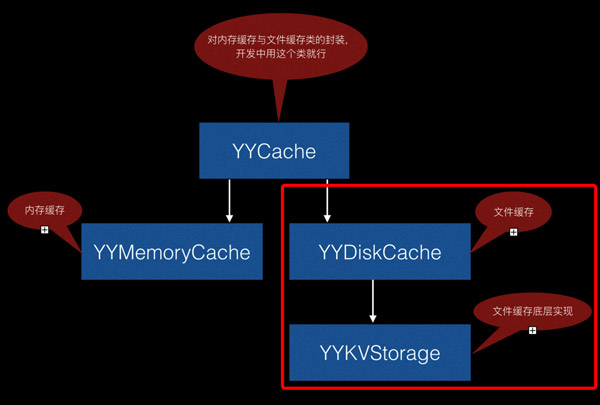
本文分析 YYDiskCache 對 YYKVStorage 的封装實現。YYDiskCache 本質上是 YYKVStorage 的一層外殼,底層採用「數據庫 + 文件」的複合緩存策略。所以我們先看核心類 YYKVStorage,再看表層的 YYDiskCache。
YYKVStorage.h 方法結構圖
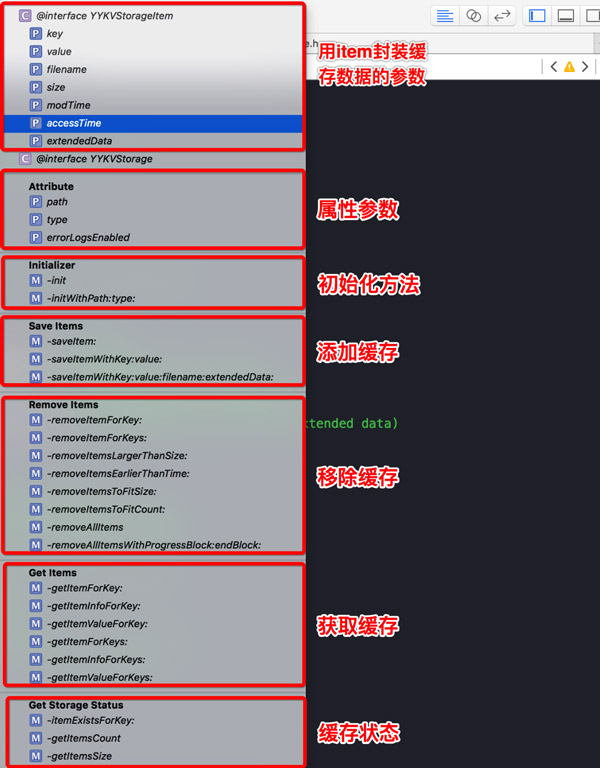
YYKVStorage.h 關鍵聲明解讀
#import <Foundation/Foundation.h>

NS_ASSUME_NONNULL_BEGIN

// 用 YYKVStorageItem 保存緩存相關參數
@interface YYKVStorageItem : NSObject
@property (nonatomic, strong) NSString *key;            // 緩存鍵值
@property (nonatomic, strong) NSData *value;            // 緩存對象
@property (nullable, nonatomic, strong) NSString *filename; // 緩存文件名
@property (nonatomic) int size;                         // 緩存大小
@property (nonatomic) int modTime;                      // 修改時間
@property (nonatomic) int accessTime;                   // 最後使用時間
@property (nullable, nonatomic, strong) NSData *extendedData; // 拓展數據
@end

// 可以指定緩存類型
typedef NS_ENUM(NSUInteger, YYKVStorageType) {
    // 文件緩存 (filename != null)
    YYKVStorageTypeFile = 0,
    // 數據庫緩存
    YYKVStorageTypeSQLite = 1,
    // 如果 filename != null,則 value 用文件緩存,其他參數用數據庫緩存;
    // 如果 filename == null,則全部走數據庫緩存
    YYKVStorageTypeMixed = 2,
};

// 緩存操作實現
@interface YYKVStorage : NSObject
#pragma mark - Attribute
@property (nonatomic, readonly) NSString *path;         // 緩存路徑
@property (nonatomic, readonly) YYKVStorageType type;   // 緩存方式
@property (nonatomic) BOOL errorLogsEnabled;            // 是否打開錯誤日志

#pragma mark - Initializer
// 這兩個方法不能使用,因為實例化時必須指定 path、type
- (instancetype)init UNAVAILABLE_ATTRIBUTE;
+ (instancetype)new UNAVAILABLE_ATTRIBUTE;

/**
 實例化對象
 @param path 緩存路徑
 @param type 緩存方式
 */
- (nullable instancetype)initWithPath:(NSString *)path type:(YYKVStorageType)type NS_DESIGNATED_INITIALIZER;

#pragma mark - Save Items
- (BOOL)saveItem:(YYKVStorageItem *)item;
- (BOOL)saveItemWithKey:(NSString *)key value:(NSData *)value;
- (BOOL)saveItemWithKey:(NSString *)key
                  value:(NSData *)value
               filename:(nullable NSString *)filename
           extendedData:(nullable NSData *)extendedData;

#pragma mark - Remove Items
- (BOOL)removeItemForKey:(NSString *)key;
- (BOOL)removeItemForKeys:(NSArray<NSString *> *)keys;
- (BOOL)removeItemsLargerThanSize:(int)size;      // 刪除內存大於 size 的緩存
- (BOOL)removeItemsEarlierThanTime:(int)time;     // 刪除時間早於 time 的緩存
- (BOOL)removeItemsToFitSize:(int)maxSize;        // LRU 裁剪到指定總大小
- (BOOL)removeItemsToFitCount:(int)maxCount;      // LRU 裁剪到指定總數量
- (BOOL)removeAllItems;
- (void)removeAllItemsWithProgressBlock:(nullable void(^)(int removedCount, int totalCount))progress
                               endBlock:(nullable void(^)(BOOL error))end;

#pragma mark - Get Items
- (nullable YYKVStorageItem *)getItemForKey:(NSString *)key;
- (nullable YYKVStorageItem *)getItemInfoForKey:(NSString *)key;
- (nullable NSData *)getItemValueForKey:(NSString *)key;
- (nullable NSArray<YYKVStorageItem *> *)getItemForKeys:(NSArray<NSString *> *)keys;
- (nullable NSArray<YYKVStorageItem *> *)getItemInfoForKeys:(NSArray<NSString *> *)keys;
- (nullable NSDictionary<NSString *, NSData *> *)getItemValueForKeys:(NSArray<NSString *> *)keys;

#pragma mark - Get Storage Status
- (BOOL)itemExistsForKey:(NSString *)key;   // 判斷是否存在緩存
- (int)getItemsCount;                       // 緩存總數量
- (int)getItemsSize;                        // 緩存總內存開銷
@end

NS_ASSUME_NONNULL_END
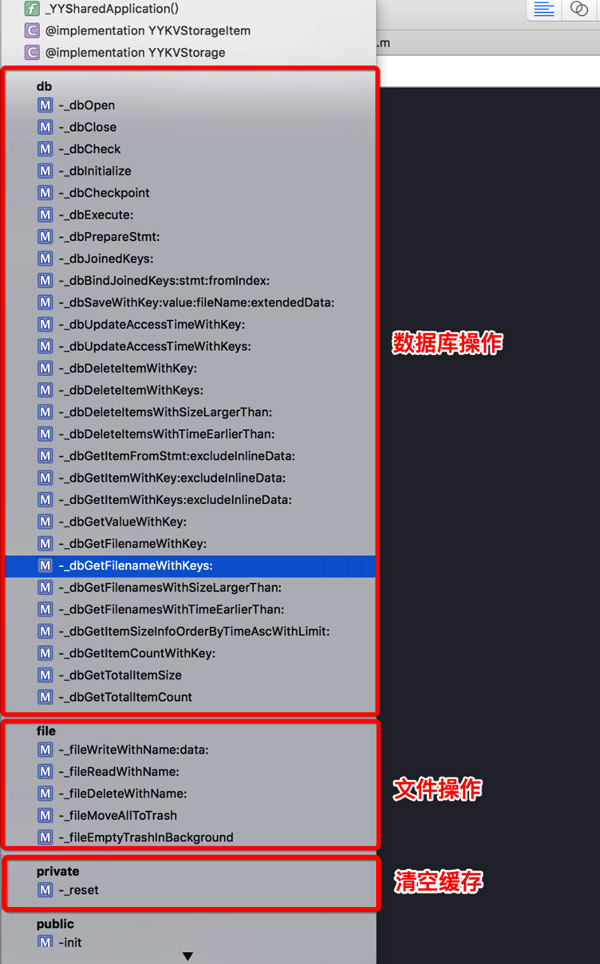
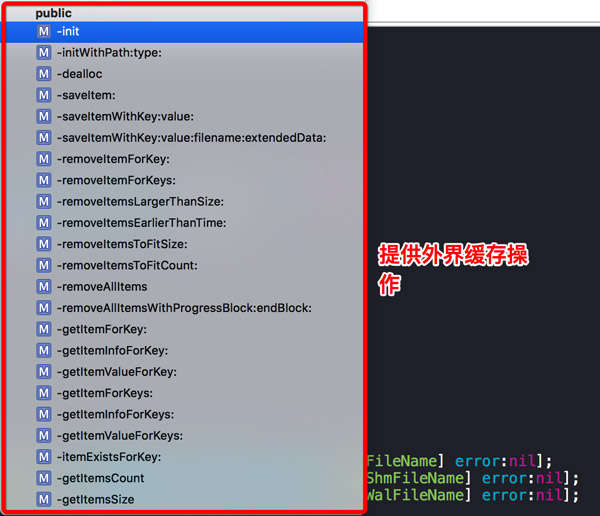
YYKVStorage.m 方法結構
私有方法:
公開方法:
YYKVStorage.m 核心實現
下面分別挑出添加、刪除、查找三條主線來講。
1. 添加
// 添加緩存
- (BOOL)saveItemWithKey:(NSString *)key value:(NSData *)value filename:(NSString *)filename extendedData:(NSData *)extendedData {
    if (key.length == 0 || value.length == 0) return NO;
    if (_type == YYKVStorageTypeFile && filename.length == 0) {
        // 緩存方式為純文件緩存,但未傳文件名,則直接忽略
        return NO;
    }
    if (filename.length) {
        // 存在文件名則用文件緩存,並把 key / filename / extendedData 寫入數據庫
        // 緩存數據寫入文件
        if (![self _fileWriteWithName:filename data:value]) {
            return NO;
        }
        // 把 key、filename、extendedData 寫入數據庫(此時不把 value 寫入數據庫)
        if (![self _dbSaveWithKey:key value:value fileName:filename extendedData:extendedData]) {
            // 數據庫操作失敗,回滾剛才的文件緩存
            [self _fileDeleteWithName:filename];
            return NO;
        }
        return YES;
    } else {
        if (_type != YYKVStorageTypeSQLite) {
            // 緩存方式並非純數據庫
            // 根據 key 查找舊的緩存文件名
            NSString *filename = [self _dbGetFilenameWithKey:key];
            if (filename) {
                // 存在舊文件則刪除,避免殘留
                [self _fileDeleteWithName:filename];
            }
        }
        // 直接寫入數據庫
        return [self _dbSaveWithKey:key value:value fileName:nil extendedData:extendedData];
    }
}

// 把 data 寫入文件
- (BOOL)_fileWriteWithName:(NSString *)filename data:(NSData *)data {
    // 拼接文件路徑
    NSString *path = [_dataPath stringByAppendingPathComponent:filename];
    // 寫入文件
    return [data writeToFile:path atomically:NO];
}

// 寫入數據庫
- (BOOL)_dbSaveWithKey:(NSString *)key value:(NSData *)value fileName:(NSString *)fileName extendedData:(NSData *)extendedData {
    // 執行 sql 語句
    NSString *sql = @"insert or replace into manifest (key, filename, size, inline_data, modification_time, last_access_time, extended_data) values (?1, ?2, ?3, ?4, ?5, ?6, ?7);";
    // 所有 sql 執行前,都必須能 prepare 成功
    sqlite3_stmt *stmt = [self _dbPrepareStmt:sql];
    if (!stmt) return NO;
    // 時間戳
    int timestamp = (int)time(NULL);
    // 綁定參數值
    sqlite3_bind_text(stmt, 1, key.UTF8String, -1, NULL);
    sqlite3_bind_text(stmt, 2, fileName.UTF8String, -1, NULL);
    sqlite3_bind_int(stmt, 3, (int)value.length);
    if (fileName.length == 0) {
        // fileName 為空時,把 value 內聯存進數據庫
        sqlite3_bind_blob(stmt, 4, value.bytes, (int)value.length, 0);
    } else {
        // fileName 不為空時,value 走文件,數據庫裡不存
        sqlite3_bind_blob(stmt, 4, NULL, 0, 0);
    }
    sqlite3_bind_int(stmt, 5, timestamp);
    sqlite3_bind_int(stmt, 6, timestamp);
    sqlite3_bind_blob(stmt, 7, extendedData.bytes, (int)extendedData.length, 0);
    // 執行操作
    int result = sqlite3_step(stmt);
    if (result != SQLITE_DONE) {
        // 執行失敗,輸出錯誤日志
        if (_errorLogsEnabled) NSLog(@"%s line:%d sqlite insert error (%d): %s", __FUNCTION__, __LINE__, result, sqlite3_errmsg(_db));
        return NO;
    }
    return YES;
}

// 將 sql 編譯成 stmt(帶緩存)
- (sqlite3_stmt *)_dbPrepareStmt:(NSString *)sql {
    if (![self _dbCheck] || sql.length == 0 || !_dbStmtCache) return NULL;
    // 先從 _dbStmtCache 字典裡取之前編譯過的 stmt(性能優化)
    sqlite3_stmt *stmt = (sqlite3_stmt *)CFDictionaryGetValue(_dbStmtCache, (__bridge const void *)(sql));
    if (!stmt) {
        // 首次編譯
        int result = sqlite3_prepare_v2(_db, sql.UTF8String, -1, &stmt, NULL);
        if (result != SQLITE_OK) {
            if (_errorLogsEnabled) NSLog(@"%s line:%d sqlite stmt prepare error (%d): %s", __FUNCTION__, __LINE__, result, sqlite3_errmsg(_db));
            return NULL;
        }
        // 把新編譯的 stmt 緩存起來
        CFDictionarySetValue(_dbStmtCache, (__bridge const void *)(sql), stmt);
    } else {
        // 複用前重置狀態
        sqlite3_reset(stmt);
    }
    return stmt;
}

// 刪除文件
- (BOOL)_fileDeleteWithName:(NSString *)filename {
    NSString *path = [_dataPath stringByAppendingPathComponent:filename];
    return [[NSFileManager defaultManager] removeItemAtPath:path error:NULL];
}

// 從數據庫查找文件名
- (NSString *)_dbGetFilenameWithKey:(NSString *)key {
    NSString *sql = @"select filename from manifest where key = ?1;";
    sqlite3_stmt *stmt = [self _dbPrepareStmt:sql];
    if (!stmt) return nil;
    sqlite3_bind_text(stmt, 1, key.UTF8String, -1, NULL);
    int result = sqlite3_step(stmt);
    if (result == SQLITE_ROW) {
        // 存在可讀的 row
        char *filename = (char *)sqlite3_column_text(stmt, 0);
        if (filename && *filename != 0) {
            return [NSString stringWithUTF8String:filename];
        }
    } else {
        if (result != SQLITE_DONE) {
            if (_errorLogsEnabled) NSLog(@"%s line:%d sqlite query error (%d): %s", __FUNCTION__, __LINE__, result, sqlite3_errmsg(_db));
        }
    }
    return nil;
}
2. 刪除
// 刪除緩存
- (BOOL)removeItemForKey:(NSString *)key {
    if (key.length == 0) return NO;
    // 判斷緩存方式
    switch (_type) {
        case YYKVStorageTypeSQLite: {
            // 純數據庫緩存,只需刪記錄
            return [self _dbDeleteItemWithKey:key];
        } break;
        case YYKVStorageTypeFile:
        case YYKVStorageTypeMixed: {
            // 文件緩存或混合緩存:先刪文件,再刪記錄
            NSString *filename = [self _dbGetFilenameWithKey:key];
            if (filename) {
                [self _fileDeleteWithName:filename];
            }
            return [self _dbDeleteItemWithKey:key];
        } break;
        default: return NO;
    }
}

// 刪除數據庫記錄
- (BOOL)_dbDeleteItemWithKey:(NSString *)key {
    NSString *sql = @"delete from manifest where key = ?1;";
    sqlite3_stmt *stmt = [self _dbPrepareStmt:sql];
    if (!stmt) return NO;
    sqlite3_bind_text(stmt, 1, key.UTF8String, -1, NULL);
    int result = sqlite3_step(stmt);
    if (result != SQLITE_DONE) {
        if (_errorLogsEnabled) NSLog(@"%s line:%d db delete error (%d): %s", __FUNCTION__, __LINE__, result, sqlite3_errmsg(_db));
        return NO;
    }
    return YES;
}
3. 查找
// 查找緩存
- (YYKVStorageItem *)getItemForKey:(NSString *)key {
    if (key.length == 0) return nil;
    // 先查數據庫
    YYKVStorageItem *item = [self _dbGetItemWithKey:key excludeInlineData:NO];
    if (item) {
        // 數據庫命中,順手更新訪問時間(LRU 依據)
        [self _dbUpdateAccessTimeWithKey:key];
        if (item.filename) {
            // 有文件名,說明 value 在文件裡
            item.value = [self _fileReadWithName:item.filename];
            if (!item.value) {
                // 文件丟了,這條記錄已失效,順手清掉
                [self _dbDeleteItemWithKey:key];
                item = nil;
            }
        }
    }
    return item;
}

// 數據庫查詢
- (YYKVStorageItem *)_dbGetItemWithKey:(NSString *)key excludeInlineData:(BOOL)excludeInlineData {
    NSString *sql = excludeInlineData
        ? @"select key, filename, size, modification_time, last_access_time, extended_data from manifest where key = ?1;"
        : @"select key, filename, size, inline_data, modification_time, last_access_time, extended_data from manifest where key = ?1;";
    sqlite3_stmt *stmt = [self _dbPrepareStmt:sql];
    if (!stmt) return nil;
    sqlite3_bind_text(stmt, 1, key.UTF8String, -1, NULL);
    YYKVStorageItem *item = nil;
    int result = sqlite3_step(stmt);
    if (result == SQLITE_ROW) {
        item = [self _dbGetItemFromStmt:stmt excludeInlineData:excludeInlineData];
    } else {
        if (result != SQLITE_DONE) {
            if (_errorLogsEnabled) NSLog(@"%s line:%d sqlite query error (%d): %s", __FUNCTION__, __LINE__, result, sqlite3_errmsg(_db));
        }
    }
    return item;
}

// 從 stmt 轉成模型 YYKVStorageItem
- (YYKVStorageItem *)_dbGetItemFromStmt:(sqlite3_stmt *)stmt excludeInlineData:(BOOL)excludeInlineData {
    int i = 0;
    char *key = (char *)sqlite3_column_text(stmt, i++);
    char *filename = (char *)sqlite3_column_text(stmt, i++);
    int size = sqlite3_column_int(stmt, i++);
    const void *inline_data = excludeInlineData ? NULL : sqlite3_column_blob(stmt, i);
    int inline_data_bytes = excludeInlineData ? 0 : sqlite3_column_bytes(stmt, i++);
    int modification_time = sqlite3_column_int(stmt, i++);
    int last_access_time = sqlite3_column_int(stmt, i++);
    const void *extended_data = sqlite3_column_blob(stmt, i);
    int extended_data_bytes = sqlite3_column_bytes(stmt, i++);

    YYKVStorageItem *item = [YYKVStorageItem new];
    if (key) item.key = [NSString stringWithUTF8String:key];
    if (filename && *filename != 0) item.filename = [NSString stringWithUTF8String:filename];
    item.size = size;
    if (inline_data_bytes > 0 && inline_data) item.value = [NSData dataWithBytes:inline_data length:inline_data_bytes];
    item.modTime = modification_time;
    item.accessTime = last_access_time;
    if (extended_data_bytes > 0 && extended_data) item.extendedData = [NSData dataWithBytes:extended_data length:extended_data_bytes];
    return item;
}
YYDiskCache
1. 初始化
- (instancetype)initWithPath:(NSString *)path inlineThreshold:(NSUInteger)threshold {
    self = [super init];
    if (!self) return nil;
    // 1. 先根據 path 從全局表裡找已有的 YYDiskCache(同一路徑複用同一實例)
    YYDiskCache *globalCache = _YYDiskCacheGetGlobal(path);
    if (globalCache) return globalCache;
    // 2. 重新創建實例
    // 2.1 依據 inlineThreshold 決定底層存儲方式
    YYKVStorageType type;
    if (threshold == 0) {
        type = YYKVStorageTypeFile;
    } else if (threshold == NSUIntegerMax) {
        type = YYKVStorageTypeSQLite;
    } else {
        type = YYKVStorageTypeMixed;
    }
    // 2.2 實例化 YYKVStorage(YYDiskCache 的所有緩存能力都來自它)
    YYKVStorage *kv = [[YYKVStorage alloc] initWithPath:path type:type];
    if (!kv) return nil;
    // 2.3 初始化數據
    _kv = kv;
    _path = path;
    _lock = dispatch_semaphore_create(1);
    _queue = dispatch_queue_create("com.ibireme.cache.disk", DISPATCH_QUEUE_CONCURRENT);
    _inlineThreshold = threshold;
    _countLimit = NSUIntegerMax;
    _costLimit = NSUIntegerMax;
    _ageLimit = DBL_MAX;
    _freeDiskSpaceLimit = 0;
    _autoTrimInterval = 60;
    [self _trimRecursively];
    // 2.4 把自己登記到全局表
    _YYDiskCacheSetGlobal(self);
    [[NSNotificationCenter defaultCenter] addObserver:self selector:@selector(_appWillBeTerminated) name:UIApplicationWillTerminateNotification object:nil];
    return self;
}

// 獲取已經緩存的 YYDiskCache 對象
static YYDiskCache *_YYDiskCacheGetGlobal(NSString *path) {
    if (path.length == 0) return nil;
    _YYDiskCacheInitGlobal();
    dispatch_semaphore_wait(_globalInstancesLock, DISPATCH_TIME_FOREVER);
    id cache = [_globalInstances objectForKey:path];
    dispatch_semaphore_signal(_globalInstancesLock);
    return cache;
}

// 初始化全局字典與鎖
static void _YYDiskCacheInitGlobal() {
    static dispatch_once_t onceToken;
    dispatch_once(&onceToken, ^{
        _globalInstancesLock = dispatch_semaphore_create(1);
        // key 強引用、value 弱引用,實例釋放後自動移除
        _globalInstances = [[NSMapTable alloc] initWithKeyOptions:NSPointerFunctionsStrongMemory
                                                     valueOptions:NSPointerFunctionsWeakMemory
                                                         capacity:0];
    });
}

// 登記新的 YYDiskCache
static void _YYDiskCacheSetGlobal(YYDiskCache *cache) {
    if (cache.path.length == 0) return;
    _YYDiskCacheInitGlobal();
    dispatch_semaphore_wait(_globalInstancesLock, DISPATCH_TIME_FOREVER);
    [_globalInstances setObject:cache forKey:cache.path];
    dispatch_semaphore_signal(_globalInstancesLock);
}
2. 添加緩存
// 添加緩存
- (void)setObject:(id<NSCoding>)object forKey:(NSString *)key {
    if (!key) return;
    if (!object) {
        // 對象為 nil 時,語義等同於刪除
        [self removeObjectForKey:key];
        return;
    }
    NSData *extendedData = [YYDiskCache getExtendedDataFromObject:object];
    NSData *value = nil;
    // 可以通過 customArchiveBlock 自定義歸檔方式
    if (_customArchiveBlock) {
        value = _customArchiveBlock(object);
    } else {
        @try {
            value = [NSKeyedArchiver archivedDataWithRootObject:object];
        } @catch (NSException *exception) {
            // nothing to do...
        }
    }
    if (!value) return;
    NSString *filename = nil;
    if (_kv.type != YYKVStorageTypeSQLite) {
        // 非純數據庫模式時,超過閾值的數據才落文件
        if (value.length > _inlineThreshold) {
            filename = [self _filenameForKey:key];
        }
    }
    // 加鎖,保證與讀寫、裁剪操作的互斥
    Lock();
    [_kv saveItemWithKey:key value:value filename:filename extendedData:extendedData];
    Unlock();
}
3. 其他的查找與刪除實現思路類似,這裡不再逐行分析。