
iOS 手勢衝突處理:讓子視圖不被父視圖的點擊手勢攔截
編輯:iOS 開發基礎
開發時常遇到這樣的狀況:你替某個
view加了手勢,但又不希望點擊它上面的子視圖時觸發這個手勢。如下圖,我們在紅色 view上加了手勢,卻不希望點擊黃色 view時也被觸發。這裡用到的是UITapGestureRecognizer的一個代理方法。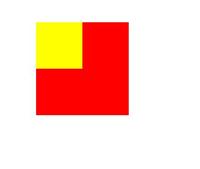
先建立兩個 view,並為
bigView加上手勢:
self.bigView = [[UIView alloc] initWithFrame:CGRectMake(50, 50, 100, 100)];
self.bigView.backgroundColor = [UIColor redColor];

UITapGestureRecognizer *recognizer = [[UITapGestureRecognizer alloc] initWithTarget:self action:@selector(bigMap:)];
recognizer.delegate = self;
[self.bigView addGestureRecognizer:recognizer];
[self.view addSubview:self.bigView];

self.smallView = [[UIView alloc] initWithFrame:CGRectMake(0, 0, 50, 50)];
self.smallView.backgroundColor = [UIColor yellowColor];
[self.bigView addSubview:self.smallView];
接著實作
UITapGestureRecognizer的代理方法,判斷觸摸是否落在子視圖上——如果是,就回傳NO讓手勢不生效:
- (BOOL)gestureRecognizer:(UIGestureRecognizer *)gestureRecognizer shouldReceiveTouch:(UITouch *)touch{
    if ([touch.view isDescendantOfView:self.smallView]) {
        return NO;
    }
    return YES;
}
就這麼簡單。最後送大家一段我用無人機拍的短片。
文章轉自 Senior丶 的簡書