
數字金額跳動動效實作
編輯:iOS 開發基礎
前言
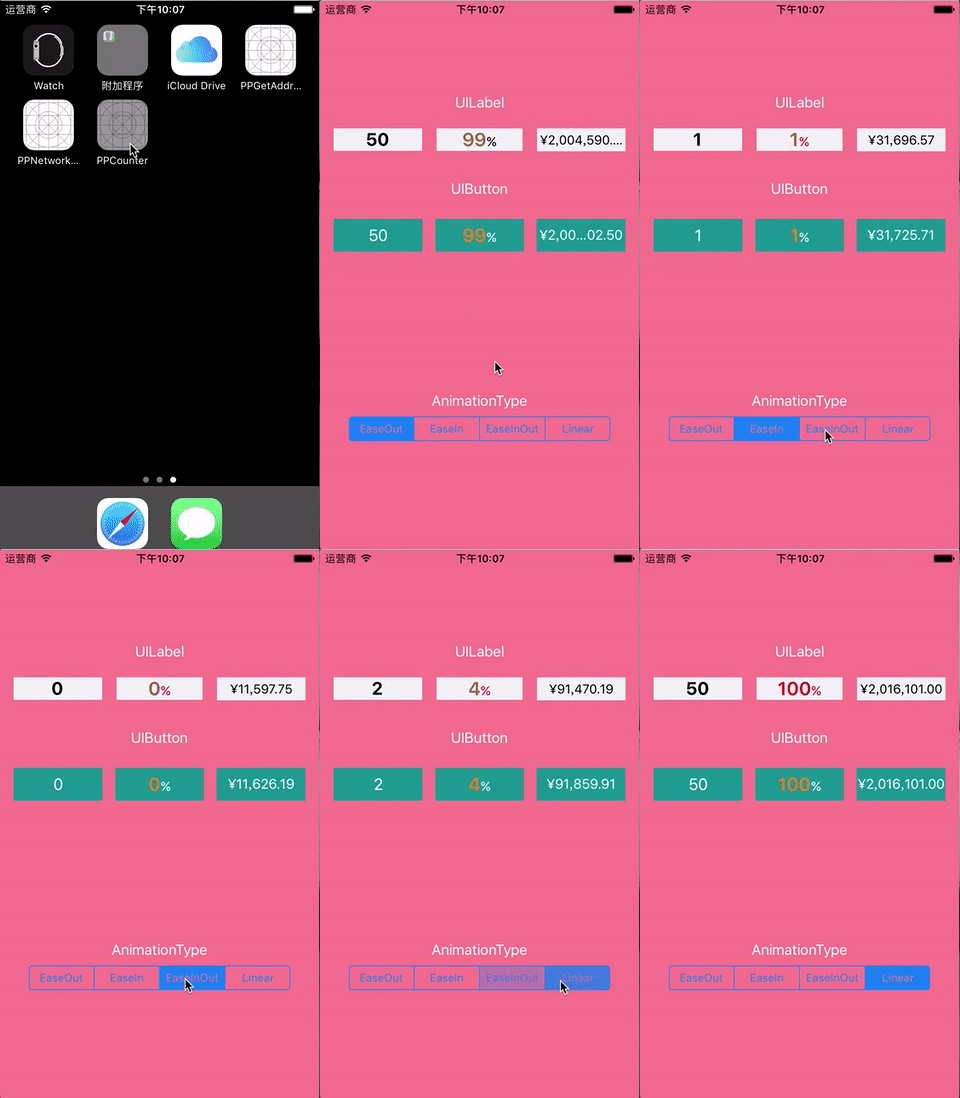
在新專案裡,UI 妹子設計了一款金額不斷累加的動畫,效果如下圖:

於是上網查了些相關經驗,並受到《iOS 核心動畫高級技巧》一文的啟發,最終決定用 CADisplayLink 計時器作為這個動效的引擎(其實用 NSTimer 或 GCD 計時器也能做到,但以 CADisplayLink 效果最佳)。
目前我已把這個效果從專案中拆出來,獨立封裝完成,只需一行程式碼即可實現數字的加減動效
支援 ULabel/UIButton/自訂文字控制項的數字加減動畫;
支援一般文字屬性與富文字屬性的字體顯示;
支援四種時間曲線函數動畫:由慢到快再到慢、由慢到特別快、由快到慢、勻速;
支援自訂文字格式,例如把數字格式化為千分位顯示;
支援 CocoaPods 導入。
程式碼部分
1.1 設定一般字體屬性的 UILabel
.... [label pp_fromNumber:0 toNumber:100 duration:1.5 animationType:PPCounterAnimationTypeEaseOut formatBlock:^NSString *(CGFloat number) { // 此處自由拼接內容 return [NSString stringWithFormat:@"%.2f",number]; } completeBlock:^{ // 完成的回調 }];1.2 設定富文字屬性的 UILabel
.... [label pp_fromNumber:0 toNumber:100 duration:1.5 animationType:PPCounterAnimationTypeEaseOut attributedFormatBlock:^NSAttributedString *(CGFloat number) { // 此處自由設置富文本屬性的內容 NSMutableAttributedString *attributedString = [[NSMutableAttributedString alloc] initWithString:@""]; return attributedString; } completeBlock:^{ // 完成的回調 }];2. UIButton
2.1 設定一般字體屬性的 UIButton
.... [button pp_fromNumber:0 toNumber:100 duration:1.5 animationType:PPCounterAnimationTypeEaseOut formatBlock:^NSString *(CGFloat number) { // 此處自由拼接內容 return [NSString stringWithFormat:@"%.2f",number]; } completeBlock:^{ // 完成的回調 }];2.2 設定富文字屬性的 UIButton
.... [button pp_fromNumber:0 toNumber:100 duration:1.5 animationType:PPCounterAnimationTypeEaseOut attributedFormatBlock:^NSAttributedString *(CGFloat number) { // 此處自由設置富文本屬性的內容 NSMutableAttributedString *attributedString = [[NSMutableAttributedString alloc] initWithString:@""]; return attributedString; } completeBlock:^{ // 完成的回調 }];以上就是 PPCounter 的簡要用法,更詳細的用法請參考 Demo:https://github.com/jkpang/PPCounter,歡迎 Star、歡迎 Fork!
你的 Star 是我持續更新的動力!
- 上一篇文章: 視錯覺進階實作:用 Mask 打造多重視覺效果
- 下一篇文章: iOS 簡約風格載入動畫詳解