
UICollectionView 深入實戰:自訂 Layout 與瀑布流完整拆解
本文假設你已看過 UICollectionView 的基礎用法,重點放在 UICollectionViewLayout 自訂布局的常用方法、瀑布流的完整實作(含頭尾視圖)、插入刪除動畫,以及 iOS 9 之後的互動式移動。
自訂 Layout 必懂的幾個方法
// 預布局:所有計算都應該寫在這裡
- (void)prepareLayout

// 返回當前螢幕可見視圖(cell、頭尾視圖)的布局屬性集合
- (NSArray *)layoutAttributesForElementsInRect:(CGRect)rect

// 依 indexPath 取值;移動、刪除時系統會呼叫它重新取得屬性再布局
- (UICollectionViewLayoutAttributes *)layoutAttributesForItemAtIndexPath:(NSIndexPath *)indexPath
- (UICollectionViewLayoutAttributes *)layoutAttributesForSupplementaryViewOfKind:(NSString *)elementKind
                                                                             atIndexPath:(NSIndexPath *)indexPath

// 回傳內容尺寸
- (CGSize)collectionViewContentSize

// 是否需要重新布局
- (BOOL)shouldInvalidateLayoutForBoundsChange:(CGRect)newBounds

// 以下四個方法處理插入、刪除、移動時的動畫
- (void)prepareForCollectionViewUpdates:(NSArray *)updateItems
- (UICollectionViewLayoutAttributes *)initialLayoutAttributesForAppearingItemAtIndexPath:(NSIndexPath *)itemIndexPath
- (nullable UICollectionViewLayoutAttributes *)finalLayoutAttributesForDisappearingItemAtIndexPath:(NSIndexPath *)itemIndexPath
- (void)finalizeCollectionViewUpdates

// iOS 9 之後處理互動式移動
- (UICollectionViewLayoutInvalidationContext *)invalidationContextForInteractivelyMovingItems:
        (NSArray *)targetIndexPaths withTargetPosition:(CGPoint)targetPosition
        previousIndexPaths:(NSArray *)previousIndexPaths previousPosition:(CGPoint)previousPosition NS_AVAILABLE_IOS(9_0)
- (UICollectionViewLayoutInvalidationContext *)invalidationContextForEndingInteractiveMovementOfItemsToFinalIndexPaths:
        (NSArray *)indexPaths previousIndexPaths:(NSArray *)previousIndexPaths
        movementCancelled:(BOOL)movementCancelled NS_AVAILABLE_IOS(9_0)
瀑布流布局:先看介面定義
.h 檔案
#importUIKIT_EXTERN NSString *const AC_UICollectionElementKindSectionHeader; UIKIT_EXTERN NSString *const AC_UICollectionElementKindSectionFooter; @class AC_WaterCollectionViewLayout; @protocol AC_WaterCollectionViewLayoutDelegate // 由外部提供 cell 高度 - (CGFloat)collectionView:(UICollectionView *)collectionView layout:(AC_WaterCollectionViewLayout *)layout heightOfItemAtIndexPath:(NSIndexPath *)indexPath itemWidth:(CGFloat)itemWidth; // 處理移動後的資料源同步 - (void)moveItemAtIndexPath:(NSIndexPath *)sourceIndexPath toIndexPath:(NSIndexPath *)destinationIndexPath; @end @interface AC_WaterCollectionViewLayout : UICollectionViewLayout @property (assign, nonatomic) NSInteger numberOfColumns; // 列數 @property (assign, nonatomic) CGFloat cellDistance; // cell 間距 @property (assign, nonatomic) CGFloat topAndBottomDustance; // cell 到頂/底的間距 @property (assign, nonatomic) CGFloat headerViewHeight; // 頭視圖高度 @property (assign, nonatomic) CGFloat footViewHeight; // 尾視圖高度 @property (nonatomic, weak) id delegate; @end
標頭檔沒有太多東西,看註解應該都能理解。與 UICollectionViewFlowLayout 不同的是這裡沒有方向設定——瀑布流橫向排列實在少見,所以頭尾視圖也一併從 CGSize 簡化為 CGFloat。
瀑布流布局:核心實作
.m 檔案
#import "AC_WaterCollectionViewLayout.h"

NSString *const AC_UICollectionElementKindSectionHeader = @"AC_HeadView";
NSString *const AC_UICollectionElementKindSectionFooter = @"AC_FootView";

@interface AC_WaterCollectionViewLayout ()
@property (strong, nonatomic) NSMutableDictionary *cellLayoutInfo;    // cell 布局
@property (strong, nonatomic) NSMutableDictionary *headLayoutInfo;    // 頭視圖布局
@property (strong, nonatomic) NSMutableDictionary *footLayoutInfo;    // 尾視圖布局
@property (assign, nonatomic) CGFloat startY;                        // 下一個視圖的起始 Y
@property (strong, nonatomic) NSMutableDictionary *maxYForColumn;     // 每列最下方 cell 的底部 Y
@property (strong, nonatomic) NSMutableArray *shouldanimationArr;     // 需要播放動畫的 indexPath
@end

@implementation AC_WaterCollectionViewLayout

- (instancetype)init {
    self = [super init];
    if (self) {
        _numberOfColumns = 3;
        _topAndBottomDustance = 10;
        _cellDistance = 10;
        _headerViewHeight = 0;
        _footViewHeight = 0;
        _startY = 0;
        _maxYForColumn = [NSMutableDictionary dictionary];
        _shouldanimationArr = [NSMutableArray array];
        _cellLayoutInfo = [NSMutableDictionary dictionary];
        _headLayoutInfo = [NSMutableDictionary dictionary];
        _footLayoutInfo = [NSMutableDictionary dictionary];
    }
    return self;
}

- (void)prepareLayout {
    [super prepareLayout];
    // 重新布局前必須清空
    [self.cellLayoutInfo removeAllObjects];
    [self.headLayoutInfo removeAllObjects];
    [self.footLayoutInfo removeAllObjects];
    [self.maxYForColumn removeAllObjects];
    self.startY = 0;

    CGFloat viewWidth = self.collectionView.frame.size.width;
    // 高度由 delegate 提供,寬度則由列數與間距反推
    CGFloat itemWidth = (viewWidth - self.cellDistance * (self.numberOfColumns + 1)) / self.numberOfColumns;

    NSInteger sectionsCount = [self.collectionView numberOfSections];
    for (NSInteger section = 0; section < sectionsCount; section++) {
        NSIndexPath *supplementaryViewIndexPath = [NSIndexPath indexPathForRow:0 inSection:section];

        // 頭視圖:高度不為 0 且 data source 實作得當才建立
        if (_headerViewHeight > 0 &&
            [self.collectionView.dataSource respondsToSelector:@selector(collectionView:viewForSupplementaryElementOfKind:atIndexPath:)]) {
            UICollectionViewLayoutAttributes *attribute =
                [UICollectionViewLayoutAttributes layoutAttributesForSupplementaryViewOfKind:AC_UICollectionElementKindSectionHeader
                                                                                 withIndexPath:supplementaryViewIndexPath];
            attribute.frame = CGRectMake(0, self.startY, self.collectionView.frame.size.width, _headerViewHeight);
            self.headLayoutInfo[supplementaryViewIndexPath] = attribute;
            self.startY = self.startY + _headerViewHeight + _topAndBottomDustance;
        } else {
            // 沒有頭視圖時,仍要保留首排 cell 距頂部的間距
            self.startY += _topAndBottomDustance;
        }

        // 初始化每列的起始 Y
        for (int i = 0; i < _numberOfColumns; i++) {
            self.maxYForColumn[@(i)] = @(self.startY);
        }

        // 逐一計算 cell 布局
        NSInteger rowsCount = [self.collectionView numberOfItemsInSection:section];
        for (NSInteger row = 0; row < rowsCount; row++) {
            NSIndexPath *cellIndePath = [NSIndexPath indexPathForItem:row inSection:section];
            UICollectionViewLayoutAttributes *attribute =
                [UICollectionViewLayoutAttributes layoutAttributesForCellWithIndexPath:cellIndePath];

            // 找出目前最短的一列
            CGFloat y = [self.maxYForColumn[@(0)] floatValue];
            NSInteger currentRow = 0;
            for (int i = 1; i < _numberOfColumns; i++) {
                if ([self.maxYForColumn[@(i)] floatValue] < y) {
                    y = [self.maxYForColumn[@(i)] floatValue];
                    currentRow = i;
                }
            }

            CGFloat x = self.cellDistance + (self.cellDistance + itemWidth) * currentRow;
            CGFloat height = [(id)self.delegate collectionView:self.collectionView layout:self
                                      heightOfItemAtIndexPath:cellIndePath itemWidth:itemWidth];
            attribute.frame = CGRectMake(x, y, itemWidth, height);

            // 更新該列的底部 Y
            y = y + self.cellDistance + height;
            self.maxYForColumn[@(currentRow)] = @(y);
            self.cellLayoutInfo[cellIndePath] = attribute;

            // section 最後一個 cell:取最長列決定 startY
            if (row == rowsCount - 1) {
                CGFloat maxY = [self.maxYForColumn[@(0)] floatValue];
                for (int i = 1; i < _numberOfColumns; i++) {
                    if ([self.maxYForColumn[@(i)] floatValue] > maxY) {
                        maxY = [self.maxYForColumn[@(i)] floatValue];
                    }
                }
                self.startY = maxY - self.cellDistance + self.topAndBottomDustance;
            }
        }

        // 尾視圖
        if (_footViewHeight > 0 &&
            [self.collectionView.dataSource respondsToSelector:@selector(collectionView:viewForSupplementaryElementOfKind:atIndexPath:)]) {
            UICollectionViewLayoutAttributes *attribute =
                [UICollectionViewLayoutAttributes layoutAttributesForSupplementaryViewOfKind:AC_UICollectionElementKindSectionFooter
                                                                                 withIndexPath:supplementaryViewIndexPath];
            attribute.frame = CGRectMake(0, self.startY, self.collectionView.frame.size.width, _footViewHeight);
            self.footLayoutInfo[supplementaryViewIndexPath] = attribute;
            self.startY = self.startY + _footViewHeight;
        }
    }
}

- (NSArray *)layoutAttributesForElementsInRect:(CGRect)rect {
    NSMutableArray *allAttributes = [NSMutableArray array];
    // 只回傳與 rect 相交的可見元素
    [self.cellLayoutInfo enumerateKeysAndObjectsUsingBlock:^(NSIndexPath *indexPath, UICollectionViewLayoutAttributes *attribute, BOOL *stop) {
        if (CGRectIntersectsRect(rect, attribute.frame)) { [allAttributes addObject:attribute]; }
    }];
    [self.headLayoutInfo enumerateKeysAndObjectsUsingBlock:^(NSIndexPath *indexPath, UICollectionViewLayoutAttributes *attribute, BOOL *stop) {
        if (CGRectIntersectsRect(rect, attribute.frame)) { [allAttributes addObject:attribute]; }
    }];
    [self.footLayoutInfo enumerateKeysAndObjectsUsingBlock:^(NSIndexPath *indexPath, UICollectionViewLayoutAttributes *attribute, BOOL *stop) {
        if (CGRectIntersectsRect(rect, attribute.frame)) { [allAttributes addObject:attribute]; }
    }];
    return allAttributes;
}

- (UICollectionViewLayoutAttributes *)layoutAttributesForItemAtIndexPath:(NSIndexPath *)indexPath {
    return self.cellLayoutInfo[indexPath];
}

- (UICollectionViewLayoutAttributes *)layoutAttributesForSupplementaryViewOfKind:(NSString *)elementKind
                                                                     atIndexPath:(NSIndexPath *)indexPath {
    if ([elementKind isEqualToString:AC_UICollectionElementKindSectionHeader]) {
        return self.headLayoutInfo[indexPath];
    } else if ([elementKind isEqualToString:AC_UICollectionElementKindSectionFooter]) {
        return self.footLayoutInfo[indexPath];
    }
    return nil;
}

- (CGSize)collectionViewContentSize {
    return CGSizeMake(self.collectionView.frame.size.width, MAX(self.startY, self.collectionView.frame.size.height));
}

- (void)prepareForCollectionViewUpdates:(NSArray *)updateItems {
    [super prepareForCollectionViewUpdates:updateItems];
    NSMutableArray *indexPaths = [NSMutableArray array];
    for (UICollectionViewUpdateItem *updateItem in updateItems) {
        switch (updateItem.updateAction) {
            case UICollectionUpdateActionInsert:
                [indexPaths addObject:updateItem.indexPathAfterUpdate];
                break;
            case UICollectionUpdateActionDelete:
                [indexPaths addObject:updateItem.indexPathBeforeUpdate];
                break;
            case UICollectionUpdateActionMove:
                break;
            default:
                NSLog(@"unhandled case: %@", updateItem);
                break;
        }
    }
    self.shouldanimationArr = indexPaths;
}

// 對應 indexPathBeforeUpdate
- (UICollectionViewLayoutAttributes *)initialLayoutAttributesForAppearingItemAtIndexPath:(NSIndexPath *)itemIndexPath {
    if ([self.shouldanimationArr containsObject:itemIndexPath]) {
        UICollectionViewLayoutAttributes *attr = self.cellLayoutInfo[itemIndexPath];
        attr.transform = CGAffineTransformRotate(CGAffineTransformMakeScale(0.2, 0.2), M_PI);
        attr.center = CGPointMake(CGRectGetMidX(self.collectionView.bounds), CGRectGetMaxY(self.collectionView.bounds));
        attr.alpha = 1;
        [self.shouldanimationArr removeObject:itemIndexPath];
        return attr;
    }
    return nil;
}

// 對應 indexPathAfterUpdate
- (UICollectionViewLayoutAttributes *)finalLayoutAttributesForDisappearingItemAtIndexPath:(NSIndexPath *)itemIndexPath {
    if ([self.shouldanimationArr containsObject:itemIndexPath]) {
        UICollectionViewLayoutAttributes *attr = self.cellLayoutInfo[itemIndexPath];
        attr.transform = CGAffineTransformRotate(CGAffineTransformMakeScale(2, 2), 0);
        attr.alpha = 0;
        [self.shouldanimationArr removeObject:itemIndexPath];
        return attr;
    }
    return nil;
}

- (void)finalizeCollectionViewUpdates {
    self.shouldanimationArr = nil;
}

- (BOOL)shouldInvalidateLayoutForBoundsChange:(CGRect)newBounds {
    CGRect oldBounds = self.collectionView.bounds;
    if (!CGSizeEqualToSize(oldBounds.size, newBounds.size)) {
        return YES;
    }
    return NO;
}

#pragma mark - 互動式移動(iOS 9+)
- (UICollectionViewLayoutInvalidationContext *)invalidationContextForInteractivelyMovingItems:
        (NSArray *)targetIndexPaths withTargetPosition:(CGPoint)targetPosition
        previousIndexPaths:(NSArray *)previousIndexPaths previousPosition:(CGPoint)previousPosition NS_AVAILABLE_IOS(9_0) {
    UICollectionViewLayoutInvalidationContext *context =
        [super invalidationContextForInteractivelyMovingItems:targetIndexPaths withTargetPosition:targetPosition
                                             previousIndexPaths:previousIndexPaths previousPosition:previousPosition];
    if ([self.delegate respondsToSelector:@selector(moveItemAtIndexPath:toIndexPath:)]) {
        [self.delegate moveItemAtIndexPath:previousIndexPaths[0] toIndexPath:targetIndexPaths[0]];
    }
    return context;
}

- (UICollectionViewLayoutInvalidationContext *)invalidationContextForEndingInteractiveMovementOfItemsToFinalIndexPaths:
        (NSArray *)indexPaths previousIndexPaths:(NSArray *)previousIndexPaths
        movementCancelled:(BOOL)movementCancelled NS_AVAILABLE_IOS(9_0) {
    return [super invalidationContextForEndingInteractiveMovementOfItemsToFinalIndexPaths:indexPaths
                                                                         previousIndexPaths:previousIndexPaths
                                                                         movementCancelled:movementCancelled];
}
@end
幾個實作上的關鍵細節
- prepareLayout 是整套布局的起點。這裡特別說明兩個屬性:
startY負責決定「下一個視圖物件」的起始 Y;maxYForColumn記錄每一列目前最下方 cell 的底部值。布局 cell 時,Y 取maxYForColumn中的最小值(也就是最矮的那一列);而當 section 內所有 cell 都布局完畢、要接著放尾視圖時,startY則應取其中的最大值。 - layoutAttributesForElementsInRect: 需回傳當前可見元素的屬性集合,許多額外的視覺效果(例如 Skew、Scale 變換)都是在這個方法裡加工。
- prepareForCollectionViewUpdates: 在呼叫插入/刪除/移動 API 時觸發。其中
indexPathBeforeUpdate對應 initialLayoutAttributesForAppearingItemAtIndexPath:,indexPathAfterUpdate對應 finalLayoutAttributesForDisappearingItemAtIndexPath:。範例中插入時收集的是 AfterUpdate,刪除時收集的是 BeforeUpdate。
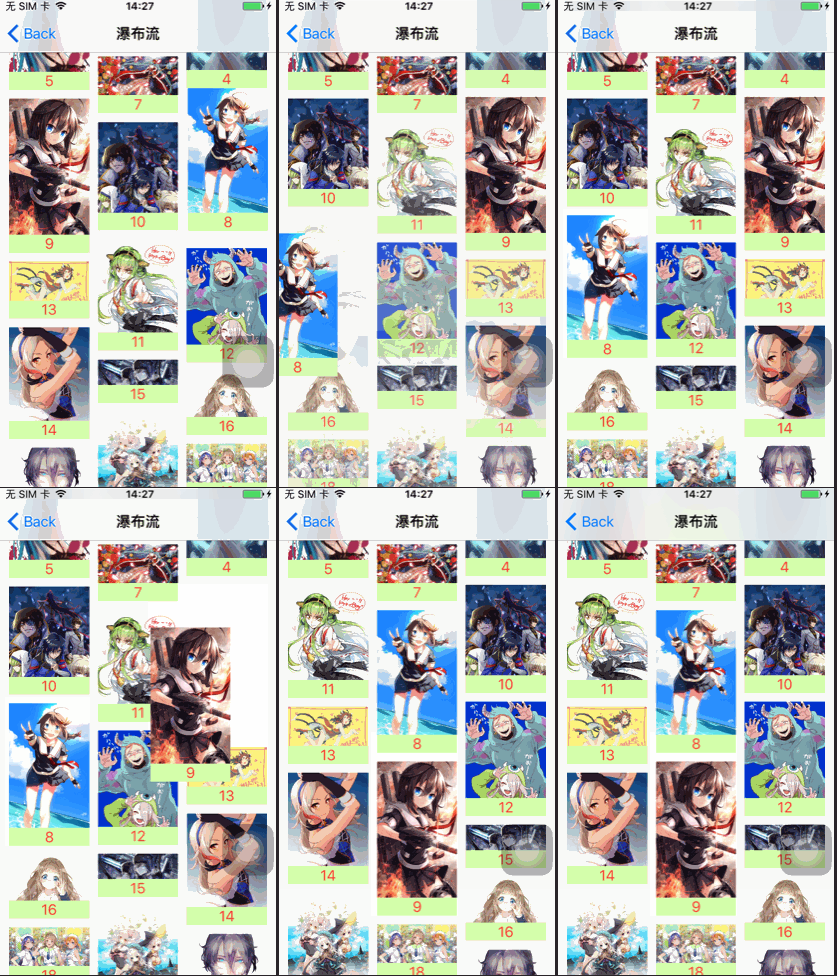
互動式拖曳排序
系統提供的移動能力僅限 iOS 9 之後;若想支援更早版本,必須自行實作(可參考「可拖拽重排的 CollectionView」相關文章)。手勢的綁定與回呼都在 controller 中處理:
// 加入長按手勢
UILongPressGestureRecognizer *longGest =
    [[UILongPressGestureRecognizer alloc] initWithTarget:self action:@selector(longGest:)];
[self.waterCollectionView addGestureRecognizer:longGest];

- (void)longGest:(UILongPressGestureRecognizer *)gest {
    switch (gest.state) {
        case UIGestureRecognizerStateBegan: {
            NSIndexPath *touchIndexPath =
                [self.waterCollectionView indexPathForItemAtPoint:[gest locationInView:self.waterCollectionView]];
            if (touchIndexPath) {
                [self.waterCollectionView beginInteractiveMovementForItemAtIndexPath:touchIndexPath];
            } else {
                break;
            }
        }
            break;
        case UIGestureRecognizerStateChanged:
            [self.waterCollectionView updateInteractiveMovementTargetPosition:[gest locationInView:gest.view]];
            break;
        case UIGestureRecognizerStateEnded:
            [self.waterCollectionView endInteractiveMovement];
            break;
        default:
            break;
    }
}
這裡有一個坑,值得單獨說明
手指移動期間,系統會不斷呼叫 invalidationContextForInteractivelyMovingItems:withTargetPosition:previousIndexPaths:previousPosition:。由於瀑布流每個 cell 高度不同,必須透過 delegate 持續同步資料源順序,系統才會反覆呼叫 prepareLayout 重新布局。
我最初採用系統提供的 collectionView:moveItemAtIndexPath:toIndexPath: 來更新資料源,結果發現:拖曳過程中顯示正常,但一放手、資料重新載入後順序就亂了。印出資料源才發現,順序根本沒有變動,仍是原本的排列。
問題出在手勢結束時呼叫的 [self.waterCollectionView endInteractiveMovement]。查 Xcode 對該方法的說明:
Ends interactive movement tracking and moves the target item to its new location. ... The collection view responds by calling the collectionView:moveItemAtIndexPath:toIndexPath: method of its data source to ensure that your data structures are updated.
也就是說,手勢結束時系統會「再一次」呼叫 moveItemAtIndexPath:toIndexPath:,把移動期間的變換又翻了回來。最後的解法是自己寫一個 delegate 方法來處理資料源,繞開系統的回呼:
// 自訂回呼
- (void)moveItemAtIndexPath:(NSIndexPath *)sourceIndexPath toIndexPath:(NSIndexPath *)destinationIndexPath {
    if (sourceIndexPath.row != destinationIndexPath.row) {
        NSString *value = self.imageArr[sourceIndexPath.row];
        [self.imageArr removeObjectAtIndex:sourceIndexPath.row];
        [self.imageArr insertObject:value atIndex:destinationIndexPath.row];
        NSLog(@"from:%ld   to:%ld", sourceIndexPath.row, destinationIndexPath.row);
    }
}
運行效果
- 上一篇文章: 五個立刻生效的技巧,讓 Xcode 編譯快起來
- 下一篇文章: iOS 學習路徑圖:給初學者到進階者的完整資料清單