
使用MVVM減少控制器代碼實戰(減少56%)

減少比例= (360(原來的行數)-159(瘦身後的行數))/360 = 56%
父類MVC 和MVVM 前後基本不動
父類主要完成如下三個功能:
功能:MJRefrsh +上拉下拉沒有更多數據,封裝到父類的控制器 子類調用3行代碼增加所有刷新功能
網絡失敗:顯示網絡錯誤的鏈接,寫在父類子類調用一行代碼就可
加載數據完成,列表中沒有數據提示View,比如購買界面,沒有購買記錄,寫在父類子類一行代碼調用
瘦身思路(總的代碼量增加了30多行,但是控制器更清爽了)
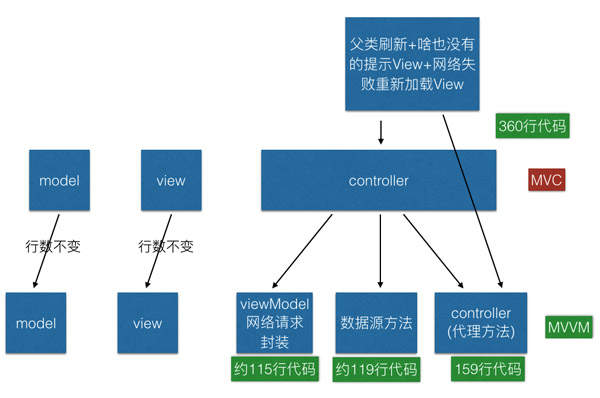
網絡前網絡請求函數是這樣的
瘦身結果
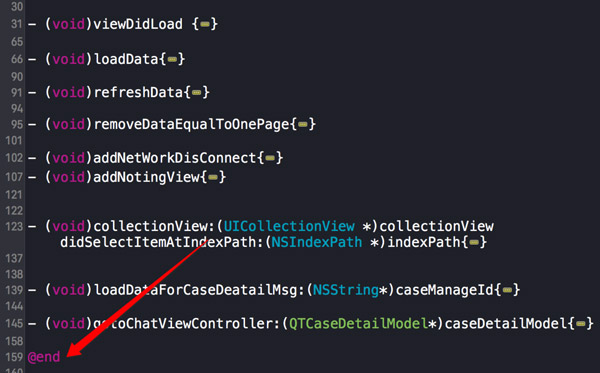
瘦身具體實現
1)網絡請求移到ViewModel
以前網絡代碼直接寫在控制器中,如下所示
- (void)loadDataForCaseDeatailMsg:(NSString*)caseManageId{    NSMutableDictionary *dict = createMutDict;
    [dict setObject:@"case-info" forKey:@"method"];
    [dict setObject:caseManageId forKey:@"caseManageId"];
    [QTFHttpTool    requestPara:dict
                        needHud:YES
                        hudView:self.view
                 loadingHudText:nil
                   errorHudText:nil
                         sucess:^(NSDictionary *json) {
                         BOOL success = (BOOL)[json[@"success"] boolValue];
                         if(success){
                                 QTCaseDetailModel *caseDetailModel = [[QTCaseDetailModel alloc]init];
                                 caseDetailModel.expertId = json[@"expertId"];
                                 caseDetailModel.userName = json[@"userName"];
                                 caseDetailModel.data = [QTCaseDetailMsgModel objectArrayWithKeyValuesArray:json[@"data"]];
                                 [self gotoChatViewController:caseDetailModel];

                             }
                         }failur:^(NSError *error) {

                         }];
}
MVVM封裝後控制器中的網絡請求是這樣的,控制器只取需要的東西,如下所示,不關心一些無關的細節,細節移到ViewModel中,5行搞定了網絡請求獲取網絡數據,還算精簡吧!
- (void)loadDataForCaseDeatailMsg:(NSString*)caseManageId{
    [QTCaseDetailViewModel caseDetailhudView:self.view caseManageId:caseManageId getDataSuccess:^(id item, NSInteger totalPage) {
        [self gotoChatViewController:item];
    } getDataFailure:^(NSError *error) {}];
}
具體實現在viewModle中,viewModel添加hud,完成字典轉模型,對後台做錯誤處理,顯示錯誤(部分工作在我自己封裝的底層網絡請求實現的)
+ (void)caseDetailhudView:(UIView*)hudView caseManageId:(NSString*)caseManageId getDataSuccess:(GetDataAllSuccessBlock)success getDataFailure:(GetDataFailureBlock)failure{
    NSMutableDictionary *dict = createMutDict;
    [dict setObject:@"case-info" forKey:@"method"];
    [dict setObject:caseManageId forKey:@"caseManageId"];
    [QTFHttpTool    requestPara:dict
                        needHud:YES
                        hudView:hudView
                 loadingHudText:nil
                   errorHudText:nil
                         sucess:^(NSDictionary *json) {
                             BOOL success1 = (BOOL)[json[@"success"] boolValue];                             if(success1){
                                 QTCaseDetailModel *caseDetailModel = [[QTCaseDetailModel alloc]init];                                 caseDetailModel.expertId = json[@"expertId"];                                 caseDetailModel.userName = json[@"userName"];                                 caseDetailModel.data = [QTCaseDetailMsgModel objectArrayWithKeyValuesArray:json[@"data"]];
                                 success(caseDetailModel,1);
                             }
                         }failur:^(NSError *error) {

                         }];

}
將網絡請求部分工作移到Viewmodel中,本控制器有三個網絡請求 這樣節省代碼量很可觀
2) datasource,以前直接寫在控制機器中,現在寫到dataSource 文件中,控制器中調用dataSource這個類
/*
 本類作用:用以處理TableView以及CollectionView的數據源
 */#import @import UIKit;// 用於配置當前Cell的數據// id cell表示什麼類型的Cell// id item表示什麼類型的模型對象typedef void (^TableViewCellConfigureBlock)(id cell, id item);@interface QTArrayDataSource : NSObject // 參數1:用以數據源的控制,主要是通過改數組來控制當前tableView或者collectionView顯示Cell的數量// 參數2:當前需要顯示的cell的重用標示// 參數3:用以配置當前cell數據的block- (id)initWithItems:(NSArray *)anItems
     cellIdentifier:(NSString *)aCellIdentifier
 configureCellBlock:(TableViewCellConfigureBlock)aConfigureCellBlock;// 通過indexPath來獲取當前具體的某一個對象- (id)itemAtIndexPath:(NSIndexPath *)indexPath;@end
#import "QTArrayDataSource.h"#import "QTSpecialCaseCell.h"@interface QTArrayDataSource ()// 當前數據數組@property (nonatomic, strong) NSArray *items;// 當前cell重用標示@property (nonatomic, copy) NSString *cellIdentifier;// 當前配置cell的block@property (nonatomic, copy) TableViewCellConfigureBlock configureCellBlock;@end@implementation QTArrayDataSource- (id)init
{    return nil;
}

- (id)initWithItems:(NSArray *)anItems
     cellIdentifier:(NSString *)aCellIdentifier
 configureCellBlock:(TableViewCellConfigureBlock)aConfigureCellBlock
{    self = [super init];    if (self) {
        _items = anItems;
        _cellIdentifier = aCellIdentifier;
        _configureCellBlock = [aConfigureCellBlock copy];
    }    return self;
}

- (id)itemAtIndexPath:(NSIndexPath *)indexPath
{    return self.items[(NSUInteger)indexPath.row];
}#pragma mark UITableViewDataSource- (NSInteger)tableView:(UITableView *)tableView numberOfRowsInSection:(NSInteger)section
{    return self.items.count;
}

- (UITableViewCell *)tableView:(UITableView *)tableView cellForRowAtIndexPath:(NSIndexPath *)indexPath
{    UITableViewCell *cell = [tableView dequeueReusableCellWithIdentifier:self.cellIdentifier
                                                            forIndexPath:indexPath];    // 獲取當前某一行的對象
    id item = [self itemAtIndexPath:indexPath];    // 通過調用該block配置當前cell顯示的內容
    self.configureCellBlock(cell, item);    return cell;
}#pragma mark UICollectionDataSource- (NSInteger)collectionView:(UICollectionView *)collectionView numberOfItemsInSection:(NSInteger)section
{    return self.items.count;
}

- (UICollectionViewCell *)collectionView:(UICollectionView *)collectionView cellForItemAtIndexPath:(NSIndexPath *)indexPath
{
    QTSpecialCaseCell *cell = [collectionView dequeueReusableCellWithReuseIdentifier:self.cellIdentifier
                                                                           forIndexPath:indexPath];    // 獲取當前某一行的對象

    id item = [self itemAtIndexPath:indexPath];    // 通過調用該block配置當前cell顯示的內容
    self.configureCellBlock(cell, item);    return cell;
}@end
3) viewdidload代碼中, 以協議的方式加載數據源
TableViewCellConfigureBlock configureCell = ^(QTSpecialCaseCell
                                            *cell, id data) {
        [cell configureForCell:data];
    };
    [_collectionView registerClass:[QTSpecialCaseCell class] forCellWithReuseIdentifier:CellIdentify];
    self.arrayDataSource = [[QTArrayDataSource alloc]
    initWithItems:self.data    cellIdentifier:CellIdentify
    configureCellBlock:configureCell];
    self.collectionView.dataSource = self.arrayDataSource;
    self.collectionView.delegate = self;
    [self refreshOneCreateCollectionView:_collectionView methodSelStr:@"loadData"];
4) 本文的待討論的部分
代理方法沒有剝離出來,如果剝離出來,控制器進一步減少到120行左右,代理剝離有點麻煩,感覺沒有必要
創建collectionView 的代碼沒剝離,剝離出來可以再減少20行左右,也參考一些別人的文章,目前覺得就這樣了,沒必要的
也參考了一些別人的代碼:如何寫好一個UITableView
如何正確的寫好一個UITableView,寫的也很高大上,感覺各種繼承,真的很復雜耶
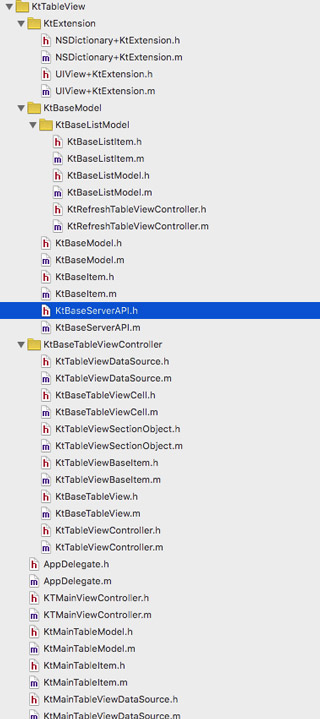
代碼 不能過度封裝,也不能不封裝
有人對我的網絡請求比較感興趣,我的網絡請求,針對公司的後台數據結構做了封裝,hud 也封裝到網絡請求中了。


- 值得珍藏的iOS開辟經常使用代碼塊
- iOS 開辟經常使用宏總結
- iOS經常使用加密算法引見和代碼理論
- 比擬IOS開辟中經常使用視圖的四種切換方法
- iOS中NSArray數組經常使用處置方法
- iOS中應用MD5加密字符串
- iOS中的表單按鈕選項UIActionSheet經常使用辦法整頓
- iOS運用開辟中AFNetworking庫的經常使用HTTP操作辦法小結
- iOS運用中UILabel文字顯示後果的經常使用設置總結
- iOS App開辟中UITextField組件的經常使用屬性小結
- iOS開辟中經常使用的各類動畫、頁面切面後果
- Objective-C中字符串NSString的經常使用操作辦法總結
- IOS框架Spring經常使用的動畫後果
- iOS開辟中UIImageView控件的經常使用操作整頓
- iOS開辟中罕見的項目文件與MVC構造優化思緒解析

- App Extension的脫殼辦法
- 源碼推薦(12.2):在設備上發現內存洩露等問題,Swift實現Pinterest轉場效果
- iOS開發通過代碼方式使用AutoLayout (NSLayoutConstraint + Masonry)
- 源碼推薦(1.8):Xcode6插件快速跳轉到沙盒,zxing實現的掃碼工具
- 寶庫iOS開發筆試題
- iOS經典錯誤Undefined symbols for architecture XXX:
- iOS顯示FPS值的工具FHHFPSIndicator
- iOS 動畫效果:Core Animation & Facebook
- iOS開發數據庫SQLite的使用
- 解密——神秘的RunLoop