私有Pods封裝個推SDK功能(解決方案)

一:運用場景
一:運用場景
公司中同時有好幾個APP在開發,而且每個APP都有使用到集成個推SDK來處理消息的功能,以前的做法是每個APP都去集成並在AppDelegate處理一些SDK的代碼,包含個推基礎配置、消息接收處理、遠程信息處理、蘋果通知注冊等等;後來你會發現其實在這部分內容中只有配置跟消息接收時存在差異,畢竟接收消息用來處理不同的業務邏輯問題;今天要介紹的功能就是把相同或不變的內容封裝起來,開放出差異給每個APP的AppDelegate進行處理;而對於這部分相同的封裝運用私有Pods進行管理,所以封裝後的個推使用起來很簡單,哪怕你對個推都不了解也能在一分鐘搞定個推集成功能;
實現這個封裝運用下面幾個知識點,私有Pods的搭建、AppDelegate方法的注入(采用插件XAspect 地址:https://github.com/xareelee/XAspect)
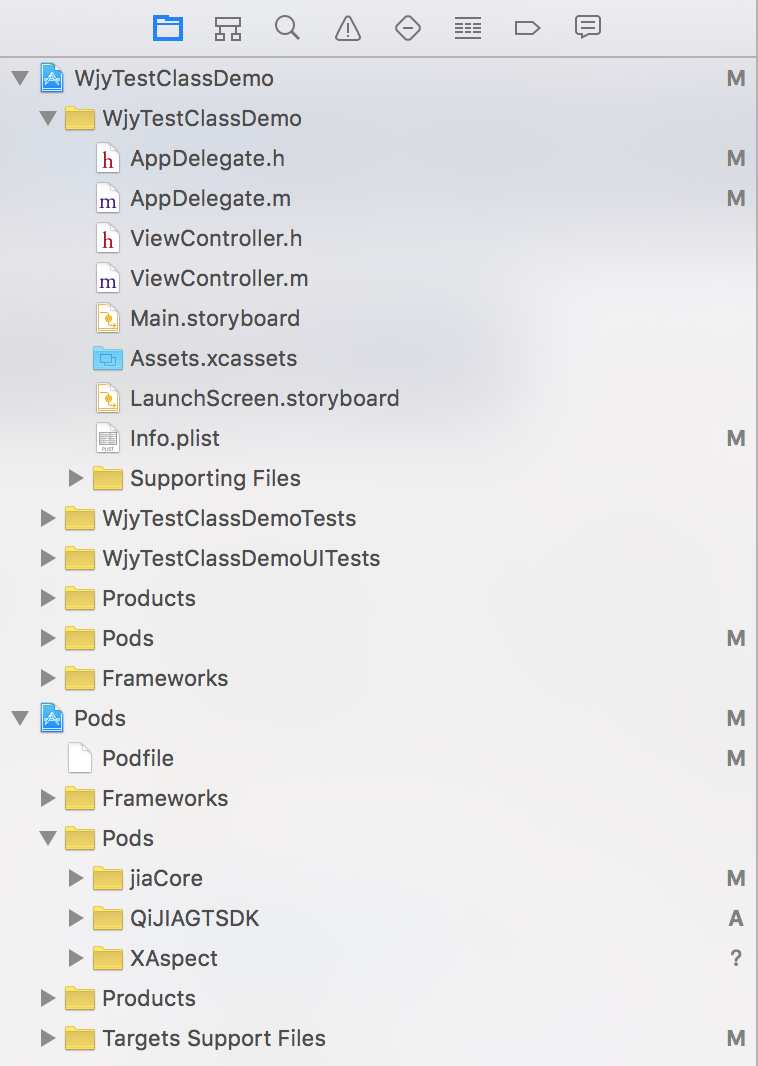
上面圖為整體一個項目實例,相信也是很多項目目前采用Pod插件管理的方式;
二:集成效果
1:首先了解一某個工程內的AppDelegate的代碼,從下面的代碼你是否已經找不到個推SDK那些代碼及你消息注冊等等;只在didFinishLaunchingWithOptions中增加一個配置,其它兩個方法是用來處理消息的內容;
- (BOOL)application:(UIApplication *)application didFinishLaunchingWithOptions:(NSDictionary *)launchOptions {

    //配置個推信息
    jiaGTConfigManager *gtConfig=[jiaGTConfigManager sharedInstance];
    gtConfig.jiaGTAppId=@"C83sm0U3xt5D5GUYqkfk53";
    gtConfig.jiaGTAppKey=@"13OydrjIuC8TZliF43hRS5";
    gtConfig.jiaGTAppSecret=@"gdgYQJSUNa5pIQB2icrCt1";

    ViewController *logInVc = [[ViewController alloc]init];
    self.window.rootViewController = logInVc;
    self.window.backgroundColor = [UIColor whiteColor];
    [self.window makeKeyAndVisible];

    return [super application:application didFinishLaunchingWithOptions:launchOptions];
}


/**
 *  @author wujunyang, 16-07-07 16:07:25
 *
 *  @brief  處理個推消息
 *
 *  @param notificationObject
 */
-(void)gtNotification:(NSObject *)notificationObject
{
    if (notificationObject) {
        NSNotification *curNotification=(NSNotification *)notificationObject;
        NSLog(@"%@",curNotification.userInfo[@"payload"]);
        NSLog(@"-----接收到個推通知------");
    }
}


/**
 *  @author wujunyang, 16-07-07 16:07:40
 *
 *  @brief  處理遠程蘋果通知
 *
 *  @param notificationObject
 */
-(void)receiveRemoteNotification:(NSObject *)notificationObject
{
    if (notificationObject) {
        NSNotification *curNotification=(NSNotification *)notificationObject;
        UIAlertView *alert=[[UIAlertView alloc]initWithTitle:@"您有一條新消息" message:[NSString stringWithFormat:@"%@,%@",curNotification.userInfo[@"payload"],curNotification.userInfo[@"message"]] delegate:self cancelButtonTitle:@"取消" otherButtonTitles:@"確定", nil];
        [alert show];
    }
}
2:工程中的AppDelegate繼承於我們定義的父類jiaAppDelegate,關於jiaAppDelegate是什麼,jiaGTConfigManager又是干什麼;你可以接著往下看;
#import #import "jiaAppDelegate.h"
#import "jiaGTConfigManager.h"


@interface AppDelegate :jiaAppDelegate@end
3:引入Pod指令
link_with ['WjyTestClassDemo']

source 'https://github.com/CocoaPods/Specs.git'        #官方倉庫地址
source ‘https://github.com/wujunyang/WjySpecs.git’        #私有倉庫地址

platform :ios, "7.0"

pod "QiJIAGTSDK"
4:查看效果圖
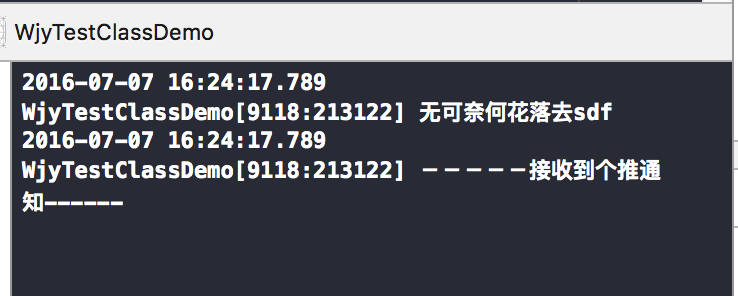
上面隨便用個推推送一條消息,可以准確獲得;到這邊如果你只是運用,那麼就可以結束了;就算你不懂個推也已經搞定集成功能;
三:實現過程
為了實現上面這個簡化版的集成功能,我們采用的私有Pods對個推進行管理,主要是把個推SDK跟我們編寫的一些代碼進行整合;關於如果搭建私有Pods不是本文的重點,如果說你對這方面也有感興趣可以留言,我再寫一個關於搭建私有Pods的文章,網絡上也有很多這方面的內容,歡迎一起交流;當然XAspect在封裝的過程中也起到很重要的作用,它的注入功能解決把原本應該在AppDelegate的代碼解耦出來;
1:首先創建一個AppDelegate,主要作用是為了其它項目的AppDelegate可以以它為基類,而我的XAspect文件就可以只對我這個父類的AppDelegate進行注入,方便後期我擴展,比如後期我可能要實現關於友盟SDK、融雲SDK的集成封裝;
jiaAppDelegate.h的文件內容:
#import @interface jiaAppDelegate : UIResponder @property (strong, nonatomic) UIWindow *window;

@end
jiaAppDelegate.m的文件內容:
#import "jiaAppDelegate.h"

@interface jiaAppDelegate()

@end

@implementation jiaAppDelegate

- (BOOL)application:(UIApplication *)application didFinishLaunchingWithOptions:(NSDictionary *)launchOptions {

    return YES;
}

- (void)applicationWillResignActive:(UIApplication *)application {
}

- (void)applicationDidEnterBackground:(UIApplication *)application {
}

- (void)applicationWillEnterForeground:(UIApplication *)application {
}

- (void)applicationDidBecomeActive:(UIApplication *)application {
}

- (void)applicationWillTerminate:(UIApplication *)application {
}

-(void)dealloc
{
}

-(void)application:(UIApplication *)application didReceiveRemoteNotification:(NSDictionary *)userInfo fetchCompletionHandler:(void (^)(UIBackgroundFetchResult result))completionHandler
{
}


-(void)application:(UIApplication *)application didReceiveRemoteNotification:(NSDictionary *)userInfo
{
}
@end
是否發現其實jiaAppDelegate在這我什麼也沒有做,這樣其實就足夠了;因為這部分是比較基礎的內容,所以我也用Pods進行管理,當然你也可以再創建一個viewController的基類,讓你的工程所有的都以這為基類進行開發,有基類在手你後期一些擴展都比較好辦;
2:接下來將要介紹關於集成個推模塊的功能及相關代碼,也是本文的重點;首先你可以上個推的gitHub去下載它最新的SDK及一個頭文件GeTuiSdk.h;其實這兩個文件也是你平時集成個推時引入到工程的內容;如下的目錄是被我封裝後的個推目錄結構;除了那兩個文件其它就是抽離出來的內容;
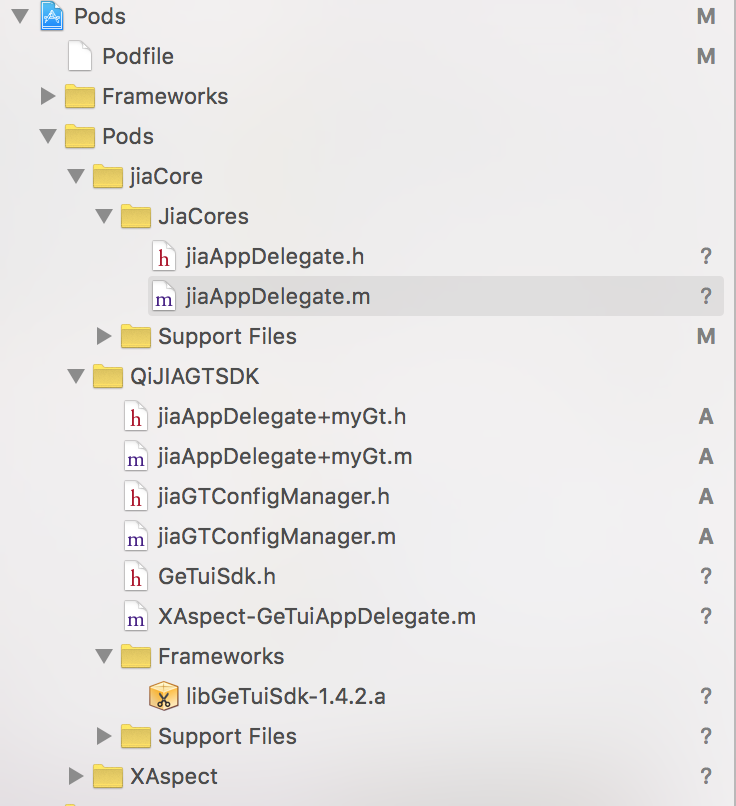
2.1 jiaAppDelegate+myGt類作用
因為封裝的這個推SDK是依賴我們上面jiaAppDelegate;所以我們就可以對它進行擴展,創建這個Category是為了解決關於個推GeTuiSdkDelegate,因為XAspect 目前無法針對Delegate進行聲明引用;
jiaAppDelegate+myGt.h的文件內容:
#import "jiaAppDelegate.h"
#import "GeTuiSdk.h"


@interface jiaAppDelegate (myGt)@end
jiaAppDelegate+myGt.m的文件內容:
#import "jiaAppDelegate+myGt.h"

@implementation jiaAppDelegate (myGt)

@end
從上面的代碼可以看出來只是引入的
2.2 jiaGTConfigManager類作用
因為在個推會存在基礎配置的內容,決定創建一個配置類進行管理,它是一個單例模式;
jiaGTConfigManager.h文件的內容
#import @interface jiaGTConfigManager : NSObject

+ (jiaGTConfigManager *)sharedInstance;

//個推配置
@property (strong, nonatomic) NSString *jiaGTAppId;
@property (strong, nonatomic) NSString *jiaGTAppKey;
@property (strong, nonatomic) NSString *jiaGTAppSecret;

@end
jiaGTConfigManager.m文件的內容
#import "jiaGTConfigManager.h"

@implementation jiaGTConfigManager

+ (jiaGTConfigManager *)sharedInstance
{
    static jiaGTConfigManager* instance = nil;

    static dispatch_once_t onceToken;
    dispatch_once(&onceToken, ^{
        instance = [jiaGTConfigManager new];
    });

    return instance;
}

@end
只是開放出三個屬性用於獲取到配置內容;
2.3 XAspect-GeTuiAppDelegate作用
正如前面說的個推集成的代碼是工程當前的AppDelegate不用寫,但並不代碼一直不用寫,只是被我們抽離在XAspect-GeTuiAppDelegate中,更加模塊化;XAspect插件運用起來很比較簡單,它比較一般注入的插件好處是可以多次對同一個文件相同的方法進行注入;
AspectPatch(-, BOOL, application:(UIApplication *)application didFinishLaunchingWithOptions:(NSDictionary *)launchOptions)
{
    //個推初始化
    [self initLoadGeTui:launchOptions];

    //注冊個推通知事件
    [[NSNotificationCenter defaultCenter] addObserver:self selector:@selector(geTuiMessageHandling:) name:jiaGeTuiNotification object:nil];

    [[NSNotificationCenter defaultCenter] addObserver:self selector:@selector(receiveRemoteMessageHandling:) name:jiaReceiveRemoteNotification object:nil];

    return XAMessageForward(application:application didFinishLaunchingWithOptions:launchOptions);
}
上面這段代碼就是Aspect針對didFinishLaunchingWithOptions的注入,如果有多個文件它都會進行注入到此方法中;類似的寫法就不再介紹,可以去官網進行了解;接收到個推消息跟遠程消息運用本地通知的方式進行獲取;
/** SDK收到透傳消息回調 */
- (void)GeTuiSdkDidReceivePayload:(NSString *)payloadId andTaskId:(NSString *)taskId andMessageId:(NSString *)aMsgId andOffLine:(BOOL)offLine fromApplication:(NSString *)appId {

    [self handlePushMessage:nil notification:nil];
    // [4]: 收到個推消息
    NSData *payload = [GeTuiSdk retrivePayloadById:payloadId];
    NSString *payloadMsg = nil;
    if (payload) {
        payloadMsg = [[NSString alloc] initWithBytes:payload.bytes length:payload.length encoding:NSUTF8StringEncoding];
    }

    NSDictionary *dict =[[NSDictionary alloc] initWithObjectsAndKeys:aMsgId,@"aMsgId", [NSNumber numberWithBool:offLine],@"offLine",appId,@"appId",payloadMsg,@"payload",nil];
    //創建通知
    NSNotification *notification =[NSNotification notificationWithName:@"jiaGeTuiNotification" object:nil userInfo:dict];
    //通過通知中心發送通知
    [[NSNotificationCenter defaultCenter] postNotification:notification];
}
在獲取到個推消息後我可以針對消息的內容先處理解析,因為本地通知的參數是一個字典,所以你可以存入你想開放的信息內容,然後再把它傳給本地通知作處理,這樣你在真正業務要使用的地方已經相當簡便;遠程通知也是類似;
而關於處理本地通知的方法讓使用的當前工程AppDelegate去實現,方法gtNotification跟receiveRemoteNotification正是開頭文章我們調用的方法;
//處理個推本地通知,判斷是否存在gtNotification方法
- (void)geTuiMessageHandling:(NSNotification *)text{
    SEL gtNotificationSelector=@selector(gtNotification:);
    if([self respondsToSelector:gtNotificationSelector])
    {
        [self performSelector:gtNotificationSelector withObject:text];
    }
}


//處理蘋果遠程通知,判斷是否存在receiveRemoteNotification方法
- (void)receiveRemoteMessageHandling:(NSNotification *)text{
    SEL receiveRemoteNotificationSelector=@selector(receiveRemoteNotification:);
    if([self respondsToSelector:receiveRemoteNotificationSelector])
    {
        [self performSelector:receiveRemoteNotificationSelector withObject:text];
    }
}
因為Aspect是要針對某個類進行注入,這個也是我們創建GeTuiAppDelegate基類的意義,這樣我都可以只針對這個基類進行注入;你可以看到XAspect-GeTuiAppDelegate開頭有這麼兩句,AtAspectOfClass就是指向類;
#define AtAspect GeTuiAppDelegate
#define AtAspectOfClass jiaAppDelegate
上面只是簡單介紹一下XAspect-GeTuiAppDelegate的內容,下面是我會把它的完全代碼貼出來;
四:引入私有Pod
當我們上面封裝好的代碼就可以進行使用Pod的打包,並推到我們的私有倉庫,讓別人使用了;雖然私有Pod不是本文的重點,但也把相關的創建命令提供出來,若有不明白可以留言其它文章更新;
1:當前podspec文件內容
Pod::Spec.new do |s|

  # ―――  Spec Metadata  ―――――――――――――――――――――――――――――――――――――――――――――――――――――――――― #
  #
  #  These will help people to find your library, and whilst it
  #  can feel like a chore to fill in it's definitely to your advantage. The
  #  summary should be tweet-length, and the description more in depth.
  #

  s.name         = "QiJIAGTSDK"
  s.version      = "1.4.4"
  s.summary      = "個推iOS SDK Cocoa Pods集成庫"

  s.description  = < "MIT", :file => "LICENSE" }


  # ――― Author Metadata  ――――――――――――――――――――――――――――――――――――――――――――――――――――――――― #
  #
  #  Specify the authors of the library, with email addresses. Email addresses
  #  of the authors are extracted from the SCM log. E.g. $ git log. CocoaPods also
  #  accepts just a name if you'd rather not provide an email address.
  #
  #  Specify a social_media_url where others can refer to, for example a twitter
  #  profile URL.
  #

  s.author             = { "個推" => "support@getui.com" }
  # Or just: s.author    = "個推實驗室"
  # s.authors            = { "個推實驗室" => "support@getui.com" }
  # s.social_media_url   = "http://twitter.com/個推實驗室"

  # ――― Platform Specifics ――――――――――――――――――――――――――――――――――――――――――――――――――――――― #
  #
  #  If this Pod runs only on iOS or OS X, then specify the platform and
  #  the deployment target. You can optionally include the target after the platform.
  #

  # s.platform     = :ios
  s.platform     = :ios, "7.0"

  #  When using multiple platforms
  s.ios.deployment_target = "7.0"
  # s.osx.deployment_target = "10.7"
  # s.watchos.deployment_target = "2.0"


  # ――― Source Location ―――――――――――――――――――――――――――――――――――――――――――――――――――――――――― #
  #
  #  Specify the location from where the source should be retrieved.
  #  Supports git, hg, bzr, svn and HTTP.
  #

  s.source       = { :git => "https://github.com/wujunyang/jiaGTSDK.git", :tag => "1.4.4" }


  # ――― Source Code ―――――――――――――――――――――――――――――――――――――――――――――――――――――――――――――― #
  #
  #  CocoaPods is smart about how it includes source code. For source files
  #  giving a folder will include any swift, h, m, mm, c & cpp files.
  #  For header files it will include any header in the folder.
  #  Not including the public_header_files will make all headers public.
  #

  s.source_files  = "Pod/**/*.{h,m}"
  #s.exclude_files = "Classes/Exclude"

  # s.public_header_files = "Classes/**/*.h"


  # ――― Resources ―――――――――――――――――――――――――――――――――――――――――――――――――――――――――――――――― #
  #
  #  A list of resources included with the Pod. These are copied into the
  #  target bundle with a build phase script. Anything else will be cleaned.
  #  You can preserve files from being cleaned, please don't preserve
  #  non-essential files like tests, examples and documentation.
  #

  # s.resource  = "icon.png"
  # s.resources = "Resources/*.png"

  s.preserve_paths = "libGeTuiSdk-1.4.2.a"
  s.ios.vendored_library = "libGeTuiSdk-1.4.2.a"


  # ――― Project Linking ―――――――――――――――――――――――――――――――――――――――――――――――――――――――――― #
  #
  #  Link your library with frameworks, or libraries. Libraries do not include
  #  the lib prefix of their name.
  #

  #s.framework  = "UIKit"
  # s.frameworks = "SomeFramework", "AnotherFramework"
  s.frameworks = 'SystemConfiguration', 'CFNetwork','CoreTelephony','CoreLocation','AVFoundation','CoreBluetooth','Security','JavaScriptCore'
  s.ios.frameworks = 'SystemConfiguration', 'CFNetwork','CoreTelephony','CoreLocation','AVFoundation','CoreBluetooth','Security','JavaScriptCore'
  # s.library   = "sqlite3"
  s.ios.libraries = 'z','sqlite3.0'

  # ――― Project Settings ――――――――――――――――――――――――――――――――――――――――――――――――――――――――― #
  #
  #  If your library depends on compiler flags you can set them in the xcconfig hash
  #  where they will only apply to your library. If you depend on other Podspecs
  #  you can include multiple dependencies to ensure it works.

  s.requires_arc = true

  # s.xcconfig = { "HEADER_SEARCH_PATHS" => "$(SDKROOT)/usr/include/libxml2" }
  s.dependency "jiaCore"
end
其實這個文件是拿個推那個進行簡單修改,而個推的SDK被我們用自個的git進行管理起來;主要是因為它是靜態的framework文件,所以在私有pod引入靜態的framework文件一直失敗,所以才想出這個辦法;
2:私有Pod檢驗跟合並推倉庫的指令
pod lib lint QiJIAGTSDK.podspec --use-libraries --verbose --allow-warnings
--sources='https://github.com/CocoaPods/Specs.git,https://github.com/wujunyang/WjySpecs.git'pod

repo push WjySpecs QiJIAGTSDK.podspec --use-libraries --verbose --allow-warnings
--sources='https://github.com/CocoaPods/Specs.git,https://github.com/wujunyang/WjySpecs.git'
主要是包含靜態所以指令中--use-libraries,而sources則是關於倉庫的地址,一個是公共一個是我們自個私有;
當你封裝好推到私有倉庫後,對於後面新項目你只要告訴它Pod引入命令,並配置跟處理消息就可以了;完全不用開發者了解關於個推的內容;
五:XAspect-GeTuiAppDelegate文件內容:
//
//  XAspect-LogAppDelegate.m
//  MobileProject 抽離原本應在AppDelegate的內容(個推)
//
//  Created by wujunyang on 16/6/22.
//  Copyright ? 2016年 wujunyang. All rights reserved.
//

#import "jiaAppDelegate.h"
#import "GeTuiSdk.h"
#import "XAspect.h"
#import "jiaGTConfigManager.h"

NSString * const jiaGeTuiNotification = @"jiaGeTuiNotification";
NSString * const jiaReceiveRemoteNotification = @"jiaReceiveRemoteNotification";


#define AtAspect GeTuiAppDelegate

#define AtAspectOfClass jiaAppDelegate
@classPatchField(jiaAppDelegate)

@synthesizeNucleusPatch(Default, -, BOOL, application:(UIApplication *)application didFinishLaunchingWithOptions:(NSDictionary *)launchOptions);
@synthesizeNucleusPatch(Default, -, void, application:(UIApplication *)application didRegisterForRemoteNotificationsWithDeviceToken:(NSData *)deviceToken);
@synthesizeNucleusPatch(Default, -, void, application:(UIApplication *)application didFailToRegisterForRemoteNotificationsWithError:(NSError *)error);
@synthesizeNucleusPatch(Default, -, void, application:(UIApplication *)application didRegisterUserNotificationSettings:(UIUserNotificationSettings *)notificationSettings);
@synthesizeNucleusPatch(Default, -, void, application:(UIApplication *)application didReceiveRemoteNotification:(NSDictionary *)userInfo fetchCompletionHandler:(void (^)(UIBackgroundFetchResult result))completionHandler);
@synthesizeNucleusPatch(Default,-,void, dealloc);


AspectPatch(-, BOOL, application:(UIApplication *)application didFinishLaunchingWithOptions:(NSDictionary *)launchOptions)
{
    //個推初始化
    [self initLoadGeTui:launchOptions];

    //注冊個推通知事件
    [[NSNotificationCenter defaultCenter] addObserver:self selector:@selector(geTuiMessageHandling:) name:jiaGeTuiNotification object:nil];

    [[NSNotificationCenter defaultCenter] addObserver:self selector:@selector(receiveRemoteMessageHandling:) name:jiaReceiveRemoteNotification object:nil];

    return XAMessageForward(application:application didFinishLaunchingWithOptions:launchOptions);
}

/** 遠程通知注冊成功委托 */
AspectPatch(-, void, application:(UIApplication *)application didRegisterForRemoteNotificationsWithDeviceToken:(NSData *)deviceToken)
{
    NSString *myToken = [[deviceToken description] stringByTrimmingCharactersInSet:[NSCharacterSet characterSetWithCharactersInString:@"<>"]];
    myToken = [myToken stringByReplacingOccurrencesOfString:@" " withString:@""];

    [GeTuiSdk registerDeviceToken:myToken];

    NSLog(@"
>>>[DeviceToken值]:%@

", myToken);

    return XAMessageForward(application:application didRegisterForRemoteNotificationsWithDeviceToken:deviceToken);
}

/** 遠程通知注冊失敗委托 */
AspectPatch(-, void, application:(UIApplication *)application didFailToRegisterForRemoteNotificationsWithError:(NSError *)error){

    [GeTuiSdk registerDeviceToken:@""];

    NSLog(@"
>>>[DeviceToken失敗]:%@

", error.description);

    return XAMessageForward(application:application didFailToRegisterForRemoteNotificationsWithError:error);
}


#pragma mark - 用戶通知(推送)回調 _IOS 8.0以上使用

/** 已登記用戶通知 */
AspectPatch(-, void, application:(UIApplication *)application didRegisterUserNotificationSettings:(UIUserNotificationSettings *)notificationSettings)
{
    // 注冊遠程通知(推送)
    [application registerForRemoteNotifications];

    return XAMessageForward(application:application didRegisterUserNotificationSettings:notificationSettings);
}


AspectPatch(-, void,application:(UIApplication *)application didReceiveRemoteNotification:(NSDictionary *)userInfo fetchCompletionHandler:(void (^)(UIBackgroundFetchResult result))completionHandler)
{

    //處理applicationIconBadgeNumber-1
    [self handlePushMessage:userInfo notification:nil];

    //除了個推還要處理走蘋果的信息放在body裡面
    if (userInfo) {
        NSString *payloadMsg = [userInfo objectForKey:@"payload"];
        NSString *message=[[[userInfo objectForKey:@"aps"]objectForKey:@"alert"]objectForKey:@"body"];

        NSDictionary *dict =[[NSDictionary alloc] initWithObjectsAndKeys:payloadMsg,@"payload",message,@"message",nil];
        //創建通知
        NSNotification *notification =[NSNotification notificationWithName:@"jiaReceiveRemoteNotification" object:nil userInfo:dict];
        //通過通知中心發送通知
        [[NSNotificationCenter defaultCenter] postNotification:notification];
    }
    // 處理APN
    //NSLog(@"
>>>[Receive RemoteNotification - Background Fetch]:%@

", userInfo);
    completionHandler(UIBackgroundFetchResultNewData);
    return XAMessageForward(application:(UIApplication *)application didReceiveRemoteNotification:(NSDictionary *)userInfo fetchCompletionHandler:(void (^)(UIBackgroundFetchResult result))completionHandler);
}

AspectPatch(-, void, dealloc)
{
    [[NSNotificationCenter defaultCenter] removeObserver:self name:jiaGeTuiNotification object:nil];
    [[NSNotificationCenter defaultCenter] removeObserver:self name:jiaReceiveRemoteNotification object:nil];
    XAMessageForwardDirectly(dealloc);
}


#pragma mark - GeTuiSdkDelegate

/** SDK啟動成功返回cid */
- (void)GeTuiSdkDidRegisterClient:(NSString *)clientId {
    // [4-EXT-1]: 個推SDK已注冊,返回clientId
    NSLog(@"
>>>[個推Cid]:%@

", clientId);
}

/** SDK遇到錯誤回調 */
- (void)GeTuiSdkDidOccurError:(NSError *)error {
    // [EXT]:個推錯誤報告,集成步驟發生的任何錯誤都在這裡通知,如果集成後,無法正常收到消息,查看這裡的通知。
    NSLog(@"
>>>[GexinSdk error]:%@

", [error localizedDescription]);
}


/** SDK收到sendMessage消息回調 */
- (void)GeTuiSdkDidSendMessage:(NSString *)messageId result:(int)result {
    // [4-EXT]:發送上行消息結果反饋
    NSString *msg = [NSString stringWithFormat:@"sendmessage=%@,result=%d", messageId, result];
    NSLog(@"
>>>[GexinSdk DidSendMessage]:%@

", msg);
}

/** SDK運行狀態通知 */
- (void)GeTuiSDkDidNotifySdkState:(SdkStatus)aStatus {
    // [EXT]:通知SDK運行狀態
    NSLog(@"
>>>[GexinSdk SdkState]:%u

", aStatus);
}

/** SDK設置推送模式回調 */
- (void)GeTuiSdkDidSetPushMode:(BOOL)isModeOff error:(NSError *)error {
    if (error) {
        NSLog(@"
>>>[GexinSdk SetModeOff Error]:%@

", [error localizedDescription]);
        return;
    }

    NSLog(@"
>>>[GexinSdk SetModeOff]:%@

", isModeOff ? @"開啟" : @"關閉");
}

// 處理推送消息
- (void)handlePushMessage:(NSDictionary *)dict notification:(UILocalNotification *)localNotification {
    if ([UIApplication sharedApplication].applicationIconBadgeNumber != 0) {
        if (localNotification) {
            [[UIApplication sharedApplication] cancelLocalNotification:localNotification];
        }
        [UIApplication sharedApplication].applicationIconBadgeNumber -= 1;
    }
    else {
        [[UIApplication sharedApplication] cancelAllLocalNotifications];
        [UIApplication sharedApplication].applicationIconBadgeNumber = 0;
    }
}


/** SDK收到透傳消息回調 */
- (void)GeTuiSdkDidReceivePayload:(NSString *)payloadId andTaskId:(NSString *)taskId andMessageId:(NSString *)aMsgId andOffLine:(BOOL)offLine fromApplication:(NSString *)appId {

    [self handlePushMessage:nil notification:nil];
    // [4]: 收到個推消息
    NSData *payload = [GeTuiSdk retrivePayloadById:payloadId];
    NSString *payloadMsg = nil;
    if (payload) {
        payloadMsg = [[NSString alloc] initWithBytes:payload.bytes length:payload.length encoding:NSUTF8StringEncoding];
    }

    NSDictionary *dict =[[NSDictionary alloc] initWithObjectsAndKeys:aMsgId,@"aMsgId", [NSNumber numberWithBool:offLine],@"offLine",appId,@"appId",payloadMsg,@"payload",nil];
    //創建通知
    NSNotification *notification =[NSNotification notificationWithName:@"jiaGeTuiNotification" object:nil userInfo:dict];
    //通過通知中心發送通知
    [[NSNotificationCenter defaultCenter] postNotification:notification];
}


#pragma mark 自定義關於個推的內容

-(void)initLoadGeTui:(NSDictionary *)launchOptions
{
    // 通過 appId、 appKey 、appSecret 啟動SDK,注:該方法需要在主線程中調用
    [GeTuiSdk startSdkWithAppId:[jiaGTConfigManager sharedInstance].jiaGTAppId appKey:[jiaGTConfigManager sharedInstance].jiaGTAppKey appSecret:[jiaGTConfigManager sharedInstance].jiaGTAppSecret delegate:self];

    // 注冊APNS
    [self registerUserNotification];

    // 處理遠程通知啟動APP
    [self receiveNotificationByLaunchingOptions:launchOptions];

    //個推SDK支持當APP進入後台後,個推是否運行。NO是不允許(為了讓個APP進入後端時就直接走蘋果推送)
    [GeTuiSdk runBackgroundEnable:NO];
}


#pragma mark - 用戶通知(推送) _自定義方法

/** 注冊用戶通知 */
- (void)registerUserNotification {

    /*
     注冊通知(推送)
     申請App需要接受來自服務商提供推送消息
     */

    // 判讀系統版本是否是“iOS 8.0”以上
    if ([[[UIDevice currentDevice] systemVersion] floatValue] >= 8.0 ||
        [UIApplication instancesRespondToSelector:@selector(registerUserNotificationSettings:)]) {

        // 定義用戶通知類型(Remote.遠程 - Badge.標記 Alert.提示 Sound.聲音)
        UIUserNotificationType types = UIUserNotificationTypeAlert | UIUserNotificationTypeBadge | UIUserNotificationTypeSound;

        // 定義用戶通知設置
        UIUserNotificationSettings *settings = [UIUserNotificationSettings settingsForTypes:types categories:nil];

        // 注冊用戶通知 - 根據用戶通知設置
        [[UIApplication sharedApplication] registerUserNotificationSettings:settings];
        [[UIApplication sharedApplication] registerForRemoteNotifications];
    } else { // iOS8.0 以前遠程推送設置方式
        // 定義遠程通知類型(Remote.遠程 - Badge.標記 Alert.提示 Sound.聲音)
        UIRemoteNotificationType myTypes = UIRemoteNotificationTypeBadge | UIRemoteNotificationTypeAlert | UIRemoteNotificationTypeSound;

        // 注冊遠程通知 -根據遠程通知類型
        [[UIApplication sharedApplication] registerForRemoteNotificationTypes:myTypes];
    }
}

/** 自定義:APP被“推送”啟動時處理推送消息處理(APP 未啟動--》啟動)*/
- (void)receiveNotificationByLaunchingOptions:(NSDictionary *)launchOptions {
    if (!launchOptions)
        return;

    /*
     通過“遠程推送”啟動APP
     UIApplicationLaunchOptionsRemoteNotificationKey 遠程推送Key
     */
    NSDictionary *userInfo = [launchOptions objectForKey:UIApplicationLaunchOptionsRemoteNotificationKey];
    if (userInfo) {
        NSLog(@"
>>>[Launching RemoteNotification]:%@", userInfo);
    }
}


//處理個推本地通知,判斷是否存在gtNotification方法
- (void)geTuiMessageHandling:(NSNotification *)text{
    SEL gtNotificationSelector=@selector(gtNotification:);
    if([self respondsToSelector:gtNotificationSelector])
    {
        [self performSelector:gtNotificationSelector withObject:text];
    }
}


//處理蘋果遠程通知,判斷是否存在receiveRemoteNotification方法
- (void)receiveRemoteMessageHandling:(NSNotification *)text{
    SEL receiveRemoteNotificationSelector=@selector(receiveRemoteNotification:);
    if([self respondsToSelector:receiveRemoteNotificationSelector])
    {
        [self performSelector:receiveRemoteNotificationSelector withObject:text];
    }
}

@end
#undef AtAspectOfClass
#undef AtAspect
如果還有什麼不明白可以留言,順便介紹一下自個一個開源的iOS快速搭建項目源代碼,地址https://github.com/wujunyang/MobileProject
已經集成一些常用的功能,希望可以一起完善起來,當然如果對你有幫助也可以點下星哈;

- 史上最具體的CocoaPods裝置教程(圖文)
- 2016 cocoapods的裝置和應用辦法和版本進級碰到的成績
- IOS CocoaPods詳解之制造篇
- IOS CocoaPods具體應用辦法
- 周全解析iOS中同步要求、異步要求、GET要求、POST要求
- iOS開辟中#import、#include和@class的差別解析
- iOS 9 Core Spotlight搜刮實例代碼
- iOS經由過程http post上傳圖片
- iOS9開放的新API--Spotlight應用指南
- iOS開辟中UIPopoverController的應用詳解
- 解析iOS開辟中的FirstResponder第一呼應對象
- 晉級 pod 用的命令
- 詳解2016 cocoapods的裝置和運用以及版本晉級遇到的問題
- cocoapods search 獲取不到最新庫的處置步驟
- 阻攔UIViewController的popViewController事情