iOS顯示FPS值的工具FHHFPSIndicator
編輯:IOS開發基礎
FHHFPSIndicator提供了三種位置顯示FPS值,默認是'中偏下',此外還有‘中偏左’、‘中偏右’。iPhone4、5系列手機建議采用默認值來顯示調試。
GitHub地址:https://github.com/jvjishou/FHHFPSIndicator

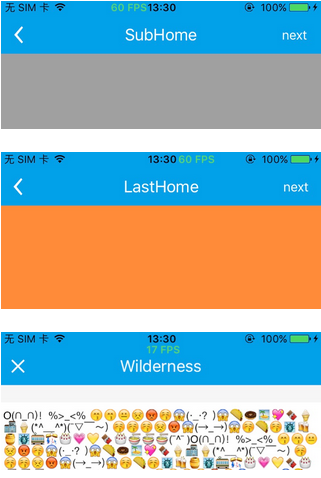
集成方法和使用步驟:
將`FHHFPSIndicator`文件夾中的所有源代碼拽入項目中。
然後在AppDelegate.m文件中添加以下代碼即可
#if defined(DEBUG) || defined(_DEBUG)
#import "FHHFPSIndicator.h"
#endif
- (BOOL)application:(UIApplication *)application didFinishLaunchingWithOptions:(NSDictionary *)launchOptions {
    // Override point for customization after application launch.

    self.window = [[UIWindow alloc] initWithFrame:[UIScreen mainScreen].bounds];
    [self.window makeKeyAndVisible];

    // add the follwing code after the window become keyAndVisible
    #if defined(DEBUG) || defined(_DEBUG)
        [[FHHFPSIndicator sharedFPSIndicator] show];
//        [FHHFPSIndicator sharedFPSIndicator].fpsLabelPosition = FPSIndicatorPositionTopRight;
    #endif

    self.window.rootViewController = [[UINavigationController alloc] initWithRootViewController:[[HomeViewController alloc] init]];

    return YES;
}
注意:必須在:
[self.window makeKeyAndVisible];
之後添加。
詳情請參考GitHub項目地址。


相關文章
+