iOS干貨:快速集成搜索界面下拉菜單框架
編輯:IOS開發基礎
前言
這次推出的控件,比較常用,搜索界面下拉菜單,如果喜歡我的文章,可以關注我微博:吖了個峥,也可以來小碼哥,了解下我們的iOS培訓課程。後續還會更新更多內容,有任何問題,歡迎簡書留言峥吖。。。
Demo效果:
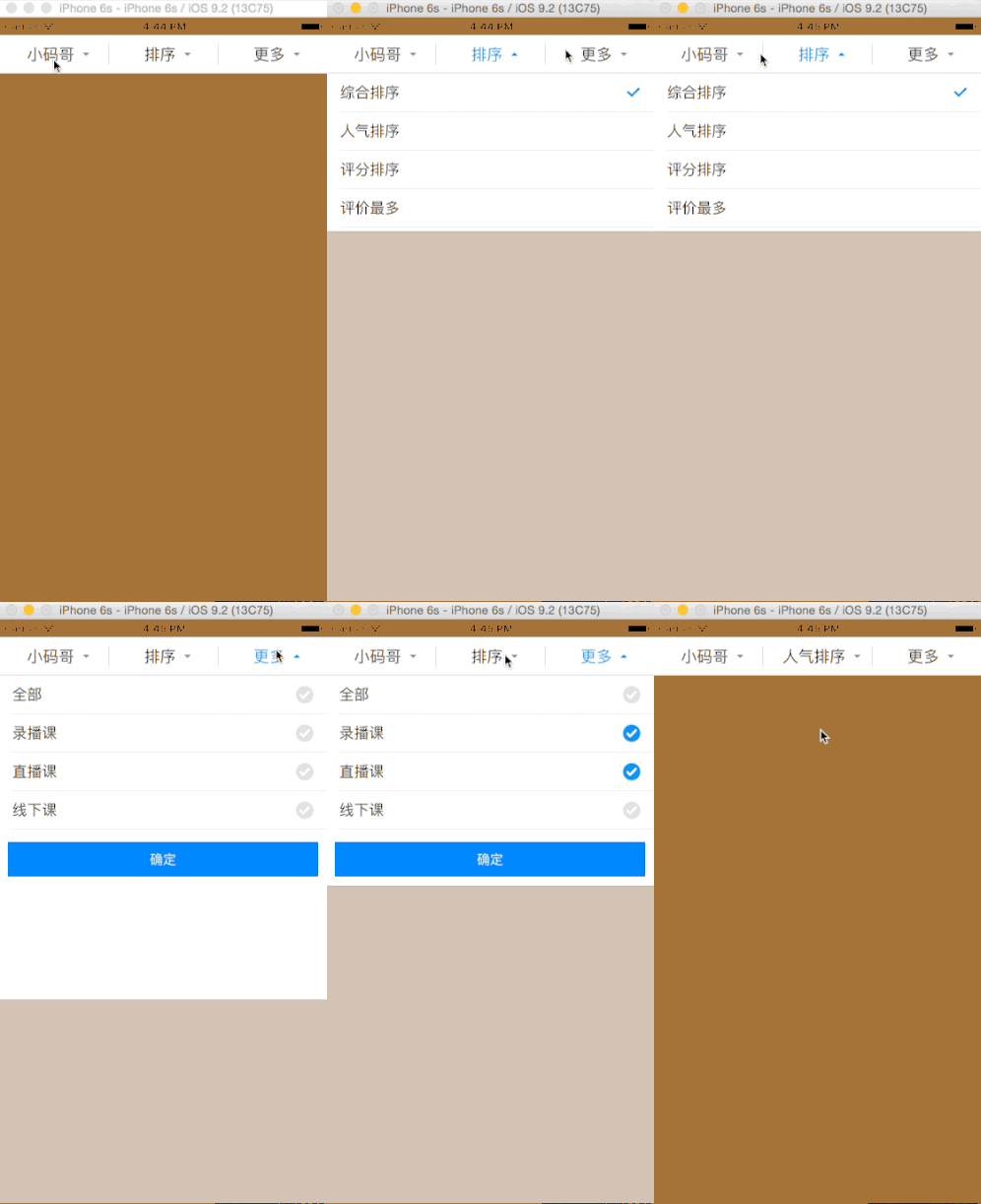
Demo演示:
1.創建下拉菜單
YZPullDownMenu *menu = [[YZPullDownMenu alloc] init];
menu.frame = CGRectMake(0, 20, YZScreenW, 44);
[self.view addSubview:menu];
2.設置下拉菜單代理
menu.dataSource = self;
3.添加所有下拉菜單對應的子控制器
為什麼要這樣設計?,因為每個app對應的下拉菜單不確定,所以交給各個開發者決定,下拉菜單的界面。
- (void)setupAllChildViewController
{
    YZAllCourseViewController *allCourse = [[YZAllCourseViewController alloc] init];
    YZSortViewController *sort = [[YZSortViewController alloc] init];
    YZMoreMenuViewController *moreMenu = [[YZMoreMenuViewController alloc] init];
    // 控制器最好作為自己的子控制器
    [self addChildViewController:allCourse];
    [self addChildViewController:sort];
    [self addChildViewController:moreMenu];
}
4.實現YZPullDownMenu數據源方法
#pragma mark - YZPullDownMenuDataSource
// 返回下拉菜單多少列
- (NSInteger)numberOfColsInMenu:(YZPullDownMenu *)pullDownMenu
{
    return 3;
}

// 返回下拉菜單每列按鈕
- (UIButton *)pullDownMenu:(YZPullDownMenu *)pullDownMenu buttonForColAtIndex:(NSInteger)index
{
    YZMenuButton *button = [YZMenuButton buttonWithType:UIButtonTypeCustom];
    [button setTitle:_titles[index] forState:UIControlStateNormal];
    [button setTitleColor:[UIColor blackColor] forState:UIControlStateNormal];
    [button setTitleColor:[UIColor colorWithRed:25 /255.0 green:143/255.0 blue:238/255.0 alpha:1]
    forState:UIControlStateSelected];
    [button setImage:[UIImage imageNamed:@"標簽-向下箭頭"] forState:UIControlStateNormal];
    [button setImage:[UIImage imageNamed:@"標簽-向上箭頭"] forState:UIControlStateSelected];

    return button;
}

// 返回下拉菜單每列對應的控制器
- (UIViewController *)pullDownMenu:(YZPullDownMenu *)pullDownMenu
viewControllerForColAtIndex:(NSInteger)index
{
    return self.childViewControllers[index];
}

// 返回下拉菜單每列對應的高度
- (CGFloat)pullDownMenu:(YZPullDownMenu *)pullDownMenu heightForColAtIndex:(NSInteger)index
{
    // 第1列 高度
    if (index == 0) {
        return 400;
    }

    // 第2列 高度
    if (index == 1) {
        return 180;
    }

    // 第3列 高度
    return 240;
}
5.【更新菜單標題,需要發送通知給我】
為什麼要這樣設計?解耦,自己的控制器中就不需要導入我的框架的頭文件了,侵入性不大。
【更新菜單標題步驟】
1.把
【extern NSString * const YZUpdateMenuTitleNote;】這行代碼拷貝到自己控制器中,這個在YZPullDownMenu.h中2.在選中標題的方法中,發送以下通知
[[NSNotificationCenter defaultCenter] postNotificationName:YZUpdateMenuTitleNote object:self userInfo:@{@"title":cell.textLabel.text}];3.1 postNotificationName:通知名稱 =>
【YZUpdateMenuTitleNote】3.2 object:誰發送的通知 =>【self】(當前控制器)
3.3 userInfo:選中標題信息 => 可以多個key,多個value,沒有固定的,因為有些界面,需要勾選很多選項,key可以隨意定義。
3.4 底層會自動判定,當前userInfo有多少個value,如果有一個就會直接更新菜單標題,有多個就會更新,滿足大部分需求。
3.5 發出通知,會自動彈回下拉菜單
5.1 可以參考YZSortViewController中代碼
- (void)tableView:(UITableView *)tableView didSelectRowAtIndexPath:(NSIndexPath *)indexPath
{
    _selectedCol = indexPath.row;

    // 選中當前
    YZSortCell *cell = [tableView cellForRowAtIndexPath:indexPath];

    // 更新菜單標題
    [[NSNotificationCenter defaultCenter] postNotificationName:YZUpdateMenuTitleNote
    object:self userInfo:@{@"title":cell.textLabel.text}];
}
點擊這下載源代碼


相關文章
+