UIButton圖文布局
編輯:IOS開發基礎
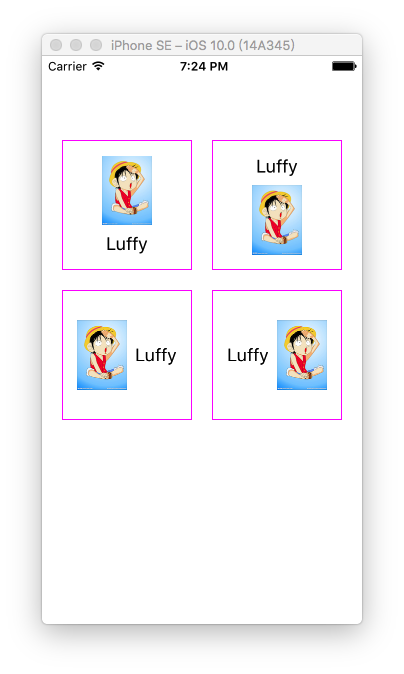
關於實現UIButton的上圖下文、上文下圖、左圖右文、右圖左文的布局需求,我也嘗試過擴展分類使用EdgeInsets來實現,但總是不太靈活不太如意。
於是我選擇了暴力解決辦法:使用UIButton的子類,重寫layoutSubviews。
JXLayoutButton.h
//
//  JXLayoutButton.h
//  JXLayoutButtonDemo
//
//  Created by JiongXing on 16/9/24.
//  Copyright ? 2016年 JiongXing. All rights reserved.
//

#import typedef NS_ENUM(NSUInteger, JXLayoutButtonStyle) {
    JXLayoutButtonStyleLeftImageRightTitle,
    JXLayoutButtonStyleLeftTitleRightImage,
    JXLayoutButtonStyleUpImageDownTitle,
    JXLayoutButtonStyleUpTitleDownImage
};

/// 重寫layoutSubviews的方式實現布局,忽略imageEdgeInsets、titleEdgeInsets和contentEdgeInsets
@interface JXLayoutButton : UIButton

/// 布局方式
@property (nonatomic, assign) JXLayoutButtonStyle layoutStyle;
/// 圖片和文字的間距,默認值8
@property (nonatomic, assign) CGFloat midSpacing;

@end
JXLayoutButton.m
//
//  JXLayoutButton.m
//  JXLayoutButtonDemo
//
//  Created by JiongXing on 16/9/24.
//  Copyright ? 2016年 JiongXing. All rights reserved.
//

#import "JXLayoutButton.h"

@implementation JXLayoutButton

- (instancetype)initWithFrame:(CGRect)frame {
    if (self = [super initWithFrame:frame]) {
        self.midSpacing = 8;
    }
    return self;
}

- (void)layoutSubviews {
    [super layoutSubviews];

    [self.imageView sizeToFit];
    [self.titleLabel sizeToFit];

    switch (self.layoutStyle) {
        case JXLayoutButtonStyleLeftImageRightTitle:
            [self layoutHorizontalWithLeftView:self.imageView rightView:self.titleLabel];
            break;
        case JXLayoutButtonStyleLeftTitleRightImage:
            [self layoutHorizontalWithLeftView:self.titleLabel rightView:self.imageView];
            break;
        case JXLayoutButtonStyleUpImageDownTitle:
            [self layoutVerticalWithUpView:self.imageView downView:self.titleLabel];
            break;
        case JXLayoutButtonStyleUpTitleDownImage:
            [self layoutVerticalWithUpView:self.titleLabel downView:self.imageView];
            break;
        default:
            break;
    }
}

- (void)layoutHorizontalWithLeftView:(UIView *)leftView rightView:(UIView *)rightView {
    CGRect leftViewFrame = leftView.frame;
    CGRect rightViewFrame = rightView.frame;

    CGFloat totalWidth = CGRectGetWidth(leftViewFrame) + self.midSpacing + CGRectGetWidth(rightViewFrame);

    leftViewFrame.origin.x = (CGRectGetWidth(self.frame) - totalWidth) / 2.0;
    leftViewFrame.origin.y = (CGRectGetHeight(self.frame) - CGRectGetHeight(leftViewFrame)) / 2.0;
    leftView.frame = leftViewFrame;

    rightViewFrame.origin.x = CGRectGetMaxX(leftViewFrame) + self.midSpacing;
    rightViewFrame.origin.y = (CGRectGetHeight(self.frame) - CGRectGetHeight(rightViewFrame)) / 2.0;
    rightView.frame = rightViewFrame;
}

- (void)layoutVerticalWithUpView:(UIView *)upView downView:(UIView *)downView {
    CGRect upViewFrame = upView.frame;
    CGRect downViewFrame = downView.frame;

    CGFloat totalHeight = CGRectGetHeight(upViewFrame) + self.midSpacing + CGRectGetHeight(downViewFrame);

    upViewFrame.origin.y = (CGRectGetHeight(self.frame) - totalHeight) / 2.0;
    upViewFrame.origin.x = (CGRectGetWidth(self.frame) - CGRectGetWidth(upViewFrame)) / 2.0;
    upView.frame = upViewFrame;

    downViewFrame.origin.y = CGRectGetMaxY(upViewFrame) + self.midSpacing;
    downViewFrame.origin.x = (CGRectGetWidth(self.frame) - CGRectGetWidth(downViewFrame)) / 2.0;
    downView.frame = downViewFrame;
}

- (void)setImage:(UIImage *)image forState:(UIControlState)state {
    [super setImage:image forState:state];
    [self setNeedsLayout];
}

- (void)setTitle:(NSString *)title forState:(UIControlState)state {
    [super setTitle:title forState:state];
    [self setNeedsLayout];
}

@end
測試
//
//  ViewController.m
//  JXLayoutButtonDemo
//
//  Created by JiongXing on 16/9/24.
//  Copyright ? 2016年 JiongXing. All rights reserved.
//

#import "ViewController.h"
#import "JXLayoutButton.h"

@interface ViewController ()

@end

@implementation ViewController

- (void)viewDidLoad {
    [super viewDidLoad];

    CGFloat margin = 20;
    CGFloat buttonWidth = (CGRectGetWidth(self.view.frame) - 20 * 3) / 2.0;
    CGFloat buttonHeight = buttonWidth;

    [self addButton: [self generateButtonWithStyle:JXLayoutButtonStyleUpImageDownTitle]
           withFrame:CGRectMake(margin, 64 + margin, buttonWidth, buttonHeight)];

    [self addButton: [self generateButtonWithStyle:JXLayoutButtonStyleUpTitleDownImage]
          withFrame:CGRectMake(margin + buttonWidth + margin, 64 + margin, buttonWidth, buttonHeight)];

    [self addButton: [self generateButtonWithStyle:JXLayoutButtonStyleLeftImageRightTitle]
          withFrame:CGRectMake(margin, 64 + margin + buttonHeight + margin, buttonWidth, buttonHeight)];

    [self addButton: [self generateButtonWithStyle:JXLayoutButtonStyleLeftTitleRightImage]
          withFrame:CGRectMake(margin + buttonWidth + margin, 64 + margin + buttonHeight + margin, buttonWidth, buttonHeight)];
}

- (JXLayoutButton *)generateButtonWithStyle:(JXLayoutButtonStyle)style {
    JXLayoutButton *button = [JXLayoutButton buttonWithType:UIButtonTypeCustom];
    [button setImage:[UIImage imageNamed:@"luffy"] forState:UIControlStateNormal];
    [button setTitle:@"Luffy" forState:UIControlStateNormal];
    [button setTitleColor:[UIColor darkTextColor] forState:UIControlStateNormal];
    button.layoutStyle = style;

    button.layer.borderWidth = 1;
    button.layer.borderColor = [UIColor magentaColor].CGColor;
    return button;
}

- (void)addButton:(JXLayoutButton *)button withFrame:(CGRect)frame {
    button.frame = frame;
    [self.view addSubview:button];
}
@end
結果如上圖。
項目源碼:https://github.com/JiongXing


相關文章
+- iOS開源一個簡略的訂餐app UI框架
- iOS 10 應用相機相簿閃退的bug修改辦法
- 在uiview 的tableView中點擊cell進入跳轉到另外一個界面的完成辦法
- iOS開辟之UIScrollView控件詳解
- 進修iOS自界說導航掌握器UINavigationController
- IOS中UITableView轉動到指定地位
- iOS為UIView設置暗影後果
- iOS設置UIButton文字顯示地位和字體年夜小、色彩的辦法
- iOS開辟之UIPickerView完成城市選擇器的步調詳解
- iOS長按UIlabel完成可復制功效
- iOS開辟中UIWebView的加載當地數據的三種方法
- iOS中修正UITextField占位符字體色彩的辦法總結
- IOS 仿時間網選票UI實例代碼
- iOS推送之當地告訴UILocalNotification
- 應用UITextField限制只可輸出中,英文,數字的辦法