iOS日志獲取和實時浏覽器顯示日志

投稿文章,作者:yohunl(微博)
平時我們寫代碼的時候,為了調試方便,總是會在代碼中寫入很多的NSLog(也可能是其它的日志框架等,例如大名鼎鼎的CocoaLumberjack),但是我們對於NSLog到底了解多少?NSLog的信息為什麼Xcode能夠獲取的到?我們能自己寫個程序獲取所有的NSlog麼?NSLog寫入的信息到底在哪裡?
NSLog輸出到哪?
我們都知道,NSLog是一個C函數,它的函數聲明是
void NSLog(NSString *format, ...)
系統對其說明是:Logs an error message to the Apple System Log facility.,它是用來輸出信息到標准的Error控制台上去.其內部其實是使用Apple System Log(ASL:蘋果自己實現的輸出日志的一套接口)的API.在iOS真機設備上,使用ASL記錄的log被緩存在一個文件中,直到設備被重啟。
這裡提到的ASL,都是放在ash.h這個頭文件中,這套api可以獲取指定的日志數據,具體可以參考ASL參考。
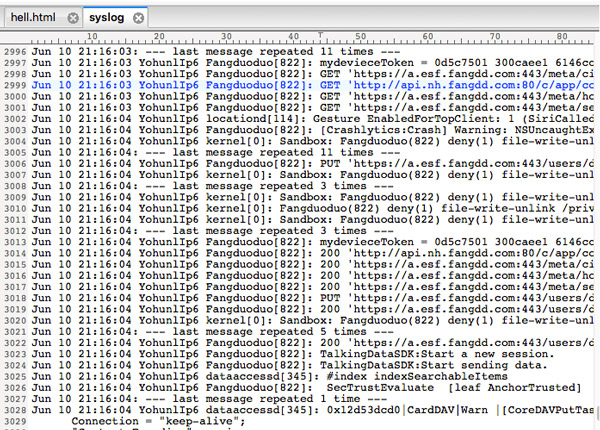
從上面可以直到,NSLog默認被系統輸出到了一個文件中,這個文件是哪個呢?NSLog默認的輸出到了系統的 /var/log/syslog這個文件中,當然了,如果你的機器沒有越獄,你是查看不了這個文件的.我手機是越獄的,於是乎驗證了下,使用iTools等工具將真機的/var/log/syslog文件導出,下面就是這個文件的部分內容的截取 log.png 從中,我們可以看到,所有的APP的NSLog全部都是寫到這個文件中的!!!
標准的err控制台
我們現在了解到了NSLog就是輸出到文件syslog中,既然要往文件中寫,那麼肯定就有文件的句柄了,這個文件的句柄是多少呢? 在C語言中,我們有三個默認的句柄
#define stdin __stdinp
#define stdout __stdoutp
#define stderr __stderrp
其對應的iOS系統層面的上述三個句柄其實也就是下面的三個
#define STDIN_FILENO 0 /* standard input file descriptor */
#define STDOUT_FILENO 1 /* standard output file descriptor */
#define STDERR_FILENO 2 /* standard error file descriptor */
我們的NSLog輸出的是到 STDERR_FILENO 上,我們可以使用c語言的輸出到文件的fprintf來驗證一下
NSLog(@"ViewController viewDidLoad");
fprintf (stderr, "%s\n", "ViewController viewDidLoad222");
在Xcode的控制台可以看到輸出
2016-06-15 12:57:17.286 TestNSlog[68073:1441419] ViewController viewDidLoad
ViewController viewDidLoad222
由於fprintf並不會像NSLog那樣,在內部調用ASL接口,所以只是單純的輸出信息,並沒有添加日期,進程名,進程id等,也不會自動換行。
NSLog的重定向
既然NSLog是寫到STDERR_FILENO中去的,那麼根據Unix的知識,我們可以重定向這個文件,讓NSLog直接寫到文件中去
//to log to document directory
NSArray *paths = NSSearchPathForDirectoriesInDomains(NSDocumentDirectory, NSUserDomainMask, YES);
NSString *documentsPath = [paths objectAtIndex:0];
NSString *loggingPath = [documentsPath stringByAppendingPathComponent:@"/mylog.log"];
//redirect NSLog
freopen([loggingPath cStringUsingEncoding:NSASCIIStringEncoding], "a+", stderr);
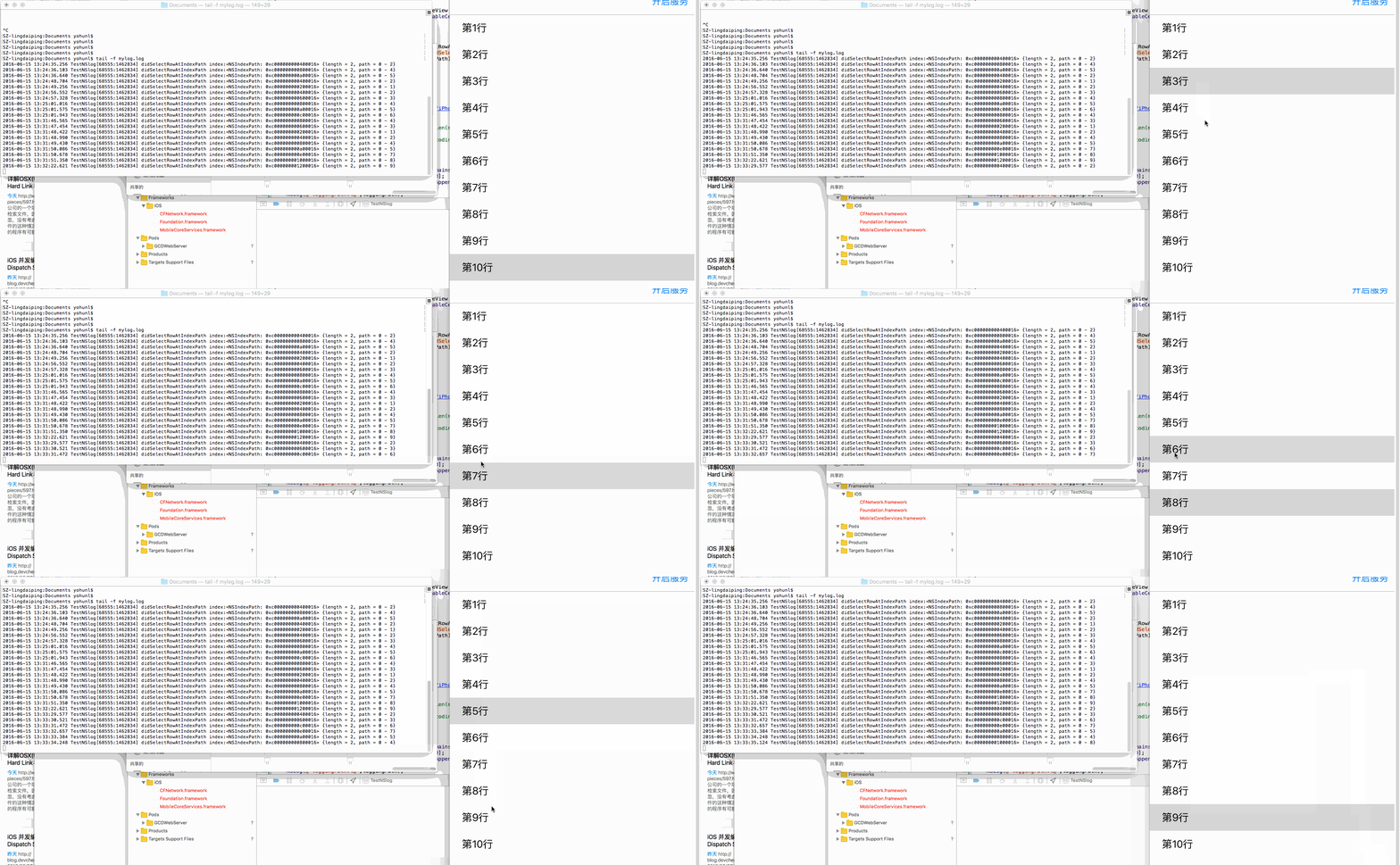
利用c語言的freopen函數,進行重定向,將寫往stderr的內容重定向到我們制定的文件中去,一旦執行了上述代碼,那麼在這個之後的NSLog將不會在控制台顯示了,會直接輸出在文件mylog.log中! 在模擬器中,我們可以使用終端的tail命令(tail -f mylog.log)對這個文件進行實時查看,就如同我們在xcode的輸出窗口中看到的那樣,你還可以結合grep命令進行實時過濾查看,非常方便在大量的日志信息中迅速定位到我們要的日志信息
在真機中,這種重定向有什麼用處呢? 由於重定向到的文件是我們沙盒中的文件,那麼就可以在我們的程序中寫一段代碼將這個文件發送給我們,遠程的用戶app出了問題,把日志發送給我們,我們就可以根據日志信息,找尋可能的問題所在!
也可以開啟app的文件夾itunse共享。
配置共享文件夾:
在應用程序的Info.plist文件中添加UIFileSharingEnabled鍵,並將鍵值設置為YES。將您希望共享的文件放在應用程序的Documents目錄。一旦設備插入到用戶計算機,iTunes 9.1就會在選中設備的Apps標簽中顯示一個File Sharing區域。此後,用戶就可以向該目錄添加文件或者將文件移動到桌面計算機中
就是說,一旦設備連接上電腦,可以通過iTune查看指定應用程序的共享文件夾,將文件拷貝到你的電腦上看
一般我們都會在應用中放置一個開關,開啟或者關閉Log日志的重定向,在上面,我們使用標准C的freopen將stderr重定向到我們的文件中了,那麼問題來了,怎麼重定向回去呢???
FILE * freopen ( const char * filename, const char * mode, FILE * stream );
要想重定向回去,那麼我們需要知道stderr原來的文件路徑,很遺憾,這個在不同平台中是不一樣的,在iOS平台,由於沙盒機制,我們也並不能直接使用沙盒外的文件 對此,freopen將無能為力,要重定向回去,只能使用Unix的方法dup和dup2!
//在ios上可用的方式,還是得借助dup和dup2
int originH1 = dup(STDERR_FILENO);
FILE * myFile = freopen([loggingPath cStringUsingEncoding:NSASCIIStringEncoding], "a+", stderr);//這句話已經重定向了,現在NSLog都輸出到文件中去了,
//……………….
//恢復原來的
dup2(originH1, STDERR_FILENO);//就可以了
其它重定向STDERR_FILENO的方式集錦
方式一 采用dup2的重定向方式
(選自:http://lizaochengwen.iteye.com/blog/1476080)
- (void)redirectSTD:(int )fd{
    NSPipe * pipe = [NSPipe pipe] ;
    NSFileHandle *pipeReadHandle = [pipe fileHandleForReading] ;
    int pipeFileHandle = [[pipe fileHandleForWriting] fileDescriptor];
    dup2(pipeFileHandle, fd) ;
    [[NSNotificationCenter defaultCenter] addObserver:self
     selector:@selector(redirectNotificationHandle:)
     name:NSFileHandleReadCompletionNotification
     object:pipeReadHandle] ;
    [pipeReadHandle readInBackgroundAndNotify];
}
- (void)redirectNotificationHandle:(NSNotification *)nf{
    NSData *data = [[nf userInfo] objectForKey:NSFileHandleNotificationDataItem];
    NSString *str = [[NSString alloc] initWithData:data encoding:NSUTF8StringEncoding] ;
    //這裡可以做我們需要的操作,例如將nslog顯示到一個textview中,或者是存放到另一個文件中等等
    //self.logTextView.text = [NSString stringWithFormat:@"%@\n%@",self.logTextView.text, str];
    NSRange range;
    //range.location = [self.logTextView.text length] - 1;
    range.length = 0;
    //[self.logTextView scrollRangeToVisible:range];
    [[nf object] readInBackgroundAndNotify];
}
使用的時候
[self redirectSTD:STDERR_FILENO];
就可以將NSLOg的輸出重定向到我們的通知中去!!!
方式二 使用GCD的dispatch Source
- (dispatch_source_t)_startCapturingWritingToFD:(int)fd  {
    int fildes[2];
    pipe(fildes);  // [0] is read end of pipe while [1] is write end
    dup2(fildes[1], fd);  // Duplicate write end of pipe "onto" fd (this closes fd)
    close(fildes[1]);  // Close original write end of pipe
    fd = fildes[0];  // We can now monitor the read end of the pipe
    char* buffer = malloc(1024);
    NSMutableData* data = [[NSMutableData alloc] init];
    fcntl(fd, F_SETFL, O_NONBLOCK);
    dispatch_source_t source = dispatch_source_create(DISPATCH_SOURCE_TYPE_READ, fd, 0, dispatch_get_global_queue(DISPATCH_QUEUE_PRIORITY_HIGH, 0));
    dispatch_source_set_cancel_handler(source, ^{
        free(buffer);
    });
    dispatch_source_set_event_handler(source, ^{
        @autoreleasepool {
            while (1) {
                ssize_t size = read(fd, buffer, 1024);
                if (size <= 0) {
                    break;
                }
                [data appendBytes:buffer length:size];
                if (size < 1024) {
                    break;
                }
            }
            NSString *aString = [[NSString alloc] initWithData:data encoding:NSUTF8StringEncoding];
            //printf("aString = %s",[aString UTF8String]);
            //NSLog(@"aString = %@",aString);
            //讀到了日志,可以進行我們需要的各種操作了
        }
    });
    dispatch_resume(source);
    return source;
}
使用的時候
_sourt_t = [self _startCapturingWritingToFD:STDERR_FILENO];
記得,要自己保留返回的dispatchsourcet對象,不然其釋放了,你就獲取不到了!
ASL讀取日志
以上的方式,都是重定向文件,一旦重定向後,那麼NSLog就不會再寫到系統的syslog中去了,也就意味著不能使用ASL接口獲取到重定向後的數據了。
不重定向NSLog,怎麼讀取所有的log呢?
ASL讀取log的核心代碼
+ (NSMutableArray*)allLogMessagesForCurrentProcess
{
    asl_object_t query = asl_new(ASL_TYPE_QUERY);
    // Filter for messages from the current process. Note that this appears to happen by default on device, but is required in the simulator.
    NSString *pidString = [NSString stringWithFormat:@"%d", [[NSProcessInfo processInfo] processIdentifier]];
    asl_set_query(query, ASL_KEY_PID, [pidString UTF8String], ASL_QUERY_OP_EQUAL);
    aslresponse response = asl_search(NULL, query);
    aslmsg aslMessage = NULL;
    NSMutableArray *logMessages = [NSMutableArray array];
    while ((aslMessage = asl_next(response))) {
        [logMessages addObject:[SystemLogMessage logMessageFromASLMessage:aslMessage]];
    }
    asl_release(response);
    return logMessages;
}
//這個是怎麼從日志的對象aslmsg中獲取我們需要的數據
+(instancetype)logMessageFromASLMessage:(aslmsg)aslMessage
{
    SystemLogMessage *logMessage = [[SystemLogMessage alloc] init];
    const char *timestamp = asl_get(aslMessage, ASL_KEY_TIME);
    if (timestamp) {
        NSTimeInterval timeInterval = [@(timestamp) integerValue];
        const char *nanoseconds = asl_get(aslMessage, ASL_KEY_TIME_NSEC);
        if (nanoseconds) {
            timeInterval += [@(nanoseconds) doubleValue] / NSEC_PER_SEC;
        }
        logMessage.timeInterval = timeInterval;
        logMessage.date = [NSDate dateWithTimeIntervalSince1970:timeInterval];
    }
    const char *sender = asl_get(aslMessage, ASL_KEY_SENDER);
    if (sender) {
        logMessage.sender = @(sender);
    }
    const char *messageText = asl_get(aslMessage, ASL_KEY_MSG);
    if (messageText) {
        logMessage.messageText = @(messageText);//NSLog寫入的文本內容
    }
    const char *messageID = asl_get(aslMessage, ASL_KEY_MSG_ID);
    if (messageID) {
        logMessage.messageID = [@(messageID) longLongValue];
    }
    return logMessage;
}
ASL的好處是沒有重定向文件,所以不會影響Xcode等控制台的輸出,它是一種非侵入式的讀取的方式,類似於我們讀取數據庫的文件,我們只是讀取數據,並沒有將原來的數據庫文件刪除。
在app中內置一個小型的http web服務器
上面的方式,當測試,或者平時我們沒有連接XCode時,想查看日志信息,還是不太方便,試想,如果我們在需要的時候,可以直接用浏覽器查看輸出的log信息那該多好?
結合上面的ASL和一個小型的web服務器,我們就可以實現了,
對於httpserver github上比較知名的有
CocoaHTTPServer,這個已經三年沒更新了,不推薦使用 GCDWebServer 作者一直在維護,據說性能也不錯,推薦使用這個,下面的demo也使用的這個
摘錄其中的部分代碼如下:
#define kMinRefreshDelay 500  // In milliseconds
@interface HttpServerLogger ()
@property (nonatomic,strong) GCDWebServer* webServer;
@end
@implementation HttpServerLogger
+ (instancetype)shared {
    static dispatch_once_t onceToken;
    static HttpServerLogger *shared;
    dispatch_once(&onceToken, ^{
        shared = [HttpServerLogger new];
    });
    return shared;
}
- (GCDWebServer *)webServer {
    if (!_webServer) {
        _webServer = [[GCDWebServer alloc] init];
        __weak __typeof__(self) weakSelf = self;
        // Add a handler to respond to GET requests on any URL
        [_webServer addDefaultHandlerForMethod:@"GET"
          requestClass:[GCDWebServerRequest class]
          processBlock:^GCDWebServerResponse *(GCDWebServerRequest* request) {
                  return [weakSelf createResponseBody:request];
          }];
        NSLog(@"Visit %@ in your web browser", _webServer.serverURL);
    }
    return _webServer;
}
- (void)startServer{
     // Use convenience method that runs server on port 8080
    // until SIGINT (Ctrl-C in Terminal) or SIGTERM is received
    [self.webServer startWithPort:8080 bonjourName:nil];
}
- (void)stopServer {
    [_webServer stop];
    _webServer = nil;
}
//當浏覽器請求的時候,返回一個由日志信息組裝成的html返回給浏覽器
- (GCDWebServerDataResponse *)createResponseBody :(GCDWebServerRequest* )request{
    GCDWebServerDataResponse *response = nil;
    NSString* path = request.path;
    NSDictionary* query = request.query;
    //NSLog(@"path = %@,query = %@",path,query);
    NSMutableString* string;
    if ([path isEqualToString:@"/"]) {
        string = [[NSMutableString alloc] init];
        [string appendString:@""];
        [string appendString:@""];
        [string appendFormat:@"%s[%i]", getprogname(), getpid()];
        [string appendString:@""];
        [string appendFormat:@"", kMinRefreshDelay];
        [string appendString:@""];
        [string appendString:@""];
        [string appendString:@"
"];
        [self _appendLogRecordsToString:string afterAbsoluteTime:0.0];
        [string appendString:@""];
        [string appendString:@"
"];
        [string appendString:@""];
        [string appendString:@""];
    }
    else if ([path isEqualToString:@"/log"] && query[@"after"]) {
        string = [[NSMutableString alloc] init];
        double time = [query[@"after"] doubleValue];
        [self _appendLogRecordsToString:string afterAbsoluteTime:time];
    }
    else {
       string = [@"
無數據
" mutableCopy];
    }
    if (string == nil) {
        string = [@"" mutableCopy];
    }
    response = [GCDWebServerDataResponse responseWithHTML:string];
    return response;
}
- (void)_appendLogRecordsToString:(NSMutableString*)string afterAbsoluteTime:(double)time {
    __block double maxTime = time;
    NSArray *allMsg = [SystemLogManager allLogAfterTime:time];
    [allMsg enumerateObjectsUsingBlock:^(SystemLogMessage * _Nonnull obj, NSUInteger idx, BOOL * _Nonnull stop) {
        const char* style = "color: dimgray;";
        NSString* formattedMessage = [self displayedTextForLogMessage:obj];
        [string appendFormat:@"
%@", style, formattedMessage];
        if (obj.timeInterval > maxTime) {
            maxTime = obj.timeInterval ;
        }
    }];
    [string appendFormat:@"
", maxTime];
}
- (NSString *)displayedTextForLogMessage:(SystemLogMessage *)msg{
    NSMutableString *string = [[NSMutableString alloc] init];
    [string appendFormat:@"
",[SystemLogMessage logTimeStringFromDate:msg.date ],msg.sender, msg.messageText];
%@    %@    %@
    return string;
}
@end
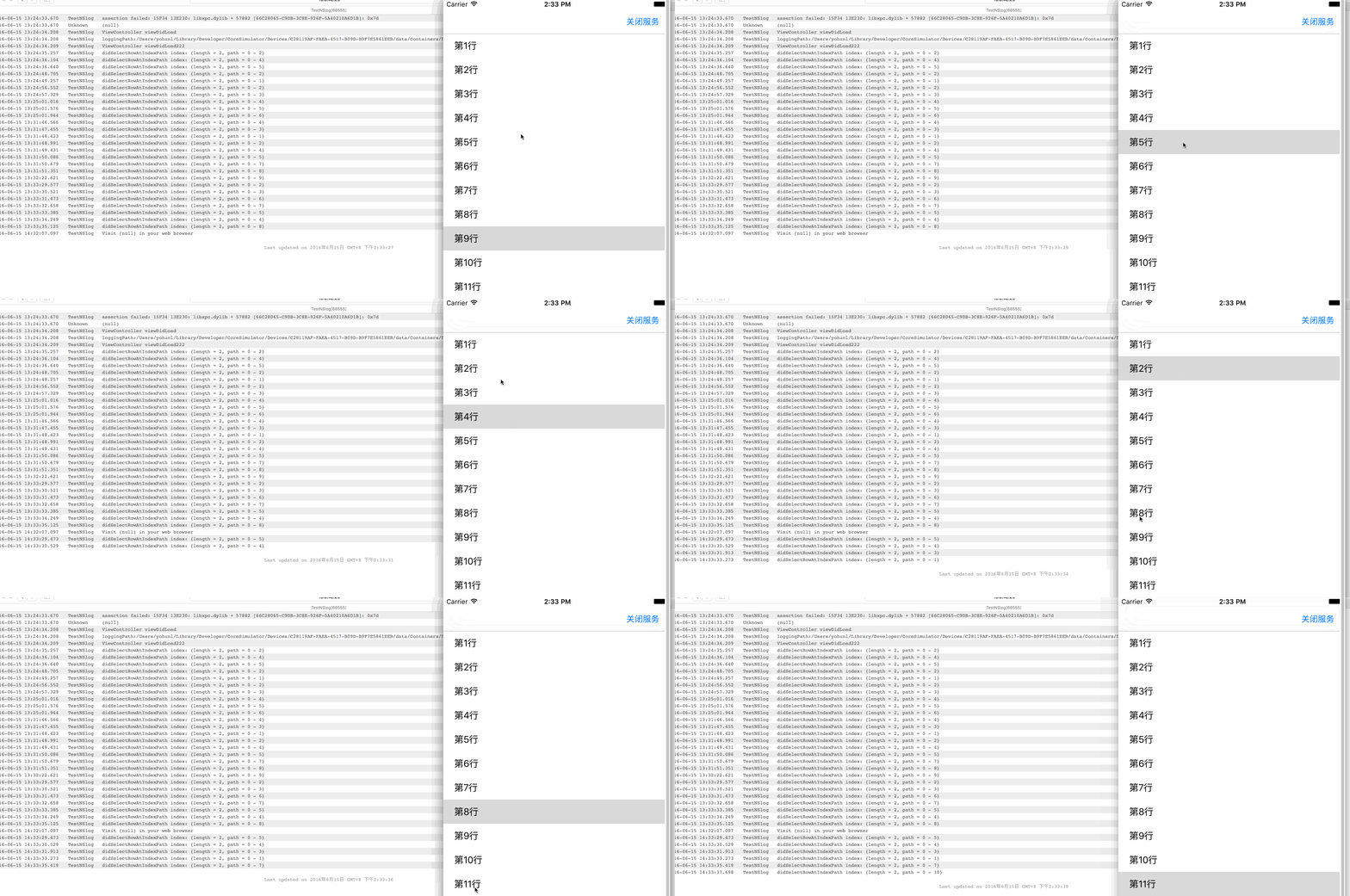
使用的時候,開啟webserver服務,在同一個局域網下, 使用 http://機子的ip:8080來請求 演示2.gif
上述演示代碼下載 TestLog。
幾個優秀的第三方日志框架
CocoaLumberjack
另一個日志替代品XLFacility,其中實現了本地存儲,重定向,web服務等,是本demo的重要參考代碼
CCLogSystem
ASL的swift版本的封裝CleanroomASLswift
輕量級的iOS和mac上的http serverCocoaHTTPServer
輕量級的iOS和mac上的http serverGCDWebServer
參考
官方的ASL說明
freopen實現
read-log-messages-posted-to-the-device-console
readout-at-runtime-in-an-application
how-to-nslog-into-a-file
- 上一頁:盤點:Xcode 8新特性
- 下一頁:UIWebView保存圖片