
iOS 自訂 AlertView 提示框:可換色的彈窗實作
編輯:iOS 程式設計技術
先上圖:彈框背景色、按鈕背景色、提示文字顏色都能自由調整
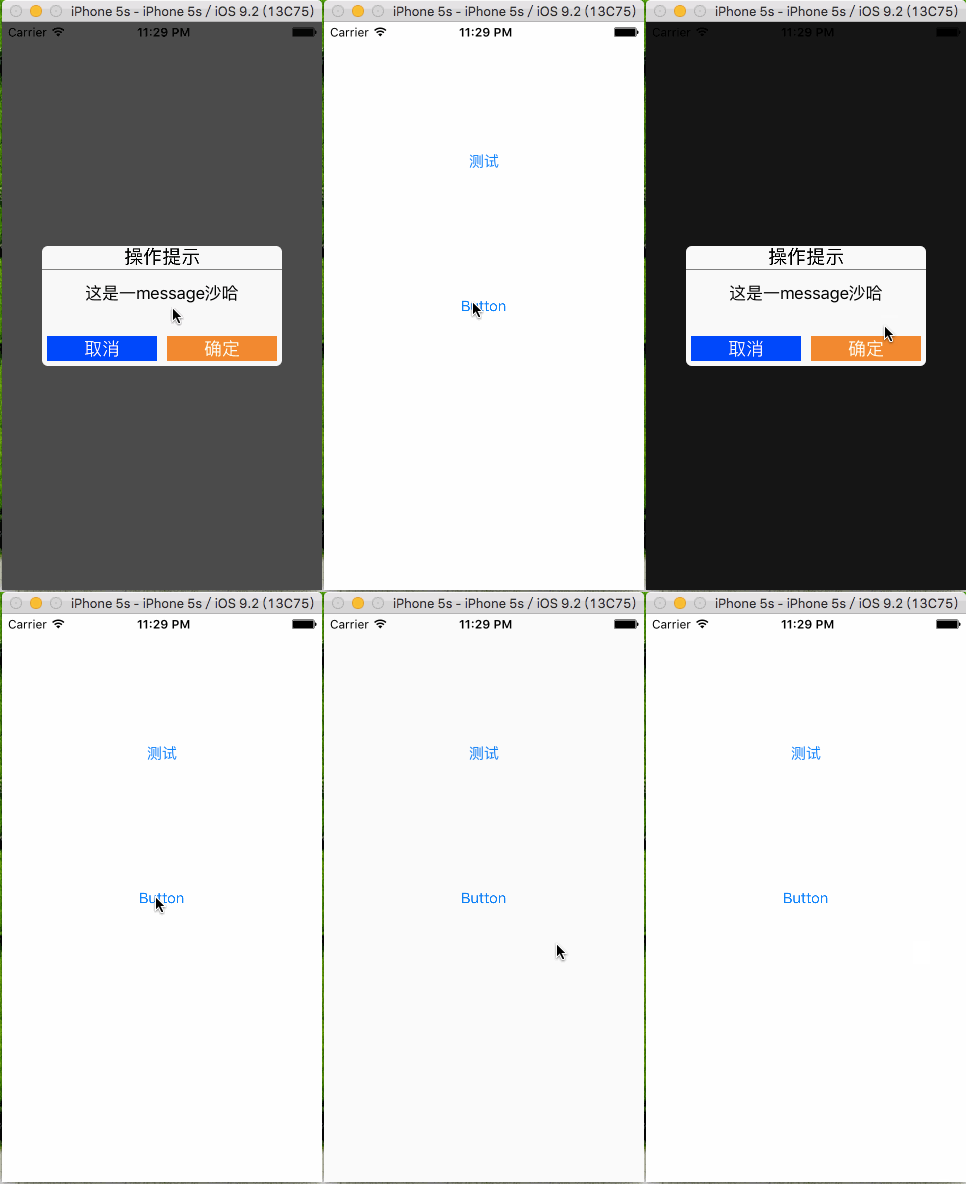
- 透過單例實作豐富的自訂介面
//
//  PBAlertController.h
//  PBAlertDemo
//
#import <UIKit/UIKit.h>

typedef void(^PBBlock)();

@interface PBAlertController : UIViewController
/** 設置 alertView 背景色 */
@property (nonatomic, copy) UIColor *alertBackgroundColor;
/** 設置確定按鈕背景色 */
@property (nonatomic, copy) UIColor *btnConfirmBackgroundColor;
/** 設置取消按鈕背景色 */
@property (nonatomic, copy) UIColor *btnCancelBackgroundColor;
/** 設置 message 字體顏色 */
@property (nonatomic, copy) UIColor *messageColor;
/** 建立單例 */
+(instancetype)shareAlertController;
/** 彈出 alertView 以及點擊確定的回呼 block */
-(void)alertViewControllerWithMessage:(NSString *)message andBlock:(PBBlock)block;
@end- .m 檔中初始化控制項,並對 alertView 的屬性做懶載入,設定初始顏色。
//
//  PBAlertController.m
//  PBAlertDemo
//
#import "PBAlertController.h"

/** 螢幕尺寸 */
#define kMainScreenBounds [UIScreen mainScreen].bounds

@interface PBAlertController ()
/** 蒙版 */
@property (nonatomic, strong) UIView *coverView;
/** 彈框 */
@property (nonatomic, strong) UIView *alertView;
/** 點擊確定回呼的 block */
@property (nonatomic, copy) PBBlock block;
@end

@implementation PBAlertController

- (void)viewDidLoad {
    [super viewDidLoad];
    self.view.backgroundColor = [UIColor whiteColor];
}

-(void)alertViewControllerWithMessage:(NSString *)message andBlock:(PBBlock)block {
    self.block = block;
    // 建立蒙版
    UIView *coverView = [[UIView alloc] initWithFrame:kMainScreenBounds];
    self.coverView = coverView;
    [self.view addSubview:coverView];
    coverView.backgroundColor = [UIColor blackColor];
    coverView.alpha = 0.7;

    // 建立提示框 view
    UIView *alertView = [[UIView alloc] init];
    alertView.backgroundColor = self.alertBackgroundColor;
    alertView.layer.cornerRadius = 6.0; // 設置圓角半徑
    self.alertView = alertView;
    [self.view addSubview:alertView];
    alertView.center = coverView.center;
    alertView.bounds = CGRectMake(0, 0, kMainScreenBounds.size.width * 0.75, kMainScreenBounds.size.width * 0.75 * 1.5 / 3);

    // 建立操作提示 label
    UILabel *label = [[UILabel alloc] init];
    [alertView addSubview:label];
    label.text = @"操作提示";
    label.font = [UIFont systemFontOfSize:19];
    label.textAlignment = NSTextAlignmentCenter;
    CGFloat lblWidth = alertView.bounds.size.width;
    CGFloat lblHigth = 22;
    label.frame = CGRectMake(0, 0, lblWidth, lblHigth);

    // 建立中間灰色分割線
    UIView *separateLine = [[UIView alloc] init];
    separateLine.backgroundColor = [UIColor grayColor];
    [alertView addSubview:separateLine];
    separateLine.frame = CGRectMake(0, lblHigth + 1, alertView.bounds.size.width, 1);

    // 建立 message label
    UILabel *lblMessage = [[UILabel alloc] init];
    lblMessage.textColor = self.messageColor;
    [alertView addSubview:lblMessage];
    lblMessage.text = message;
    lblMessage.textAlignment = NSTextAlignmentCenter;
    lblMessage.numberOfLines = 2; // 最多顯示兩行
    CGFloat margin = 5;
    CGFloat msgX = margin;
    CGFloat msgY = lblHigth + 3;
    CGFloat msgW = alertView.bounds.size.width - 2 * margin;
    CGFloat msgH = 44;
    lblMessage.frame = CGRectMake(msgX, msgY, msgW, msgH);

    // 建立取消按鈕
    CGFloat buttonWidth = (alertView.bounds.size.width - 4 * margin) * 0.5;
    CGFloat buttonHigth = 25;
    UIButton *btnCancel = [[UIButton alloc] init];
    [alertView addSubview:btnCancel];
    [btnCancel setTitleColor:[UIColor whiteColor] forState:UIControlStateNormal];
    [btnCancel setTitle:@"取消" forState:UIControlStateNormal];
    [btnCancel setBackgroundColor:self.btnCancelBackgroundColor];
    btnCancel.frame = CGRectMake(margin, alertView.bounds.size.height - margin - buttonHigth, buttonWidth, buttonHigth);
    btnCancel.tag = 0;
    [btnCancel addTarget:self action:@selector(didClickBtnConfirm:) forControlEvents:UIControlEventTouchUpInside];

    // 建立確定按鈕
    UIButton *btnConfirm = [[UIButton alloc] init];
    btnConfirm.tag = 1;
    [alertView addSubview:btnConfirm];
    [btnConfirm setTitleColor:[UIColor whiteColor] forState:UIControlStateNormal];
    [btnConfirm setTitle:@"確定" forState:UIControlStateNormal];
    [btnConfirm setBackgroundColor:self.btnConfirmBackgroundColor];
    btnConfirm.frame = CGRectMake(alertView.bounds.size.width - margin - buttonWidth, alertView.bounds.size.height - margin - buttonHigth, buttonWidth, buttonHigth);
    [btnConfirm addTarget:self action:@selector(didClickBtnConfirm:) forControlEvents:UIControlEventTouchUpInside];
}

/** 點擊確定或取消觸發事件 */
-(void)didClickBtnConfirm:(UIButton *)sender {
    if (sender.tag == 0) {
        [self dismissViewControllerAnimated:YES completion:nil];
        return;
    }
    self.block();
    [self dismissViewControllerAnimated:YES completion:nil];
}

static PBAlertController *instance = nil;
+(instancetype)shareAlertController {
    static dispatch_once_t onceToken;
    dispatch_once(&onceToken, ^{
        instance = [[PBAlertController alloc] init];
    });
    return instance;
}

-(UIColor *)alertBackgroundColor {
    if (_alertBackgroundColor == nil) {
        _alertBackgroundColor = [UIColor colorWithRed:249/255.0 green:249/255.0 blue:249/255.0 alpha:1];
    }
    return _alertBackgroundColor;
}

/** 確定按鈕背景色 */
-(UIColor *)btnConfirmBackgroundColor {
    if (_btnConfirmBackgroundColor == nil) {
        _btnConfirmBackgroundColor = [UIColor orangeColor];
    }
    return _btnConfirmBackgroundColor;
}

/** 取消按鈕背景色 */
-(UIColor *)btnCancelBackgroundColor {
    if (_btnCancelBackgroundColor == nil) {
        _btnCancelBackgroundColor = [UIColor blueColor];
    }
    return _btnCancelBackgroundColor;
}

/** message 字體顏色 */
-(UIColor *)messageColor {
    if (_messageColor == nil) {
        _messageColor = [UIColor blackColor];
    }
    return _messageColor;
}
@end- 在需要呼叫的地方使用即可
//
//  ViewController.m
//  PBAlertDemo
//
#import "ViewController.h"
#import "PBAlertController.h"

@interface ViewController ()
@end

@implementation ViewController

// 點擊按鈕彈出提示框
- (IBAction)clickShowAlertBtn:(id)sender {
    PBAlertController *alertVc = [PBAlertController shareAlertController];
    alertVc.messageColor = [UIColor redColor];
    [alertVc alertViewControllerWithMessage:@"這是一段 message" andBlock:^{
        NSLog(@"點擊確定後執行的方法");
    }];
    alertVc.modalTransitionStyle = UIModalTransitionStyleCrossDissolve;
    [self presentViewController:alertVc animated:YES completion:nil];
}
@end- 原始碼 demo 下載地址與使用方法:
https://git.oschina.net/alexpei/AlertViewController.git
- 上一篇文章: iOS 影片轉碼:將 mov 轉換為 MP4
- 下一篇文章: iOS 每日一發:用 30 行程式碼做出側邊抽屜效果