
在 iOS 中實作簡單的 HTTP 服務
編輯:iOS 技巧大全
HTTP 是電腦之間通訊協定中較簡單的一種。由於 iPhone 缺乏原生的數據同步與文件共享機制,實作 PC 與裝置間數據傳輸的最佳方式,就是在程式中內嵌一個 HTTP 伺服器。本文將簡單示範第三方 HTTP 伺服器的使用。
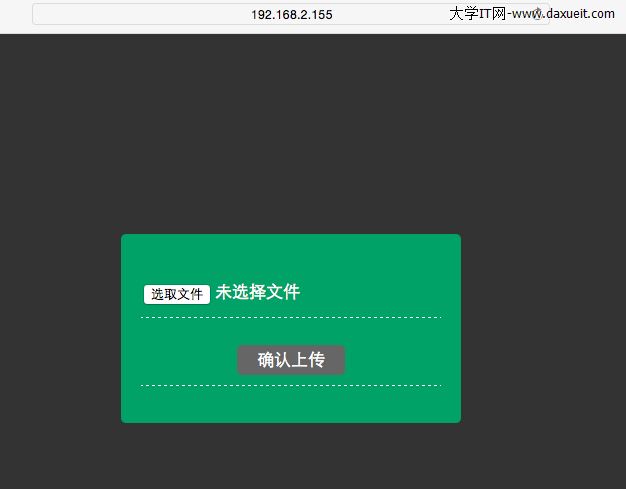
範例程式運行如下(在 PC 端輸入裝置的 IP 與連接埠,即可選取當前 PC 的文件上傳至裝置):
該伺服器涉及的相關類別如下:
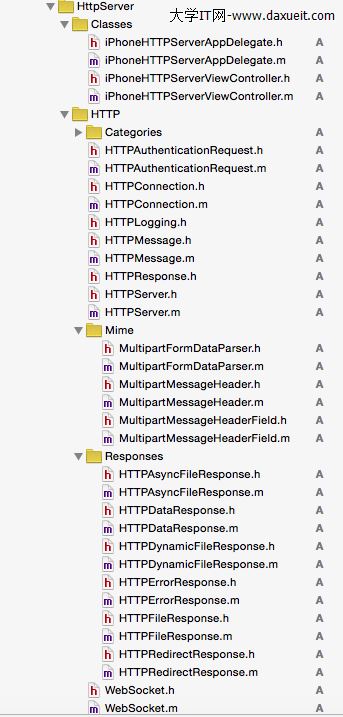
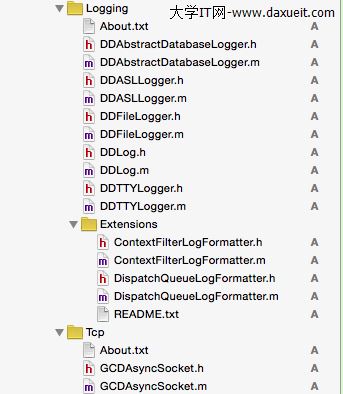
程式碼實作方面,建立一個符合自身需求的 MyHTTPConnection 類別,繼承自第三方的 HTTPConnection:
MyHTTPConnection.h:
#import "HTTPConnection.h"

@class MultipartFormDataParser;

@interface MyHTTPConnection : HTTPConnection
{
    MultipartFormDataParser *parser;
    NSFileHandle *storeFile;
    NSMutableArray *uploadedFiles;
}
@end
MyHTTPConnection.m(重點方法):
// 1. 指定可處理的方法與路徑
- (BOOL)supportsMethod:(NSString *)method atPath:(NSString *)path {
    if ([method isEqualToString:@"POST"] && [path isEqualToString:@"/upload.html"]) {
        return YES;
    }
    return [super supportsMethod:method atPath:path];
}

// 2. 驗證請求主體,確保 header 中設定了 boundary
- (BOOL)expectsRequestBodyFromMethod:(NSString *)method atPath:(NSString *)path {
    if ([method isEqualToString:@"POST"] && [path isEqualToString:@"/upload.html"]) {
        NSString *contentType = [request headerField:@"Content-Type"];
        // 解析 multipart/form-data 並取出 boundary
        // ...(此處依需求解析 content-type)
    }
    return [super expectsRequestBodyFromMethod:method atPath:path];
}

// 3. 產生回應
- (NSObject<HTTPResponse> *)httpResponseForMethod:(NSString *)method URI:(NSString *)path {
    if ([method isEqualToString:@"POST"] && [path isEqualToString:@"/upload.html"]) {
        NSMutableString *filesStr = [[NSMutableString alloc] init];
        for (NSString *filePath in uploadedFiles) {
            [filesStr appendFormat:@"%@<br/><br/>", [filePath lastPathComponent]];
        }
        NSString *templatePath = [[config documentRoot] stringByAppendingPathComponent:@"upload.html"];
        NSDictionary *replacementDict = [NSDictionary dictionaryWithObject:filesStr forKey:@"MyFiles"];
        return [[HTTPDynamicFileResponse alloc] initWithFilePath:templatePath forConnection:self separator:@"%" replacementDictionary:replacementDict];
    }
    if ([method isEqualToString:@"GET"] && [path hasPrefix:@"/upload/"]) {
        return [[HTTPFileResponse alloc] initWithFilePath:[[config documentRoot] stringByAppendingString:path] forConnection:self];
    }
    return [super httpResponseForMethod:method URI:path];
}

// 4. 準備接收主體,設定 MIME 解析器
- (void)prepareForBodyWithSize:(UInt64)contentLength {
    NSString *boundary = [request headerField:@"boundary"];
    parser = [[MultipartFormDataParser alloc] initWithBoundary:boundary formEncoding:NSUTF8StringEncoding];
    parser.delegate = self;
    uploadedFiles = [[NSMutableArray alloc] init];
}

// 5. 處理資料片段,更新上傳進度
- (void)processBodyData:(NSData *)postDataChunk {
    [parser appendData:postDataChunk];
}

// 6. 處理每個部分的開頭,建立檔案
- (void)processStartOfPartWithHeader:(MultipartMessageHeader *)header {
    MultipartMessageHeaderField *disposition = [header.fields objectForKey:@"Content-Disposition"];
    NSString *filename = [[disposition.params objectForKey:@"filename"] lastPathComponent];
    if (filename == nil || [filename isEqualToString:@""]) return;
    // 建立檔案並取得 NSFileHandle 寫入
    // ...
}

// 7. 寫入內容
- (void)processContent:(NSData *)data WithHeader:(MultipartMessageHeader *)header {
    if (storeFile) {
        [storeFile writeData:data];
    }
}

// 8. 處理每個部分的結尾,搬移檔案
- (void)processEndOfPartWithHeader:(MultipartMessageHeader *)header {
    [storeFile closeFile];
    storeFile = nil;
}
伺服器的建立與管理則放在全域類別 Global.m 中:
+ (BOOL)createiPhoneServer { // 建立並設定 iPhone 的伺服器
    Global *global = [Global sharedGlobal];
    global.httpServer = [[HTTPServer alloc] init];
    [global.httpServer setType:@"_http._tcp."];
    NSString *docRoot = [[[[NSBundle mainBundle] resourcePath] stringByAppendingPathComponent:@"MyResources"] stringByAppendingPathComponent:@"Web"];
    [global.httpServer setDocumentRoot:docRoot];
    [global.httpServer setPort:Http_Port];
    [global.httpServer setConnectionClass:[MyHTTPConnection class]]; // 設為自訂的連接類
    return YES;
}

+ (BOOL)startServer { // 開啟伺服器
    NSError *error;
    if ([[Global sharedGlobal].httpServer start:&error]) {
        NSLog(@"開啟成功%u", [Global sharedGlobal].httpServer.listeningPort);
        return YES;
    }
    NSLog(@"開啟失敗,%@", error);
    return NO;
}

+ (BOOL)stopServer { // 關閉伺服器
    [[Global sharedGlobal].httpServer stop:YES];
    return YES;
}
取得當前裝置 IP 位址的方法(透過遍歷網路介面取得 en0 的位址):
+ (NSString *)getIPAddress {
    NSString *address = @"開啟失敗";
    struct ifaddrs *interfaces = NULL;
    if (getifaddrs(&interfaces) == 0) {
        struct ifaddrs *temp_addr = interfaces;
        while (temp_addr != NULL) {
            if (temp_addr->ifa_addr->sa_family == AF_INET) {
                if ([[NSString stringWithUTF8String:temp_addr->ifa_name] isEqualToString:@"en0"]) {
                    address = [NSString stringWithUTF8String:inet_ntoa(((struct sockaddr_in *)temp_addr->ifa_addr)->sin_addr)];
                }
            }
            temp_addr = temp_addr->ifa_next;
        }
    }
    freeifaddrs(interfaces);
    if ([address isEqualToString:@"開啟失敗"]) return @"開啟失敗";
    return [NSString stringWithFormat:@"https://%@:%d", address, Http_Port];
}
然後在需要的地方開啟這個服務即可。至此 HTTP 服務搭建完成,開啟服務後就能在 PC 瀏覽器輸入當前裝置的 IP 與連接埠(如 https://192.168.2.155:8088)上傳所需文件,這些文件會依程式設計存到相應位置。
- 上一篇文章: Core Animation 進階:視覺效果與 3D 變換
- 下一篇文章: iOS 圖片縮放與裁剪的實作演算法