
用兩個 UIView 自幹一個可客製進度條
編輯:iOS 技巧大全
系統的 UIProgressView 能用的地方很有限,想要外框、內填色、圓角、間距全部自己說了算,與其硬套外掛,不如兩個 view 疊一疊就搞定。
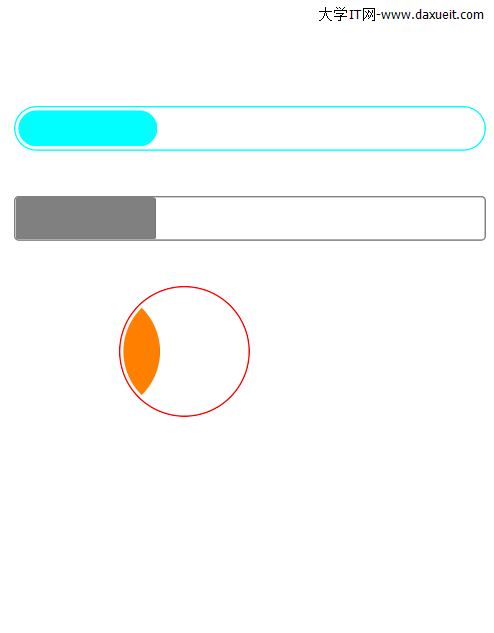
思路
外層一個 view 當軌道,內層一個 view 當填充,中間留 gapSize 的間距。外層設圓角與邊框,內層圓角則是「外層圓角減去間距」,這樣兩者的圓弧曲率才會視覺上對齊。進度更新時只改內層的寬度。
實作
/**
 初始化進度條
 aFrame            外層尺寸
 aFrameColor       外層(軌道)顏色
 aBarColor         內層(填充)顏色
 aFrameCornerRadius 圓角半徑
 aFrameBorderColor 外層邊框顏色
 gapSize           內外層間距
 */
- (id)initWithFrame:(CGRect)aFrame
         frameColor:(UIColor *)aFrameColor
           barColor:(UIColor *)aBarColor
 aFrameCornerRadius:(CGFloat)aFrameCornerRadius
    aFrameBorderColor:(CGColorRef)aFrameBorderColor
             gapSize:(CGFloat)gapSize {
    self = [super initWithFrame:aFrame];
    if (self) {
        self.backgroundColor = [UIColor clearColor];
        _gap = gapSize;

        // 外層軌道
        _outter = [[UILabel alloc] init];
        _outter.frame = self.bounds;
        _outter.backgroundColor = aFrameColor;
        _outter.layer.borderWidth = 1;
        _outter.layer.borderColor = aFrameBorderColor;
        _outter.layer.cornerRadius = aFrameCornerRadius;
        _outter.layer.masksToBounds = YES;
        [self addSubview:_outter];

        // 內層填充
        _inner = [[UILabel alloc] init];
        _inner.frame = CGRectZero;
        _inner.backgroundColor = aBarColor;
        _inner.layer.cornerRadius = aFrameCornerRadius - gapSize;
        _inner.layer.masksToBounds = YES;
        [self addSubview:_inner];
    }
    return self;
}

// 更新進度,傳入值會被夾在 0 ~ 1 之間
- (void)setProgress:(float)progress {
    progress = progress < 0 ? 0 : progress;
    progress = progress > 1 ? 1 : progress;
    _inner.frame = CGRectMake(_gap,
                              _gap,
                              progress * (self.frame.size.width - _gap * 2.0),
                              self.frame.size.height - _gap * 2.0);
}

- (void)dealloc {
    [_inner removeFromSuperview];
    [_outter removeFromSuperview];
}
幾個實作細節
進度值一定要做上下界夾取,否則傳入 1.5 會讓內層超出外層,傳入負數則會出現反向寬度。另外用 self.bounds 而非 frame 來設定外層,是因為此時父視圖座標系還不一定可靠。
原範例用 UILabel 當容器,其實改成 UIView 更貼切語意,也少掉 label 不必要的 text 屬性開銷。