UIDynamic
編輯:IOS技巧綜合
[摘要]本文是對UIDynamic - 推動行為: UIPushBehavior的講解,對學習IOS蘋果軟件開發有所幫助,與大家分享。
用途:
從一個點移動到另外一個點;
相關屬性:
mode : UIPushBehaviorModeContinuous //推移模式
angle : setAngle //推移角度
magnitude : setMagnitude //速度 每1個magnigude將會引起100/平方秒的加速度
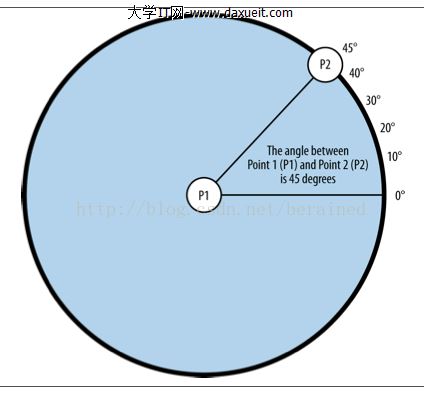
圖片說明:
p1 : squareView的中心點 p2 : 單擊的點
促使squareView朝著p2移動,因為加了UICollisionBehavior,所以移動時又不會超過邊界
代碼:
 //
 //  YFPushBehaviorViewController.m
 //  BigShow1949
 //
 //  Created by apple on 16/8/25.
 //  Copyright © 2016年 BigShowCompany. All rights reserved.
 //

 #import "YFPushBehaviorViewController.h"

 @interface YFPushBehaviorViewController ()
 @property(nonatomic,strong)UIDynamicAnimator *animator;
 @property (nonatomic, strong) UIView *squareView;
 @property (nonatomic, strong) UIPushBehavior *pushBehavior;

 @end

 @implementation YFPushBehaviorViewController
 - (void)viewDidLoad {

     [super viewDidLoad];
     self.view.backgroundColor = [UIColor whiteColor];

 }

 - (void)viewDidAppear:(BOOL)animated{
     [super viewDidAppear:animated];

     // 創建一個正方形
     self.squareView =[[UIView alloc] initWithFrame: CGRectMake(0.0f, 0.0f, 80.0f, 80.0f)];
     self.squareView.backgroundColor = [UIColor greenColor];
     self.squareView.center = self.view.center;
     [self.view addSubview:self.squareView];

     // 視圖單機手勢
     [self createGestureRecognizer];

     [self createAnimatorAndBehaviors];
 }

 - (void) createGestureRecognizer{
     UITapGestureRecognizer *tapGestureRecognizer =
     [[UITapGestureRecognizer alloc] initWithTarget:self  action:@selector(handleTap:)];
     [self.view addGestureRecognizer:tapGestureRecognizer];
 }

 - (void) handleTap:(UITapGestureRecognizer *)paramTap{

     CGPoint tapPoint = [paramTap locationInView:self.view];  //p2
     CGPoint squareViewCenterPoint = self.squareView.center;  //p1

     CGFloat deltaX = tapPoint.x - squareViewCenterPoint.x;
     CGFloat deltaY = tapPoint.y - squareViewCenterPoint.y;
     CGFloat angle = atan2(deltaY, deltaX);
     [self.pushBehavior setAngle:angle];  //推移的角度

     //勾股
     CGFloat distanceBetweenPoints =
     sqrt(pow(tapPoint.x - squareViewCenterPoint.x, 2.0) +
          pow(tapPoint.y - squareViewCenterPoint.y, 2.0));
     //double pow(double x, double y);計算以x為底數的y次冪
     //double sqrt (double);開平方

     //推力的大小(移動速度)
     [self.pushBehavior setMagnitude:distanceBetweenPoints / 50.0f];
     //每1個magnigude將會引起100/平方秒的加速度,這裡分母越大,速度越小

 }
 - (void) createSmallSquareView{
     self.squareView =[[UIView alloc] initWithFrame: CGRectMake(0.0f, 0.0f, 80.0f, 80.0f)];

     self.squareView.backgroundColor = [UIColor greenColor];
     self.squareView.center = self.view.center;

     [self.view addSubview:self.squareView];
 }
 - (void) createAnimatorAndBehaviors{
     self.animator = [[UIDynamicAnimator alloc] initWithReferenceView:self.view];

     /* Create collision detection */
     UICollisionBehavior *collision = [[UICollisionBehavior alloc]
                                       initWithItems:@[self.squareView]];
     collision.translatesReferenceBoundsIntoBoundary = YES;

     self.pushBehavior = [[UIPushBehavior alloc]
                          initWithItems:@[self.squareView]
                          mode:UIPushBehaviorModeContinuous];

     [self.animator addBehavior:collision];
     [self.animator addBehavior:self.pushBehavior];
 }

 @end
- 上一頁:你真的了解UIControl嗎?
- 下一頁:iOS 對模型對象進行歸檔

相關文章
+- iOS開源一個簡略的訂餐app UI框架
- Mac Android Studio快捷鍵整頓
- 在uiview 的tableView中點擊cell進入跳轉到另外一個界面的完成辦法
- iOS開辟之UIScrollView控件詳解
- 進修iOS自界說導航掌握器UINavigationController
- IOS中UITableView轉動到指定地位
- iOS為UIView設置暗影後果
- iOS 和 Android 哪一個更利於賺錢?
- iOS設置UIButton文字顯示地位和字體年夜小、色彩的辦法
- iOS開辟之UIPickerView完成城市選擇器的步調詳解
- iOS長按UIlabel完成可復制功效
- IOS裝備上給body綁定click事宜不失效的緣由及處理方法
- iOS開辟中UIWebView的加載當地數據的三種方法
- iOS中修正UITextField占位符字體色彩的辦法總結
- IOS 仿時間網選票UI實例代碼