
iOS 後台處理
編輯:IOS技巧綜合
[摘要]本文是對iOS 後台處理的講解,對學習IOS蘋果軟件開發有所幫助,與大家分享。
iOS 後台處理的常見用途
1、進入後台時候刪除資源:應用處於掛起狀態的時候所占用的資源越少,該應用被iOS終止的風險就越低。通過從內存中清理那些易於重新創建的資源,可以增加應用駐留內存的機會,因此可以大幅加快重啟速度。
2、進入後台時候保存狀態:保存與用戶執行的操作相關的所有信息,這樣的話,用戶下次回來的時候,依然可以恢復到他們離開時的進度。
3、延時執行,請求更多的後台時間:如果進入後台花費了很多時間,應用可能會從內存中移除,如果應用正在進行文件傳輸,沒有能夠完成的話,將會帶來很多不便。我們可以將applicationDidEnterBackground 作為平台,告訴系統,你還有額外的工作要做,然後啟動一個程序塊,真正的執行該工作。
例解:
@property (strong, nonatomic) UILabel *label;
@property (strong, nonatomic) UIImage *smiley;
@property (strong, nonatomic) UIImageView *smileyView;
@property (strong, nonatomic) UISegmentedControl *segmentedControl;
@implementation BIDViewController {
    BOOL animate;
}
- (void)viewDidLoad
{
    [super viewDidLoad];


    CGRect bounds = self.view.bounds;
    CGRect labelFrame = CGRectMake(bounds.origin.x, CGRectGetMidY(bounds) - 50,
                                   bounds.size.width, 100);

    //轉動的Label
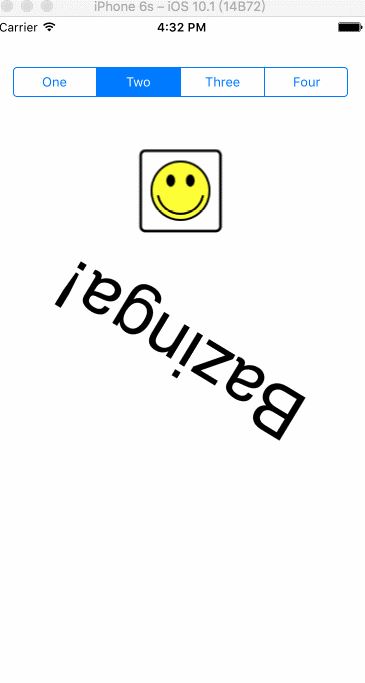
    self.label = [[UILabel alloc] initWithFrame:labelFrame];
    self.label.font = [UIFont fontWithName:@"Helvetica" size:70];
    self.label.text = @"Bazinga!";
    self.label.textAlignment = NSTextAlignmentCenter;
    self.label.backgroundColor = [UIColor clearColor];


    //笑臉
    CGRect smileyFrame = CGRectMake(CGRectGetMidX(bounds) - 42,
                                    CGRectGetMidY(bounds)/2 - 35,
                                    84, 84);
    self.smileyView = [[UIImageView alloc] initWithFrame:smileyFrame];
    self.smileyView.contentMode = UIViewContentModeCenter;
    NSString *smileyPath = [[NSBundle mainBundle] pathForResource:@"smiley"
                                                           ofType:@"png"];

    self.smiley = [UIImage imageWithContentsOfFile:smileyPath];
    self.smileyView.image = self.smiley;


    //分段器
    self.segmentedControl = [[UISegmentedControl alloc] initWithItems:
                             [NSArray arrayWithObjects:
                              @"One", @"Two", @"Three", @"Four", nil]] ;
    self.segmentedControl.frame = CGRectMake(bounds.origin.x + 20,
                                             50,
                                             bounds.size.width - 40, 30);


    [self.view addSubview:self.segmentedControl];
    [self.view addSubview:self.smileyView];
    [self.view addSubview:self.label];


    NSNumber *indexNumber = [[NSUserDefaults standardUserDefaults]
                             objectForKey:@"selectedIndex"];
    if (indexNumber) {
        NSInteger selectedIndex = [indexNumber intValue];
        self.segmentedControl.selectedSegmentIndex = selectedIndex;
    }

    //通知
    NSNotificationCenter *center = [NSNotificationCenter defaultCenter];
    [center addObserver:self
               selector:@selector(applicationWillResignActive)
                   name:UIApplicationWillResignActiveNotification
                 object:nil];
    [center addObserver:self
               selector:@selector(applicationDidBecomeActive)
                   name:UIApplicationDidBecomeActiveNotification
                 object:nil];

    [center addObserver:self
               selector:@selector(applicationDidEnterBackground)
                   name:UIApplicationDidEnterBackgroundNotification
                 object:nil];
    [center addObserver:self
               selector:@selector(applicationWillEnterForeground)
                   name:UIApplicationWillEnterForegroundNotification
                 object:nil];
}
//Label 向下轉動
- (void)rotateLabelDown
{
    [UIView animateWithDuration:0.5
                     animations:^{
                         self.label.transform = CGAffineTransformMakeRotation(M_PI);
                     }
                     completion:^(BOOL finished){
                         [self rotateLabelUp];
                     }];
}

//Label 向上轉動
- (void)rotateLabelUp
{
    [UIView animateWithDuration:0.5
                     animations:^{
                         self.label.transform = CGAffineTransformMakeRotation(0);
                     }
                     completion:^(BOOL finished){
                         if (animate) {
                             [self rotateLabelDown];
                         }
                     }];
}
//離開活動狀態
- (void)applicationWillResignActive
{
    NSLog(@"VC: %@", NSStringFromSelector(_cmd));
    animate = NO;
}

//進入活動狀態
- (void)applicationDidBecomeActive
{
    NSLog(@"VC: %@", NSStringFromSelector(_cmd));
    animate = YES;
    [self rotateLabelDown];
}
//後台運行
- (void)applicationDidEnterBackground
{
    NSLog(@"VC: %@", NSStringFromSelector(_cmd));
    //先獲取共享的UIApplication 實例。
    UIApplication *app = [UIApplication sharedApplication];

    //聲明了taskId變量、並用__block修飾。
    __block UIBackgroundTaskIdentifier taskId;

    //告訴系統,需要更多的時間來完成某件事,並承諾在完成之後告訴它。如果系統判定我們運行了太久時間並決定停止運行,可以調用我們做為參數提供的程序塊
    taskId = [app beginBackgroundTaskWithExpirationHandler:^{
        NSLog(@"Background task ran out of time and was terminated.");
        [app endBackgroundTask:taskId];
    }];

    //如果系統返回的值是UIBackgroundTaskInvalid,表明系統沒有為我們提供任何多余的時間。
    if (taskId == UIBackgroundTaskInvalid) {
        NSLog(@"Failed to start background task!");
        return;
    }

    //
    dispatch_async(dispatch_get_global_queue(DISPATCH_QUEUE_PRIORITY_DEFAULT, 0),
    ^{
        NSLog(@"Starting background task with %f seconds remaining",
              app.backgroundTimeRemaining);

        self.smiley = nil;
        self.smileyView.image = nil;

        //存儲segmentedControl的位置
        NSInteger selectedIndex = self.segmentedControl.selectedSegmentIndex;
        [[NSUserDefaults standardUserDefaults] setInteger:selectedIndex
                                                   forKey:@"selectedIndex"];

        //模擬一個25秒的過程
        [NSThread sleepForTimeInterval:25];

        NSLog(@"Finishing background task with %f seconds remaining",
              app.backgroundTimeRemaining);
        //告訴系統,我們已經完成
        [app endBackgroundTask:taskId];
    });
}
//進入前台
- (void)applicationWillEnterForeground
{
    NSLog(@"VC: %@", NSStringFromSelector(_cmd));
    NSString *smileyPath = [[NSBundle mainBundle] pathForResource:@"smiley"
                                                           ofType:@"png"];
    self.smiley = [UIImage imageWithContentsOfFile:smileyPath];
    self.smileyView.image = self.smiley;
}
運行效果:


相關文章
+
- iOS10.2 Beta3怎麼更新/升級 iOS10.2 Beta3更新升級圖文教程
- 不升iOS9.3/9.3.1理由 iOS8越獄照樣用iOS9快捷手勢
- WeatherPeek 可快速對天氣信息進行查看的插件
- iphone5S國行A1533升級ios8.0心得[圖]
- 蘋果iOS9.1 beta4固件下載地址 iOS9.1 beta4升級教程
- ios9.3備忘錄新功能有哪些?ios9.3備忘錄鎖怎麼用?
- iPhone怎麼查看儲存空間 iPhone儲存空間查看教程
- iphone照片編輯器怎麼旋轉照片?iphone自帶照片編輯器旋轉照片教程
- iPhone鎖屏密碼忘記了怎麼辦?如何成功解鎖
- iOS9 Beta4開發者預覽版已知Bug及閃退應用匯總