iOS開發之多線程技術(NSThread、OperationQueue、GCD)
在前面的博客中如果用到了異步請求的話,也是用到的第三方的東西,沒有正兒八經的用過iOS中多線程的東西。其實多線程的東西還是蠻重要的,如果對於之前學過操作系統的小伙伴來說,理解多線程的東西還是比較容易的,今天就做一個小的demo來詳細的了解一下iOS中的多線程的東西。可能下面的東西會比較枯燥,但還是比較實用的。
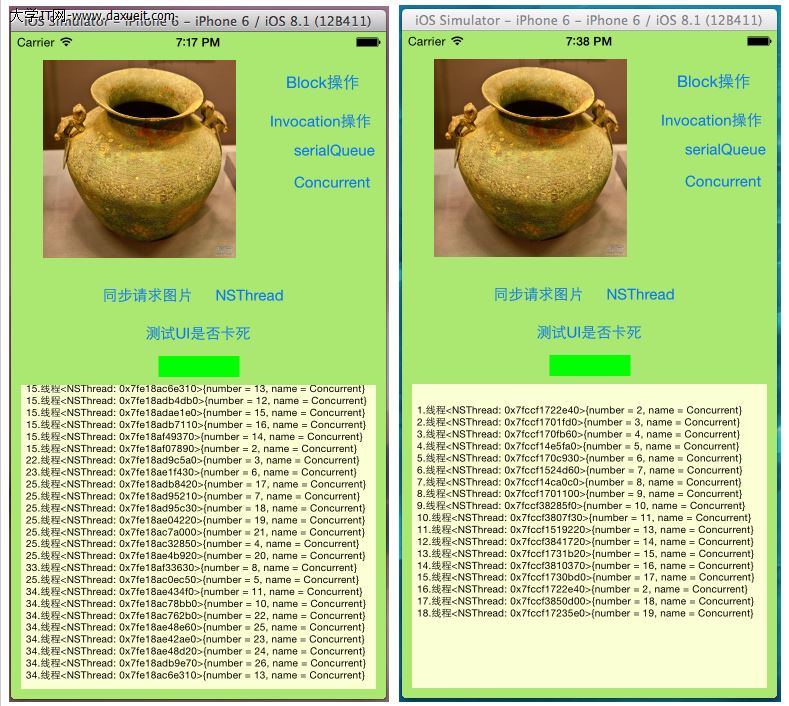
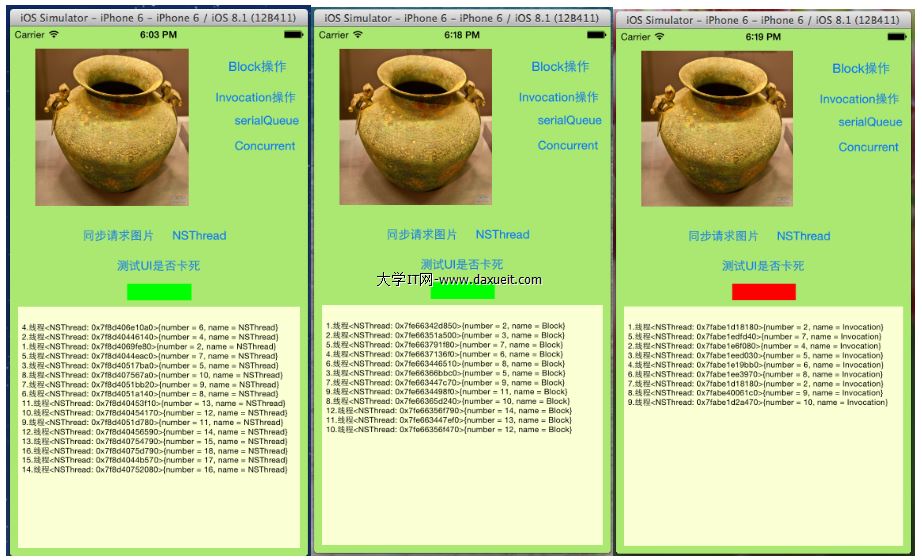
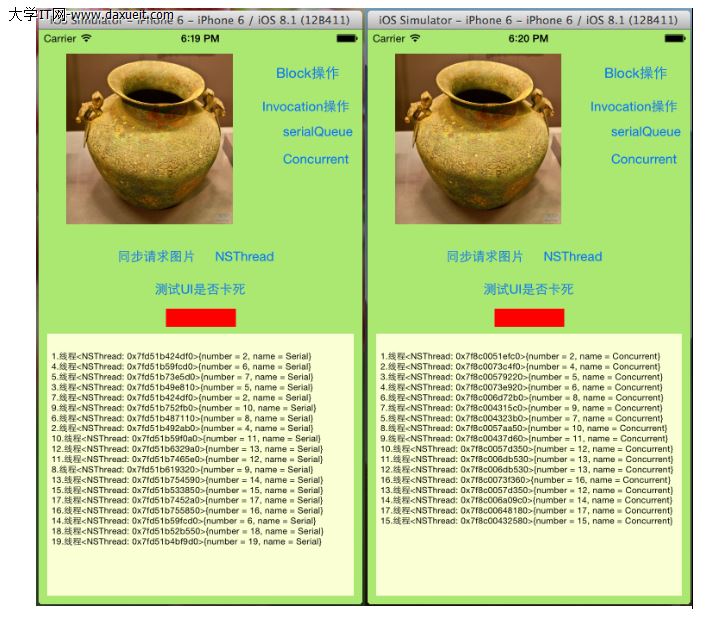
多線程用的還是比較多的,廢話少說了,下面的兩張截圖是今天我們實驗的最終結果,應該是比較全的,小伙伴們由圖來分析具體的功能吧:
功能說明:
1、點擊同步請求圖片,觀察整個UI界面的變化,並點擊測試按鈕,紅色是否會變成綠色。
2、NSThread按鈕,是由NSThread方式創建線程並執行相應的操作。
3、Block操作按鈕是用Block創建操作,並在操作隊列中執行,下面的是Invocation操作
4、serial是GCD中的串行隊列,concurrent是GCD中的並行隊列
好啦,上面的鹹蛋先到這兒,代碼該走起啦。
一、准備階段
1.不管使用代碼寫,還是storyboard或者xib等,先把上面所需的控件初始化好以便使用
2.點擊測試UI按鈕,改變下邊label的顏色的代碼如下:
 //改變lable的顏色,在紅綠顏色之間進行交換
 - (IBAction)tapTestButton:(id)sender {
     static int i = 1;
     if (i == 1) {
         _testLabel.backgroundColor = [UIColor redColor];
         i = 0;
     }
     else
     {
         _testLabel.backgroundColor = [UIColor greenColor];
         i = 1;
     }

 }
3.從網絡上獲取圖片,並使用主線程顯示進程調用情況
 //從wang'lu獲取圖片數據
 -(NSData *) getImageData
 {

     _count ++;
     int count = _count;

     NSData *data;
     [NSThread sleepForTimeInterval:0.5];
     data = [NSData dataWithContentsOfURL:[NSURL URLWithString:IMAGEURL]];

     NSString *str = [NSString stringWithFormat:@"%d.線程%@完畢",count,[NSThread currentThread]];
     //請求數據的任務由其他線程解決,所以LogTextView的內容由主線程更新,也只有主線程才能更新UI
     [self performSelectorOnMainThread:@selector(updateTextViewWithString:) withObject:str waitUntilDone:YES];
     return data;
 }
4.上面的用到了主線程來調用updateTextViewWithString方法,因為只有主線程才能更新UI,updateTextViewWithString:這個方法負責把線程的執行信息顯示在View上,代碼如下:
 //在ViewController上顯示圖片請求情況
 -(void)updateTextViewWithString:(NSString *)str
 {
     NSString *old_str = [NSString stringWithFormat:@"%@\n%@",_logTextView.text, str];

     _logTextView.text = old_str;
     //改變Label的顏色,便於觀察
     [self tapTestButton:nil];
 }
5.把請求完的圖片加載到ImageView上
 //更新圖片
 -(void) updateImageWithData:(NSData *)data
 {
     UIImage *image = [UIImage imageWithData:data];
     [_testImage setImage:image];
 }
6.加載圖片的,也就是請求數據後在ImageView上顯示
 //由其他線程請求數據,由主線程來更新UI
 -(void)loadImageWithThreadName:(NSString *)threadName
 {
     [[NSThread currentThread] setName:threadName];

     NSData *data = [self getImageData];
     [self performSelectorOnMainThread:@selector(updateImageWithData:) withObject:data waitUntilDone:YES];
 }
二、通過各種方式來
1.同步請求圖片測試,請求數據和更新UI都放在主線程中順序執行,這樣在請求數據的時候UI會卡死,代碼如下;
 //同步請求圖片,視圖阻塞的,因為主線程被占用,無法進行視圖的更新
 - (IBAction)tapButton:(id)sender {
     NSData *data = [self getImageData];
     [self updateImageWithData:data];
 }
2.NSThread創建線程測試,用detachNewThreadSelector方法來創建新的線程會自動啟動並執行,而不用調用start方法。代碼如下:
 //NSThread
 - (IBAction)tapButton2:(id)sender {
     //點擊一次button就創建一個新的線程來請求圖片數據

     [NSThread detachNewThreadSelector:@selector(loadImageWithThreadName:) toTarget:self withObject:@"NSThread"];
  }
3.NSInvocationOperation的使用,新建一個調用操作,然後添加到隊列中執行,代碼如下:
 //NSInvocationOperation
 - (IBAction)tapInvocationOperation:(id)sender {
     //實例化一個調用操作,來執行數據請求
     NSInvocationOperation *invocationOperation = [[NSInvocationOperation alloc] initWithTarget:self selector:@selector(loadImageWithThreadName:) object:@"Invocation"];

     //上面的調用操作需要放到調用隊列裡才執行的
     //創建操作隊列
     NSOperationQueue *operationQueue = [[NSOperationQueue alloc] init];

     //把上面的調用操作放到操作隊列裡,隊列會自動開啟一個線程調用我們指定的方法
     [operationQueue addOperation:invocationOperation];
 }
4.block的操作,新建一個block操作,並添加到隊列中執行,代碼如下:
 //BlockOperation
 - (IBAction)tapBlockOperation:(id)sender {
     __weak __block ViewController *copy_self = self;

     //創建BlockOperation
     NSBlockOperation *blockOperation = [NSBlockOperation blockOperationWithBlock:^{
         [copy_self loadImageWithThreadName:@"Block"];
     }];

     //添加到操作隊列
     NSOperationQueue *operationQueue = [[NSOperationQueue alloc] init];
     [operationQueue addOperation:blockOperation];

     //另一種方式
     [operationQueue addOperationWithBlock:^{
         [copy_self loadImageWithThreadName:@"Block"];
     }];

 }
5.GCD中的串行隊列:
 //串行隊列
 - (IBAction)tapGCDserialQueue:(id)sender {
     //創建串行隊列
     dispatch_queue_t serialQueue = dispatch_queue_create("mySerialQueue", DISPATCH_QUEUE_SERIAL);


     __weak __block ViewController *copy_self = self;
     //異步執行隊列
     dispatch_async(serialQueue, ^{
         [copy_self loadImageWithThreadName:@"Serial"];
     });

 }
6.GCD中的並行隊列:
 //並行隊列
 - (IBAction)tapGCDConcurrentQueue:(id)sender {
     //創建並行隊列
     dispatch_queue_t concurrentQueue = dispatch_queue_create("myConcurrentQueue", DISPATCH_QUEUE_CONCURRENT);
     __weak __block ViewController *copy_self = self;
     //異步執行隊列
     dispatch_async(concurrentQueue, ^{
         [copy_self loadImageWithThreadName:@"Concurrent"];
     });

 }
以上是各個按鈕對應的方法,下面的截圖是執行結果:
三、線程間的同步問題(為我們的線程添加上同步鎖)
在操作系統中講多線程時有一個名詞叫髒數據,就是多個線程操作同一塊資源造成的,下面就修改一下代碼,讓數據出現問題,然後用同步鎖來解決這個問題
1.在getImageData方法(標題一中的第3個方法)中有兩條語句。這個用來顯示線程的標號。上面的標號是沒有重復的。
     _count ++;
     int count = _count;
在兩條語句中間加一個延遲,如下:
    _count ++;
    [NSThread sleepForTimeInterval:1];
    int count = _count;
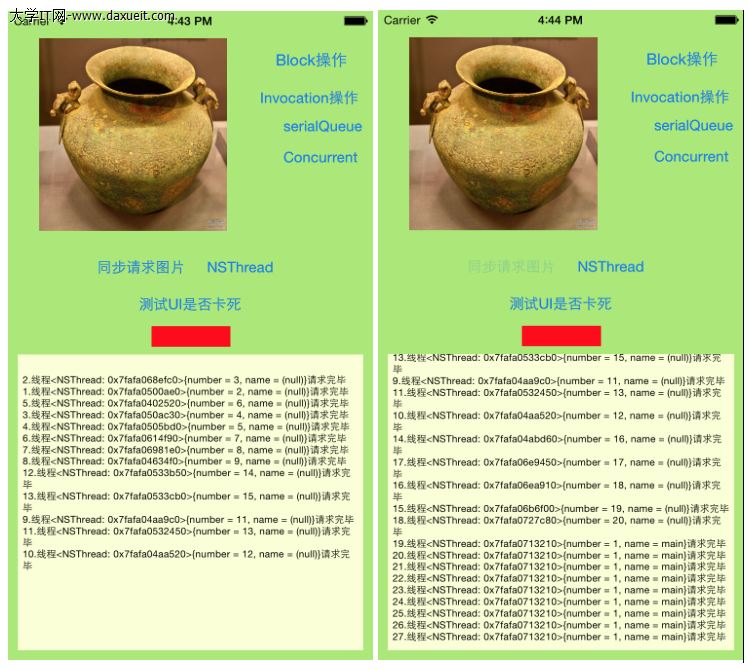
如果運行的話,會有好多標號是重復的,如圖一,__count是成員變量,多個線程對此他進行操作,所以會出現標號不一致的情況,下面我們加上同步鎖
(1)用NSLock加同步鎖,代碼如下:
     //通過NSLock加鎖
     [_lock lock];
     _count ++;
     [NSThread sleepForTimeInterval:1];
     int count = _count;
     [_lock unlock];
(2)通過@synchronized加同步鎖,代碼如下:
     //通過synchronized加鎖
     int count;
     @synchronized(self){
         _count ++;
         [NSThread sleepForTimeInterval:1];
          count = _count;
     }
加鎖前後的運行效果如下: