
iOS 讓 UILabel 文字兩端對齊的實作寫法
編輯:iOS 7 技巧
UILabel 直接設 textAlignment 只能做到左、右、置中、自然這幾種。想要「兩端對齊」(左右都對齊、行距均勻展開)就必须改用屬性化文字,透過 NSParagraphStyle 設定。
程式碼
-(NSAttributedString *)setTextString:(NSString *)text
{
    NSMutableAttributedString *mAbStr = [[NSMutableAttributedString alloc] initWithString:text];

    NSMutableParagraphStyle *npgStyle = [[NSMutableParagraphStyle alloc] init];
    npgStyle.alignment = NSTextAlignmentJustified;   // 兩端對齊
    npgStyle.paragraphSpacing = 11.0;
    npgStyle.paragraphSpacingBefore = 10.0;
    npgStyle.firstLineHeadIndent = 0.0;
    npgStyle.headIndent = 0.0;

    NSDictionary *dic = @{
        NSForegroundColorAttributeName : [UIColor blackColor],
        NSFontAttributeName            : [UIFont systemFontOfSize:15.0],
        NSParagraphStyleAttributeName  : npgStyle,
        NSUnderlineStyleAttributeName  : [NSNumber numberWithInteger:NSUnderlineStyleNone]
    };

    [mAbStr setAttributes:dic range:NSMakeRange(0, mAbStr.length)];

    NSAttributedString *attrString = [mAbStr copy];
    return attrString;
}
使用方式
NSString *const msg = @"6日,“幼兒園老師讓帶一條魚”的微博突然間就火了!占領朋友圈!征服全國網友.圖片甚至遭網友惡搞:水煮魚、生魚片都出來了。1月7日,記者在茫茫人海之中,歷經千辛萬苦終於在浙江慈溪找到了這位被網友吐槽的“粗心”家長!來聽聽他的解釋吧";
self.lbView.attributedText = [self setTextString:msg];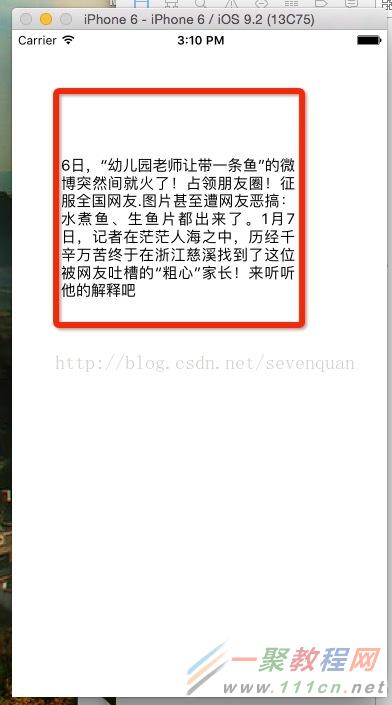
幾個參數的意義
NSTextAlignmentJustified:兩端對齊的關鍵,讓每一行左右都貼齊邊界。paragraphSpacing:段落之間的間距。paragraphSpacingBefore:段落之前的間距。firstLineHeadIndent:首行縮排,中文排版若想做出「首行空兩格」的效果,把這裡設成兩個字寬即可。headIndent:其餘行的縮排。
要留意的是,兩端對齊對「最後一行」不生效,這是排版規則本身如此,並非設定失敗。另外當文字很短、只有一行時,視覺上跟左對齊完全一樣。
最後,設定 attributedText 之後就不要再改 label.text,兩者會互相覆蓋,這也是為什麼建議把這段邏輯包成一個方法集中管理。
- 上一篇文章: iOS 實作點擊縮圖放大瀏覽效果
- 下一篇文章: iPhone 4/5 降級裝 iOS 6 雙系統教學