
iOS 音效與背景音樂播放實作:AudioServices 與 AVAudioPlayer
點擊時的「喀噠」聲、遊戲裡的背景配樂,兩者在 iOS 上用的是完全不同的 API。本文示範如何以 AudioServices 系列函式播放短音效,並用 AVAudioPlayer 播放較長的音樂,包含播放、暫停、停止的完整控制。
一、音效的播放
短音效與音樂的差別
音訊大致可以分成兩類:
- 音效:又稱「短音訊」,播放長度通常 1~2 秒,在 App 中作為點綴,用以提升整體操作回饋感。
- 音樂:例如遊戲的背景音樂,播放時間通常較長。
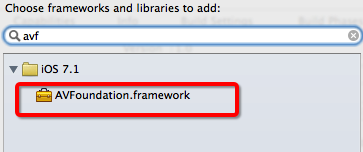
兩者都需要 AVFoundation.framework 這個框架。
播放音效的三個步驟
// 1. 取得音效檔案的路徑
NSURL *url = [[NSBundle mainBundle] URLForResource:@"m_03.wav" withExtension:nil];

// 2. 載入音效檔,取得對應的音效 ID
SystemSoundID soundID = 0;
AudioServicesCreateSystemSoundID((__bridge CFURLRef)url, &soundID);

// 3. 播放
AudioServicesPlaySystemSound(soundID);
一個重要觀念:音效檔只需要載入一次。SoundID 建立後可以重複播放,不必每次點擊都重新載入。
常用函式整理
// 載入音效檔
AudioServicesCreateSystemSoundID(CFURLRef inFileURL, SystemSoundID *outSystemSoundID)

// 釋放音效資源
AudioServicesDisposeSystemSoundID(SystemSoundID inSystemSoundID)

// 播放音效
AudioServicesPlaySystemSound(SystemSoundID inSystemSoundID)

// 播放音效並伴隨震動
AudioServicesPlayAlertSound(SystemSoundID inSystemSoundID)
完整範例
先匯入相依框架。
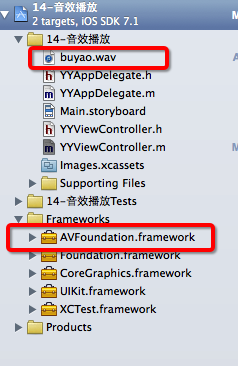
再把要播放的音效素材加入專案。
注意:AVFoundation 的型別要轉成 Core Foundation 型別時,需要使用 __bridge 橋接。
#import "YYViewController.h"
#import <AVFoundation/AVFoundation.h>

@implementation YYViewController

- (void)touchesBegan:(NSSet *)touches withEvent:(UIEvent *)event
{
    // 1. 取得音效檔的完整路徑
    NSURL *url = [[NSBundle mainBundle] URLForResource:@"buyao.wav" withExtension:nil];

    // 2. 載入音效檔並建立 SoundID(一個 ID 對應一個音效檔)
    SystemSoundID soundID = 0;
    AudioServicesCreateSystemSoundID((__bridge CFURLRef)url, &soundID);

    // 不再需要時可呼叫此式銷毀
    // AudioServicesDisposeSystemSoundID(soundID);

    // 3. 播放。PlayAlertSound 會同時觸發震動
    AudioServicesPlayAlertSound(soundID);
    // AudioServicesPlaySystemSound(soundID);
}

@end
執行後點擊螢幕即可播放音效。
二、音樂的播放:AVAudioPlayer
播放音樂用的是 AVAudioPlayer 類別,可以播放手機本機的音訊檔。兩個限制要先記住:
AVAudioPlayer只能用來播放本機音訊,不能直接播放網路串流。- 時長短的(音效)用
AudioServicesCreateSystemSoundID;時長長的(音樂)用AVAudioPlayer。
使用前必須先匯入 AVFoundation 框架並引入主標頭檔。
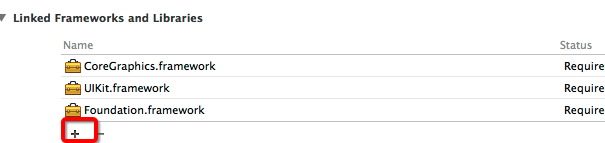
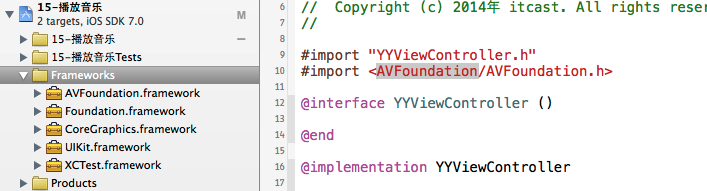
最直白的寫法(有問題)
#import "YYViewController.h"
#import <AVFoundation/AVFoundation.h>

@implementation YYViewController

- (void)touchesBegan:(NSSet *)touches withEvent:(UIEvent *)event
{
    NSURL *url = [[NSBundle mainBundle] URLForResource:@"235319.mp3" withExtension:nil];

    // 注意:一個 AVAudioPlayer 只能播放一個 url
    AVAudioPlayer *audioPlayer = [[AVAudioPlayer alloc] initWithContentsOfURL:url error:nil];

    [audioPlayer prepareToPlay]; // 預先緩衝
    [audioPlayer play];
}

@end
這樣寫執行後點擊螢幕卻沒聲音。原因是 audioPlayer 是區域變數,方法一結束就被回收,播放也就跟著中止。播放器必須提升為長生命周期的屬性。
修正後:改用屬性持有
#import "YYViewController.h"
#import <AVFoundation/AVFoundation.h>

@interface YYViewController ()
@property (nonatomic, strong) AVAudioPlayer *audioplayer;
@end

@implementation YYViewController

- (void)touchesBegan:(NSSet *)touches withEvent:(UIEvent *)event
{
    NSURL *url = [[NSBundle mainBundle] URLForResource:@"235319.mp3" withExtension:nil];

    self.audioplayer = [[AVAudioPlayer alloc] initWithContentsOfURL:url error:nil];
    [self.audioplayer prepareToPlay];
    [self.audioplayer play];
}

@end
再次強調:一個 AVAudioPlayer 只能播放一個 url。要同時播放多個檔案,就必須建立多個播放器。
三、播放、暫停與停止
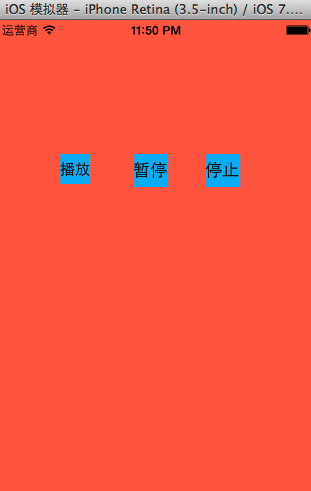
在 storyboard 中放三個按鈕,分別對應播放、暫停、停止。
#import "YYViewController.h"
#import <AVFoundation/AVFoundation.h>

@interface YYViewController ()
@property (nonatomic, strong) AVAudioPlayer *player;
- (IBAction)play;
- (IBAction)pause;
- (IBAction)stop;
@end

@implementation YYViewController

- (void)viewDidLoad
{
    [super viewDidLoad];

    NSURL *url = [[NSBundle mainBundle] URLForResource:@"235319.mp3" withExtension:nil];
    self.player = [[AVAudioPlayer alloc] initWithContentsOfURL:url error:nil];
    [self.player prepareToPlay];
}

- (IBAction)play  { [self.player play];  }  // 開始/繼續播放
- (IBAction)pause { [self.player pause]; }  // 暫停
- (IBAction)stop  { [self.player stop];  }  // 停止

@end
這裡有個容易忽略的坑:呼叫 stop 之後,播放器實際上就不能再 reuse 了。此時若繼續對它送出指令,後續行為會變得難以控制,出現各種莫名其妙的症狀。
建議寫法:用懶載入重建播放器
#import "YYViewController.h"
#import <AVFoundation/AVFoundation.h>

@interface YYViewController ()
@property (nonatomic, strong) AVAudioPlayer *player;
- (IBAction)play;
- (IBAction)pause;
- (IBAction)stop;
@end

@implementation YYViewController

#pragma mark - 懶載入
- (AVAudioPlayer *)player
{
    if (_player == nil) {
        NSURL *url = [[NSBundle mainBundle] URLForResource:@"235319.mp3" withExtension:nil];
        self.player = [[AVAudioPlayer alloc] initWithContentsOfURL:url error:nil];
        [self.player prepareToPlay];
    }
    return _player;
}

- (IBAction)play  { [self.player play];  }
- (IBAction)pause { [self.player pause]; }

- (IBAction)stop
{
    [self.player stop];
    self.player = nil; // 主動釋放,下次 play 時會透過懶載入重建
}

@end
關鍵就在 stop 之後把 player 設為 nil,讓下一次播放自動走一次懶載入流程,重新建立全新的播放器。
四、想播放多個檔案怎麼辦

在程式碼中對 url 按住 Option 鍵點擊可以查看其定義。

可以發現 url 是唯讀的,只能透過 initWithContentsOfURL: 於初始化時指定,這也意味著一個播放器物件綁一個音訊檔。
實務上的解法是封裝一個播放工具類別,內部用「音檔名稱 → 播放器」的字典來管理多個 AVAudioPlayer,對外只暴露 play / pause / stop 這類簡潔介面。這樣 zarówno音效與音樂都能統一調用,也方便全域共用同一份播放器實例。