
iOS UITableView 好友列表與可收合分組實作
iOS UITableView 好友列表與可收合分組實作
好友列表是許多通訊類 App 的常見功能。本文以 UITableView 為基礎,說明如何建立分組列表、載入 plist 資料、建立模型、設定自定義 cell,並進一步實作可收合的分組標題。
一、基本架構
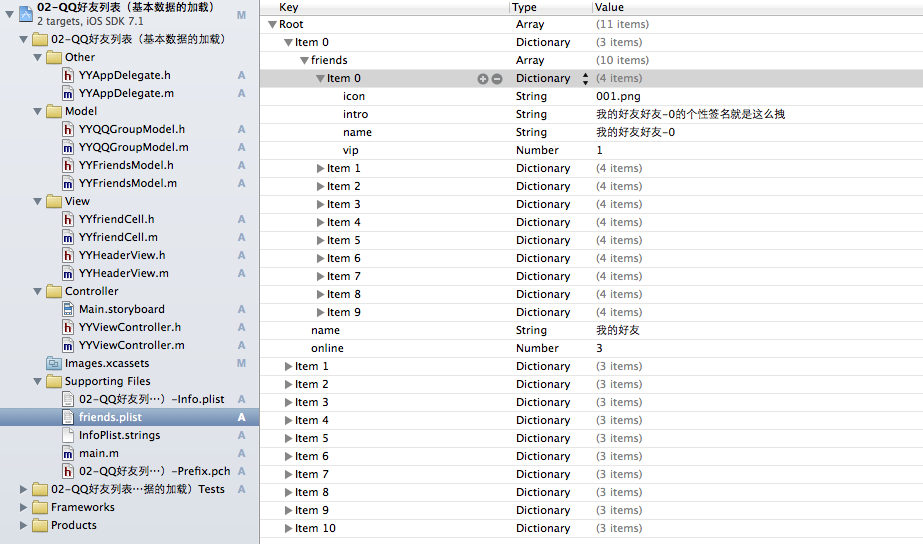
在基本版本中,主控制器可以直接繼承 UITableViewController,並透過 plist 檔案載入好友資料。
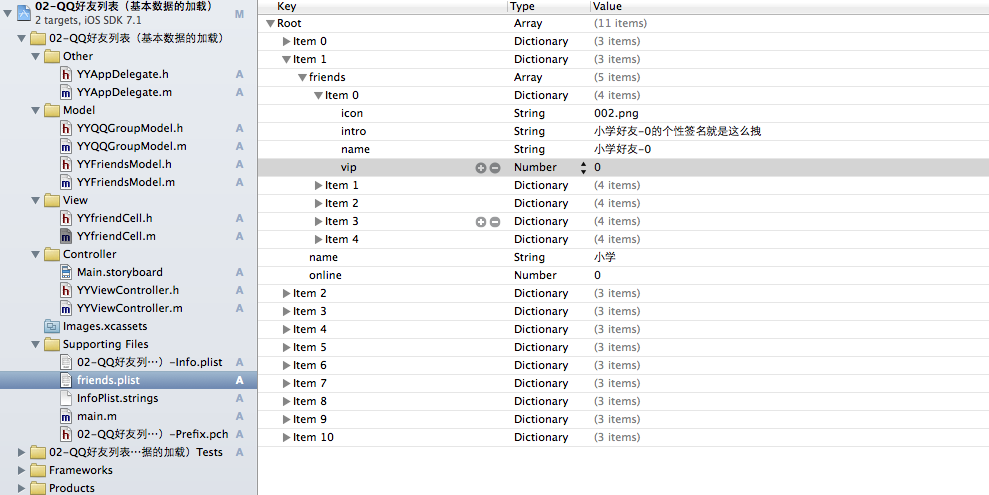
在 storyboard 中,將主控制器與 UITableViewController 關聯。

二、建立資料模型
好友列表通常會有兩層資料:
- 群組模型:包含名稱、在線人數、好友陣列。
- 好友模型:包含名稱、頭像、簽名、是否為 VIP。
群組模型可由 plist 字典轉換而來,並在初始化時把好友字典陣列轉為好友模型陣列。
- (instancetype)initWithDict:(NSDictionary *)dict {
    if (self = [super init]) {
        [self setValuesForKeysWithDictionary:dict];
        NSMutableArray *models = [NSMutableArray arrayWithCapacity:self.friends.count];
        for (NSDictionary *friendDict in self.friends) {
            YYFriendsModel *friend = [YYFriendsModel friendsWithDict:friendDict];
            [models addObject:friend];
        }
        _friends = [models copy];
    }
    return self;
}
三、建立好友 cell
可以使用系統自帶的 UITableViewCellStyleSubtitle 樣式,顯示頭像、名稱與簡介。
if (_friends.isVip) {
    [self.textLabel setTextColor:[UIColor redColor]];
} else {
    [self.textLabel setTextColor:[UIColor blackColor]];
}
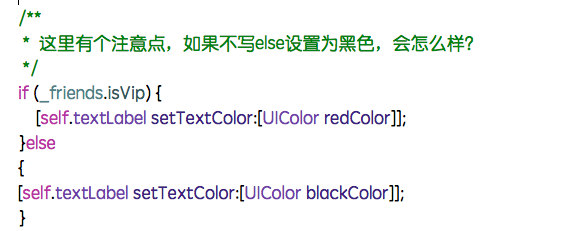
注意:在重寫 setter 時,若只設定 VIP 顏色而沒有設定一般顏色,可能會因為 cell 重用而導致狀態殘留。
四、主控制器載入資料
可以使用懶加載,在第一次需要時才從 plist 讀取資料。
NSString *fullpath = [[NSBundle mainBundle] pathForResource:@"friends.plist" ofType:nil];
NSArray *array = [NSArray arrayWithContentsOfFile:fullpath];
NSMutableArray *models = [NSMutableArray arrayWithCapacity:array.count];
for (NSDictionary *dict in array) {
    YYQQGroupModel *group = [YYQQGroupModel qqGroupModelWithDict:dict];
    [models addObject:group];
}
_groupFriends = [models copy];
在 UITableView 的資料源方法中,先回傳分組數量,再回傳每組列數,最後設定 cell 內容。
- (NSInteger)numberOfSectionsInTableView:(UITableView *)tableView {
    return self.groupFriends.count;
}

- (NSInteger)tableView:(UITableView *)tableView numberOfRowsInSection:(NSInteger)section {
    YYQQGroupModel *group = self.groupFriends[section];
    return group.friends.count;
}
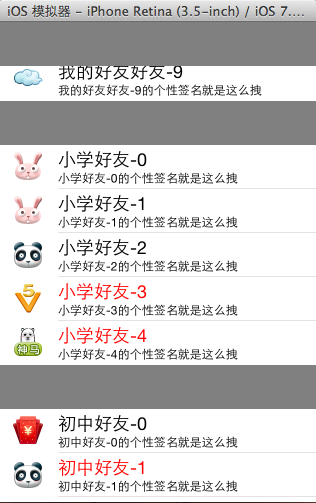
五、注意事項
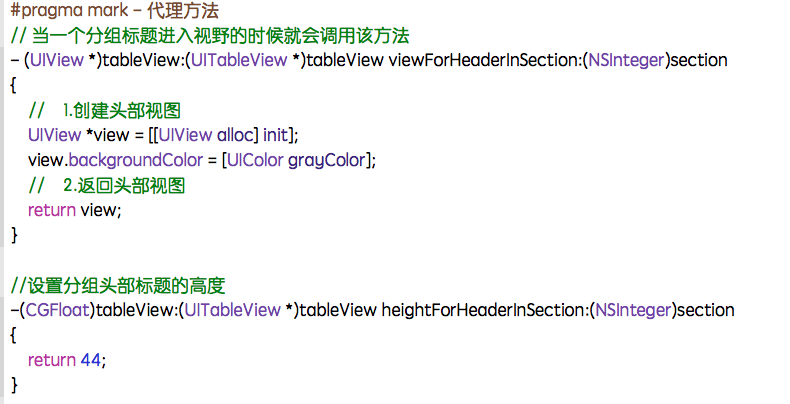
若要自訂分組標題視圖,可實作 viewForHeaderInSection。
在 cell 的 setter 中,也要考慮到重用時的狀態重置。
六、進階版本:可收合分組
若要讓分組可以展開或收合,可以在群組模型中加入 isOpen 屬性,並在 numberOfRowsInSection 中判斷。
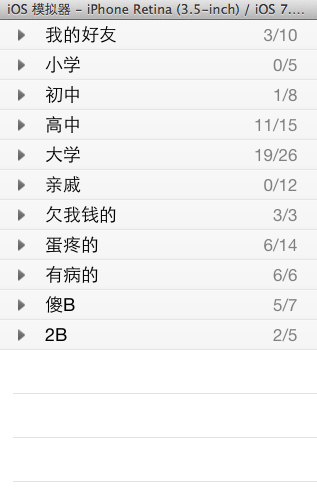
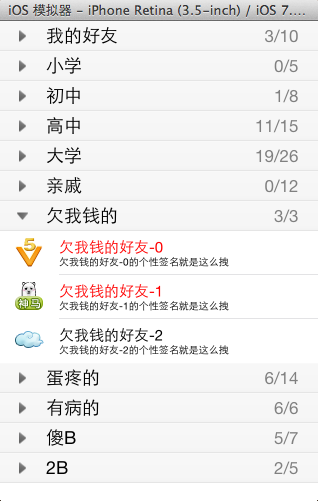
if (group.isOpen) {
    return group.friends.count;
} else {
    return 0;
}
七、自定義 header 與代理
可以建立繼承自 UITableViewHeaderFooterView 的自定義 header,加入按鈕與在線人數標籤。當按鈕被點擊時,切換 group.open,並通知控制器刷新表格。
@protocol YYHeaderViewDelegate- (void)headerViewDidClickHeaderView:(YYHeaderView *)headerView; @end - (void)btnOnClick:(UIButton *)btn { self.group.open = !self.group.isOpen; if ([self.delegate respondsToSelector:@selector(headerViewDidClickHeaderView:)]) { [self.delegate headerViewDidClickHeaderView:self]; } }
控制器收到代理方法後,重新載入表格:
- (void)headerViewDidClickHeaderView:(YYHeaderView *)headerView {
    [self.tableView reloadData];
}
八、排版與重用工藝
在自定義 header 中,子控件的 frame 通常應在 layoutSubviews 中設定,而不是在初始化方法中設定。同時,呼叫 [super layoutSubviews] 是必要的。
若控件沒有顯示,可以依序檢查:
- frame 是否為零。
- hidden 是否為 YES。
- alpha 是否過低。
- 是否已加入父視圖。
- 父視圖本身是否可見。
此外,設定按鈕標題時,應使用 setTitle:forState:,而不是直接修改 titleLabel.text,否則可能不會正確顯示。
透過模型、cell、header 與代理的組合,可以完成一個結構清楚且可維護的好友列表畫面。