
iOS 多執行緒實作:自訂 NSOperation 子類的完整範例
一、先看一個最直觀的列表畫面
先把要達到的效果擺出來,後面的改造都圍繞這個範例展開。
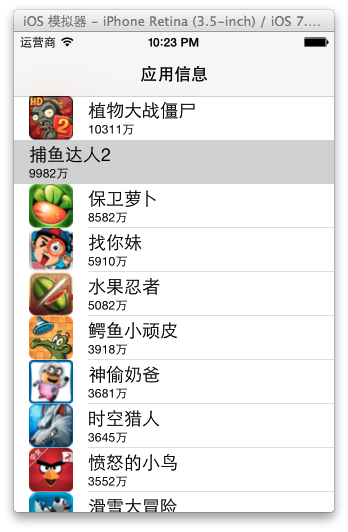
最開始的寫法很樸素:所有業務邏輯都塞在主控制器裡,也就是我們最熟悉的那種「能跑就行」的狀態。
1. 建立專案並讓控制器繼承 UITableViewController
YYViewController.h:
//
// YYViewController.h
// 01-自定義Operation
//
// Created by apple on 14-6-26.
// Copyright (c) 2014年 itcase. All rights reserved.
//
#import <UIKit/UIKit.h>
@interface YYViewController : UITableViewController
@end
2. 在 storyboard 中把界面搭好
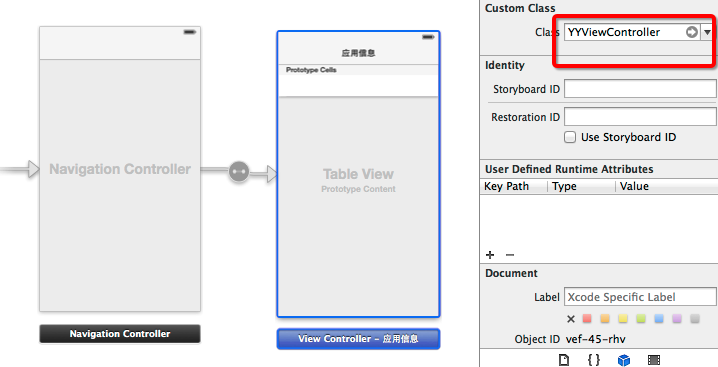
3. 讀 plist,完成字典轉模型
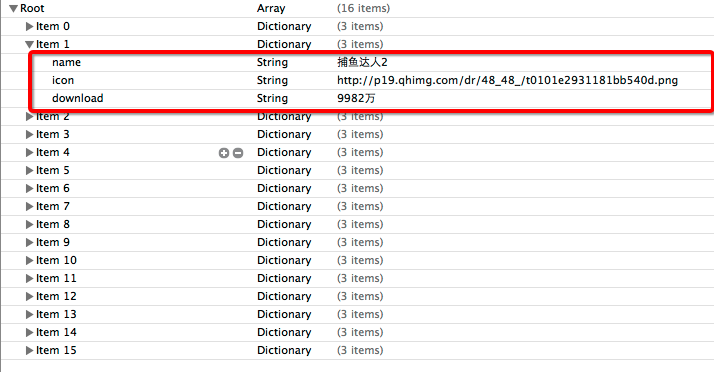
新建一個繼承自 NSObject 的類作為資料模型,YYappModel.h:
//
// YYappModel.h
// 01-自定義Operation
//
// Created by apple on 14-6-26.
// Copyright (c) 2014年 itcase. All rights reserved.
//
#import <Foundation/Foundation.h>
@interface YYappModel : NSObject
/**
*應用名稱
*/
@property(nonatomic,copy)NSString *name;
/**
* 應用圖片
*/
@property(nonatomic,copy)NSString *icon;
/**
* 應用的下載量
*/
@property(nonatomic,copy)NSString *download;
+(instancetype)appModelWithDict:(NSDictionary *)dict;
-(instancetype)initWithDict:(NSDictionary *)dict;
@end
YYappModel.m:
//
// YYappModel.m
// 01-自定義Operation
//
// Created by apple on 14-6-26.
// Copyright (c) 2014年 itcase. All rights reserved.
//
#import "YYappModel.h"
@implementation YYappModel
-(instancetype)initWithDict:(NSDictionary *)dict
{
if (self=[super init]) {
[self setValuesForKeysWithDictionary:dict];
}
return self;
}
//工廠方法
+(instancetype)appModelWithDict:(NSDictionary *)dict
{
return [[self alloc]initWithDict:dict];
}
@end
主控制器的邏輯部分,YYViewController.m:
//
// YYViewController.m
// 01-自定義Operation
// 14-6-26
//
#import "YYViewController.h"
#import "YYappModel.h"
@interface YYViewController ()
@property(nonatomic,strong)NSArray *apps;
@end
@implementation YYViewController
#pragma mark- 懶加載
-(NSArray *)apps
{
if (_apps==nil) {
NSString *path=[[NSBundle mainBundle]pathForResource:@"apps.plist" ofType:nil];
NSArray *tempArray=[NSArray arrayWithContentsOfFile:path];
//字典轉模型
NSMutableArray *array=[NSMutableArray array];
for (NSDictionary *dict in tempArray) {
YYappModel *app=[YYappModel appModelWithDict:dict];
[array addObject:app];
}
_apps=array;
}
return _apps;
}
#pragma mark-數據源方法
-(NSInteger)tableView:(UITableView *)tableView numberOfRowsInSection:(NSInteger)section
{
return self.apps.count;
}
-(UITableViewCell *)tableView:(UITableView *)tableView cellForRowAtIndexPath:(NSIndexPath *)indexPath
{
static NSString *ID=@"ID";
UITableViewCell *cell=[tableView dequeueReusableCellWithIdentifier:ID];
if (cell==nil) {
cell=[[UITableViewCell alloc]initWithStyle:UITableViewCellStyleSubtitle reuseIdentifier:ID];
}
YYappModel *app=self.apps[indexPath.row];
cell.textLabel.text=app.name;
cell.detailTextLabel.text=app.download;
//下載圖片數據
NSLog(@"加載圖片數據---%@", [NSThread currentThread]);
NSURL *url=[NSURL URLWithString:app.icon];
NSData *data=[NSData dataWithContentsOfURL:url];
UIImage *imgae=[UIImage imageWithData:data];
cell.imageView.image=imgae;
NSLog(@"完成顯示");
return cell;
}
@end
把日誌打開來看:

二、動手自訂一個 NSOperation
問題很明顯:圖片下載是妥妥的 I/O 密集任務,把它放在主執行緒上跑,列表滑動必然卡頓,使用者體驗直接崩掉。解法是把下載搬到子執行緒,用自訂的 NSOperation 封裝這段異步工作。
方案一:透過 delegate 回傳結果
延續上面的專案,新建一個繼承自 NSOperation 的類。YYdownLoadOperation.h:
//
// YYdownLoadOperation.h
// 01-自定義Operation
//
// Created by apple on 14-6-26.
// Copyright (c) 2014年 itcase. All rights reserved.
//
#import <Foundation/Foundation.h>
#pragma mark-設置代理和代理方法
@class YYdownLoadOperation;
@protocol YYdownLoadOperationDelegate <NSObject>
-(void)downLoadOperation:(YYdownLoadOperation*)operation didFishedDownLoad:(UIImage *)image;
@end
@interface YYdownLoadOperation : NSOperation
@property(nonatomic,copy)NSString *url;
@property(nonatomic,strong)NSIndexPath *indexPath;
@property(nonatomic,strong)id <YYdownLoadOperationDelegate> delegate;
@end
YYdownLoadOperation.m:
//
// YYdownLoadOperation.m
// 01-自定義Operation
//
// Created by apple on 14-6-26.
// Copyright (c) 2014年 itcase. All rights reserved.
//
#import "YYdownLoadOperation.h"
@implementation YYdownLoadOperation
-(void)main
{
NSURL *url=[NSURL URLWithString:self.url];
NSData *data=[NSData dataWithContentsOfURL:url];
UIImage *imgae=[UIImage imageWithData:data];
NSLog(@"--%@--",[NSThread currentThread]);
//圖片下載完畢後,通知代理
if ([self.delegate respondsToSelector:@selector(downLoadOperation:didFishedDownLoad:)]) {
dispatch_async(dispatch_get_main_queue(), ^{//回到主線程,傳遞數據給代理對象
[self.delegate downLoadOperation:self didFishedDownLoad:imgae];
});
}
}
@end
注意這裡的關鍵細節:下載在子執行緒完成,但回呼代理時必須切回主執行緒,因為 UI 更新只能在主執行緒做。
主控制器改成這樣:
#import "YYViewController.h"
#import "YYappModel.h"
#import "YYdownLoadOperation.h"
@interface YYViewController ()<YYdownLoadOperationDelegate>
@property(nonatomic,strong)NSArray *apps;
@property(nonatomic,strong)NSOperationQueue *queue;
@end
@implementation YYViewController
#pragma mark- 懶加載apps
-(NSArray *)apps
{
if (_apps==nil) {
NSString *path=[[NSBundle mainBundle]pathForResource:@"apps.plist" ofType:nil];
NSArray *tempArray=[NSArray arrayWithContentsOfFile:path];
//字典轉模型
NSMutableArray *array=[NSMutableArray array];
for (NSDictionary *dict in tempArray) {
YYappModel *app=[YYappModel appModelWithDict:dict];
[array addObject:app];
}
_apps=array;
}
return _apps;
}
#pragma mark-懶加載queue
-(NSOperationQueue *)queue
{
if (_queue==Nil) {
_queue=[[NSOperationQueue alloc]init];
//設置最大並發數為3
_queue.maxConcurrentOperationCount=3;
}
return _queue;
}
#pragma mark-數據源方法
-(NSInteger)tableView:(UITableView *)tableView numberOfRowsInSection:(NSInteger)section
{
return self.apps.count;
}
-(UITableViewCell *)tableView:(UITableView *)tableView cellForRowAtIndexPath:(NSIndexPath *)indexPath
{
static NSString *ID=@"ID";
UITableViewCell *cell=[tableView dequeueReusableCellWithIdentifier:ID];
if (cell==nil) {
cell=[[UITableViewCell alloc]initWithStyle:UITableViewCellStyleSubtitle reuseIdentifier:ID];
}
YYappModel *app=self.apps[indexPath.row];
cell.textLabel.text=app.name;
cell.detailTextLabel.text=app.download;
//創建一個Operation對象
YYdownLoadOperation *operation=[[YYdownLoadOperation alloc]init];
operation.url=app.icon;
operation.indexPath=indexPath;
operation.delegate=self;
//把操作對象添加到隊列中
[self.queue addOperation:operation];
return cell;
}
-(void)downLoadOperation:(YYdownLoadOperation *)operation didFishedDownLoad:(UIImage *)image
{
//取出tableview中indexPath這一行對應的cell
UITableViewCell *cell=[self.tableView cellForRowAtIndexPath:operation.indexPath];
//顯示圖片
cell.imageView.image=image;
//一定要刷新表格
[self.tableView reloadData];
NSLog(@"--%@--",[NSThread currentThread]);
}
@end
跑起來看日誌,這版其實埋了三個坑:
問題一:同一個 url 可能被反覆包成多個 operation,重複下載。
問題二:下載完成後沒有把 operation 從記錄中移除,字典只會越長越大。
問題三:無法保證一個 url 只對應一張 image,滑回去還會再下一次。
方案二:用兩本字典把問題補齊
思路是加兩個容器:一本記錄「正在進行的下載」,一本當「圖片快取」。前者用來去重,後者用來命中緩存。
#import "YYViewController.h"
#import "YYappModel.h"
#import "YYdownLoadOperation.h"
@interface YYViewController ()<YYdownLoadOperationDelegate>
@property(nonatomic,strong)NSArray *apps;
@property(nonatomic,strong)NSOperationQueue *queue;
@property(nonatomic,strong)NSMutableDictionary *operations;
@property(nonatomic,strong)NSMutableDictionary *images;
@end
@implementation YYViewController
#pragma mark- 懶加載apps
-(NSArray *)apps
{
if (_apps==nil) {
NSString *path=[[NSBundle mainBundle]pathForResource:@"apps.plist" ofType:nil];
NSArray *tempArray=[NSArray arrayWithContentsOfFile:path];
NSMutableArray *array=[NSMutableArray array];
for (NSDictionary *dict in tempArray) {
YYappModel *app=[YYappModel appModelWithDict:dict];
[array addObject:app];
}
_apps=array;
}
return _apps;
}
#pragma mark-懶加載queue
-(NSOperationQueue *)queue
{
if (_queue==Nil) {
_queue=[[NSOperationQueue alloc]init];
//設置最大並發數為3
_queue.maxConcurrentOperationCount=3;
}
return _queue;
}
#pragma mark-懶加載operations
-(NSMutableDictionary *)operations
{
if (_operations==Nil) {
_operations=[NSMutableDictionary dictionary];
}
return _operations;
}
#pragma mark-懶加載images
-(NSMutableDictionary *)images
{
if (_images==Nil) {
_images=[NSMutableDictionary dictionary];
}
return _images;
}
#pragma mark-數據源方法
-(NSInteger)tableView:(UITableView *)tableView numberOfRowsInSection:(NSInteger)section
{
return self.apps.count;
}
-(UITableViewCell *)tableView:(UITableView *)tableView cellForRowAtIndexPath:(NSIndexPath *)indexPath
{
static NSString *ID=@"ID";
UITableViewCell *cell=[tableView dequeueReusableCellWithIdentifier:ID];
if (cell==nil) {
cell=[[UITableViewCell alloc]initWithStyle:UITableViewCellStyleSubtitle reuseIdentifier:ID];
}
YYappModel *app=self.apps[indexPath.row];
cell.textLabel.text=app.name;
cell.detailTextLabel.text=app.download;
//保證一個url對應一個image對象
UIImage *image=self.images[app.icon];
if (image) {//緩存中有圖片
cell.imageView.image=image;
}else //緩存中沒有圖片,得下載
{
//先設置一張占位圖片
cell.imageView.image=[UIImage imageNamed:@"57437179_42489b0"];
YYdownLoadOperation *operation=self.operations[app.icon];
if (operation) {//正在下載,什麼都不做
}else //當前沒有下載,那就創建操作
{
operation=[[YYdownLoadOperation alloc]init];
operation.url=app.icon;
operation.indexPath=indexPath;
operation.delegate=self;
[self.queue addOperation:operation];//異步下載
self.operations[app.icon]=operation;
}
}
return cell;
}
-(void)downLoadOperation:(YYdownLoadOperation *)operation didFishedDownLoad:(UIImage *)image
{
//1.移除執行完畢的操作
[self.operations removeObjectForKey:operation.url];
//2.將圖片放到緩存中
self.images[operation.url]=image;
//3.刷新表格(只刷新下載的那一行)
[self.tableView reloadRowsAtIndexPaths:@[operation.indexPath] withRowAnimation:UITableViewRowAnimationAutomatic];
NSLog(@"--%d--%@--",operation.indexPath.row,[NSThread currentThread]);
}
@end
再對比一次日誌,重複下載的現象消失了:
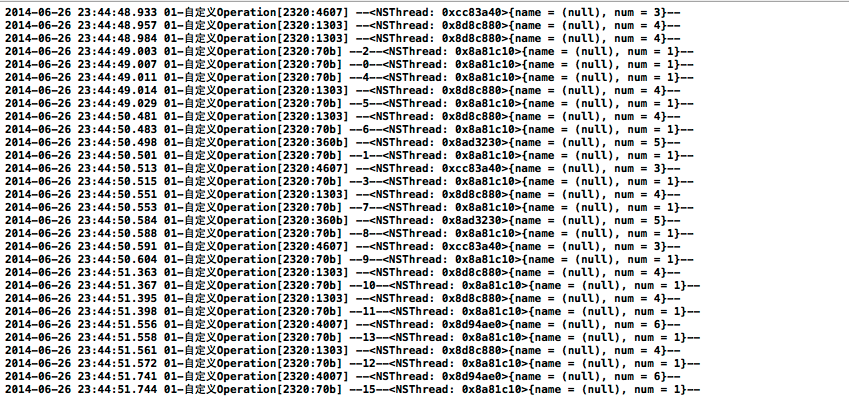
這裡有兩個值得記住的做法:一是只 reload 命中的那一行,而不是整張表;二是先放占位圖再異步替換,避免 cell 出現空白閃爍。真實專案裡,這套邏輯通常會再抽一層網路層,並改用 SDWebImage 這類成熟方案。