
iOS 實作:用 UIPickerView 打造一個可隨機選菜的點菜應用
編輯:iOS 相關教學
UIPickerView 是典型的「滾輪式」選擇器,做點菜、選擇城市、篩選條件都很合適。本文以一個三列聯動的選菜系統為例,把數據源、代理、懶加載、隨機滾動以及一個容易被忽略的點語法陷阱全部走一遍。
一、實現效果
點擊「隨機」按鈕後,三列各自隨機滾動到某一項,下方對應的信息同步刷新。
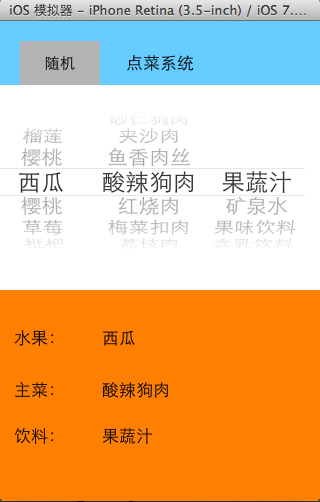
二、實現思路
- PickerView 默認高度為 162,不可修改,布局時要預留空間。
- 要顯示數據必須設置數據源,有兩種方式:讓控制器成為 dataSource 並遵守協議,或使用其他對象承擔該職責。
- 實現數據源的兩個必選方法:返回總列數,以及返回每一列的行數。
- 通過代理方法提供「某列某行顯示什麼文字」,代理通常設置為控制器。
- 用懶加載把所有食物數據讀進來。
- 完成基本展示:列、行、內容。
- 下方信息面板用一个稍大的 view 承載六個 label,三個 label 顯示名稱、三個顯示分類;監聽選中回調(
didSelectRow:inComponent:)拿到列號與行號後刷新對應 label。 - 在 viewDidLoad 中主動調用一次監聽方法,讓初始狀態也有內容。
- 隨機功能:調用
selectRow:inComponent:animated:讓 pickerView 主動滾動到指定行,並用arc4random()生成不越界的隨機數。 - 隨機數要避免與上一次結果重複,否則該列根本不會滾動,用戶會以為按鈕失靈。
- 頭部用一個高度 44 的 view 承載標題與隨機按鈕,按鈕垂直居中。
三、實現代碼
storyboard 的界面結構:
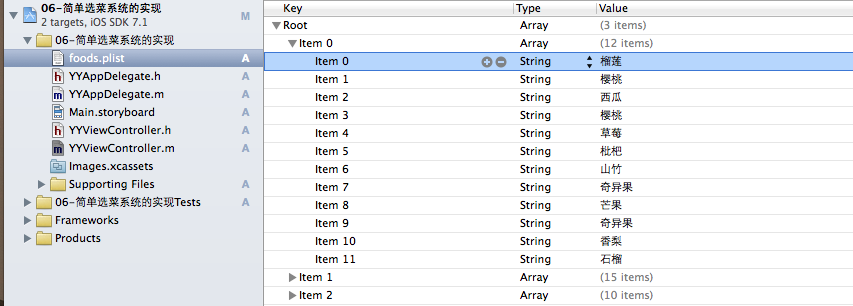
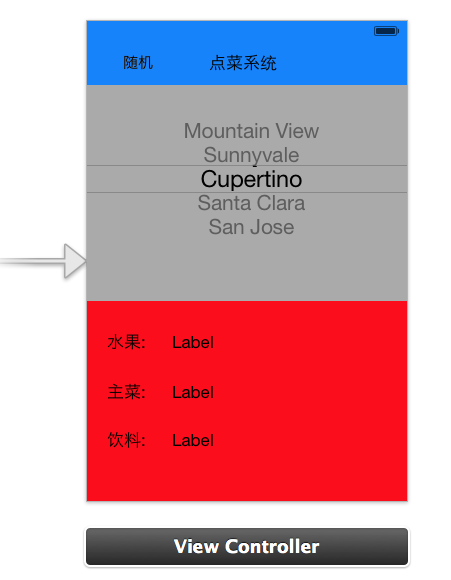
#import "YYViewController.h"

// 同時遵守數據源與代理協議
@interface YYViewController () <UIPickerViewDataSource, UIPickerViewDelegate>

/** 水果 */
@property (strong, nonatomic) IBOutlet UILabel *fruitLab;
/** 主菜 */
@property (strong, nonatomic) IBOutlet UILabel *stapleLab;
/** 飲料 */
@property (strong, nonatomic) IBOutlet UILabel *drinkLab;

/** 保存所有數據 */
@property (nonatomic, strong) NSArray *foods;

@property (weak, nonatomic) IBOutlet UIPickerView *pickerView;

- (IBAction)randomFood:(id)sender;

@end

@implementation YYViewController

- (void)viewDidLoad
{
    [super viewDidLoad];

    // 初始化下方信息面板:主動調用一次選中回調
    // 這裡傳 nil 是因為方法內部並未使用 pickerView 參數
    for (int component = 0; component < self.foods.count; component++)
    {
        [self pickerView:nil didSelectRow:0 inComponent:component];
    }
}

#pragma mark - 懶加載數據

- (NSArray *)foods
{
    if (_foods == nil)
    {
        NSString *fullPath = [[NSBundle mainBundle] pathForResource:@"foods.plist" ofType:nil];
        _foods = [NSArray arrayWithContentsOfFile:fullPath];
    }
    return _foods;
}

#pragma mark - 隨機按鈕點擊事件

- (IBAction)randomFood:(id)sender
{
    for (int component = 0; component < self.foods.count; component++)
    {
        // 當前列的數據總數
        int total = [self.foods[component] count];

        // 生成隨機數
        int randomNumber = arc4random() % total;

        // 取出上一次選中的行
        int oldRow = [self.pickerView selectedRowInComponent:component];

        // 若與上一次相同則重新生成,否則該列不會滾動
        while (oldRow == randomNumber)
        {
            randomNumber = arc4random() % total;
        }

        // 讓 pickerView 滾動到指定行
        [self.pickerView selectRow:randomNumber inComponent:component animated:YES];

        // 手動調用選中回調,讓下方信息同步刷新
        [self pickerView:nil didSelectRow:randomNumber inComponent:component];
    }
}

#pragma mark - 數據源方法

// 一共多少列
- (NSInteger)numberOfComponentsInPickerView:(UIPickerView *)pickerView
{
    return self.foods.count;
}

// 每一列對應多少行
- (NSInteger)pickerView:(UIPickerView *)pickerView numberOfRowsInComponent:(NSInteger)component
{
    NSArray *arrayM = self.foods[component];
    return arrayM.count;
}

// 每一列每一行顯示的內容
- (NSString *)pickerView:(UIPickerView *)pickerView
               titleForRow:(NSInteger)row
            forComponent:(NSInteger)component
{
    NSArray *arrayM = self.foods[component];
    return arrayM[row];
}

#pragma mark - 刷新下方信息

// 只有手指實際滑動選中時才會自動回呼
- (void)pickerView:(UIPickerView *)pickerView
     didSelectRow:(NSInteger)row
      inComponent:(NSInteger)component
{
    NSString *name = self.foods[component][row];

    if (0 == component)
    {
        self.fruitLab.text = name;
    }
    else if (1 == component)
    {
        self.stapleLab.text = name;
    }
    else
    {
        self.drinkLab.text = name;
    }
}

#pragma mark - 隱藏狀態欄

- (BOOL)prefersStatusBarHidden
{
    return YES;
}

@end
四、一個關鍵的點語法陷阱
注意代碼中始終寫的是 [self.foods[component] count],而不是 self.foods[component].count。這不是風格問題,而是必須這樣寫。
原因在於:
[self.foods objectAtIndex:0] == self.foods[0]; // 兩者等價
self.foods[0] 是 objectAtIndexedSubscript: 的語法糖,它的返回類型是 id——一個萬能指針,真實類型要到運行時才能確定。而點語法 .count 需要在編譯期就能確定類型,編譯器看到 id 類型上直接點屬性時無法確定該調用哪個方法,因此會報錯或行為不可預期。改用消息表達式 [obj count] 則完全沒有這個問題,因為 OC 的動態特性允許向 id 發送任意已知選擇器。
這個細節在混用「下標語法 + 點語法」時非常容易踩到,值得記住:下標取出的元素是 id 類型,後續操作請用方括號消息表達式。
五、可以進一步優化的方向
- 把
self.foods[component][row]這種多層下標嵌套改成先取中間變量,可讀性更好。 - 下方三個 label 的賦值邏輯可以用數據驅動替代 if-else 判斷,列數增加時不必改代碼。
- 隨機過程中可以加上短暫的動畫或震動反饋,讓「隨機」這個動作更有儀式感。
- 數據來源改為網絡接口時,注意在數據更新後調用
[self.pickerView reloadAllComponents],並重置已選行。