
iOS 封裝實作:打造可複用的 QR Code 掃描元件
編輯:iOS 相關教學
掃描二維碼效果
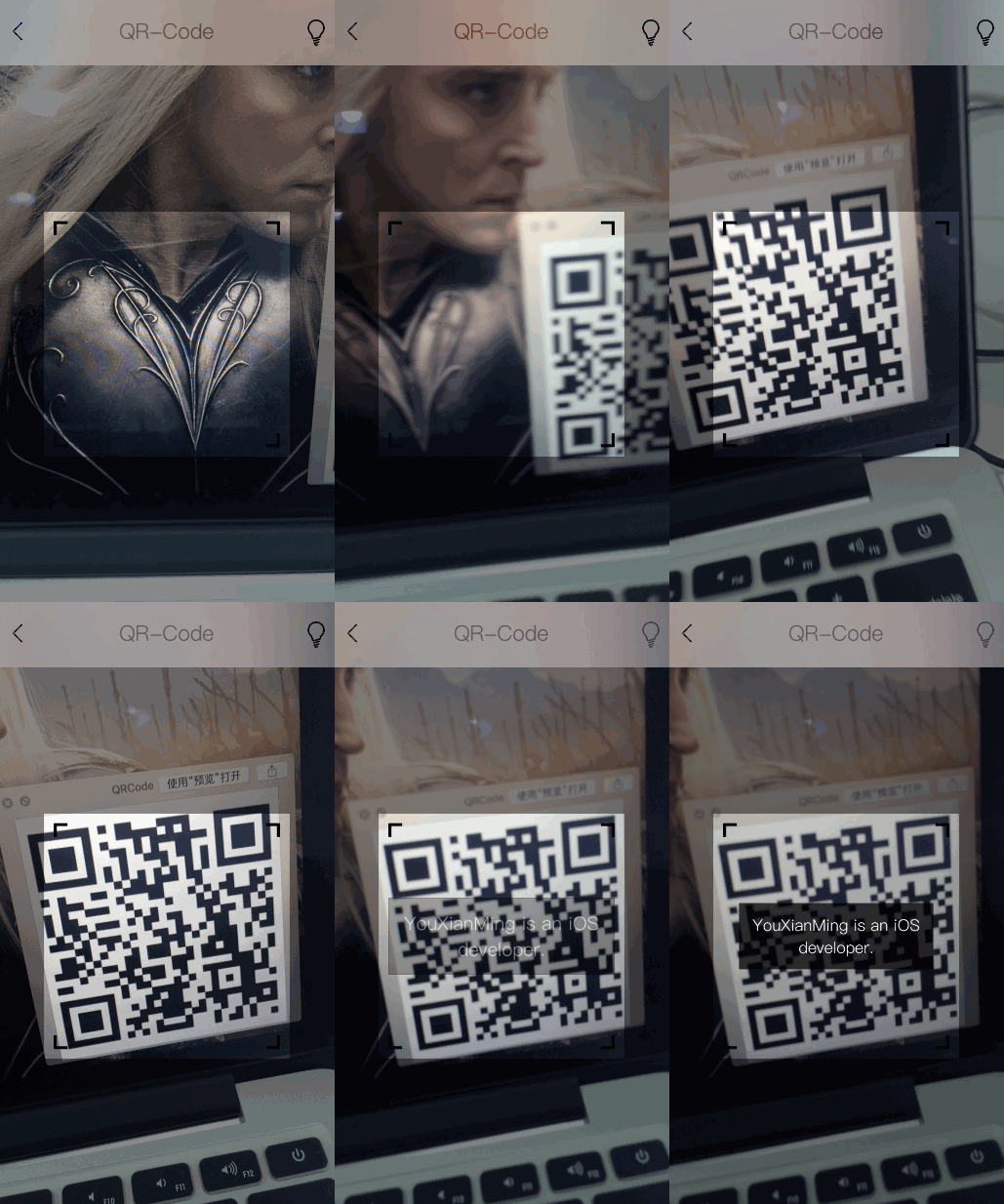
原始碼:https://github.com/YouXianMing/Animations
這個元件的設計要點是:把 AVFoundation 的相機會話、預覽層與 metadata 輸出全部收攏到一個 UIView 子類裡,對外只暴露 start/stop、手電筒開關、感興趣區域與一個可自由佈置自訂 UI 的 contentView,並透過 delegate 回傳掃描結果。這樣在實際專案中只要拉一個 QRCodeView 出來就能用,不必每頁重寫相機邏輯。
// // QRCodeView.h // QRCode // // Created by YouXianMing on 16/7/7. // Copyright © 2016年 XianMing You. All rights reserved. // #import <UIKit/UIKit.h> #import <AVFoundation/AVFoundation.h> @class QRCodeView; @protocol QRCodeViewDelegate <NSObject> @optional /** * 取得 QR 掃描結果 * * @param codeView QRCodeView 實例物件 * @param codeString 掃描到的字串 */ - (void)QRCodeView:(QRCodeView *)codeView codeString:(NSString *)codeString; @end @interface QRCodeView : UIView /** * 代理 */ @property (nonatomic, weak) id <QRCodeViewDelegate> delegate; /** * 燈的狀態,預設關閉 */ @property (nonatomic) AVCaptureTorchMode torchMode; /** * 感興趣區域,若不設定則為全螢幕掃描 */ @property (nonatomic) CGRect interestArea; /** * 用來放自訂控制項的 view,尺寸與當前 view 一致 */ @property (nonatomic, strong) UIView *contentView; /** * 是否正在運行 */ @property (nonatomic, readonly) BOOL isRunning; /** * 開始掃描 * * @return 成功回傳 YES,否則回傳 NO */ - (BOOL)start; /** * 停止掃描 */ - (void)stop; @end
// // QRCodeView.m // QRCode // // Created by YouXianMing on 16/7/7. // Copyright © 2016年 XianMing You. All rights reserved. // #import "QRCodeView.h" @interface QRCodeView () <AVCaptureMetadataOutputObjectsDelegate> @property (nonatomic) BOOL isRunning; @property (nonatomic, strong) UIView *videoView; @property (nonatomic, strong) AVCaptureDeviceInput *deviceInput; @property (nonatomic, strong) AVCaptureDevice *captureDevice; @property (nonatomic, strong) AVCaptureSession *captureSession; @property (nonatomic, strong) AVCaptureVideoPreviewLayer *videoPreviewLayer; @property (nonatomic, strong) AVCaptureMetadataOutput *captureMetadataOutput; @end @implementation QRCodeView - (instancetype)initWithFrame:(CGRect)frame { if (self = [super initWithFrame:frame]) { self.videoView = [[UIView alloc] initWithFrame:self.bounds]; [self addSubview:self.videoView]; self.contentView = [[UIView alloc] initWithFrame:self.bounds]; [self addSubview:self.contentView]; self.captureDevice = [AVCaptureDevice defaultDeviceWithMediaType:AVMediaTypeVideo]; _torchMode = AVCaptureTorchModeOff; [self addNotificationCenter]; } return self; } #pragma mark - NSNotificationCenter related. - (void)addNotificationCenter { [[NSNotificationCenter defaultCenter] addObserver:self selector:@selector(notificationCenterEvent:) name:AVCaptureInputPortFormatDescriptionDidChangeNotification object:nil]; } - (void)removeNotificationCenter { [[NSNotificationCenter defaultCenter] removeObserver:self name:AVCaptureInputPortFormatDescriptionDidChangeNotification object:nil]; } - (void)notificationCenterEvent:(NSNotification *)sender { if (self.interestArea.size.width && self.interestArea.size.height) { self.captureMetadataOutput.rectOfInterest = [self.videoPreviewLayer metadataOutputRectOfInterestForRect:self.interestArea]; } else { self.captureMetadataOutput.rectOfInterest = CGRectMake(0, 0, 1, 1); } } #pragma mark - Start & Stop. - (BOOL)start { // 建立輸入流 BOOL result = NO; NSError *error = nil; self.deviceInput = [AVCaptureDeviceInput deviceInputWithDevice:self.captureDevice error:&error]; if (self.deviceInput == nil) { NSLog(@"%@", error); return result; } // 建立 session self.captureSession = [[AVCaptureSession alloc] init]; // 加入輸入流 [self.captureSession addInput:self.deviceInput]; // 建立輸出流 self.captureMetadataOutput = [[AVCaptureMetadataOutput alloc] init]; // 加入輸出流 [self.captureSession addOutput:self.captureMetadataOutput]; // 建立 queue [self.captureMetadataOutput setMetadataObjectsDelegate:self queue:dispatch_queue_create(nil, nil)]; self.captureMetadataOutput.metadataObjectTypes = @[AVMetadataObjectTypeQRCode]; // 建立輸出圖層 self.videoPreviewLayer = [[AVCaptureVideoPreviewLayer alloc] initWithSession:self.captureSession]; self.videoPreviewLayer.videoGravity = AVLayerVideoGravityResizeAspectFill; self.videoPreviewLayer.frame = self.contentView.bounds; [self.videoView.layer addSublayer:self.videoPreviewLayer]; // 開始 [self.captureSession startRunning]; self.isRunning = YES; result = YES; return result; } - (void)stop { [self.captureSession stopRunning]; self.isRunning = NO; self.captureSession = nil; } #pragma mark - AVCaptureMetadataOutputObjectsDelegate - (void)captureOutput:(AVCaptureOutput *)captureOutput didOutputMetadataObjects:(NSArray *)metadataObjects fromConnection:(AVCaptureConnection *)connection { if (metadataObjects.count > 0) { AVMetadataMachineReadableCodeObject *metadata = metadataObjects.firstObject; NSString *result = nil; if ([metadata.type isEqualToString:AVMetadataObjectTypeQRCode]) { result = metadata.stringValue; if (_delegate && [_delegate respondsToSelector:@selector(QRCodeView:codeString:)]) { [_delegate QRCodeView:self codeString:result]; } } } } #pragma mark - Setter & Getter. - (void)setTorchMode:(AVCaptureTorchMode)torchMode { _torchMode = torchMode; if (_deviceInput && [self.captureDevice hasTorch]) { [self.captureDevice lockForConfiguration:nil]; [self.captureDevice setTorchMode:torchMode]; [self.captureDevice unlockForConfiguration]; } } #pragma mark - System method. - (void)dealloc { [self stop]; [self removeNotificationCenter]; } @end
幾個值得學的細節:一是用 metadataOutputRectOfInterestForRect: 做座標系換算,讓外部傳入的感興趣區域不必關心 layer 與 metadata 座標的差異;二是 rectOfInterest 的更新掛在 AVCaptureInputPortFormatDescriptionDidChangeNotification 上,鏡頭切換或解析度變化時不會失效;三是 dealloc 中務必 stop 並移除通知,否則容易出現相機佔用與野指標問題。