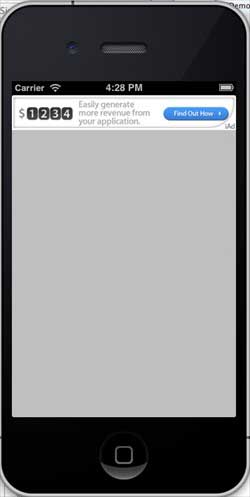
iOS 整合 iAd 廣告完整教學
編輯:iOS 入門介紹
iOS iAd 整合
簡介
iAd 是蘋果推出的行動廣告平台,開發者可以透過它在應用中獲得廣告收益。
實作步驟
1. 建立一個簡單的 View-based Application。
2. 選擇專案檔,進入 Targets,加入 iAd.framework。
3. 更新 ViewController.h:
#import <UIKit/UIKit.h> #import <iAd/iAd.h> @interface ViewController : UIViewController<ADBannerViewDelegate> { ADBannerView *bannerView; } @end
4. 更新 ViewController.m:
#import "ViewController.h" @interface ViewController () @end @implementation ViewController - (void)viewDidLoad { [super viewDidLoad]; bannerView = [[ADBannerView alloc]initWithFrame: CGRectMake(0, 0, 320, 50)]; // Optional to set background color to clear color [bannerView setBackgroundColor:[UIColor clearColor]]; [self.view addSubview: bannerView]; } - (void)didReceiveMemoryWarning { [super didReceiveMemoryWarning]; // Dispose of any resources that can be recreated. } #pragma mark - AdViewDelegates -(void)bannerView:(ADBannerView *)banner didFailToReceiveAdWithError:(NSError *)error{ NSLog(@"Error loading"); } -(void)bannerViewDidLoadAd:(ADBannerView *)banner{ NSLog(@"Ad loaded"); } -(void)bannerViewWillLoadAd:(ADBannerView *)banner{ NSLog(@"Ad will load"); } -(void)bannerViewActionDidFinish:(ADBannerView *)banner{ NSLog(@"Ad did finish"); } @end
上述四個 delegate 方法分別對應廣告載入失敗、載入完成、即將載入與使用者操作結束等狀態,實務上通常會搭配隱藏或顯示版面元素,避免廣告未載入時留下空白。
輸出結果
執行程式後: