
iOS GameKit 開發教學:Game Center 與排行榜
編輯:iOS 入門介紹
iOS GameKit
簡介
GameKit 是 iOS SDK 中相當實用的框架,核心功能有三:
- Game Center 遊戲社群平台
- P2P 裝置對等通訊
- In-Game Voice 遊戲內語音
實作步驟
1. 在 iTunes Connect 中確保擁有一個唯一的 App ID,後續更新 Bundle ID、在 Xcode 進行程式碼簽章與套用 Provisioning Profile 時都會用到。
2. 建立新應用程式並更新應用資訊。
3. 開啟你申請的 App,點擊 Manage Game Center,進入後選擇 Enable Game Center 啟用服務,接著設定自己的 Leaderboard 與 Achievements。
4. 接下來進入程式碼與使用者介面的實作。
5. 建立一個 Single View Application,並填入 Bundle Identifier。
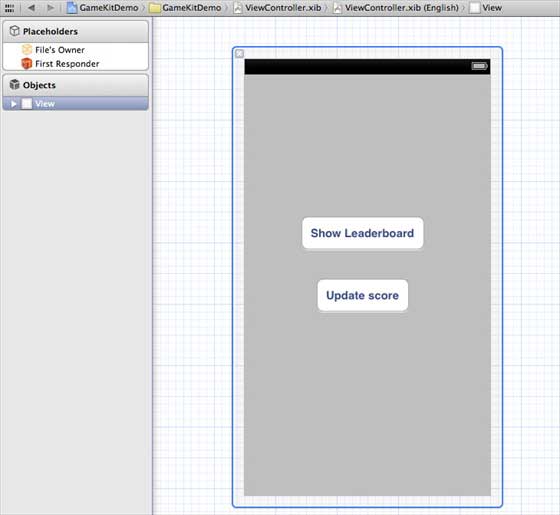
6. 更新 ViewController.xib:
7. 選擇專案檔,進入 Targets,加入 GameKit.framework。
8. 為已加入的按鈕建立 IBActions。
9. 更新 ViewController.h:
#import <UIKit/UIKit.h> #import <GameKit/GameKit.h> @interface ViewController : UIViewController <GKLeaderboardViewControllerDelegate> -(IBAction)updateScore:(id)sender; -(IBAction)showLeaderBoard:(id)sender; @end
10. 更新 ViewController.m:
#import "ViewController.h" @interface ViewController () @end @implementation ViewController - (void)viewDidLoad { [super viewDidLoad]; if([GKLocalPlayer localPlayer].authenticated == NO) { [[GKLocalPlayer localPlayer] authenticateWithCompletionHandler:^(NSError *error) { NSLog(@"Error%@",error); }]; } } - (void)didReceiveMemoryWarning { [super didReceiveMemoryWarning]; // Dispose of any resources that can be recreated. } - (void) updateScore: (int64_t) score forLeaderboardID: (NSString*) category { GKScore *scoreObj = [[GKScore alloc] initWithCategory:category]; scoreObj.value = score; scoreObj.context = 0; [scoreObj reportScoreWithCompletionHandler:^(NSError *error) { // Completion code can be added here UIAlertView *alert = [[UIAlertView alloc] initWithTitle:nil message:@"Score Updated Succesfully" delegate:self cancelButtonTitle:@"Ok" otherButtonTitles: nil]; [alert show]; }]; } -(IBAction)updateScore:(id)sender{ [self updateScore:200 forLeaderboardID:@"tutorialsPoint"]; } -(IBAction)showLeaderBoard:(id)sender{ GKLeaderboardViewController *leaderboardViewController = [[GKLeaderboardViewController alloc] init]; leaderboardViewController.leaderboardDelegate = self; [self presentModalViewController: leaderboardViewController animated:YES]; } #pragma mark - Gamekit delegates - (void)leaderboardViewControllerDidFinish: (GKLeaderboardViewController *)viewController{ [self dismissModalViewControllerAnimated:YES]; } @end
輸出結果
執行程式後:
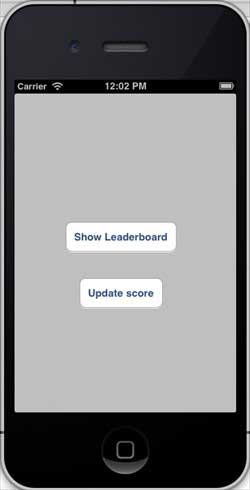
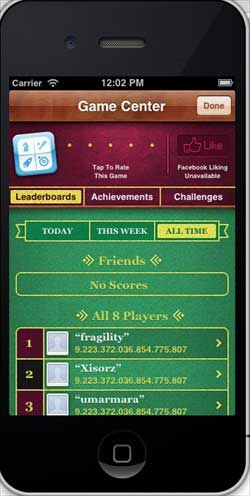
點擊顯示排行榜:
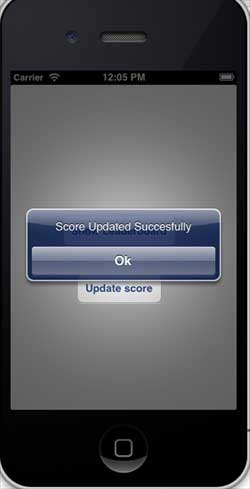
點擊更新分數後,分數會被回報至排行榜,並跳出提示:
- 上一篇文章: iOS 故事板(Storyboards)使用教學
- 下一篇文章: iOS 整合 iAd 廣告完整教學