
iOS 整合 Twitter 與 Facebook 分享功能
編輯:iOS 入門介紹
iOS - Twitter 與 Facebook 整合
簡介
Twitter 自 iOS 5.0 起內建於系統,Facebook 則在 iOS 6.0 完成整合。本文說明如何運用蘋果提供的類別,在這兩個版本中部署社群分享功能。
實作步驟
1. 建立一個簡單的 View-based Application。
2. 選擇專案檔,進入「Targets」,在 Frameworks 中新增 Social.framework 與 Accounts.framework。
3. 加入兩個按鈕 facebookPost 與 twitterPost,並為它們建立 IBActions。
4. 更新 ViewController.h 如下:
#import <Social/Social.h> #import <Accounts/Accounts.h> #import <UIKit/UIKit.h> @interface ViewController : UIViewController -(IBAction)twitterPost:(id)sender; -(IBAction)facebookPost:(id)sender; @end
5. 更新 ViewController.m:
#import "ViewController.h" @interface ViewController () @end @implementation ViewController - (void)viewDidLoad { [super viewDidLoad]; } - (void)didReceiveMemoryWarning { [super didReceiveMemoryWarning]; // Dispose of any resources that can be recreated. } -(IBAction)facebookPost:(id)sender{ SLComposeViewController *controller = [SLComposeViewController composeViewControllerForServiceType:SLServiceTypeFacebook]; SLComposeViewControllerCompletionHandler myBlock = ^(SLComposeViewControllerResult result){ if (result == SLComposeViewControllerResultCancelled) { NSLog(@"Cancelled"); } else { NSLog(@"Done"); } [controller dismissViewControllerAnimated:YES completion:nil]; }; controller.completionHandler =myBlock; //Adding the Text to the facebook post value from iOS [controller setInitialText:@"My test post"]; //Adding the URL to the facebook post value from iOS [controller addURL:[NSURL URLWithString:@"https://www.test.com"]]; //Adding the Text to the facebook post value from iOS [self presentViewController:controller animated:YES completion:nil]; } -(IBAction)twitterPost:(id)sender{ SLComposeViewController *tweetSheet = [SLComposeViewController composeViewControllerForServiceType:SLServiceTypeTwitter]; [tweetSheet setInitialText:@"My test tweet"]; [self presentModalViewController:tweetSheet animated:YES]; } @end
輸出結果
執行程式並點擊 facebookPost 後,會得到以下畫面:

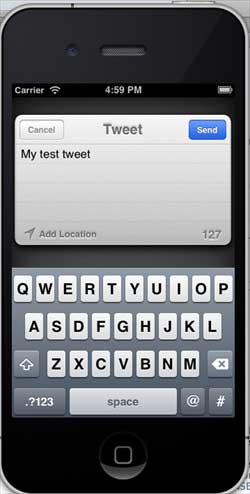
點擊 twitterPost 時則顯示:
- 上一篇文章: iOS 記憶體管理機制與實務指南
- 下一篇文章: iOS 自動布局(Auto Layout)實作教學