
iOS 自訂視圖實作:不依賴 XIB 的純程式碼繪圖方案
編輯:iOS 相關資訊
前言
先前談過用 XIB 檔案組裝自訂視圖,這次換一條路:完全不用 XIB,直接以 Objective-C 程式碼繼承 UIView 並重載 drawRect: 來繪製內容。這種做法在需要動態圖形、圓角遮罩或大量重複元件時反而更靈活。
專案結構
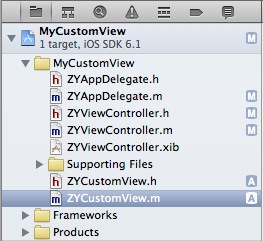
目錄中不建立 XIB 檔案,改以純 .h/.m 的 Objective-C 類別取代。
自訂視圖的繪圖邏輯
- (void)drawRect:(CGRect)rect
{
    CGRect bounds = [self bounds];
    CGPoint center;
    center.x = bounds.origin.x + bounds.size.width  / 2.0;
    center.y = bounds.origin.y + bounds.size.height / 2.0;

    // 建立可變路徑
    CGMutablePathRef path = CGPathCreateMutable();

    // 定義矩形範圍
    CGRect rectangle = CGRectMake(center.x - 100, center.y - 150, 200.0f, 300.0f);
    CGPathAddRect(path, NULL, rectangle);

    // 取得目前的繪圖上下文
    CGContextRef currentContext = UIGraphicsGetCurrentContext();
    CGContextAddPath(currentContext, path);

    // 設定填色與描邊色
    [[UIColor colorWithRed:0.20f green:0.60f blue:0.80f alpha:1.0f] setFill];
    [[UIColor brownColor] setStroke];

    CGContextSetLineWidth(currentContext, 5.0f);

    // 一次同時填色與描邊
    CGContextDrawPath(currentContext, kCGPathFillStroke);

    CGPathRelease(path);   // 用完務必釋放

    // 接著畫文字
    NSString *text = @"我是 Developer_Zhang";
    UIFont *font = [UIFont boldSystemFontOfSize:20];

    CGRect textRect;
    textRect.size = [text sizeWithFont:font];
    textRect.origin.x = center.x - textRect.size.width  / 2.0;
    textRect.origin.y = center.y - textRect.size.height / 2.0;

    [[UIColor redColor] setFill];

    // 加入陰影:位移 (4,3)、模糊半徑 2.0、顏色黑色
    CGSize offset = CGSizeMake(4, 3);
    CGColorRef color = [[UIColor blackColor] CGColor];
    CGContextSetShadowWithColor(currentContext, offset, 2.0, color);

    [text drawInRect:textRect withFont:font];
}
在視圖控制器中使用
- (void)viewDidLoad
{
    [super viewDidLoad];

    // 取得整個 window 的範圍
    CGRect wholeWindow = [[self.view window] bounds];

    // 直接以自訂類別取代預設的 view
    self.view = [[ZYCustomView alloc] initWithFrame:wholeWindow];
    [self.view setBackgroundColor:[UIColor whiteColor]];
}
執行結果
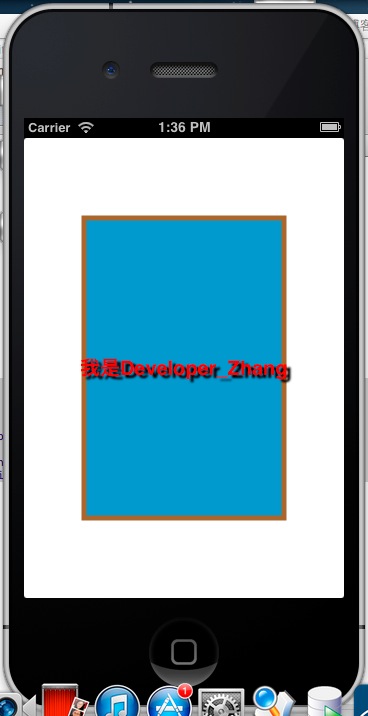
幾個關鍵觀念
drawRect: 是你唯一的繪圖入口,請不要在別的地方呼叫它。當視圖需要重繪時,呼叫 setNeedsDisplay 讓系統在下一個合適的時機安排重繪;setNeedsDisplayInRect: 則可只針對特定區域作畫,效能更好。
Core Graphics 的 C 系列物件(如 CGMutablePathRef)不受 ARC 管理,配置後必須手動釋放,否則會造成記憶體洩漏。若覺得手動管理太繁瑣,可以改用 UIBezierPath,它是 Objective-C 物件,由 ARC 代管:
UIBezierPath *path = [UIBezierPath bezierPathWithRect:rectangle];
[[UIColor brownColor] setStroke];
[path stroke];
另外提醒,範例中的 sizeWithFont: 在 iOS 7 之後已不建議使用,現行做法為 [text boundingRectWithSize:options:attributes:context:] 搭配 NSAttributedStringKey 字典計算尺寸。