
iPhone UI 實作:註冊頁面與 TextField 收起鍵盤的兩種做法
本文以一個註冊頁面為例,說明如何佈置表單、把控件連上程式碼,以及處理 UITextField 最惱人的鍵盤遮擋問題——這裡提供兩種互補的收起鍵盤方式。
一、建立專案與介面
在 Xcode 中新增一個 iOS 專案,命名為 register。表單需要四個輸入框:帳號、密碼、性別、年份;另外放兩個按鈕 Cancel 與 OK。Label 只是顯示文字、不需要取值,因此不必建立 outlet。
ViewController.h
#import <UIKit/UIKit.h>

@interface ViewController : UIViewController

{
    UIButton *cancal;
    UIButton *ok;
    UITextField *textuser;
    UITextField *textpass;
    UITextField *textsex;
    UITextField *textyear;
}

@property (nonatomic, strong) IBOutlet UIButton *cancal;
@property (nonatomic, strong) IBOutlet UIButton *ok;
@property (nonatomic, strong) IBOutlet UITextField *textuser;
@property (nonatomic, strong) IBOutlet UITextField *textpass;
@property (nonatomic, strong) IBOutlet UITextField *textsex;
@property (nonatomic, strong) IBOutlet UITextField *textyear;

@end
ViewController.m
#import "ViewController.h"

@interface ViewController ()
@end

@implementation ViewController

@synthesize cancal;
@synthesize ok;
@synthesize textuser;
@synthesize textpass;
@synthesize textsex;
@synthesize textyear;

- (void)viewDidLoad
{
    [super viewDidLoad];
}

@end
二、佈置 XIB 畫面
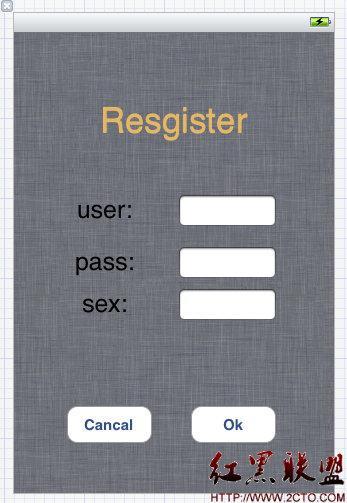
畫面上的元素包含:標題 Label「register」(調整過字級與顏色)、一張背景圖、四個輸入用的 Label(user、pass、sex、year),以及 Cancel 與 OK 兩顆按鈕。完成後記得把各個控件用 Ctrl 拖曳連到對應的 outlet。
三、做法一:按鍵盤的 Return 收起
這是最直覺的方式——輸入完成後按 Return 就收鍵盤。原理是讓 TextField 放棄第一響應者的身分。
先在 header 宣告:
- (IBAction)TextFieldDoneEditing:(id)sender;
在實作檔中完成:
- (void)TextFieldDoneEditing:(id)sender
{
    [sender resignFirstResponder];
}
接著回到 XIB,把四個 TextField 的 Did End On Exit 事件都連到 TextFieldDoneEditing:。這樣按下鍵盤上的 Return,對應的輸入框就會失去焦點、鍵盤隨之收起。
四、做法二:點畫面空白處收起
問題來了:並非所有鍵盤都有 Return 鍵。數字鍵盤、電話鍵盤就沒有,使用者根本按不到。這時需要第二種做法。
在 header 再宣告一個方法:
- (IBAction)BackgroundClick:(id)sender;
實作時把每個 TextField 都放棄第一響應者:
- (void)BackgroundClick:(id)sender
{
    [textuser resignFirstResponder];
    [textpass resignFirstResponder];
    [textsex resignFirstResponder];
    [textyear resignFirstResponder];
}
接著在 XIB 中把每個 TextField 的 Touch Up Inside 連到 BackgroundClick:。這樣輸入完畢後,點一下畫面上的非輸入區就能收起鍵盤。
五、兩種做法的取捨與進階
這兩個方法通常並用:Return 鍵存在時用 Did End On Exit 快速跳下一欄,鍵盤沒有 Return 時則靠點空白處收尾。
如果改成點「整個背景」都能收鍵盤,還有另一條路:把 XIB 中最外層的 view 其 class 從 UIView 改為 UIControl,再把它的 Touch Down 事件連到 BackgroundClick:。這樣點任何非控件區域都會觸發,不必逐一把事件連到每個 TextField 上。
更進一步的做法是實作 UITextFieldDelegate 的 textFieldShouldReturn:,在回呼中判斷目前是哪個輸入框,主動把焦點移到下一欄,做出逐欄填寫的順暢體驗。此外,當鍵盤遮住下半部畫面時,還需要監聽 UIKeyboardWillShowNotification 並上移整個表單,才算完整。
- 上一篇文章: iOS 繪圖入門:在 drawRect: 中繪製文字與取得顏色資訊
- 下一篇文章: iOS 中如何解析並播放 GIF 動畫