
iOS 繪圖入門:在 drawRect: 中繪製文字與取得顏色資訊
一、Cocoa Touch 的繪圖架構
在 Cocoa Touch 中,App 的畫面由「視窗」與「視圖」組成。任何帶 UI 的程式至少有一個視窗(UIWindow 的實例),視窗中則包含一或多個視圖。開發者會往視窗裡添加視圖來構成介面的各個部分——按鈕、文字、圖片、自訂控件——而這些元素的處理與繪製,全部由 UIKit 統籌。
Apple 提供了幾層繪圖與動畫框架,分工如下:
· UIKit:高階框架,讓開發者建立視圖、視窗、按鈕等 UI 元素,並把低層 API 封裝成易用的介面。
· Quartz 2D:iOS 內部實際執行繪圖的引擎,UIKit 底層就是走這條路。
· Core Graphics:提供圖形上下文、載入圖片、繪製圖片等能力的框架。
· Core Animation:顧名思義,負責 iOS 上的動畫。
二、程式碼實作
自訂繪圖的入口是 UIView 子類的 drawRect:。
- (void)drawRect:(CGRect)rect
{
    // 指定字型
    UIFont *helveticaBold = [UIFont fontWithName:@"HelveticaNeue-Bold" size:30.0f];

    // 建立一個洋紅色
    UIColor *magentaColor = [UIColor colorWithRed:0.5f
                                           green:0.0f
                                            blue:0.5f
                                           alpha:1.0f];

    // 把顏色設定到目前的圖形上下文,之後的繪圖都會套用
    [magentaColor set];

    NSString *myString = @"I Learn Really Fast";

    // 在指定的矩形區域內繪製文字
    [myString drawInRect:CGRectMake(100,  /* x */
                                    120,  /* y */
                                    100,  /* width */
                                    200)  /* height */
               withFont:helveticaBold];

    // 取出這個顏色在 Quartz 2D 中的 CGColor 表示(唯讀)
    CGColorRef colorRef = [magentaColor CGColor];

    // 取得顏色元件陣列
    const CGFloat *components = CGColorGetComponents(colorRef);

    // 取得元件數量
    NSUInteger componentsCount = CGColorGetNumberOfComponents(colorRef);

    for (NSUInteger counter = 0; counter < componentsCount; counter++) {
        NSLog(@"Component %lu = %.02f", (unsigned long)counter, components[counter]);
    }
}
三、工程設定
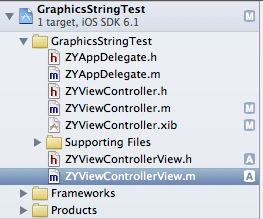
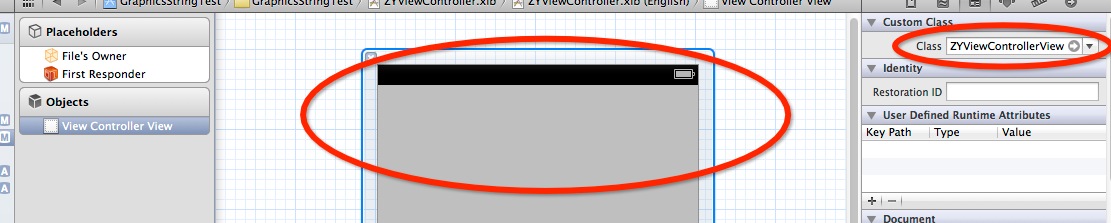
程式寫完還差一步:必須把 XIB 中那個 view 的 class 指向你的自訂 UIView 子類 ZYViewControllerView,否則 drawRect: 不會被呼叫。
四、執行結果
文字會以指定字型與顏色繪製在畫面上:
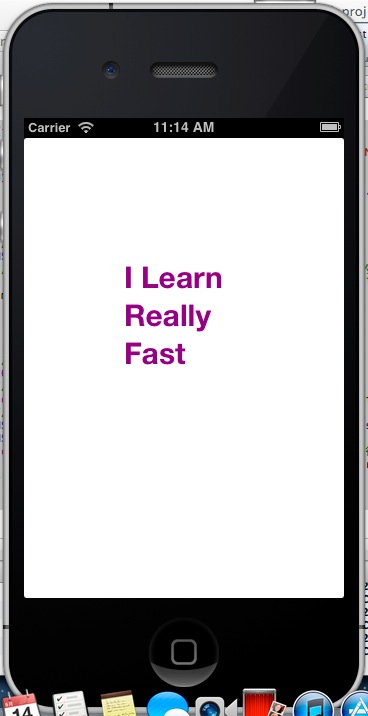
console 則印出該顏色的四個 RGBA 元件值:
2013-05-14 11:14:13.611 GraphicsStringTest[1030:c07] Component 0 = 0.50
2013-05-14 11:14:13.613 GraphicsStringTest[1030:c07] Component 1 = 0.00
2013-05-14 11:14:13.614 GraphicsStringTest[1030:c07] Component 2 = 0.50
2013-05-14 11:14:13.615 GraphicsStringTest[1030:c07] Component 3 = 1.00
四個值分別對應 red、green、blue、alpha,與我們設定的 (0.5, 0.0, 0.5, 1.0) 完全一致。這示範了 UIColor 與 CGColor 之間的轉換——UIKit 的顏色物件底層就是 Core Graphics 的 CGColor,兩者可以互相取用。
五、drawAtPoint: 與 drawInRect: 的選擇
範例中註解掉的 drawAtPoint:withFont: 會從指定座標開始畫,寬度由內容決定,文字過長時會超出邊界;drawInRect:withFont: 則會在指定矩形內換行,適合多行或需要控制寬度的場合。這兩者對應的現代寫法是 NSAttributedString 的 drawWithRect:options:context:,支援段落樣式與行距設定。