
詳解 iOS 中 UIWindow 的使用與運行機制
每個 iOS 程序都至少有一個 UIWindow。用模板創建工程時,Xcode 會自動生成一個 window,並將它設為 keyWindow 後顯示出來。這一切來得過於自然,以至於我們常常忽略了——其實自己也能創建 UIWindow 對象。本文深入剖析 UIWindow 的層級、KeyWindow 機制及其背後的通知流程。
一、UIWindowLevel 窗口層級
UIWindow 有三個主要層級:Normal、StatusBar、Alert。打印它們的值會發現依次為 0、1000、2000,也就是說 Normal 最低、StatusBar 居中、Alert 最高。通常應用的界面處於 Normal 級別,系統頂部狀態欄處於 StatusBar 級別,而 UIActionSheet、UIAlertView 這類用於中斷當前流程、提醒用戶的控件則位於 Alert 級別。
進一步觀察 UIWindow 頭文件會發現一個實例變量 _windowSublevel,這意味著每個層級內部還可以劃分更細的子層級。透過打印可以驗證:系統 UIAlertView 的級別約為 1996,UIActionSheet 約為 2001,確實存在子層級的概念。
UIWindow 在顯示時會依據 UIWindowLevel 排序,Level 越高越靠前(顯示在最上層)。以下示例創建了不同層級的 window:
const UIWindowLevel UIWindowLevelNormal;    // 0
const UIWindowLevel UIWindowLevelStatusBar; // 1000
const UIWindowLevel UIWindowLevelAlert;     // 2000

- (BOOL)application:(UIApplication *)application didFinishLaunchingWithOptions:(NSDictionary *)launchOptions {
    self.window = [[[UIWindow alloc] initWithFrame:[[UIScreen mainScreen] bounds]] autorelease];
    self.window.backgroundColor = [UIColor yellowColor];
    [self.window makeKeyAndVisible];

    UIWindow *normalWindow = [[UIWindow alloc] initWithFrame:[[UIScreen mainScreen] bounds]];
    normalWindow.backgroundColor = [UIColor blueColor];
    normalWindow.windowLevel = UIWindowLevelNormal;
    [normalWindow makeKeyAndVisible];

    UIWindow *alertLevelWindow = [[UIWindow alloc] initWithFrame:/* 自定義 frame */ CGRectZero];
    alertLevelWindow.windowLevel = UIWindowLevelAlert;
    alertLevelWindow.backgroundColor = [UIColor redColor];
    [alertLevelWindow makeKeyAndVisible];

    UIWindow *statusLevelWindow = [[UIWindow alloc] initWithFrame:CGRectMake(0, 50, 320, 20)];
    statusLevelWindow.windowLevel = UIWindowLevelStatusBar;
    statusLevelWindow.backgroundColor = [UIColor blackColor];
    [statusLevelWindow makeKeyAndVisible];

    NSLog(@"Normal: %f, Alert: %f, Status: %f",
          UIWindowLevelNormal, UIWindowLevelAlert, UIWindowLevelStatusBar);
    return YES;
}
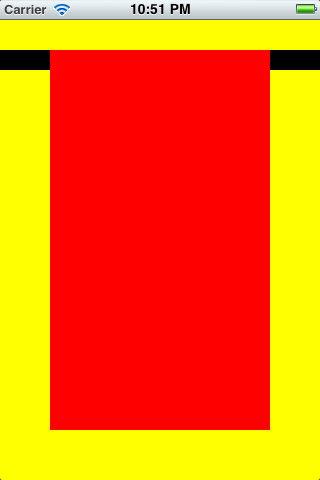
運行結果驗證了兩點重要規律:
- normalWindow 雖然在第一個默認 window 之後調用 makeKeyAndVisible,卻沒有顯示出來。這說明當層級相同時,只有第一個設為 KeyWindow 的會顯示,後續同層級的 window 即使再設為 KeyWindow 也不會顯示。
- statusLevelWindow 在 alertLevelWindow 之後調用 makeKeyAndVisible,仍只顯示在 alertLevelWindow 下方。這說明UIWindow 顯示時只看 Level、無視谁是 KeyWindow,Level 最高者始終顯示在最前面。
二、KeyWindow 機制
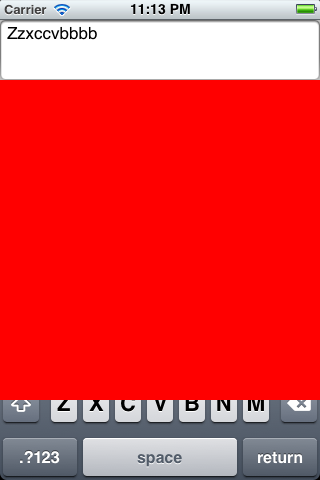
官方文檔對 keyWindow 的解釋是:它被指定用來接收鍵盤及其他非觸摸類事件,且任一時刻只能有一個 window 是 keyWindow。有意思的是,實測發現非 keyWindow 其實也能接收鍵盤輸入——在默認 window 上放置 UITextField,即使另建了一個 alert 級別的 window 並設為 keyWindow,點擊 textField 依然能喚出並使用鍵盤,只是鍵盤可能被遮擋。
UIWindow 提供了四個與窗口變化相關的通知:
UIWindowDidBecomeVisibleNotification
UIWindowDidBecomeHiddenNotification
UIWindowDidBecomeKeyNotification
UIWindowDidResignKeyNotification
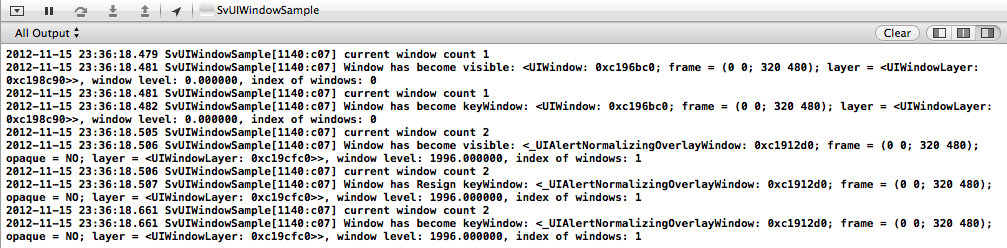
這些通知的 object 均代表當前已顯示(隱藏)或已成為(不再是)keyWindow 的 window 對象。透過註冊這些通知並打印信息,可以觀察到 keyWindow 的變化流程:
- 程序默認的 window 先顯示出來;
- 默認 window 接著成為 keyWindow;
- AlertView 的 window 顯示出來;
- 默認 window 變為非 keyWindow;
- 最終 AlertView 的 window 成為 keyWindow。
通俗地說就是:「要想當老大(keyWindow),得先從小弟(非 keyWindow)開始混起」。此時可打印得知默認 window 的 level 為 0(Normal),AlertView 的 window 約為 1996。
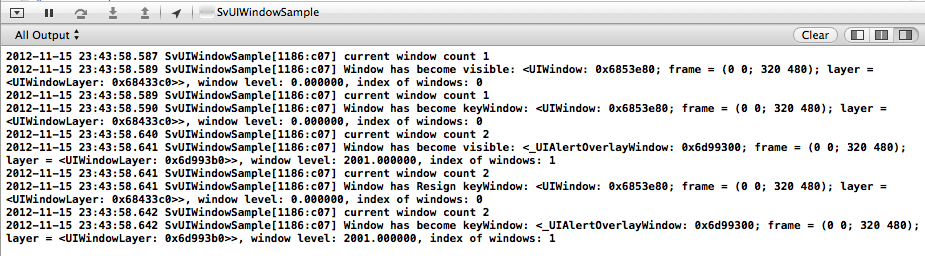
當彈出並隨後關閉 ActionSheet 時,流程則相反:ActionSheet 的 window 先變為非 keyWindow,默認 window 重新成為 keyWindow,最後 ActionSheet 的 window 才隱藏。可概括為:「想隱居幕後可以,但得先交出權力」。此時 ActionSheet 的 window level 約為 2001。

掌握 UIWindow 的層級與 keyWindow 機制,對於實現自定義彈窗、浮層等需求很有幫助——例如把自定義 window 的 windowLevel 設為 Alert 級別,就能實現一個外觀可自由定製的 UIAlertView。
- 上一篇文章: iOS 開發中定位功能與地圖標注的實現示例
- 下一篇文章: iOS 視圖下拉放大與上拉模糊的漸進效果實現