
iOS 螢幕旋轉原理剖析:從加速計到 Transform 矩陣
方向定義:裝置方向與介面方向
加速計是整個 iOS 螢幕旋轉的基礎,唯有依靠它,裝置才能判斷自己目前的姿態。iOS 定義了七種裝置方向:
typedef NS_ENUM(NSInteger, UIDeviceOrientation) {
    UIDeviceOrientationUnknown,
    UIDeviceOrientationPortrait,              // 縱向,home 鍵在下
    UIDeviceOrientationPortraitUpsideDown,    // 縱向倒置,home 鍵在上
    UIDeviceOrientationLandscapeLeft,         // 橫向,home 鍵在右
    UIDeviceOrientationLandscapeRight,        // 橫向,home 鍵在左
    UIDeviceOrientationFaceUp,                // 平放,正面朝上
    UIDeviceOrientationFaceDown               // 平放,正面朝下
};
而介面方向只有四種,並與裝置方向做對應:
typedef NS_ENUM(NSInteger, UIInterfaceOrientation) {
    UIInterfaceOrientationPortrait           = UIDeviceOrientationPortrait,
    UIInterfaceOrientationPortraitUpsideDown = UIDeviceOrientationPortraitUpsideDown,
    UIInterfaceOrientationLandscapeLeft      = UIDeviceOrientationLandscapeRight,
    UIInterfaceOrientationLandscapeRight     = UIDeviceOrientationLandscapeLeft
};
注意 Landscape 左右是交叉對應的,這經常是新手混淆的來源。
一、UIKit 處理旋轉的流程
加速計偵測到方向變化時,會發出 UIDeviceOrientationDidChangeNotification。任何關心方向的 view 都可以註冊這個通知並做出回應。UIKit 內部的處理順序是:
- 設備旋轉,UIKit 接收到旋轉事件。
- UIKit 透過 AppDelegate 通知程式的 window。
- Window 告知它的 rootViewController,由它判定支援的旋轉方向並完成旋轉。
- 若存在被模態呈現的 view controller,系統會改依該被呈現者來判定是否旋轉。
二、UIViewController 的六個階段
當 view controller 收到 window 傳來的方向變化,流程如下:
- 先判斷是否支援旋轉到目標方向。不支援則流程直接結束。
- 呼叫
willRotateToInterfaceOrientation:duration:。若此 VC 是 container view controller,會繼續往下呼叫 content view controller 的對應方法。這裡適合先把某些 view 暫時隱藏。 - window 調整顯示中 view controller 的 bounds,bounds 改變會觸發
viewWillLayoutSubviews。此時self.interfaceOrientation與statusBarOrientation仍是原本的方向。 - 呼叫
willAnimateRotationToInterfaceOrientation:duration:,系統會把此方法內進行的屬性變化都包進 animation block。 - 執行旋轉動畫。
- 呼叫
didRotateFromInterfaceOrientation:,通知旋轉動畫已完成。此時可把第 2 步隱藏的 view 顯示回來。
照著這個節奏處理,就能完整支援螢幕旋轉。
三、注意事項與建議
注意事項:view controller 隱藏時,裝置方向仍可能變化。例如 A 模態呈現全螢幕的 B 之後,A 完全不可見,因此收不到旋轉訊息;這時若旋轉了裝置,關掉 B 之後 A 的方向就會是錯的。解法是在 A 的 viewWillAppear 中更新方向。
實作建議:
- 旋轉過程中暫時停用介面操作的回應,避免互動與動畫互相打架。
- 旋轉前後盡量維持內容的顯示位置不變。
- view 層級複雜時,可在旋轉開始前用截圖替換整個層級,旋轉結束後再換回來,藉此降低排版成本。
- 旋轉後最好強制 reload table view,確保新的 row 能填滿全螢幕。例如照片展示頁縱向顯示一列、橫向顯示網格,重新載入就非常必要。
四、旋轉背後:Transform 矩陣
iTouch、iPhone、iPad 都支援旋轉。要設定 App 支援哪些方向,通常在 Info.plist 中調整 Supported interface orientations;每個 view controller 也各自有方法可進一步收緊:
- (NSUInteger)supportedInterfaceOrientations;   // iOS 6.0 及以後
- (BOOL)shouldAutorotateToInterfaceOrientation:(UIInterfaceOrientation)interfaceOrientation; // iOS 6.0 之前
透過這些方法可以做到更細粒度的控制,例如只允許特定頁面旋轉。
那麼,旋轉時系統到底做了什麼?做個簡單實驗,在旋轉完成後印出 view 資訊:
- (void)didRotateFromInterfaceOrientation:(UIInterfaceOrientation)fromInterfaceOrientation {
    NSLog(@"did rotated to new Orientation, view Information %@", self.view);
}
Transform(變換矩陣)是一個 3×3 的矩陣:
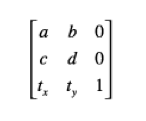
透過它,可以對座標系統做縮放、平移、旋轉以及這些操作的任意組合。矩陣乘法不具交換律,操作順序不同結果就不同。UIView 有 transform 屬性,設定它即可改變該 view 在 superView 中的大小與姿態。
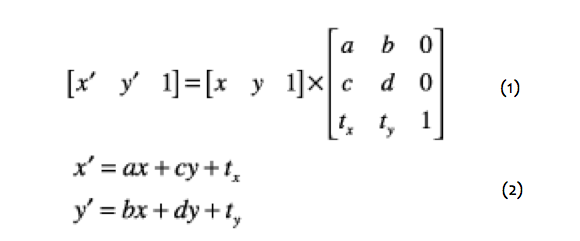
設 (x, y) 為原座標系中的位置,(x', y') 為變換後的位置,展開矩陣公式後可清楚看出關係:
- 當 c、b、tx、ty 皆為 0 時,x' = ax、y' = by,a 與 d 分別是 x、y 方向的放大比例;若 a、d 皆為 1,則 x' = x、y' = y,這就是單位的
CGAffineTransformIdentity。 - 當 a、d 為 1 而 c、b 為 0 時,x' = x + tx、y' = y + ty,tx 與 ty 即為平移量。
- 若不做平移與縮放,一點 (x, y) 旋轉 α° 之後的旋轉矩陣展開為 x' = x·cosα − y·sinα,y' = x·sinα + y·cosα。
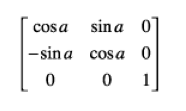
把這些變換綜合起來,就能完成所有二維矩陣運算。
回頭對照前面的輸出:處於 Portrait 時矩陣為單位矩陣,因此沒有特別變化;轉到 UIInterfaceOrientationLandscapeLeft 時,設備順時針轉了 90°(逆時針為正、順時針為負),矩陣應為 (cos−90°, sin−90°, −sin−90°, cos−90°, tx, ty),未做平移故 tx、ty 皆為 0,正好與主控台印出的 transform = [0, -1, 1, 0, 0, 0] 吻合。其他兩個方向的結果也與推導一致。
結論很清楚:螢幕旋轉的本質就是 view 的矩陣變換。設備偵測到旋轉後通知程式,程式再通知 window,window 通知它的 rootViewController,rootViewController 設定自己 view 的 transform,旋轉就此完成。
如果直接把某個 view 加到 window 上,系統不會代勞旋轉,這時就得自行設定 transform。這種情形雖然不常見,但確實存在——例如許多 App 用來做狀態列訊息提示的自建 window,就是靠自行設定 transform 來支援旋轉的。