
Subview 事件響應的隱藏陷阱與 viewWithTag 的查找規則
畫得出來,卻點不到
在 view 的層級結構中,subview 預設可以顯示到父 view 的 frame 之外;把 clipsToBounds 設為 YES 才會裁剪掉超出部分。
但觸控的投遞規則完全不同:不論顯示範圍如何,touch 在各 UIView 之間傳遞時,一律被限制在該 view 的 frame 之內。這裡藏著兩個資訊:
- 在當前 view 的 frame 之外所做的操作,不會傳遞給該 view——這點容易理解。
- 若 touch 發生在當前 view 的 frame 之外,那麼它所有的 subview 也都不會收到這個訊息——這點最容易被忽略,也是許多怪異問題的根源。
最典型的症狀是:畫面上明明看得到一顆按鈕,卻怎麼點都沒反應。實務上要特別注意,程式最底層的 view 必須填滿整個 window 的可用區域,否則就會出現這種「看得到、點不到」的窘境。
示範程式
// 預設情況下 subView 可以超出父 view 的 frame,也就是能顯示到父 View 外面;
// 但訊息的接收範圍受父 View 大小限制,超出父 View 的 subView 收不到訊息
@interface SvTestClipSubviewEvent : UIView
@end

@implementation SvTestClipSubviewEvent

- (id)initWithFrame:(CGRect)frame {
    self = [super initWithFrame:frame];
    if (self) {
        self.backgroundColor = [UIColor redColor];

        // 位置在父 view frame 之外
        UIButton *testOutBtn = [UIButton buttonWithType:UIButtonTypeRoundedRect];
        testOutBtn.frame = CGRectMake(-80, -50, 70, 30);
        [testOutBtn addTarget:self action:@selector(btnAction:)
             forControlEvents:UIControlEventTouchUpInside];
        [testOutBtn setTitle:@"I'm out" forState:UIControlStateNormal];
        [self addSubview:testOutBtn];

        // 位置在父 view frame 之內
        UIButton *testInBtn = [UIButton buttonWithType:UIButtonTypeRoundedRect];
        testInBtn.frame = CGRectMake(20, 30, 70, 30);
        [testInBtn addTarget:self action:@selector(btnAction:)
             forControlEvents:UIControlEventTouchUpInside];
        [testInBtn setTitle:@"I'm in" forState:UIControlStateNormal];
        [self addSubview:testInBtn];
    }
    return self;
}

- (void)btnAction:(UIButton *)sender {
    NSLog(@"HI, you tap button %@", [sender titleForState:UIControlStateNormal]);
}

@end
在 ViewController 中加入測試:
SvTestClipSubviewEvent *testClipSubView =
    [[SvTestClipSubviewEvent alloc] initWithFrame:CGRectMake(100, 100, 150, 150)];
[self.view addSubview:testClipSubView];
[testClipSubView release];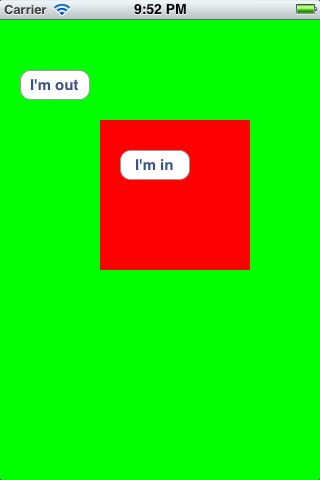
執行後會看到紅色方塊左上角露出一小截按鈕,但那顆按鈕點不動;反之,落在 frame 內的按鈕一切正常。
取得 subview 的兩種方式
- 保留引用:自己持有一個指向 subview 的屬性,需要時直接操作。缺點是要自行管理記憶體,記得在合適的位置釋放。
- 設定 tag,用 viewWithTag 取回:寫法簡潔,也不必自行維護記憶體,是實務上更常見的做法。
viewWithTag 的查找規則
viewWithTag: 採用深度優先遍歷,回傳第一個 tag 相符的 subview。這意味著:當同一個 view 下有多個 subview 的 tag 相同時,你拿到的不一定是心裡想的那一個。
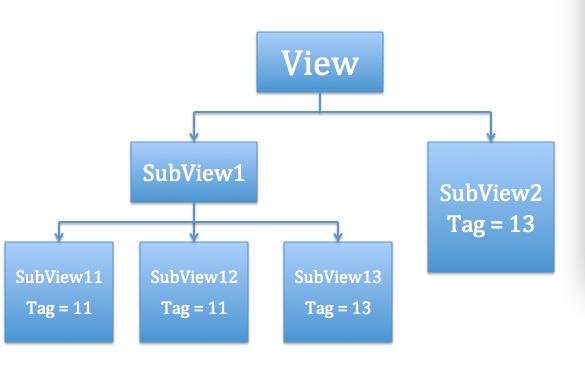
範例中的每個 subview 都是一個設定了文字內容的 UILabel。按鈕回應的邏輯是:先把所有 UILabel 類型的 subview 隱藏(排除 UIButton,因為它需要一直可見),再依指定 tag 取回目標 subview,並將它與其 superView 的 hidden 設為 NO。如此每次點擊都只會顯示符合條件的其中一個。
兩組驗證結果:
同層級的順序:在 subview1 裡放了兩個 tag 都是 11 的子 view(subview11 與 subview12)。執行後點「Show Tag 11」,畫面顯示的是 SubView11 而非 SubView12,而且不論點幾次都是如此。可見同一層級中,查找順序是 index 由小到大,也就是相對下層者優先。
跨層級的深度優先:在 subview1 中加入 tag 為 13 的 subview13,同時直接在根 view 上加入 tag 也是 13 的 subview2。點「Show Tag 13」後顯示的是 SubView13 而非 SubView2。可見搜尋會先深入最下層,遞迴查完其子 view 之後才往上層走。
綜合兩點,viewWithTag: 的基本原則就是:深度優先、下層優先。因此實務上若要依 tag 定位 view,最好確保同一層級內 tag 不重複,否則很容易取回意料之外的物件。