
iOS 快取機制入門:從 NSURLCache 到本地快取的實作思路
一、同一個網址為何要請求很多次
實務上常遇到這種情況:同一個 URL 重複請求,伺服器回傳的內容其實一模一樣。比如伺服器上的一張圖片,無論下載幾次,回傳的位元組完全相同。
這顯然會帶來兩個問題:
- 使用者行動網路流量被白白消耗;
- 程式每次都得等網路往返,回應速度上不去。
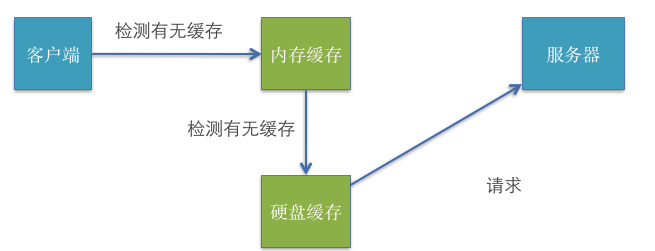
要解決它,最直接的想法就是把資料快取起來。
二、快取的分層運作
為了提升回應速度,可以同時利用記憶體快取與硬碟快取。
第一次發出請求時,記憶體與硬碟裡都沒有資料,只能老老實實走網路。伺服器回傳資料後,我們要做兩件事:
- 立刻使用這份資料(解析、顯示);
- 把資料寫入硬碟(沙盒)。
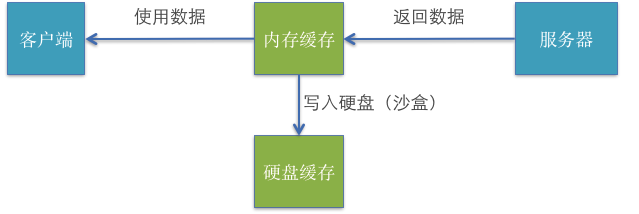
此時記憶體與硬碟都各自存了一份。接下來的請求分兩種情況:
- 程式一直沒關閉:記憶體快取仍在,直接取用最快。
- 程式被重啟過:記憶體隨進程消失,但硬碟快取還在,於是改讀硬碟;讀進來之後,記憶體快取又被填回來了。
三、NSURLCache 的使用要點
GET 通常用來查詢資料,POST 則多半是把大量資料送去伺服器處理、變動性高,因此實務上一般只快取 GET 請求。iOS 提供 NSURLCache 類別來負責這件事:iOS 5 之前只支援記憶體快取,從 iOS 5 開始記憶體與硬碟快取都支援。
它的原理是「一個 NSURLRequest 對應一個 NSCachedURLResponse」,並把快取內容存進資料庫。常見用法如下:
// 取得全域快取物件,無須手動建立
NSURLCache *cache = [NSURLCache sharedURLCache];

// 設定記憶體快取上限(位元組,預設 512KB)
[cache setMemoryCapacity:1024 * 1024];

// 設定硬碟快取上限(位元組,預設 10M)
[cache setDiskCapacity:20 * 1024 * 1024];

// 硬碟快取位置:沙盒/Library/Caches

// 取出某個請求的快取
NSCachedURLResponse *resp = [cache cachedResponseForRequest:request];

// 清除單一請求的快取 / 清除全部快取
[cache removeCachedResponseForRequest:request];
[cache removeAllCachedResponses];
要為 GET 請求開啟快取,只需設定快取政策
NSMutableURLRequest *request = [NSMutableURLRequest requestWithURL:url];
request.cachePolicy = NSURLRequestReturnCacheDataElseLoad;
政策一設定,系統就會自動透過 NSURLCache 處理後續的快取與讀取。
NSURLRequest 的七種快取政策(實際可用的只有四種)
NSURLRequestUseProtocolCachePolicy:預設值,行為取決於協定。NSURLRequestReloadIgnoringLocalCacheData:忽略本地快取,重新請求。NSURLRequestReloadIgnoringCacheData:等同上一項。NSURLRequestReturnCacheDataElseLoad:有快取就用快取,沒有才發請求。NSURLRequestReturnCacheDataDontLoad:有快取就用,沒有就當作請求失敗,適合離線模式。NSURLRequestReloadIgnoringLocalAndRemoteCacheData與NSURLRequestReloadRevalidatingCacheData:未實作。
快取的取捨
要不要快取,取決於資料特性:
- 頻繁變動(股票、開獎號碼):千萬別快取。
- 幾乎不變:果斷快取。
- 偶爾更新:可以定期切換快取政策,或週期性清空。
另外提醒:快取只會越積越大,記得安排定期清理,否則反而拖累體驗。
四、本地快取的兩種常見做法
為了省流量並改善離線體驗,愈來愈多 App 導入本地快取。整體來說有兩條路:自己動手實作,或借用 ASIHTTPRequest 的 ASIDownloadCache。
做法一:自行處理,把資料寫進沙盒
最簡單的版本,是把伺服器第一次回傳的結果存起來,斷網時再從本地讀回。
+ (void)saveCache:(int)type andID:(int)_id andString:(NSString *)str {
    NSUserDefaults *setting = [NSUserDefaults standardUserDefaults];
    NSString *key = [NSString stringWithFormat:@"detail-%d-%d", type, _id];
    [setting setObject:str forKey:key];
    [setting synchronize];
}

+ (NSString *)getCache:(int)type andID:(int)_id {
    NSUserDefaults *settings = [NSUserDefaults standardUserDefaults];
    NSString *key = [NSString stringWithFormat:@"detail-%d-%d", type, _id];
    return [settings objectForKey:key];
}
讀取前先以 type 與 id 組出 key,判斷本地有沒有對應資料;若存在,就直接還原成模型陣列並刷新列表:
NSString *value = [Tool getCache:5 andID:self.QiuTime];
if (value) {
    NSDictionary *backdict = [value JSONValue];
    NSArray *array = [NSArray arrayWithArray:[backdict objectForKey:@"items"]];
    for (NSDictionary *qiushi in array) {
        QiuShi *qs = [[[QiuShi alloc] initWithDictionary:qiushi] autorelease];
        [self.list addObject:qs];
    }
    [self.tableView reloadData];
}
做法二:使用 ASIDownloadCache
先在 AppDelegate 宣告一個全域的 ASIDownloadCache,並在啟動時指定存放路徑與預設政策:
ASIDownloadCache *cache = [[ASIDownloadCache alloc] init];
self.myCache = cache;
[cache release];

NSArray *paths = NSSearchPathForDirectoriesInDomains(NSDocumentDirectory, NSUserDomainMask, YES);
NSString *documentDirectory = [paths objectAtIndex:0];
[self.myCache setStoragePath:[documentDirectory stringByAppendingPathComponent:@"resource"]];
[self.myCache setDefaultCachePolicy:ASIOnlyLoadIfNotCachedCachePolicy];
記得在 dealloc 中釋放。接著在送出請求處掛上這個快取物件:
ASIHTTPRequest *request = [ASIHTTPRequest requestWithURL:url];
AppDelegate *appDelegate = [[UIApplication sharedApplication] delegate];
[request setDownloadCache:appDelegate.myCache];
[request setCacheStoragePolicy:ASICachePermanentlyCacheStoragePolicy];
request.delegate = self;
[request startAsynchronous];
清理時,只要針對特定政策呼叫清除即可,適合放在 App 的設定頁面讓使用者手動觸發:
AppDelegate *appDelegate = [[UIApplication sharedApplication] delegate];
[appDelegate.myCache clearCachedResponsesForStoragePolicy:ASICachePermanentlyCacheStoragePolicy];
換成別的政策參數,就能清除對應政策下的快取資料。