
iOS 網路資料解析之 JSON:NSJSONSerialization 用法與序列化限制
前言
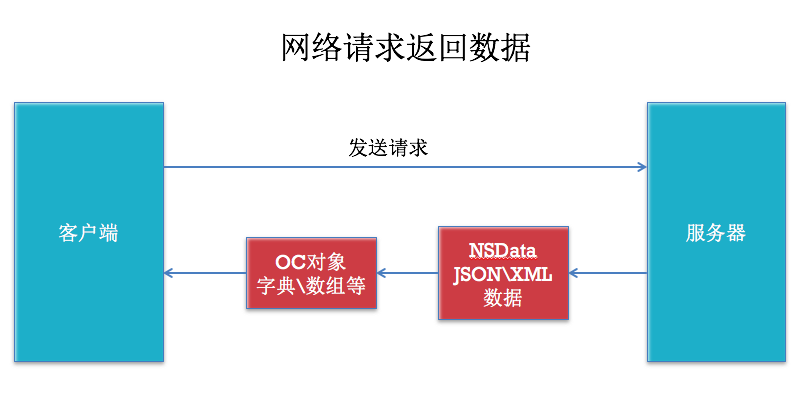
向伺服器發請求之後,回傳給用戶端的資料格式通常是 JSON 或 XML(檔案下載除外)。本篇先談 JSON。
關於 JSON
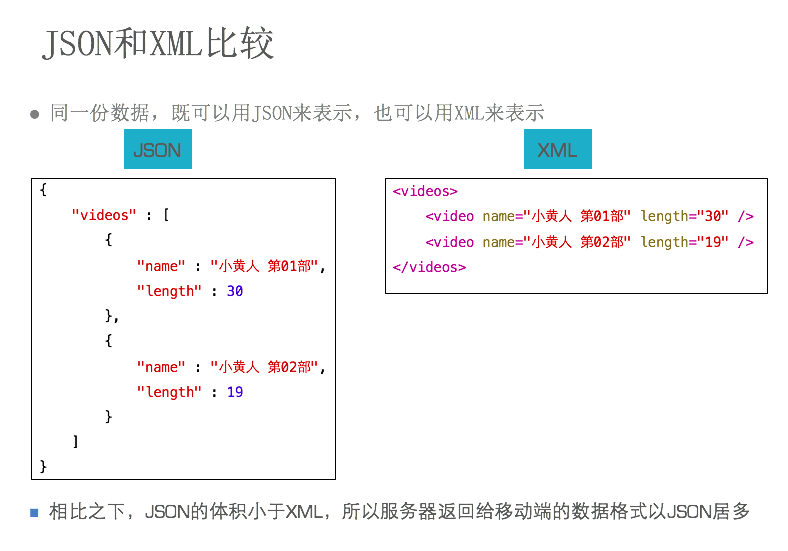
JSON 是一種輕量級的資料交換格式,長相與 Objective-C 的字典、陣列極為相似:
{"name":"jack","age":10}
幾個格式上的注意點:標準 JSON 的 key 必須使用雙引號(這點與某些語言的寬鬆寫法不同),字串值也必須用雙引號包裹。
JSON 與 Objective-C 型別的對應關係如下:
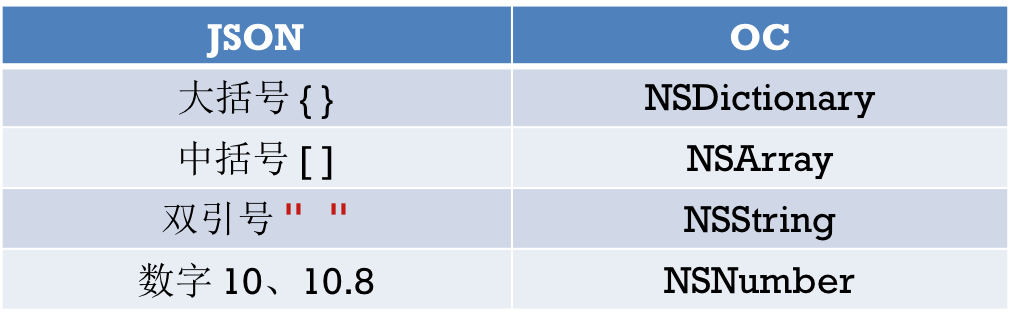
其中 null 會對應到 OC 的 NSNull 型別,這點在解析時要特別小心,直接當成 nil 處理會引發例外。
反序列化:JSON → OC 物件
iOS 上的 JSON 解析方案不少,但論效能,蘋果原生的 NSJSONSerialization 是最好的選擇,沒有必要再引入第三方庫。
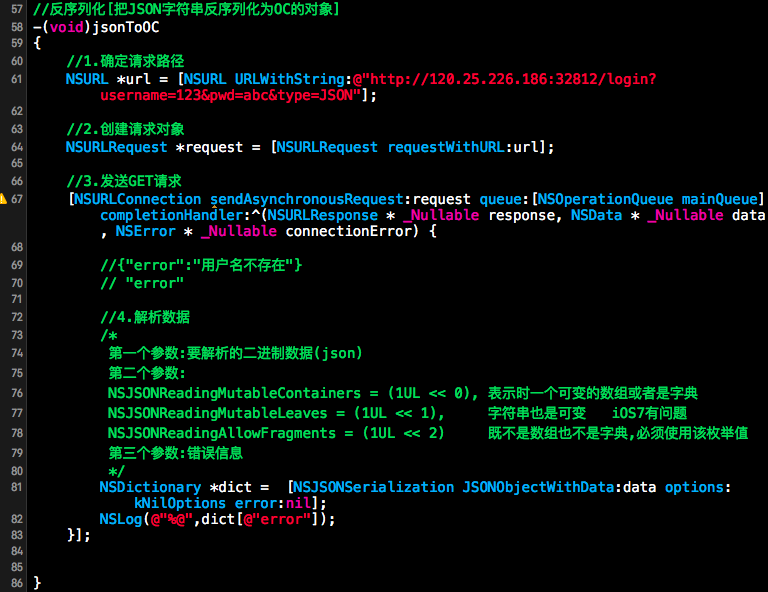
基本呼叫形式如下,第二個參數是解析選項,一般傳 NSJSONReadingAllowFragments:
NSArray *array = [NSJSONSerialization JSONObjectWithData:data
                                               options:NSJSONReadingAllowFragments
                                                 error:nil];
序列化:OC 物件 → JSON
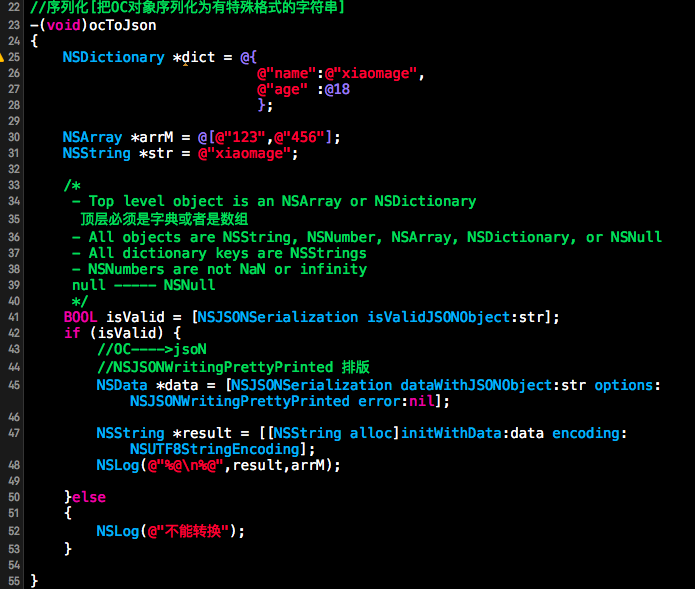
這裡有個常被忽略的細節:字典的 value 不能傳 nil,但可以傳 [NSNull null]。
更重要的是,並非所有型別都能轉成 JSON。蘋果官方規定,只有以下型別可以:
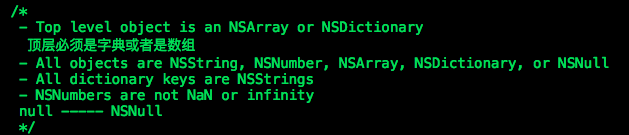
也就是 NSNumber、NSString、NSArray、NSDictionary 這幾類,且陣列與字典中的元素必須同屬這些型別,同時 key 必須是 NSString。自訂的 model 物件要先轉成字典才能序列化。
完整範例:列表頁異步載入 JSON 與圖片
#import "MainViewController.h"
#import "Video.h"

#define kBaseURL @"https://192.168.3.252/~apple"

@interface MainViewController ()
@property (strong, nonatomic) NSArray *dataList;
@property (weak, nonatomic) UITableView *tableView;
@end

@implementation MainViewController

#pragma mark 建立視圖
- (void)loadView {
    self.view = [[UIView alloc] initWithFrame:[UIScreen mainScreen].applicationFrame];

    CGRect frame = self.view.bounds;
    UITableView *tableView = [[UITableView alloc] initWithFrame:
        CGRectMake(0, 0, frame.size.width, frame.size.height - 44)
                                                       style:UITableViewStylePlain];
    [tableView setDataSource:self];
    [tableView setDelegate:self];
    [tableView setRowHeight:80];
    [self.view addSubview:tableView];
    self.tableView = tableView;

    UIToolbar *toolBar = [[UIToolbar alloc] initWithFrame:
        CGRectMake(0, tableView.bounds.size.height, 320, 44)];
    [self.view addSubview:toolBar];

    UIBarButtonItem *item1 = [[UIBarButtonItem alloc] initWithTitle:@"load json"
                                                             style:UIBarButtonItemStyleDone
                                                            target:self action:@selector(loadJson)];
    UIBarButtonItem *item2 = [[UIBarButtonItem alloc] initWithTitle:@"load xml"
                                                             style:UIBarButtonItemStyleDone
                                                            target:self action:@selector(loadXML)];
    UIBarButtonItem *space = [[UIBarButtonItem alloc] initWithBarButtonSystemItem:
        UIBarButtonSystemItemFlexibleSpace target:nil action:nil];
    [toolBar setItems:@[space, item1, space, item2, space]];
}

#pragma mark - UITableView 資料來源
- (NSInteger)tableView:(UITableView *)tableView numberOfRowsInSection:(NSInteger)section {
    return self.dataList.count;
}

- (UITableViewCell *)tableView:(UITableView *)tableView cellForRowAtIndexPath:(NSIndexPath *)indexPath {
    static NSString *ID = @"MyCell";
    UITableViewCell *cell = [tableView dequeueReusableCellWithIdentifier:ID];
    if (cell == nil) {
        cell = [[UITableViewCell alloc] initWithStyle:UITableViewCellStyleSubtitle
                                     reuseIdentifier:ID];
    }

    Video *v = self.dataList[indexPath.row];
    cell.textLabel.text = v.name;
    cell.detailTextLabel.text = v.teacher;

    // 先放佔位圖,再異步載入真圖
    if (v.cacheImage == nil) {
        [cell.imageView setImage:[UIImage imageNamed:@"user_default.png"]];
        [self loadImageAsyncWithIndexPath:indexPath];
    } else {
        [cell.imageView setImage:v.cacheImage];
    }
    return cell;
}

#pragma mark 異步載入網路圖片
// 注意:切勿使用 dataWithContentsOfURL: 這類同步方法載入網路圖片,
// 它會阻塞呼叫執行緒,且無法設定逾時時間。
// 另外,由於 cell 會被重用,不能直接把 imageView 傳進異步方法,
// 否則快速滾動時會出現圖片錯位。正確作法是傳入 indexPath,完成後刷新該列。
- (void)loadImageAsyncWithIndexPath:(NSIndexPath *)indexPath {
    Video *v = self.dataList[indexPath.row];
    NSString *imagePath = [NSString stringWithFormat:@"%@%@", kBaseURL, v.imageURL];
    NSURL *imageUrl = [NSURL URLWithString:imagePath];

    NSURLRequest *request = [NSURLRequest requestWithURL:imageUrl];
    [NSURLConnection sendAsynchronousRequest:request
                                       queue:[NSOperationQueue mainQueue]
                           completionHandler:^(NSURLResponse *response, NSData *data, NSError *error) {
        v.cacheImage = [UIImage imageWithData:data];
        [self.tableView reloadRowsAtIndexPaths:@[indexPath]
                             withRowAnimation:UITableViewRowAnimationLeft];
    }];
}

#pragma mark 處理 JSON 資料
- (void)handlerJSONData:(NSData *)data {
    NSArray *array = [NSJSONSerialization JSONObjectWithData:data
                                                   options:NSJSONReadingAllowFragments
                                                     error:nil];
    NSLog(@"%@", array);

    // 反序列化的結果可順手存進沙盒,供離線快取使用
    NSArray *docs = NSSearchPathForDirectoriesInDomains(NSDocumentDirectory, NSUserDomainMask, YES);
    NSString *path = [docs[0] stringByAppendingPathComponent:@"json.plist"];
    [array writeToFile:path atomically:YES];

    NSMutableArray *arrayM = [NSMutableArray array];
    for (NSDictionary *dict in array) {
        Video *video = [[Video alloc] init];
        [video setValuesForKeysWithDictionary:dict];   // KVC 快速賦值
        [arrayM addObject:video];
    }
    self.dataList = arrayM;
    [self.tableView reloadData];
}

#pragma mark 載入 JSON
- (void)loadJson {
    NSString *str = @"https://www.baidu.com?format=json";

    NSURL *url = [NSURL URLWithString:str];
    NSURLRequest *request = [NSURLRequest requestWithURL:url
                                           cachePolicy:NSURLRequestUseProtocolCachePolicy
                                       timeoutInterval:2.0f];

    // 注意:這裡刻意示範同步請求,實務上請改用異步,並務必設定 timeoutInterval
    NSError *error = nil;
    NSURLResponse *response = nil;
    NSData *data = [NSURLConnection sendSynchronousRequest:request
                                        returningResponse:&response
                                                    error:&error];

    if (data != nil) {
        // 除錯用;處理網路資料時不需將 NSData 轉成 NSString
        NSString *result = [[NSString alloc] initWithData:data encoding:NSUTF8StringEncoding];
        NSLog(@"%@", result);
        [self handlerJSONData:data];
    } else if (error == nil) {
        NSLog(@"空資料");
    } else {
        NSLog(@"%@", error.localizedDescription);
    }
}

#pragma mark 載入 XML
- (void)loadXML {
    NSLog(@"load xml");
}

@end
這個範例有兩處值得留意。第一是 快取策略:把 model 的 cacheImage 寫在 Video 物件上,讓圖片隨資料一起被記憶,避免每次滾動都重新下載。第二是 重用陷阱:UITableViewCell 會被反覆重用,因此異步回呼中只能引用 indexPath 而非 cell 或 imageView,否則快速滑動時會出現「圖片跑到隔壁列」的經典 bug。
此外,KVC 的 setValuesForKeysWithDictionary: 雖然方便,但要求 model 的屬性名稱與 JSON 的 key 完全一致。實務上後端欄位常是 snake_case,這時改用 MJExtension 之類的映射工具會省下大量手工作業。