
iOS 模擬電子書首頁:打造書架布局效果
編輯:iOS 開發綜合
本文將示範如何實作一個類似電子書首頁的書架布局頁面,用來展示圖書或小說清單。以下範例以 iPhone 6 模擬器為基準,尚未針對其他螢幕尺寸做適配,僅作為一個純程式碼實現的簡易 demo。
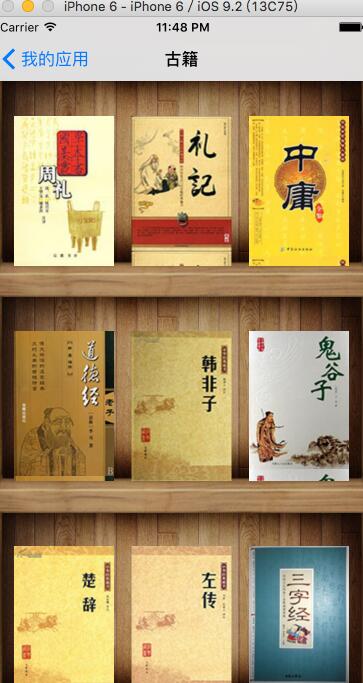
整體實現採用 UICollectionView 搭配 UICollectionViewFlowLayout。
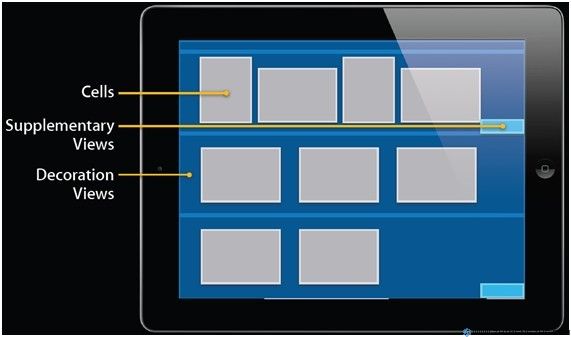
一、實現 layout 的 DecorationView
 // FWBookShelfDecarationViewCollectionReusableView.h
#import <UIKit/UIKit.h>
extern NSInteger const kDecorationViewHeight;
@interface FWBookShelfDecarationView : UICollectionReusableView
@end
 // FWBookShelfDecarationViewCollectionReusableView.m
#import "FWBookShelfDecarationView.h"
NSInteger const kDecorationViewHeight = 216;
@implementation FWBookShelfDecarationView
- (instancetype)initWithFrame:(CGRect)frame {
 if (self = [super initWithFrame:frame]) {
 UIImageView *img = [[UIImageView alloc] initWithFrame:CGRectMake(0, 0, screenSize.width, kDecorationViewHeight)];
 img.image = [UIImage imageNamed:@"boolshelf.png"];
 [self addSubview:img];
 }
 return self;
}
@end
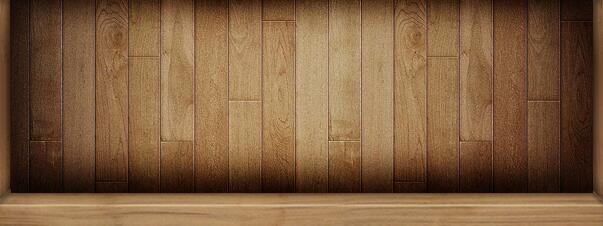
FWBookShelfDecarationView 這個類別非常簡單,只定義了裝飾 view 的背景圖片,也就是書架的底圖。
二、導入可重新排序的第三方 layout
在實際專案中,你可能會遇到需要在一個集合視圖中把某個項目拖曳到另一個位置的情況,此時就需要對視圖中的元素重新排序。這裡推薦一個好用的第三方類別 LXReorderableCollectionViewFlowLayout。
 // LXReorderableCollectionViewFlowLayout.h
#import <UIKit/UIKit.h>
@interface LXReorderableCollectionViewFlowLayout : UICollectionViewFlowLayout <UIGestureRecognizerDelegate>
@property (assign, nonatomic) CGFloat scrollingSpeed;
@property (assign, nonatomic) UIEdgeInsets scrollingTriggerEdgeInsets;
@property (strong, nonatomic, readonly) UILongPressGestureRecognizer *longPressGestureRecognizer;
@property (strong, nonatomic, readonly) UIPanGestureRecognizer *panGestureRecognizer;
@end
@protocol LXReorderableCollectionViewDataSource <UICollectionViewDataSource>
@optional
- (void)collectionView:(UICollectionView *)collectionView itemAtIndexPath:(NSIndexPath *)fromIndexPath willMoveToIndexPath:(NSIndexPath *)toIndexPath;
- (void)collectionView:(UICollectionView *)collectionView itemAtIndexPath:(NSIndexPath *)fromIndexPath didMoveToIndexPath:(NSIndexPath *)toIndexPath;
- (BOOL)collectionView:(UICollectionView *)collectionView canMoveItemAtIndexPath:(NSIndexPath *)indexPath;
- (BOOL)collectionView:(UICollectionView *)collectionView itemAtIndexPath:(NSIndexPath *)fromIndexPath canMoveToIndexPath:(NSIndexPath *)toIndexPath;
@end
@protocol LXReorderableCollectionViewDelegateFlowLayout <UICollectionViewDelegateFlowLayout>
@optional
- (void)collectionView:(UICollectionView *)collectionView layout:(UICollectionViewLayout *)collectionViewLayout willBeginDraggingItemAtIndexPath:(NSIndexPath *)indexPath;
- (void)collectionView:(UICollectionView *)collectionView layout:(UICollectionViewLayout *)collectionViewLayout didBeginDraggingItemAtIndexPath:(NSIndexPath *)indexPath;
- (void)collectionView:(UICollectionView *)collectionView layout:(UICollectionViewLayout *)collectionViewLayout willEndDraggingItemAtIndexPath:(NSIndexPath *)indexPath;
- (void)collectionView:(UICollectionView *)collectionView layout:(UICollectionViewLayout *)collectionViewLayout didEndDraggingItemAtIndexPath:(NSIndexPath *)indexPath;
@end
由於 .m 檔的實作內容相當龐長(主要處理長按手勢、拖曳時的滾動與重新排序邏輯),這裡僅列出介面宣告,實際使用時請直接引用完整的第三方原始碼。
三、實現自訂的 layout
首先讓自訂的 layout 繼承 LXReorderableCollectionViewFlowLayout,如此一來它就具備了重新排序的能力。
 // FWBookshelfCollectionViewLayout.h
#import "LXReorderableCollectionViewFlowLayout.h"
extern NSString * const FWBookshelfCollectionViewLayoutDecorationViewKind;
@interface FWBookshelfCollectionViewLayout : LXReorderableCollectionViewFlowLayout
@end
 // FWBookshelfCollectionViewLayout.m
#import "FWBookshelfCollectionViewLayout.h"
#import "FWBookShelfDecarationView.h"
NSString * const FWBookshelfCollectionViewLayoutDecorationViewKind = @"FWBookshelfCollectionViewLayoutDecorationViewKind";
@interface FWBookshelfCollectionViewLayout ()
@property (nonatomic, strong) NSDictionary *bookShelfRectanges;
@property NSInteger countOfRow;
@end
@implementation FWBookshelfCollectionViewLayout
- (void)prepareLayout {
 [super prepareLayout];
 [self registerClass:[FWBookShelfDecarationView class] forDecorationViewOfKind:FWBookshelfCollectionViewLayoutDecorationViewKind];
 NSMutableDictionary *dictionary = [NSMutableDictionary dictionary];
 NSInteger itemCount = [self.collectionView numberOfItemsInSection:0];
 self.countOfRow = ceilf(itemCount / 3.0);
 for (int row = 0; row < self.countOfRow; row++) {
 dictionary[[NSIndexPath indexPathForItem:row inSection:0]] = [NSValue valueWithCGRect:CGRectMake(0, kDecorationViewHeight * row, screenSize.width, kDecorationViewHeight)];
 }
 self.bookShelfRectanges = [NSDictionary dictionaryWithDictionary:dictionary];
}
- (NSArray *)layoutAttributesForElementsInRect:(CGRect)rect {
 NSArray *array = [super layoutAttributesForElementsInRect:rect];
 NSMutableArray *newArray = [array mutableCopy];
 [self.bookShelfRectanges enumerateKeysAndObjectsUsingBlock:^(id key, id shelfRect, BOOL *stop) {
 if (CGRectIntersectsRect([shelfRect CGRectValue], rect)) {
 UICollectionViewLayoutAttributes *shelfAttributes = [self layoutAttributesForDecorationViewOfKind:FWBookshelfCollectionViewLayoutDecorationViewKind atIndexPath:key];
 [newArray addObject:shelfAttributes];
 }
 }];
 for (int i = 0; i < [self.collectionView numberOfItemsInSection:0]; i++) {
 NSIndexPath *indexPath = [NSIndexPath indexPathForItem:i inSection:0];
 [newArray addObject:[self layoutAttributesForItemAtIndexPath:indexPath]];
 }
 return [newArray copy];
}
- (UICollectionViewLayoutAttributes *)layoutAttributesForItemAtIndexPath:(NSIndexPath *)indexPath {
 UICollectionViewLayoutAttributes *attris = [UICollectionViewLayoutAttributes layoutAttributesForCellWithIndexPath:indexPath];
 NSInteger currentRow = indexPath.item / 3;
 CGRect frame = CGRectMake(20 + (indexPath.item % 3) * (kCellWidth + 17.5), 35+ currentRow * (kCellHeight + 65), kCellWidth, kCellHeight);
 attris.frame = frame;
 attris.zIndex = 1;
 return attris;
}
- (UICollectionViewLayoutAttributes *)layoutAttributesForDecorationViewOfKind:(NSString *)decorationViewKind atIndexPath:(NSIndexPath *)indexPath {
 id shelfRect = self.bookShelfRectanges[indexPath];
 if (!shelfRect) return nil;
 UICollectionViewLayoutAttributes *attributes = [UICollectionViewLayoutAttributes layoutAttributesForDecorationViewOfKind:decorationViewKind withIndexPath:indexPath];
 attributes.frame = [shelfRect CGRectValue];
 attributes.zIndex = -1;
 return attributes;
}
- (CGSize)collectionViewContentSize {
 CGSize contentSize = CGSizeMake(self.collectionView.bounds.size.width, self.countOfRow * kDecorationViewHeight + 20);
 return contentSize;
}
@end
四、應用
 // FWAncientPoetryCollectionViewController.m
#import "FWAncientPoetryCollectionViewController.h"
#import "FWBookShelfDecarationView.h"
#import "FWBookshelfCollectionViewLayout.h"
#import "FWBookCategoryViewController.h"
@interface FWAncientPoetryCollectionViewController () <LXReorderableCollectionViewDataSource, LXReorderableCollectionViewDelegateFlowLayout>
@property (nonatomic, strong) NSMutableArray *books;
@end
@implementation FWAncientPoetryCollectionViewController
static NSString * const cellReuseIdentifier = @"Cell";
- (void)viewDidLoad {
 [super viewDidLoad];
 self.title = @"古籍";
 self.collectionView.backgroundColor = [UIColor colorWithPatternImage:[UIImage imageNamed:@"bookShelfBackground.png"]];
 [self.collectionView registerClass:[UICollectionViewCell class] forCellWithReuseIdentifier:cellReuseIdentifier];
 self.books = [[NSMutableArray alloc] initWithArray:[self bookNameOfAllBooks]];
}
- (NSArray *)bookNameOfAllBooks {
 return [[FWDataManager getDataForPoetry] allKeys];
}
#pragma mark <UICollectionViewDataSource>
- (NSInteger)numberOfSectionsInCollectionView:(UICollectionView *)collectionView {
 return 1;
}
- (NSInteger)collectionView:(UICollectionView *)collectionView numberOfItemsInSection:(NSInteger)section {
 return [self.books count];
}
- (UICollectionViewCell *)collectionView:(UICollectionView *)collectionView cellForItemAtIndexPath:(NSIndexPath *)indexPath {
 UICollectionViewCell *cell = [collectionView dequeueReusableCellWithReuseIdentifier:cellReuseIdentifier forIndexPath:indexPath];
 UIImage *image = [UIImage imageNamed:self.books[indexPath.item]];
 cell.backgroundColor = [UIColor colorWithPatternImage:image];
 return cell;
}
- (void)collectionView:(UICollectionView *)collectionView itemAtIndexPath:(NSIndexPath *)fromIndexPath willMoveToIndexPath:(NSIndexPath *)toIndexPath {
 NSString *theBookName = self.books[fromIndexPath.item];
 [self.books removeObjectAtIndex:fromIndexPath.item];
 [self.books insertObject:theBookName atIndex:toIndexPath.item];
}
#pragma mark - UICollectionViewDelegateFlowLayout
- (CGSize)collectionView:(UICollectionView *)collectionView layout:(UICollectionViewLayout *)collectionViewLayout sizeForItemAtIndexPath:(NSIndexPath *)indexPath {
 return CGSizeMake(kCellWidth, kCellHeight);
}
- (void)collectionView:(UICollectionView *)collectionView didSelectItemAtIndexPath:(NSIndexPath *)indexPath {
 FWBookCategoryViewController *vc = [[FWBookCategoryViewController alloc] initWithUrlString:[[FWDataManager getDataForPoetry] objectForKey:self.books[indexPath.item]]];
 [self.navigationController pushViewController:vc animated:YES];
}
- (void)didReceiveMemoryWarning {
 [super didReceiveMemoryWarning];
 [self.books removeAllObjects];
 self.books = nil;
}
@end
以上就是完整的實作內容。透過 UICollectionView、自訂 DecorationView 與可重新排序的 FlowLayout,就能模擬出手機閱讀軟件首頁那樣的書架效果,並支援長按拖曳調整書籍順序,希望對大家的學習有所幫助。