
iOS App 中修改 UILabel 預設字型的兩種方法
在一個相對成熟的專案中,遇到了這樣一個需求:應用需要引入新的字型,並將所有 Label 的預設字型一併更換,但同時,對於一些已特別設定字型的 Label 又不需要更換。乍看之下,這個問題相當棘手。首先,專案規模龐大,逐一設定所有 Label 的 font 工作量驚人,而且在許多動態呈現的畫面中,很可能遺漏某些 Label 而產生 bug;其次,專案中的 Label 來源並不唯一,有用程式碼建立的,也有來自 xib 與 StoryBoard 的,這同樣會耗費大量精力。面對這種情況,我們通常有以下兩種處理方式。
一、普通方法
要在同一個 UILabel 中以不同顏色或不同字型呈現字串,自 iOS 6 之後可以輕鬆實現。官方 API 為我們提供了 UILabel 的 attributedText 屬性,透過 NSAttributedString 與 NSMutableAttributedString 類,就能實作不同顏色與不同字型的混合字串。
實作程式碼:
.h 檔案
@interface ViewController : UIViewController
@property (nonatomic, strong) IBOutlet UILabel *attrLabel;
- (IBAction)next:(id)sender;
@end
.m 檔案,在 viewDidLoad 方法中加入以下程式碼:
self.title = @"For iOS 6 & later";
NSMutableAttributedString *str = [[NSMutableAttributedString alloc] initWithString:@"Using NSAttributed String"];
[str addAttribute:NSForegroundColorAttributeName value:[UIColor blueColor] range:NSMakeRange(0,5)];
[str addAttribute:NSForegroundColorAttributeName value:[UIColor redColor] range:NSMakeRange(6,12)];
[str addAttribute:NSForegroundColorAttributeName value:[UIColor greenColor] range:NSMakeRange(19,6)];
[str addAttribute:NSFontAttributeName value:[UIFont fontWithName:@"Arial-BoldItalicMT" size:30.0] range:NSMakeRange(0, 5)];
[str addAttribute:NSFontAttributeName value:[UIFont fontWithName:@"HelveticaNeue-Bold" size:30.0] range:NSMakeRange(6, 12)];
[str addAttribute:NSFontAttributeName value:[UIFont fontWithName:@"Courier-BoldOblique" size:30.0] range:NSMakeRange(19, 6)];
attrLabel.attributedText = str;
效果圖:
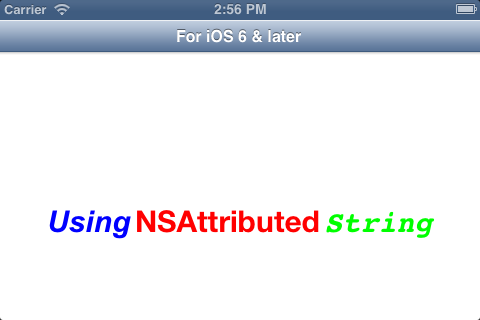
如果想在 iOS 6.0 以前的版本實現這個效果,則需要用到第三方庫 TTTAttributedLabel,同時還要引入 CoreText.framework 框架。
二、運用 runtime 全域修改 UILabel 的預設字型
這是最簡單方便的方法。我們可以利用 runtime 機制替換掉 UILabel 的初始化方法,在其中對 Label 的字型進行預設設定。由於 Label 可以從 initWithFrame、init 與 nib 檔案三個來源初始化,因此我們需要把這三個初始化方法都替換掉。
首先,建立一個 UILabel 的分類:
#import <UIKit/UIKit.h>

@interface UILabel (YHBaseChangeDefaultFont)
@end
在其中加入如下程式碼:
#import "UILabel+YHBaseChangeDefaultFont.h"
#import <objc/runtime.h>

@implementation UILabel (YHBaseChangeDefaultFont)
/**
 * 每個 NSObject 的子類都會呼叫下面這個方法,在這裡將 init 方法進行替換,使用我們的新字型
 * 如果在程式中又特別設定了字型,則特別設定的字型不會受影響,但不要在 Label 的 init 方法中設定字型
 * 從 init、initWithFrame 與 nib 檔案的載入方法都支援更換預設字型
 */
+(void)load{
    //只執行一次這個方法
    static dispatch_once_t onceToken;
    dispatch_once(&onceToken, ^{
        Class class = [self class];
        //替換三個方法
        SEL originalSelector = @selector(init);
        SEL originalSelector2 = @selector(initWithFrame:);
        SEL originalSelector3 = @selector(awakeFromNib);
        SEL swizzledSelector = @selector(YHBaseInit);
        SEL swizzledSelector2 = @selector(YHBaseInitWithFrame:);
        SEL swizzledSelector3 = @selector(YHBaseAwakeFromNib);

        Method originalMethod = class_getInstanceMethod(class, originalSelector);
        Method originalMethod2 = class_getInstanceMethod(class, originalSelector2);
        Method originalMethod3 = class_getInstanceMethod(class, originalSelector3);
        Method swizzledMethod = class_getInstanceMethod(class, swizzledSelector);
        Method swizzledMethod2 = class_getInstanceMethod(class, swizzledSelector2);
        Method swizzledMethod3 = class_getInstanceMethod(class, swizzledSelector3);

        BOOL didAddMethod =
            class_addMethod(class,
                originalSelector,
                method_getImplementation(swizzledMethod),
                method_getTypeEncoding(swizzledMethod));
        BOOL didAddMethod2 =
            class_addMethod(class,
                originalSelector2,
                method_getImplementation(swizzledMethod2),
                method_getTypeEncoding(swizzledMethod2));
        BOOL didAddMethod3 =
            class_addMethod(class,
                originalSelector3,
                method_getImplementation(swizzledMethod3),
                method_getTypeEncoding(swizzledMethod3));

        if (didAddMethod) {
            class_replaceMethod(class,
                    swizzledSelector,
                    method_getImplementation(originalMethod),
                    method_getTypeEncoding(originalMethod));
        } else {
            method_exchangeImplementations(originalMethod, swizzledMethod);
        }
        if (didAddMethod2) {
            class_replaceMethod(class,
                    swizzledSelector2,
                    method_getImplementation(originalMethod2),
                    method_getTypeEncoding(originalMethod2));
        }else {
            method_exchangeImplementations(originalMethod2, swizzledMethod2);
        }
        if (didAddMethod3) {
            class_replaceMethod(class,
                    swizzledSelector3,
                    method_getImplementation(originalMethod3),
                    method_getTypeEncoding(originalMethod3));
        }else {
            method_exchangeImplementations(originalMethod3, swizzledMethod3);
        }
    });
}

/**
 * 在這些方法中將你的字型名稱換進去
 */
- (instancetype)YHBaseInit
{
    id __self = [self YHBaseInit];
    UIFont * font = [UIFont fontWithName:@"這裡輸入你的字型名稱" size:self.font.pointSize];
    if (font) {
        self.font=font;
    }
    return __self;
}

-(instancetype)YHBaseInitWithFrame:(CGRect)rect{
    id __self = [self YHBaseInitWithFrame:rect];
    UIFont * font = [UIFont fontWithName:@"這裡輸入你的字型名稱" size:self.font.pointSize];
    if (font) {
        self.font=font;
    }
    return __self;
}

-(void)YHBaseAwakeFromNib{
    [self YHBaseAwakeFromNib];
    UIFont * font = [UIFont fontWithName:@"這裡輸入你的字型名稱" size:self.font.pointSize];
    if (font) {
        self.font=font;
    }
}

@end
在上面三個方法中寫入我們想要 UILabel 預設顯示的字型。接著分別從 init、initWithFrame 與 nib 檔案建立一個 UILabel 加到視圖上,不做任何其他的操作:
UILabel * label = [[UILabel alloc]initWithFrame:CGRectMake(20, 100, 280, 30)];
label.text = @"你是從initWithFrame來的label";
UILabel * label2 = [[UILabel alloc]init];
label2.frame= CGRectMake(20, 200, 280, 30);
label2.text = @"你是從init來的label";
[self.view addSubview:label];
[self.view addSubview:label2];
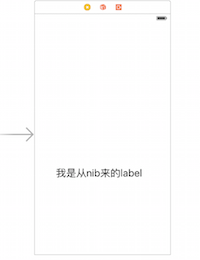
執行結果如下,可以看出字型全部被換掉了:
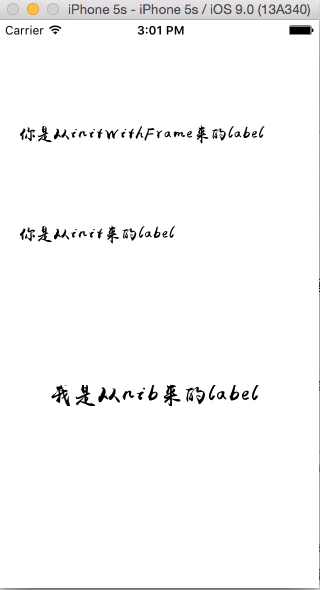
透過這種 Method Swizzling 的做法,只要專案中的 Label 沒有特別指定字型,都會自動套用我們設定的預設字型;而少數已明確指定字型的 Label 則不受影響,正好滿足前面提到的需求。這相較於逐一修改每個 Label,效率與可靠性都高出許多。