
使用 NSURLConnection 處理 HTTP 同步與非同步請求
一、前言
自 iOS 7 之後,NSURLSession 基本取代了 NSURLConnection 成為網路開發的首選。到了 iOS 9,NSURLConnection 相關方法被完全棄用。由於 iOS 系統具有向下相容的特性,即使 NSURLConnection 已被棄用,其方法在開發中仍然可以使用;而且如果需要相容到較低版本的 iOS 系統,有時就必須使用 NSURLConnection 類了。
二、使用 NSURLConnection 進行同步請求
網路請求可分為同步與非同步兩種。同步是指在請求結果返回之前,程式碼會卡在請求處,後續程式碼不會被執行;非同步則是在送出請求之後,一邊在子執行緒中接收返回資料,一邊執行之後的程式碼,待資料接收完畢後,再透過回調的方式通知主執行緒處理。
使用下面的方法進行 NSURLConnection 的同步請求:
NSURL * url = [NSURL URLWithString:@"https://www.baidu.com"];
NSURLRequest * request = [NSURLRequest requestWithURL:url];
NSData * data = [NSURLConnection sendSynchronousRequest:request returningResponse:nil error:nil];
NSLog(@"%@",data);
NSLog(@"繼續執行");
從執行結果可以看出,只有當資料返回結束後,才會執行後面的程式碼。
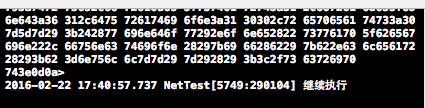
三、使用 NSURLConnection 進行非同步請求
同步方式請求有一個很大的弊端:網路請求時,資料返回往往需要一段時間,不可能瞬間完成,使用同步方式會導致介面卡住,既沒有提示也無法進行任何使用者互動,這很可能讓使用者誤以為程式當機了。
NSURLConnection 類提供了兩種方式進行非同步請求。
1. 使用 block 的方式進行非同步請求
使用下面的程式碼進行 block 方式的非同步請求,block 中會傳入請求到的返回資料與回應資訊等參數:
NSURL * url = [NSURL URLWithString:@"https://www.baidu.com"];
NSURLRequest * request = [NSURLRequest requestWithURL:url];
//其中的 queue 參數決定 block 中的程式碼在哪個佇列中執行
[NSURLConnection sendAsynchronousRequest:request queue:[NSOperationQueue mainQueue] completionHandler:^(NSURLResponse * _Nullable response, NSData * _Nullable data, NSError * _Nullable connectionError) {
    NSLog(@"%@",data);
}];
NSLog(@"繼續執行");
2. 使用代理回調的非同步請求方式
首先遵守協議並宣告一個可變的 NSData 用於接收資料:
@interface ViewController ()<NSURLConnectionDataDelegate>
{
    NSMutableData * _data;
}
@end
使用下面的程式碼進行請求:
_data = [[NSMutableData alloc]init];
NSURL * url = [NSURL URLWithString:@"https://www.baidu.com"];
NSURLRequest * request = [NSURLRequest requestWithURL:url];
[NSURLConnection connectionWithRequest:request delegate:self];
請求送出後,會依序呼叫下面的代理方法,用於監聽請求過程與取得資料:
-(void)connection:(NSURLConnection *)connection didReceiveResponse:(NSURLResponse *)response{
    //開始接收資料
    [_data setLength:0];
}
-(void)connection:(NSURLConnection *)connection didReceiveData:(NSData *)data{
    //正在接收資料
    [_data appendData:data];
}
-(void)connection:(NSURLConnection *)connection didFailWithError:(NSError *)error{
    //接收資料失敗
    NSLog(@"%@",error);
}
-(void)connectionDidFinishLoading:(NSURLConnection *)connection{
    //接收資料完成
    NSLog(@"%@",_data);
}
四、示例
1. 透過 NSURLConnection 進行非同步下載:NSURLConnection 提供了同步與非同步兩種連線方式,非同步連線會建立一個新的執行緒負責下載,而同步連線則會在連線與通訊時阻斷呼叫它的執行緒。
許多開發者認為同步連線一定會堵塞主執行緒,其實這種觀點並不完全正確。同步連線會阻斷呼叫它的那個執行緒——如果你在主執行緒上建立同步連線,主執行緒確實會被阻斷;但如果你不是從主執行緒啟動同步連線,它的表現就會類似非同步連線。因此這種情況並不會堵塞主執行緒。事實上,同步與非同步的主要差別就在於:執行環境會為非同步連線建立一個執行緒,而同步連線則不會。
//asynchronousRequest connection
-(void)fetchAppleHtml{
    NSString *urlString = @"https://www.apple.com";
    NSURL *url = [NSURL URLWithString:urlString];
    NSURLRequest *urlRequest = [NSURLRequest requestWithURL:url cachePolicy:NSURLRequestReloadIgnoringLocalAndRemoteCacheData timeoutInterval:30.0f]; //maximal timeout is 30s

    NSOperationQueue *queue = [[NSOperationQueue alloc] init];
    [NSURLConnection sendAsynchronousRequest:urlRequest queue:queue completionHandler:^(NSURLResponse *response, NSData *data, NSError *connectionError) {
        if ([data length] > 0 && connectionError == nil) {
            NSString *documentsDir = [NSSearchPathForDirectoriesInDomains(NSDocumentDirectory, NSUserDomainMask, YES) objectAtIndex:0];
            NSString *filePath = [documentsDir stringByAppendingPathComponent:@"apple.html"];
            [data writeToFile:filePath atomically:YES];
            NSLog(@"Successfully saved the file to %@",filePath);
            NSString *html = [[NSString alloc] initWithData:data encoding:NSUTF8StringEncoding];
            NSLog(@"HTML = %@",html);
        }else if ([data length] == 0 && connectionError == nil){
            NSLog(@"Nothing was downloaded.");
        }else if (connectionError != nil){
            NSLog(@"Error happened = %@",connectionError);
        }
    }];
}
2. 透過 NSURLConnection 進行同步下載:使用 sendSynchronousRequest:returningResponse:error: 類方法可以進行同步請求。要留意的是,同步連線並不一定會堵塞主執行緒——如果連線建立在主執行緒上,那麼確實會堵塞主執行緒;但若建立在 GCD 的全域並發佇列上,則不會堵塞主執行緒。下面初始化第一個同步連線,嘗試取得 Yahoo! 美國站首頁內容:
//synchronousRequest connection
-(void)fetchYahooData{
    NSLog(@"We are here...");
    NSString *urlString = @"https://www.yahoo.com";
    NSURL *url = [NSURL URLWithString:urlString];
    NSURLRequest *urlRequest = [NSURLRequest requestWithURL:url];
    NSURLResponse *response = nil;
    NSError *error = nil;
    NSLog(@"Firing synchronous url connection...");
    NSData *data = [NSURLConnection sendSynchronousRequest:urlRequest returningResponse:&response error:&error];
    if ([data length] > 0 && error == nil) {
        NSLog(@"%lu bytes of data was returned.",(unsigned long)[data length]);
    }else if([data length] == 0 && error == nil){
        NSLog(@"No data was return.");
    }else if (error != nil){
        NSLog(@"Error happened = %@",error);
    }
    NSLog(@"We are done.");
}

//call sendSynchronousRequest on GCD pool
-(void)fetchYahooData2_GCD{
    NSLog(@"We are here...");
    NSString *urlString = @"https://www.yahoo.com";
    NSLog(@"Firing synchronous url connection...");
    dispatch_queue_t dispatchQueue = dispatch_get_global_queue(DISPATCH_QUEUE_PRIORITY_DEFAULT, 0);
    dispatch_async(dispatchQueue, ^{
        NSURL *url = [NSURL URLWithString:urlString];
        NSURLRequest *urlRequest = [NSURLRequest requestWithURL:url];
        NSURLResponse *response = nil;
        NSError *error = nil;
        NSData *data = [NSURLConnection sendSynchronousRequest:urlRequest returningResponse:&response error:&error];
        if ([data length] > 0 && error == nil) {
            NSLog(@"%lu bytes of data was returned.",(unsigned long)[data length]);
        }else if ([data length] == 0 && error == nil){
            NSLog(@"No data was returned.");
        }else if (error != nil){
            NSLog(@"Error happened = %@",error);
        }
    });
    NSLog(@"We are done.");
}
查看執行輸出結果,分別如下:
在主執行緒上未搭配 GCD 的同步下載:

在主執行緒上搭配 GCD 的同步下載:

可以看到,在主執行緒上呼叫同步下載會阻斷當前執行緒,而搭配 GCD 則不會。
- 上一篇文章: 透過 UIDevice 類取得 iOS 設備資訊的方法詳解
- 下一篇文章: iOS App 中修改 UILabel 預設字型的兩種方法