
iOS 程式碼筆記:實作下拉式選單效果
編輯:iOS 開發綜合
本文為大家分享 iOS 下拉式選單的具體程式碼,供大家參考,具體內容如下。
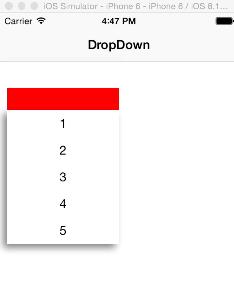
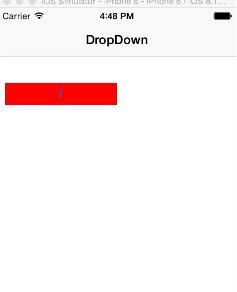
一、效果圖
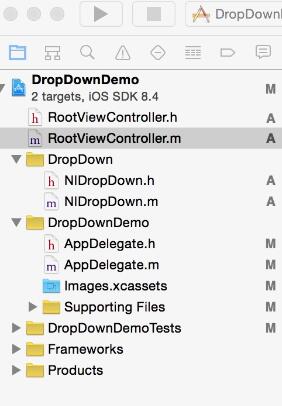
二、工程結構圖
三、程式碼
RootViewController.h
#import <UIKit/UIKit.h>

@interface RootViewController : UIViewController
@end
RootViewController.m
#import "RootViewController.h"
#import "NIDropDown.h"

@interface RootViewController ()
@end

@implementation RootViewController

- (id)initWithNibName:(NSString *)nibNameOrNil bundle:(NSBundle *)nibBundleOrNil {
    self = [super initWithNibName:nibNameOrNil bundle:nibBundleOrNil];
    if (self) {
        // Custom initialization
    }
    return self;
}

- (void)viewDidLoad {
    [super viewDidLoad];
    self.title=@"DropDown";

    UIButton *button=[UIButton buttonWithType:UIButtonTypeRoundedRect];
    button.frame=CGRectMake(10, 100, 150,30);
    button.backgroundColor=[UIColor redColor];
    [button addTarget:self action:@selector(doClickAction:) forControlEvents:UIControlEventTouchUpInside];
    [self.view addSubview:button];
}

-(void)doClickAction:(UIButton *)btn {
    NSArray *dataArray=[NSArray arrayWithObjects:@"1",@"2",@"3",@"4",@"5", nil];
    NIDropDown *dropDown=[[NIDropDown alloc]init];
    [dropDown showDropDown:btn andHeight:[dataArray count]*36 andData:dataArray];
    [self.view addSubview:dropDown];
}
這個範例使用自訂的 NIDropDown 元件來實作下拉式選單。做法是在畫面上先擺一個按鈕作為觸發點,點擊時透過 showDropDown:andHeight:andData: 方法傳入要顯示的選項資料陣列與展開高度,NIDropDown 便會以該按鈕為基準向下展開一張選單。這種元件常用於篩選、排序或快速切換的情境,讓使用者能在有限空間內靈活選擇。
以上就是本文的全部內容,希望對大家的學習有所幫助。
- 上一篇文章: IOS 選擇城市後跳轉 Tabbar 頁面的實作
- 下一篇文章: 透過 UIDevice 類取得 iOS 設備資訊的方法詳解