
動手做一個 iOS 自製推送橫幅:STPushView 完整實作教學
看到這個標題,你可能會先愣一下:推送提示框不是系統自己就跳出來了嗎,為什麼還要自己寫一個?
原因在於產品需求。這陣子手上的專案要接遠端推送,還要做一套客服系統,分成「店鋪客服」與「官方客服」兩個區塊。條件是:只要有新訊息推過來,而且使用者此刻並不在客服頁面上,那麼不管 App 是留在前台還是被切到背景,畫面上方都必須浮出一條看起來跟系統通知無異的橫幅。
系統不會賞臉在前台幫你彈橫幅,所以唯一的路就是自己畫一個。以下是我當時的實作步驟。
一、先做提示框本體 STPushView
頭檔很單純,一個單例加上 show / hide 兩個類別方法,再掛一個資料模型:
#import <UIKit/UIKit.h>
#import "STPushModel.h"

@interface STPushView : UIView

/** 推送資料模型 */
@property (nonatomic, strong) STPushModel *model;

+ (instancetype)shareInstance;
+ (void)show;
+ (void)hide;

@end
實作檔的部分,我用 Masonry 排版:左邊是 App 圖示,右邊塞標題、時間與兩行內文,最下方再放一條小小的手勢提示條,視覺上盡量貼近 iOS 原生橫幅。
#import "STPushView.h"
#import "AppDelegate.h"

@interface STPushView ()
@property (nonatomic, weak) UIImageView *imageV;
@property (nonatomic, weak) UILabel *timLabel;
@property (nonatomic, weak) UILabel *content;
@end

@implementation STPushView

static STPushView *_instance = nil;

+ (instancetype)shareInstance {
    static dispatch_once_t onceToken;
    dispatch_once(&onceToken, ^{
        _instance = [[STPushView alloc] init];
    });
    return _instance;
}

+ (instancetype)allocWithZone:(struct _NSZone *)zone {
    if (!_instance) {
        _instance = [super allocWithZone:zone];
    }
    return _instance;
}

- (instancetype)initWithFrame:(CGRect)frame {
    if (self = [super initWithFrame:frame]) {
        self.backgroundColor = CUSTOMCOLOR(15, 14, 12);
        CGFloat margin = 12;

        UIImageView *imageV = [[UIImageView alloc] init];
        imageV.userInteractionEnabled = NO;
        imageV.image = [UIImage imageNamed:@"logo"];
        imageV.layer.cornerRadius = 5;
        [self addSubview:imageV];
        self.imageV = imageV;
        [imageV mas_makeConstraints:^(MASConstraintMaker *make) {
            make.left.equalTo(self).offset(margin);
            make.centerY.equalTo(self.mas_centerY);
            make.width.mas_equalTo(30);
            make.height.mas_equalTo(30);
        }];

        UILabel *titleLabel = [[UILabel alloc] init];
        titleLabel.textColor = [UIColor whiteColor];
        titleLabel.font = [UIFont boldSystemFontOfSize:12];
        titleLabel.text = @"121店官方客服";
        [self addSubview:titleLabel];
        [titleLabel mas_makeConstraints:^(MASConstraintMaker *make) {
            make.left.equalTo(imageV.mas_right).offset(margin);
            make.top.equalTo(self.mas_top).offset(margin);
            make.height.mas_equalTo(16);
        }];
        [titleLabel sizeToFit];

        UILabel *timLabel = [[UILabel alloc] init];
        timLabel.font = [UIFont systemFontOfSize:12];
        timLabel.userInteractionEnabled = NO;
        timLabel.text = @"剛剛";
        timLabel.textColor = [UIColor lightGrayColor];
        [self addSubview:timLabel];
        self.timLabel = timLabel;
        [timLabel mas_makeConstraints:^(MASConstraintMaker *make) {
            make.left.equalTo(titleLabel.mas_right).offset(margin);
            make.top.equalTo(self.mas_top).offset(margin);
            make.width.mas_lessThanOrEqualTo(40);
            make.height.mas_equalTo(16);
        }];

        UILabel *content = [[UILabel alloc] init];
        content.numberOfLines = 2;
        content.font = [UIFont systemFontOfSize:13];
        content.textColor = [UIColor whiteColor];
        content.userInteractionEnabled = NO;
        [self addSubview:content];
        self.content = content;
        [content mas_makeConstraints:^(MASConstraintMaker *make) {
            make.left.equalTo(imageV.mas_right).offset(margin);
            make.top.equalTo(titleLabel.mas_bottom).offset(-3);
            make.right.equalTo(self.mas_right).offset(-margin);
            make.height.mas_equalTo(35);
        }];

        UIView *toolbar = [[UIView alloc] init];
        toolbar.backgroundColor = CUSTOMCOLOR(121, 101, 81);
        toolbar.layer.cornerRadius = 3;
        [self addSubview:toolbar];
        [toolbar mas_makeConstraints:^(MASConstraintMaker *make) {
            make.width.mas_equalTo(35);
            make.height.mas_equalTo(6);
            make.centerX.equalTo(self.mas_centerX);
            make.bottom.equalTo(self.mas_bottom).offset(-2);
        }];
    }
    return self;
}

- (void)setModel:(STPushModel *)model {
    _model = model;
    self.timLabel.text = @"剛剛";
    self.content.text = model.content;
}

+ (void)show {
    [UIApplication sharedApplication].statusBarHidden = YES;
    STPushView *pushView = [STPushView shareInstance];
    pushView.hidden = NO;
    AppDelegate *app = (AppDelegate *)[UIApplication sharedApplication].delegate;
    [app.window bringSubviewToFront:pushView];
    [UIView animateWithDuration:0.25 animations:^{
        pushView.frame = CGRectMake(0, 0, SCREEN_WIDTH, pushViewHeight);
        dispatch_after(dispatch_time(DISPATCH_TIME_NOW, (int64_t)(5 * NSEC_PER_SEC)), dispatch_get_main_queue(), ^{
            [UIView animateWithDuration:0.25 animations:^{
                pushView.frame = CGRectMake(0, -pushViewHeight, SCREEN_WIDTH, pushViewHeight);
            } completion:^(BOOL finished) {
                [UIApplication sharedApplication].statusBarHidden = NO;
                pushView.hidden = YES;
            }];
        });
    }];
}

+ (void)hide {
    STPushView *pushView = [STPushView shareInstance];
    [UIView animateWithDuration:0.25 animations:^{
        pushView.frame = CGRectMake(0, -pushViewHeight, SCREEN_WIDTH, pushViewHeight);
    } completion:^(BOOL finished) {
        [UIApplication sharedApplication].statusBarHidden = NO;
        pushView.hidden = YES;
    }];
}

@end
二、推送資料模型 STPushModel
服務端推過來的 JSON 大概長這樣:
content = dsfdsnfds;
id      = 5077;
mid     = 1270339;
title   = dsfdsnfds;
url     = "3?_from=push";
urlType = 3;
對應的模型宣告如下。這裡的 STBaseModel 是我自己寫的類別,主要負責字典轉模型,你若沒有這層封裝,直接繼承 NSObject 也可以。
#import <Foundation/Foundation.h>

@interface STPushModel : STBaseModel <NSCoding>

/** id */
@property (copy, nonatomic) NSString *recordId;
/** 標題 */
@property (copy, nonatomic) NSString *title;
/** 跳轉網址 */
@property (copy, nonatomic) NSString *url;
/** 網址類型 */
@property (copy, nonatomic) NSString *urlType;
/** 訊息 mid */
@property (assign, nonatomic) NSString *mid;
/** 推送內容 */
@property (copy, nonatomic) NSString *content;

@end
由於 App 裡有好幾個頁面都要讀同一份推送資料並各自決定業務走向,我替這個模型做了歸檔(NSCoding),把它落地成檔案,跨頁面共用就方便多了。
#import "STPushModel.h"

@implementation STPushModel

/** 存物件到檔案 */
- (void)encodeWithCoder:(NSCoder *)aCoder {
    [aCoder encodeObject:self.recordId forKey:@"recordId"];
    [aCoder encodeObject:self.title    forKey:@"title"];
    [aCoder encodeObject:self.url      forKey:@"url"];
    [aCoder encodeObject:self.urlType  forKey:@"urlType"];
    [aCoder encodeObject:self.mid      forKey:@"mid"];
    [aCoder encodeObject:self.content  forKey:@"content"];
}

/** 從檔案讀回物件 */
- (id)initWithCoder:(NSCoder *)aDecoder {
    // 注意:修飾方法要先呼叫父類的初始化
    if (self = [super init]) {
        self.recordId = [aDecoder decodeObjectForKey:@"recordId"];
        self.title    = [aDecoder decodeObjectForKey:@"title"];
        self.url      = [aDecoder decodeObjectForKey:@"url"];
        self.urlType  = [aDecoder decodeObjectForKey:@"urlType"];
        self.mid      = [aDecoder decodeObjectForKey:@"mid"];
        self.content  = [aDecoder decodeObjectForKey:@"content"];
    }
    return self;
}

@end
三、註冊遠端推送(以個推為例)
前置準備都齊了,接著到 AppDelegate 註冊推送服務並監聽訊息。
- (BOOL)application:(UIApplication *)application didFinishLaunchingWithOptions:(NSDictionary *)launchOptions {
    // 註冊個推服務
    [[GeTuiApilmpl sharedInstance] geTuiRegister];
    return YES;
}
GeTuiApilmpl 是個單例,專門負責 SDK 初始化與各項回調:
#import <Foundation/Foundation.h>
#import "GeTuiSdk.h"

@interface GeTuiApilmpl : NSObject <GeTuiSdkDelegate>
+ (GeTuiApilmpl *)sharedInstance;
- (void)geTuiRegister;
@end
#import "GeTuiApilmpl.h"

@implementation GeTuiApilmpl

+ (GeTuiApilmpl *)sharedInstance {
    static id instance = nil;
    static dispatch_once_t onceToken;
    dispatch_once(&onceToken, ^{
        instance = [[self alloc] init];
    });
    return instance;
}

- (id)init {
    self = [super init];
    if (self) {
        NSString *path = [[NSBundle mainBundle] pathForResource:@"libGexin" ofType:@"plist"];
        NSDictionary *dic = [NSDictionary dictionaryWithContentsOfFile:path];
        [GeTuiSdk startSdkWithAppId:[dic objectForKey:@"GT_APPID"]
                            appKey:[dic objectForKey:@"GT_APPKEY"]
                         appSecret:[dic objectForKey:@"GT_APPSECRET"]
                          delegate:self];
    }
    return self;
}

#pragma mark - GeTuiSdkDelegate

/** SDK 啟動成功,回傳 cid */
- (void)GeTuiSdkDidRegisterClient:(NSString *)clientId {
    NSLog(@">>>[GeTuiSdk RegisterClient]:%@", clientId);
}

/** SDK 錯誤回調 */
- (void)GeTuiSdkDidOccurError:(NSError *)error {
    NSLog(@">>>[GexinSdk error]:%@", [error localizedDescription]);
}

/** 收到透傳訊息的回調 */
- (void)GeTuiSdkDidReceivePayload:(NSString *)payloadId
                         andTaskId:(NSString *)taskId
                     andMessageId:(NSString *)aMsgId
                         andOffLine:(BOOL)offLine
                   fromApplication:(NSString *)appId {
    NSData *payload = [GeTuiSdk retrivePayloadById:payloadId];
    NSString *payloadMsg = nil;
    if (payload) {
        payloadMsg = [[NSString alloc] initWithBytes:payload.bytes
                                              length:payload.length
                                            encoding:NSUTF8StringEncoding];
    }
    NSString *msg = [NSString stringWithFormat:@"payloadId=%@,taskId=%@,messageId:%@,payloadMsg:%@%@",
                     payloadId, taskId, aMsgId, payloadMsg, offLine ? @"<離線訊息>" : @""];
    NSLog(@">>>[GexinSdk ReceivePayload]:%@", msg);

    /** 回報自訂事件:actionId 取 90001-90999,回傳 YES 代表命令已送出,不代表伺服器已收到 */
    [GeTuiSdk sendFeedbackMessage:90001 taskId:taskId msgId:aMsgId];
}

/** 上行訊息結果回饋 */
- (void)GeTuiSdkDidSendMessage:(NSString *)messageId result:(int)result {
    NSLog(@">>>[GexinSdk DidSendMessage]:sendmessage=%@,result=%d", messageId, result);
}

/** SDK 運行狀態通知 */
- (void)GeTuiSDkDidNotifySdkState:(SdkStatus)aStatus {
    NSLog(@">>>[GexinSdk SdkState]:%u", aStatus);
}

/** 設定推送模式回調 */
- (void)GeTuiSdkDidSetPushMode:(BOOL)isModeOff error:(NSError *)error {
    if (error) {
        NSLog(@">>>[GexinSdk SetModeOff Error]:%@", [error localizedDescription]);
        return;
    }
    NSLog(@">>>[GexinSdk SetModeOff]:%@", isModeOff ? @"開啟" : @"關閉");
}

@end
接著在 AppDelegate 裡向系統申請通知權限,這段要同時照顧 iOS 8 之前與之後的差異:
/** 註冊使用者通知 */
- (void)registerUserNotification {
    /* 向系統申請接收推送的權限 */
    // 判斷是否為 iOS 8.0 以上
    if ([[[UIDevice currentDevice] systemVersion] floatValue] >= 8.0
        || [UIApplication instancesRespondToSelector:@selector(registerUserNotificationSettings:)]) {
        // 通知類型:Remote 遠端、Badge 角標、Alert 提示、Sound 聲音
        UIUserNotificationType types = UIUserNotificationTypeAlert
                                       | UIUserNotificationTypeBadge
                                       | UIUserNotificationTypeSound;
        UIUserNotificationSettings *settings = [UIUserNotificationSettings settingsForTypes:types categories:nil];
        [[UIApplication sharedApplication] registerUserNotificationSettings:settings];
        [[UIApplication sharedApplication] registerForRemoteNotifications];
    } else {
        // iOS 8.0 之前的寫法
        UIRemoteNotificationType myTypes = UIRemoteNotificationTypeBadge
                                         | UIRemoteNotificationTypeAlert
                                         | UIRemoteNotificationTypeSound;
        [[UIApplication sharedApplication] registerForRemoteNotificationTypes:myTypes];
    }
}
四、把橫幅掛到 window 上並綁上手勢
rootViewController 設定好之後,呼叫 addPushView 把 STPushView 加進 window,同時掛上點擊與下滑手勢。
#pragma mark - 推送資訊展示

// 加入推送提示框
- (void)addPushView {
    STPushView *topView = [STPushView shareInstance];
    topView.frame = CGRectMake(0, -pushViewHeight, SCREEN_WIDTH, pushViewHeight);
    [_window addSubview:topView];
    self.topView = topView;
    topView.hidden = YES;

    UITapGestureRecognizer *tap = [[UITapGestureRecognizer alloc] initWithTarget:self action:@selector(hudClick)];
    UIPanGestureRecognizer *pan = [[UIPanGestureRecognizer alloc] initWithTarget:self action:@selector(pan:)];
    [topView addGestureRecognizer:tap];
    [tap requireGestureRecognizerToFail:pan];
    topView.gestureRecognizers = @[tap, pan];
}

#pragma mark - addPushView 相關事件

- (void)hudClick {
    self.topView.userInteractionEnabled = NO;
    [UIView animateWithDuration:0.25 animations:^{
        self.topView.frame = CGRectMake(0, -pushViewHeight, SCREEN_WIDTH, pushViewHeight);
    } completion:^(BOOL finished) {
        [UIApplication sharedApplication].statusBarHidden = NO;
        [self hudClickOperation];
    }];
}

- (void)hudClickOperation {
    [self push:nil];
    dispatch_after(dispatch_time(DISPATCH_TIME_NOW, (int64_t)(1 * NSEC_PER_SEC)), dispatch_get_main_queue(), ^{
        self.topView.userInteractionEnabled = YES;
    });
}

- (void)pan:(UIPanGestureRecognizer *)pan {
    CGFloat distance = pushViewHeight - (pushViewHeight - [pan translationInView:self.window].y);
    if (distance < -20) {
        [UIView animateWithDuration:0.25 animations:^{
            self.topView.frame = CGRectMake(0, -pushViewHeight, SCREEN_WIDTH, pushViewHeight);
        } completion:^(BOOL finished) {
            [UIApplication sharedApplication].statusBarHidden = NO;
        }];
    }
}

// 顯示提示框
- (void)displayPushView {
    [STPushView show];
}
push 方法裡的跳轉邏輯,是依照我自己專案的業務規則寫的,你這邊只要換成自己的路由處理即可:
- (void)push:(NSDictionary *)params {
    STPushModel *model = [NSKeyedUnarchiver unarchiveObjectWithFile:KRAPI_PUSH_DATA];

    UITabBarController *tabVC = (UITabBarController *)self.window.rootViewController;
    UINavigationController *nav = (UINavigationController *)tabVC.viewControllers[tabVC.selectedIndex];

    if ([model.urlType isEqualToString:@"h5"]) {
        BOOL isStore  = [[AnalysisUrl sharedInstance] analysisWebUrl:model.url];
        BOOL isGoods  = [[AnalysisUrl sharedInstance] analysisGoodsIdWebUrl:model.url];
        BOOL isRedBag = [[AnalysisUrl sharedInstance] analyredBagWebUrl:model.url];
        BOOL istrace  = [[AnalysisUrl sharedInstance] analytraceWebUr:model.url];
        BOOL islog    = [[AnalysisUrl sharedInstance] analylogWebUrl:model.url];

        if (isStore || isGoods) {
            [[WYPageManager sharedInstance] pushViewControllerWithUrlString:model.url
                                                         currentUrlString:TRAKER_URL_INDEX];
        } else if (isRedBag || istrace || islog) {
            RedBageViewController *regBag = [[RedBageViewController alloc] init];
            NSString *string = nil;
            if (isRedBag) {
                NSArray *array = [model.url componentsSeparatedByString:@"="];
                string = [array lastObject];
                regBag.redType = @"coupon";
            } else if (istrace) {
                string = [StrUtils getIdFromURLString:model.url interceptString:@"/trace/"];
                regBag.redType = @"trace";
            } else {
                string = [StrUtils getIdFromURLString:model.url interceptString:@"/log/"];
                regBag.redType = @"log";
            }
            regBag.messageID = string;
            regBag.hidesBottomBarWhenPushed = YES;
            [nav pushViewController:regBag animated:YES];
            return;
        } else {
            if (![model.url isEqualToString:@""]) {
                UIStoryboard *sb = [UIStoryboard storyboardWithName:@"UserCenter" bundle:nil];
                TotalWebViewController *setVC = [sb instantiateViewControllerWithIdentifier:@"TotalWebViewController"];
                setVC.shopUrl = model.url;
                setVC.shopTitle = [model.title isEqualToString:@""] ? @"121店" : model.title;
                setVC.hidesBottomBarWhenPushed = YES;
                [nav pushViewController:setVC animated:YES];
            }
        }
    } else if ([model.urlType isEqualToString:@"native"]) {
        if ([model.url isEqualToString:@"2"]) {
            if ([[STCommonInfo getAuthType] intValue] != 1) {
                [self createGroundGlass];
            } else {
                STProFitViewController *vc = [[STProFitViewController alloc] init];
                vc.hidesBottomBarWhenPushed = YES;
                [nav pushViewController:vc animated:YES];
            }
        } else if ([model.url isEqualToString:@"3"]) {
            if ([[STCommonInfo getAuthType] intValue] != 1) {
                [self createGroundGlass];
            } else {
                MessageMainVC *messageVC = [[MessageMainVC alloc] init];
                messageVC.hidesBottomBarWhenPushed = YES;
                [nav pushViewController:messageVC animated:YES];
            }
        } else if ([model.url hasPrefix:@"https://"]
                   && ([model.url rangeOfString:@"client"].location != NSNotFound)) {
            // 跳進客服對話頁
            NSString *orgIdString  = [[AnalysisUrl sharedInstance] extractOrgId:model.url];
            NSString *siteIdString = [[AnalysisUrl sharedInstance] extractOrgIdStoreId:model.url];
            [[WYPageManager sharedInstance] pushViewController:@"TLChatViewController"
                                                     withParam:@{
                                                         @"title_nameString": @"官方客服",
                                                         @"orgIdString": orgIdString,
                                                         @"siteIdString": siteIdString,
                                                         @"currentURL": model.url
                                                      }
                                                      animated:YES];
        }
    }
}
五、AppDelegate 的推送回呼
/** App 因推送而被啟動時的處理(原本未啟動 → 啟動) */
- (void)receiveNotificationByLaunchingOptions:(NSDictionary *)launchOptions {
    if (!launchOptions) return;
    /* 透過「遠端推送」啟動 App,對應的 key 是 UIApplicationLaunchOptionsRemoteNotificationKey */
    NSDictionary *userInfo = [launchOptions objectForKey:UIApplicationLaunchOptionsRemoteNotificationKey];
    if (userInfo) {
        NSLog(@">>>[Launching RemoteNotification]:%@", userInfo);
    }
}

#pragma mark - 使用者通知回調(iOS 8.0 以上)

- (void)application:(UIApplication *)application
didRegisterUserNotificationSettings:(UIUserNotificationSettings *)notificationSettings {
    [application registerForRemoteNotifications];
}

#pragma mark - 遠端通知回調

/** 註冊成功 */
- (void)application:(UIApplication *)application
didRegisterForRemoteNotificationsWithDeviceToken:(NSData *)deviceToken {
    NSString *myToken = [[deviceToken description] stringByTrimmingCharactersInSet:
                         [NSCharacterSet characterSetWithCharactersInString:@"<>"]];
    myToken = [myToken stringByReplacingOccurrencesOfString:@" " withString:@""];

    NSUserDefaults *kr = [NSUserDefaults standardUserDefaults];
    [kr setValue:myToken forKey:@"deviceToken"];
    [kr synchronize];

    [GeTuiSdk registerDeviceToken:myToken];
    [[PostDeviceToken sharedInstance] postUpDeviceToken];
    NSLog(@">>>[DeviceToken Success]:%@", myToken);
}

/** 註冊失敗 */
- (void)application:(UIApplication *)application
didFailToRegisterForRemoteNotificationsWithError:(NSError *)error {
    [GeTuiSdk registerDeviceToken:@""];
    NSLog(@">>>[DeviceToken Error]:%@", error.description);
}

#pragma mark - App 運行中收到通知

/** 透傳推送訊息 */
- (void)application:(UIApplication *)application
didReceiveRemoteNotification:(NSDictionary *)userInfo
      fetchCompletionHandler:(void (^)(UIBackgroundFetchResult result))completionHandler {
    NSLog(@">>>[Receive RemoteNotification - Background Fetch]:%@", userInfo);
    completionHandler(UIBackgroundFetchResultNewData);

    NSString *payLoadString = [[MyPrevent sharedInstance] dictionary:userInfo objectForKey:@"payload"];
    [[SpotPunch sharedInstance] spotPunch:@"999.999.1" pointTwo:@"21" info:payLoadString];

    if (!([[STCommonInfo getAuthType] intValue] != 1)) {
        NSData *jsonData = [payLoadString dataUsingEncoding:NSUTF8StringEncoding];
        NSDictionary *jsonDic = [NSJSONSerialization JSONObjectWithData:jsonData
                                                               options:NSJSONReadingMutableContainers
                                                                 error:nil];
        STPushModel *model = [STPushModel modelObjectWithDict:jsonDic];
        [NSKeyedArchiver archiveRootObject:model toFile:KRAPI_PUSH_DATA];

        // 只有 App 在前台時,才需要我們自己把橫幅畫出來
        if (application.applicationState == UIApplicationStateActive) {
            self.topView.model = model;
            [self displayPushView];
        }
    }
}
六、別忘了後台證書
程式這邊寫完,還要到個推後台把推送證書配好,這部分直接參考個推官方文件即可,這裡假設你已經完成。
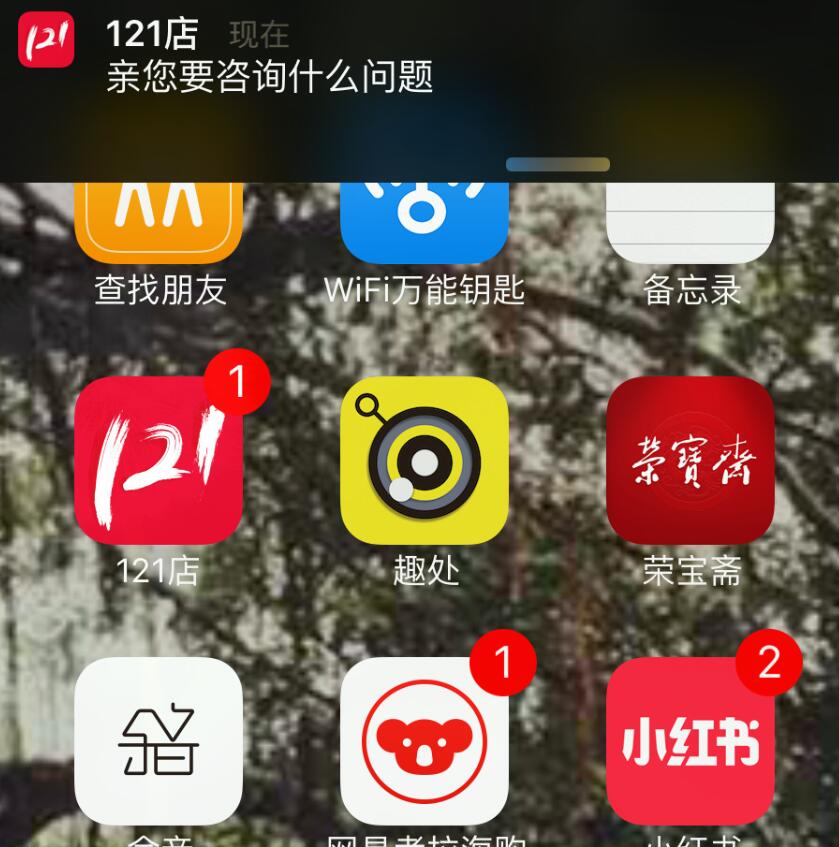
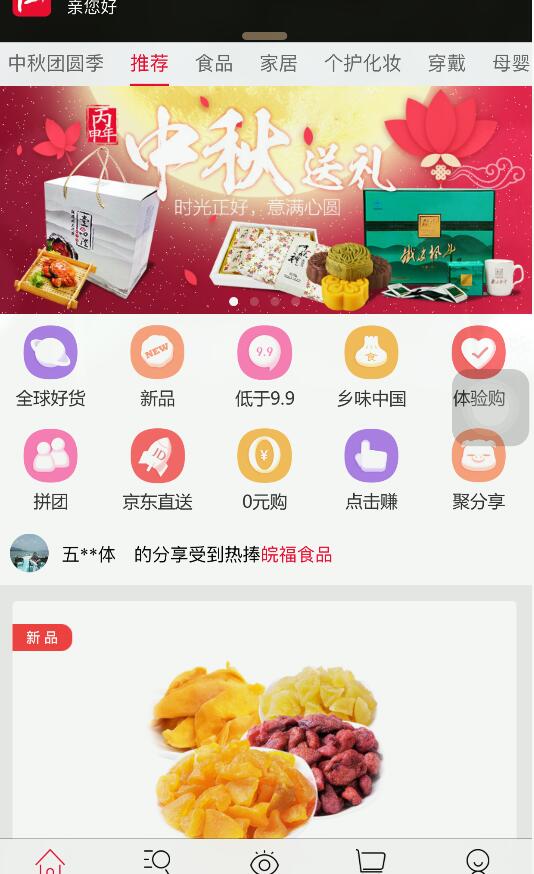
跑起來測一下:即使 App 在前台,新訊息推來時頂部也會滑出一條與系統風格一致的橫幅;點它會走你設定的跳轉邏輯。
使用者在後景時收到的提示:
使用者在前景時收到的提示:
以上就是完整的實作流程,希望對正在做類似需求的你有幫助。
- 上一篇文章: IOS 開發中收起鍵盤的五種方式
- 下一篇文章: UIWebView 自適應內容高度的四種做法一次講清楚