
iOS 自帶 TTS 文字轉語音技術與語音播報實踐
編輯:iOS 開發綜合
文字轉語音技術(Text To Speech,簡稱 TTS)是把文字即時合成人聲的能力。當你想在 iOS 上做出有聲書、朗讀或語音播報這類功能時,就會用到它。好消息是,這個能力從 iOS 7 起已由系統內建,不必依賴第三方服務。
一、使用前必須知道的幾件事
- 此功能自 iOS 7 之後才提供。
- 需要引入
AVFoundation庫。 AVSpeechSynthesizer:語音合成器,可視為一個「會說話的人」,是最主要的操作介面。AVSpeechSynthesisVoice:代表一個「聲音」,對應不同語言與地區。AVSpeechUtterance:代表「要說出的一段話」。
二、播放語音的程式碼範例
//語音播報 AVSpeechUtterance *utterance = [AVSpeechUtterance speechUtteranceWithString:@"床前明月光,疑是地上霜。"]; utterance.pitchMultiplier=0.8; //中式發音 AVSpeechSynthesisVoice *voice = [AVSpeechSynthesisVoice voiceWithLanguage:@"zh-CN"]; //英式發音 // AVSpeechSynthesisVoice *voice = [AVSpeechSynthesisVoice voiceWithLanguage:@"en-GB"]; utterance.voice = voice; NSLog(@"%@",[AVSpeechSynthesisVoice speechVoices]); AVSpeechSynthesizer *synth = [[AVSpeechSynthesizer alloc]init]; [synth speakUtterance:utterance];
三、AVSpeechSynthesizer
這個類別就像一個會說話的人:能「說話」、能「暫停」、能「繼續」,也能查詢目前是否正在說話。可用的方法與屬性如下:
- 說話:
speakUtterance - 控制:
continueSpeaking(繼續)、pauseSpeakingAtBoundary(暫停)、paused(暫停狀態)、speaking(說話狀態)、stopSpeakingAtBoundary(停止) - 委託:
delegate
四、AVSpeechBoundary
這是一個列舉型別,用來標示暫停或停止時「停在哪裡」,共有兩種:
AVSpeechBoundaryImmediate:立刻停止。AVSpeechBoundaryWord:說完當前整詞後再停。
五、AVSpeechSynthesizerDelegate
合成器的委託協定,為各項事件提供回應的接口:
didCancelSpeechUtterance:已取消說話didContinueSpeechUtterance:已繼續說話didFinishSpeechUtterance:已說完didPauseSpeechUtterance:已暫停didStartSpeechUtterance:已開始willSpeakRangeOfSpeechString:即將說出某段文字
六、AVSpeechSynthesisVoice
這個類別定義了一系列聲音,主要依語言與地區區分:
voiceWithLanguage::依指定語言取得對應聲音。speechVoices:取得當前裝置支援的所有聲音。currentLanguageCode:取得目前聲音的語言代碼字串,例如zh-cn。language:取得目前的語言。
七、AVSpeechUtterance
這個類別代表一段要說的話,主要屬性與方法包括:
pitchMultiplier:音高postUtteranceDelay:讀完一段後的停頓時間preUtteranceDelay:讀一段話之前的停頓rate:朗讀速度,系統提供AVSpeechUtteranceMinimumSpeechRate、AVSpeechUtteranceMaximumSpeechRate、AVSpeechUtteranceDefaultSpeechRate三種取值speechString:要讀的字串voice:使用的聲音,為AVSpeechSynthesisVoice物件volume:音量
八、類別關係圖
這些類別之間的關係如下圖所示:
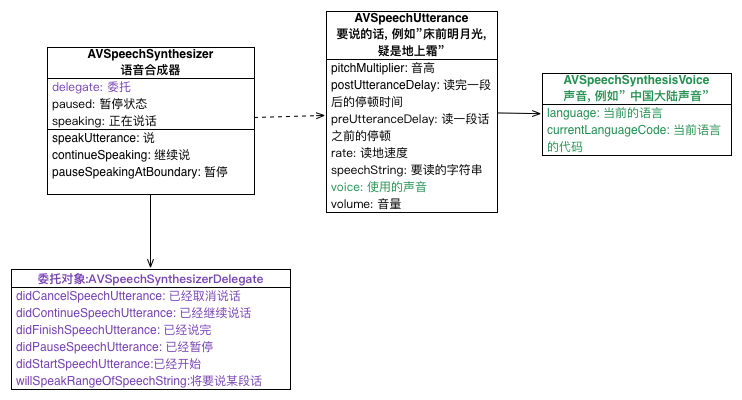
以上就是本文關於 iOS 自帶 TTS 技術與語音播報實踐的整理。整體設計相当直觀:Utterance 是內容、Voice 是聲音、Synthesizer 負責演出,搭配 delegate 就能精細控制播放流程。若有疑問歡迎留言交流。