
iOS 10 推送功能開發的注意事項與踩坑總結
編輯:iOS 開發綜合
把專案從舊版 iOS 升級到 iOS 10 之後,推送功能常會出現各種小狀況。以下幾點是實作時最容易忽略、也最該逐項檢查的地方。
1. 別忘了開啟 Push Notifications 能力
在專案的 target 中打開 Capabilities → Push Notifications,Xcode 會自動產生 .entitlement 檔。不少人在升級後抓不到 deviceToken,絕大多數就是漏了這個開關。

Capabilitie → Push Notifications
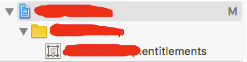
自動生成 .entitlement
2. 確認框架已導入並遵守協議
確保專案已加入 UserNotifications.framework,在 AppDelegate 中 import,並且宣告遵守 UNUserNotificationCenterDelegate。
#import <UserNotifications/UserNotifications.h> @interface AppDelegate : UIResponder <UIApplicationDelegate,UNUserNotificationCenterDelegate> @end
3. 在啟動方法中設定代理並請求權限
於 didFinishLaunchingWithOptions 裡先指定 UNUserNotificationCenter 的 delegate,再發出權限請求。這裡有個常被寫錯的細節:iOS 10 之後判斷系統版本不能再靠截取字串,建議改用數值比較的巨集。
//注意,關於 iOS10 系統版本的判斷,可以用下面這個宏來判斷。不能再用截取字符的方法。 #define SYSTEM_VERSION_GRATERTHAN_OR_EQUALTO(v) ([[[UIDevice currentDevice] systemVersion] compare:v options:NSNumericSearch] != NSOrderedAscending) -(BOOL)application:(UIApplication *)application didFinishLaunchingWithOptions:(NSDictionary *)launchOptions{ if(SYSTEM_VERSION_GRATERTHAN_OR_EQUALTO(@"10.0")){ UNUserNotificationCenter *center = [UNUserNotificationCenter currentNotificationCenter]; center.delegate = self; [center requestAuthorizationWithOptions:(UNAuthorizationOptionSound | UNAuthorizationOptionAlert | UNAuthorizationOptionBadge) completionHandler:^(BOOL granted, NSError * _Nullable error){ if( !error ){ [[UIApplication sharedApplication] registerForRemoteNotifications]; } }]; } return YES; }
4. 實作兩個核心回調
//====================For iOS 10==================== -(void)userNotificationCenter:(UNUserNotificationCenter *)center willPresentNotification:(UNNotification *)notification withCompletionHandler:(void (^)(UNNotificationPresentationOptions options))completionHandler{ NSLog(@"Userinfo %@",notification.request.content.userInfo); //功能:可設置是否在應用內彈出通知 completionHandler(UNNotificationPresentationOptionAlert); } //點擊推送消息後回調 -(void)userNotificationCenter:(UNUserNotificationCenter *)center didReceiveNotificationResponse:(UNNotificationResponse *)response withCompletionHandler:(void(^)())completionHandler{ NSLog(@"Userinfo %@",response.notification.request.content.userInfo); }
特別提醒:是否採用新的 UserNotifications.framework 必須依系統版本判斷,因此不要把 iOS 10 以前的舊程式碼急著刪掉,否則舊系統使用者一樣收不到通知。
總結
整理起來就是四件事:開啟 Capabilities 中的 Push Notifications、導入 UserNotifications.framework 並遵守 delegate、正確請求權限與設定代理、實作前景與點擊兩個回調,最後記得保留舊版分支程式碼。希望這份清單能幫你在開發 iOS 10 推送時少走幾趟彎路,有疑問歡迎留言交流。
- 上一篇文章: iOS 中 Block 回調的用法與原理解析
- 下一篇文章: iOS 如何取得當前畫面所屬的視圖控制器