
iOS 表視圖學習筆記(二):實作列表「新增一列」與插入動畫
編輯:iOS 開發綜合
上一篇談了刪除,有刪就有增。新增一列用的是這個方法:
- (void)insertRowsAtIndexPaths:(NSArray *)indexPaths
              withRowAnimation:(UITableViewRowAnimation)animation
其中 indexPaths 用來指定要插入的位置,animation 則決定插入時的動畫風格。
核心程式碼
// 設置表單元的編輯風格
- (UITableViewCellEditingStyle)tableView:(UITableView *)tableView
           editingStyleForRowAtIndexPath:(NSIndexPath *)indexPath {
    return UITableViewCellEditingStyleInsert;
}

- (void)tableView:(UITableView *)tableView
  commitEditingStyle:(UITableViewCellEditingStyle)editingStyle
   forRowAtIndexPath:(NSIndexPath *)indexPath {

    // 判斷表單元的編輯風格
    if (editingStyle == UITableViewCellEditingStyleDelete) {
        [a removeObjectAtIndex:indexPath.row];
        [tv deleteRowsAtIndexPaths:[NSArray arrayWithObject:indexPath]
                 withRowAnimation:UITableViewRowAnimationAutomatic];
    } else if (editingStyle == UITableViewCellEditingStyleInsert) {
        i = i + 1;
        NSInteger row = [indexPath row];
        NSArray *insert = [NSArray arrayWithObjects:indexPath, nil];
        NSString *str = [NSString stringWithFormat:@"%i", i];
        [a insertObject:str atIndex:row];
        [tv insertRowsAtIndexPaths:insert withRowAnimation:UITableViewRowAnimationRight];
    }
}
需要遵守的協議與成員宣告
@interface ViewController : UIViewController <UITableViewDataSource, UITableViewDelegate>
{
    IBOutlet UITableView *tv;
    NSMutableArray *a;
    NSArray *b;
    int i;
}
@end
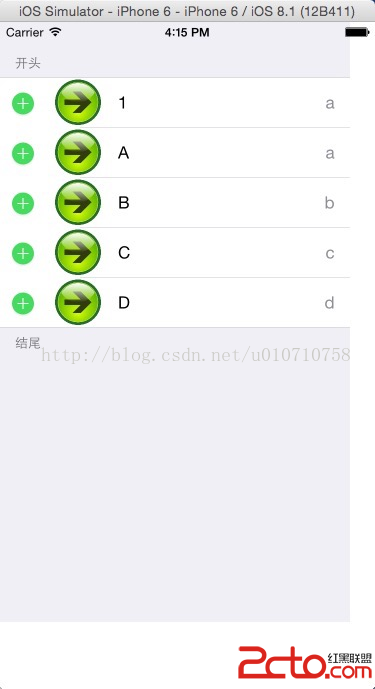
一個關鍵原則
不管是插入還是刪除,順序都必須是「先改資料來源,再呼叫 insert/deleteRows」。因為 UITableView 在執行動畫的過程中會回頭詢問 dataSource 目前的 row 數量與內容,如果資料還沒更新就呼叫動畫方法,會直接得到「不一致」的崩潰(NSInternalInconsistencyException)。上面程式碼中先 insertObject 再 insertRows,就是這個原因。
另外,insertRowsAtIndexPaths 只能操作「已經在畫面上的 section」。若要一次插入多列,建議把所有 NSIndexPath 收集成陣列再一次傳入,讓動畫同步播放,比逐列呼叫更流暢。若想整批重排,改用 reloadData 反而更單純,只是會失去動畫效果。