
iOS 陀螺儀開發(CoreMotion 框架)實例詳解
iOS 陀螺儀參數意義
self.mManager = [[CMMotionManager alloc]init]; self.mManager.deviceMotionUpdateInterval = 0.5; if (self.mManager.gyroAvailable) { [self.mManager startDeviceMotionUpdatesToQueue:[NSOperationQueue currentQueue] withHandler:^(CMDeviceMotion * _Nullable motion, NSError * _Nullable error) { NSLog(@"RotationRate X:%.2lf Y:%.2lf Z:%.2lf ",motion.userAcceleration.x,motion.userAcceleration.y,motion.userAcceleration.z); }]; }
x 軸:頭靠近為負數,頭遠離為正數。
y 軸:左側抬高為正數,右側抬高為負數。
CoreMotion 框架介紹
CoreMotion 是專門處理 Motion 的框架,涵蓋加速度計與陀螺儀兩部分。iOS 4 之前,加速度計由 UIAccelerometer 類負責採集資料,現在大多改用 CoreMotion 處理,不過因為 UIAccelerometer 比較簡單,仍有部分人在用。加速度計由三個座標軸決定,最常見的操作像是移動、搖動(搖一搖)、傾斜手機等,都能被偵測到。加速度計可偵測線性變化,陀螺儀則更擅長偵測偏轉動作。要注意的是,iOS 模擬器無法模擬這些動作,真機除錯需要開發者帳號。
加速度計
加速度計的 x、y、z 三個方向,參考下圖:
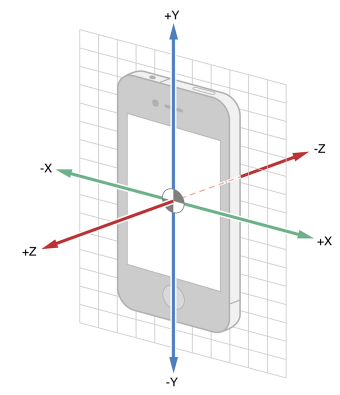
如果只需要知道裝置方向,不需要具體的方向向量角度,可以用 UIDevice 來操作,還能依方向進行判斷,具體可參考 Apple 官網程式碼:
-(void) viewDidLoad { // Request to turn on accelerometer and begin receiving accelerometer events [[UIDevice currentDevice] beginGeneratingDeviceOrientationNotifications]; [[NSNotificationCenter defaultCenter] addObserver:self selector:@selector(orientationChanged:) name:UIDeviceOrientationDidChangeNotification object:nil]; } - (void)orientationChanged:(NSNotification *)notification { // Respond to changes in device orientation } -(void) viewDidDisappear { // Request to stop receiving accelerometer events and turn off accelerometer [[NSNotificationCenter defaultCenter] removeObserver:self]; [[UIDevice currentDevice] endGeneratingDeviceOrientationNotifications]; }
當使用者晃動裝置時,系統會通知每個在用的裝置,可以讓本身成為第一響應者:
- (BOOL)canBecomeFirstResponder { return YES; } - (void)viewDidAppear:(BOOL)animated { [self becomeFirstResponder]; }
處理 Motion 事件有三種方式:開始(motionBegan)、結束(motionEnded)、取消(motionCancelled):
- (void)motionBegan:(UIEventSubtype)motion withEvent:(UIEvent *)event NS_AVAILABLE_IOS(3_0); - (void)motionEnded:(UIEventSubtype)motion withEvent:(UIEvent *)event NS_AVAILABLE_IOS(3_0); - (void)motionCancelled:(UIEventSubtype)motion withEvent:(UIEvent *)event NS_AVAILABLE_IOS(3_0);
在 motionEnded 方法中處理:
- (void)motionEnded:(UIEventSubtype)motion withEvent:(UIEvent *)event { if (motion == UIEventSubtypeMotionShake) { // FlyElephant https://www.cnblogs.com/xiaofeixiang [[NSNotificationCenter defaultCenter] postNotificationName:@"FlyElephant" object:self]; } }
CoreMotion 在處理加速度計與陀螺儀資料時是個非常重要的框架,它本身整合了許多演算法來取得原生資料並良好呈現。CoreMotion 與 UIKit 不同,它連接到的是 UIEvent 而非事件響應鏈,相較之下只是更簡單地分發 motion 事件。
CMMotionManager 類能取得裝置的所有移動資料(motion data),Core Motion 提供了兩種操作方式:
pull 方式:以 CMMotionManager 的唯讀方式取得當前任何感測器狀態或組合資料;
push 方式:以 block 或閉包形式收集想要的資料,並在特定週期內取得即時更新。
pull 處理方式:
//判斷加速計是否可用 if ([_motionManager isAccelerometerAvailable]) { // 設置加速計采樣頻率 [_motionManager setAccelerometerUpdateInterval:1 / 40.0]; [_motionManager startAccelerometerUpdates]; } else { NSLog(@"博客園-FlyElephant"); }
觸摸結束:
-(void)touchesEnded:(NSSet *)touches withEvent:(UIEvent *)event{ CMAcceleration acceleration=_motionManager.accelerometerData.acceleration; NSLog(@"%f---%f---%f",acceleration.x,acceleration.y,acceleration.z); }
push 處理方式:
 @property (strong,nonatomic) CMMotionManager *motionManager; @property (strong,nonatomic) NSOperationQueue *quene; _motionManager=[[CMMotionManager alloc]init];
//判斷加速計是否可用
if ([_motionManager isAccelerometerAvailable]) {
    // 設置加速計頻率
    [_motionManager setAccelerometerUpdateInterval:1 / 40.0];
    //開始采樣數據
    [_motionManager startAccelerometerUpdatesToQueue:_quene withHandler:^(CMAccelerometerData *accelerometerData, NSError *error) {
        NSLog(@"%f---%f",accelerometerData.acceleration.x,accelerometerData.acceleration.y);
    }];
} else {
    NSLog(@"博客園-FlyElephant");
}
更新頻率可透過下圖的時間設定來調整:

陀螺儀
陀螺儀的用法與加速度計沒有太大差別,先看這張陀螺儀旋轉角度圖:
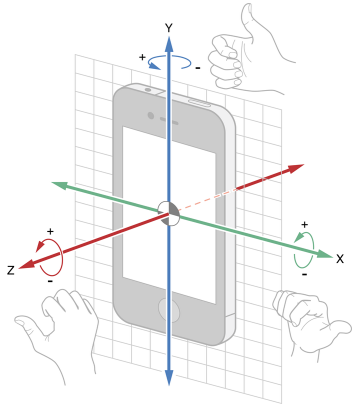
陀螺儀更新資料同樣有兩種方式,pull 方式(startGyroUpdates)與 push 方式(startGyroUpdatesToQueue):
static const NSTimeInterval gyroMin = 0.01; - (void)startUpdatesWithSliderValue:(int)sliderValue { // Determine the update interval NSTimeInterval delta = 0.005; NSTimeInterval updateInterval = gyroMin + delta * sliderValue; // Create a CMMotionManager CMMotionManager *mManager = [(APLAppDelegate *)[[UIApplication sharedApplication] delegate] sharedManager]; APLGyroGraphViewController * __weak weakSelf = self; // Check whether the gyroscope is available if ([mManager isGyroAvailable] == YES) { // Assign the update interval to the motion manager [mManager setGyroUpdateInterval:updateInterval]; [mManager startGyroUpdatesToQueue:[NSOperationQueue mainQueue] withHandler:^(CMGyroData *gyroData, NSError *error) { [weakSelf.graphView addX:gyroData.rotationRate.x y:gyroData.rotationRate.y z:gyroData.rotationRate.z]; [weakSelf setLabelValueX:gyroData.rotationRate.x y:gyroData.rotationRate.y z:gyroData.rotationRate.z]; }]; } self.updateIntervalLabel.text = [NSString stringWithFormat:@"%f", updateInterval]; } - (void)stopUpdates{ CMMotionManager *mManager = [(APLAppDelegate *)[[UIApplication sharedApplication] delegate] sharedManager]; if ([mManager isGyroActive] == YES) { [mManager stopGyroUpdates]; } }
感謝閱讀,希望能幫助到大家。
- 上一篇文章: iOS 偵測網路狀態的兩種常見做法
- 下一篇文章: iOS 實作搖一搖手勢的簡便方法