
iOS 遠程網絡音樂播放核心技術:AVPlayer、後台播放與鎖屏控制
編輯:iOS 開發綜合
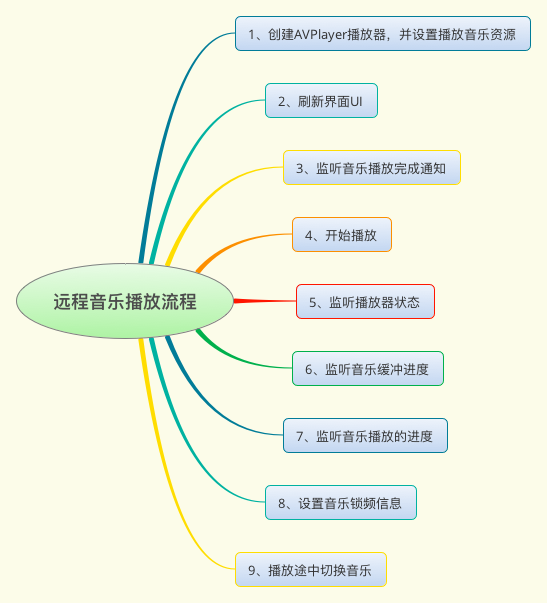
在 iOS 中播放遠程網絡音樂,最常見的方案是使用 AVFoundation 框架中的 AVPlayer。本文將整理遠程音樂播放的常見技術點,包括播放、切歌、狀態監聽、進度更新、後台播放與鎖屏控制。
一、建立 AVPlayer
播放遠程音樂時,可以先用 URL 建立 AVPlayerItem,再用它初始化 AVPlayer。
AVPlayerItem *item = [[AVPlayerItem alloc] initWithURL:[NSURL URLWithString:@"https://example.com/music.mp3"]];
AVPlayer *player = [[AVPlayer alloc] initWithPlayerItem:item];
[player play];
注意:播放器物件需要被強引用,否則可能會被釋放而無法播放。
二、切換音樂
切換歌曲時,可以使用 replaceCurrentItemWithPlayerItem:。
AVPlayerItem *newItem = [[AVPlayerItem alloc] initWithURL:[NSURL URLWithString:nextMusicURL]];
[player replaceCurrentItemWithPlayerItem:newItem];
三、監聽播放器狀態
可以透過 KVO 監聽 currentItem 的 status 屬性,判斷音樂是否準備好播放。
[player.currentItem addObserver:self
                     forKeyPath:@"status"
                        options:NSKeyValueObservingOptionNew
                        context:nil];

- (void)observeValueForKeyPath:(NSString *)keyPath
                      ofObject:(id)object
                        change:(NSDictionary *)change
                       context:(void *)context {
    if ([keyPath isEqualToString:@"status"]) {
        switch (player.status) {
            case AVPlayerItemStatusUnknown:
                NSLog(@"未知狀態");
                break;
            case AVPlayerItemStatusReadyToPlay:
                NSLog(@"準備播放");
                break;
            case AVPlayerItemStatusFailed:
                NSLog(@"載入失敗");
                break;
            default:
                break;
        }
    }
}
音樂播放完成或切換歌曲時,記得移除 KVO,否則可能造成 crash。
[player.currentItem removeObserver:self forKeyPath:@"status"];四、監聽緩衝進度
可以透過 KVO 監聽 loadedTimeRanges,取得目前載入範圍。
[player.currentItem addObserver:self
                     forKeyPath:@"loadedTimeRanges"
                        options:NSKeyValueObservingOptionNew
                        context:nil];

if ([keyPath isEqualToString:@"loadedTimeRanges"]) {
    NSArray *timeRanges = player.currentItem.loadedTimeRanges;
    CMTimeRange timeRange = [timeRanges.firstObject CMTimeRangeValue];

    NSTimeInterval loadedTime = CMTimeGetSeconds(timeRange.start) + CMTimeGetSeconds(timeRange.duration);
    NSTimeInterval totalTime = CMTimeGetSeconds(player.currentItem.duration);
    NSTimeInterval progress = loadedTime / totalTime;

    self.loadProgressView.progress = progress;
}
五、監聽播放進度
播放進度可以使用 addPeriodicTimeObserverForInterval:queue:usingBlock:。
self.timeObserver = [player addPeriodicTimeObserverForInterval:CMTimeMake(1, 1)
                                                        queue:dispatch_get_main_queue()
                                                   usingBlock:^(CMTime time) {
    Float64 current = CMTimeGetSeconds(time);
    Float64 total = CMTimeGetSeconds(player.currentItem.duration);
    self.playSlider.value = current / total;
}];
移除方式:
if (self.timeObserver) {
    [player removeTimeObserver:self.timeObserver];
    self.timeObserver = nil;
}
六、手動調整播放進度
使用者拖動滑桿時,可以使用 seekToTime: 跳轉到指定時間。
- (IBAction)sliderValueChanged:(UISlider *)sender {
    Float64 duration = CMTimeGetSeconds(player.currentItem.duration);
    Float64 targetTime = sender.value * duration;
    [player seekToTime:CMTimeMake(targetTime, 1)];
}
七、監聽播放完成
可以透過通知監聽播放結束。
[[NSNotificationCenter defaultCenter] addObserver:self
                                         selector:@selector(playFinished:)
                                             name:AVPlayerItemDidPlayToEndTimeNotification
                                           object:player.currentItem];

- (void)playFinished:(NSNotification *)notification {
    NSLog(@"播放完成");
}
八、後台播放
若希望 App 進入後台後仍能播放音樂,需要開啟 Background Modes 中的 Audio,並設定音頻會話。
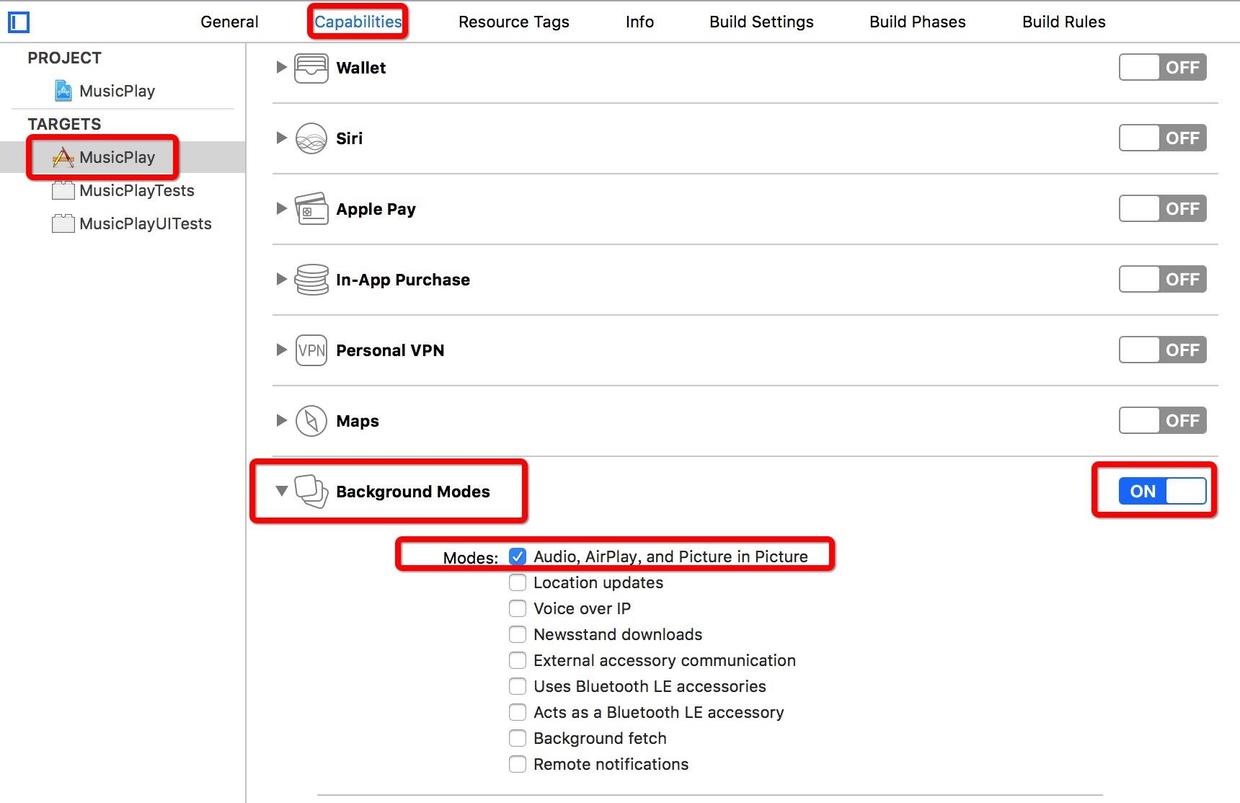
AVAudioSession *session = [AVAudioSession sharedInstance];
[session setCategory:AVAudioSessionCategoryPlayback error:nil];
[session setActive:YES error:nil];
九、鎖屏信息與遠程控制
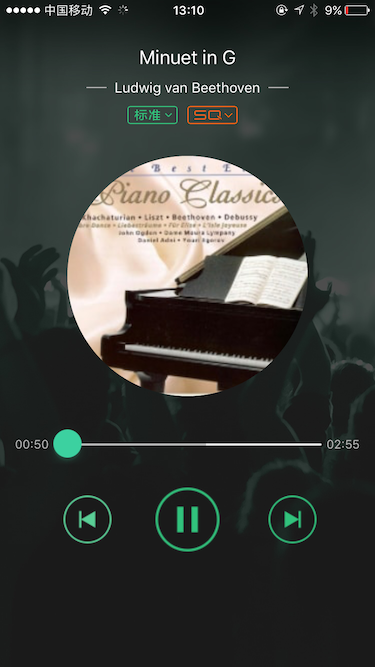
鎖屏時可以顯示歌曲資訊,並支援播放、暫停、上一首、下一首等操作。
MPNowPlayingInfoCenter *infoCenter = [MPNowPlayingInfoCenter defaultCenter];

NSMutableDictionary *info = [NSMutableDictionary dictionary];
info[MPMediaItemPropertyTitle] = self.currentSongName;
info[MPMediaItemPropertyArtist] = self.currentArtist;
info[MPMediaItemPropertyPlaybackDuration] = @(CMTimeGetSeconds(player.currentItem.duration));

infoCenter.nowPlayingInfo = info;
[[UIApplication sharedApplication] beginReceivingRemoteControlEvents];
遠程控制事件可透過以下方式接收:
- (void)remoteControlReceivedWithEvent:(UIEvent *)event {
    switch (event.subtype) {
        case UIEventSubtypeRemoteControlPlay:
            [player play];
            break;
        case UIEventSubtypeRemoteControlPause:
            [player pause];
            break;
        case UIEventSubtypeRemoteControlNextTrack:
            [self playNextSong];
            break;
        case UIEventSubtypeRemoteControlPreviousTrack:
            [self playPreviousSong];
            break;
        default:
            break;
    }
}
整體而言,AVPlayer 已能滿足大多數遠程音樂播放需求。若需要更複雜的播放能力,也可以進一步研究 AVQueuePlayer 或自定義音頻引擎。