
iOS 手勢辨識(Gesture Recognizer)觀念詳解
前言
在 iOS 中,你可以使用系統內建的手勢辨識器(Gesture Recognizer),也可以自行建立自訂手勢。Gesture Recognizer 會把低階的觸控事件轉譯為高階的操作行為,它是綁定到 view 上的物件,一旦手勢發生,綁定的 view 便會收到回應。它會判斷這個動作是否對應某個特定手勢(例如滑動、縮放、拖曳、旋轉);若能成功辨識,就會向綁定的 view 發送訊息,如下圖所示。
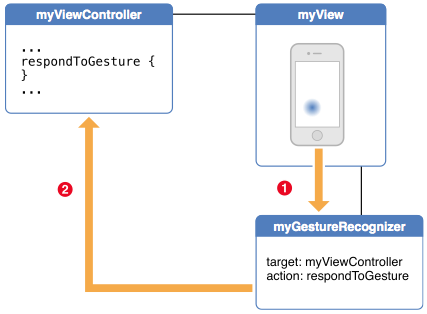
UIKit 框架已內建多種預定義的 Gesture Recognizer,包含:
- UITapGestureRecognizer:輕點手勢(單擊、雙擊)
- UIPanGestureRecognizer:拖曳手勢
- UIPinchGestureRecognizer:縮放手勢
- UISwipeGestureRecognizer:輕掃手勢
- UIRotationGestureRecognizer:旋轉手勢
- UILongPressGestureRecognizer:長按手勢
如果你希望 App 能辨識某些獨特的手勢,例如特定的手寫軌跡,就可以建立自訂的 Gesture Recognizer,這部分會在下篇中介紹。
將手勢與 view 關聯
每一個特定的手勢都必須關聯到 view 上才會生效。一個 view 可以關聯多個不同的手勢,但同一個手勢只能關聯到一個 view。當使用者觸碰該 view 時,Gesture Recognizer 便會收到訊息並回應對應的觸控事件。
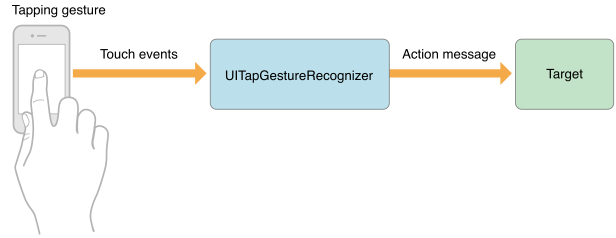
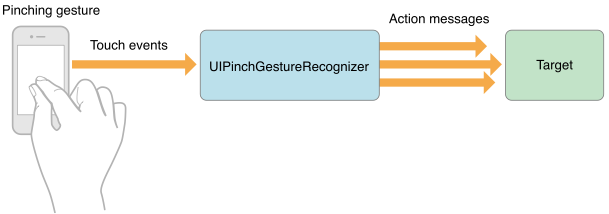
關聯到特定 view 的步驟
- 建立 Gesture Recognizer 實例
- 呼叫 addGestureRecognizer
- 實作處理手勢的方法
若要移除手勢,可使用 removeGestureRecognizer: 方法。
_panGestureRecognizer = [[UIPanGestureRecognizer alloc] initWithTarget:self action:@selector(handlerPanGesture:)]; _panGestureRecognizer.delegate = self; _panGestureRecognizer.maximumNumberOfTouches = 2; _panGestureRecognizer.minimumNumberOfTouches = 2; [self.view addGestureRecognizer:_panGestureRecognizer]; - (void)handlerPanGesture:(UIPanGestureRecognizer *)recognizer { if ((recognizer.state == UIGestureRecognizerStateBegan) || (recognizer.state == UIGestureRecognizerStateChanged)) { CGPoint offset = [recognizer translationInView:self.view]; CGRect frame = self.rightViewController.view.frame; frame.origin.x += offset.x; if (frame.origin.x >= 0 && frame.origin.x <= kScreenWidth) { self.rightViewController.view.frame = frame; } [recognizer setTranslation:CGPointZero inView:self.view]; } else if (recognizer.state == UIGestureRecognizerStateEnded) { BOOL isVisible = self.rightViewController.view.frame.origin.x < kScreenWidth / 2; [self showRightView:isVisible]; } }
手勢辨識狀態: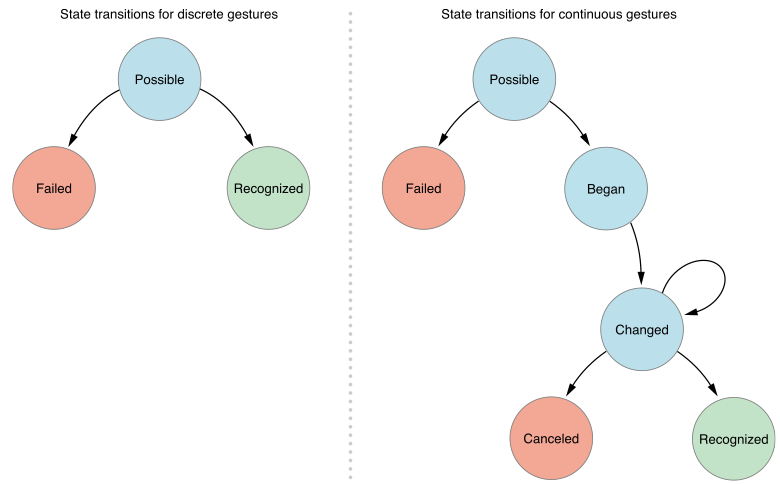
Gesture recognizer 會在各個狀態(state)之間轉換,並依是否符合特定條件來決定能否進入下一個狀態。它會分析多點觸控,若無法成功辨識手勢,就代表狀態轉換失敗,即 UIGestureRecognizerStateFailed。詳見 UIGestureRecognizerState 列舉:
typedef NS_ENUM(NSInteger, UIGestureRecognizerState) { UIGestureRecognizerStatePossible, // the recognizer has not yet recognized its gesture, but may be evaluating touch events. this is the default state UIGestureRecognizerStateBegan, // the recognizer has received touches recognized as the gesture. the action method will be called at the next turn of the run loop UIGestureRecognizerStateChanged, // the recognizer has received touches recognized as a change to the gesture. the action method will be called at the next turn of the run loop UIGestureRecognizerStateEnded, // the recognizer has received touches recognized as the end of the gesture. the action method will be called at the next turn of the run loop and the recognizer will be reset to UIGestureRecognizerStatePossible UIGestureRecognizerStateCancelled, // the recognizer has received touches resulting in the cancellation of the gesture. the action method will be called at the next turn of the run loop. the recognizer will be reset to UIGestureRecognizerStatePossible UIGestureRecognizerStateFailed, // the recognizer has received a touch sequence that can not be recognized as the gesture. the action method will not be called and the recognizer will be reset to UIGestureRecognizerStatePossible // Discrete Gestures – gesture recognizers that recognize a discrete event but do not report changes (for example, a tap) do not transition through the Began and Changed states and can not fail or be cancelled UIGestureRecognizerStateRecognized = UIGestureRecognizerStateEnded // the recognizer has received touches recognized as the gesture. the action method will be called at the next turn of the run loop and the recognizer will be reset to UIGestureRecognizerStatePossible };
為一個 view 加入多個手勢
當一個 view 掛上多個手勢時,預設情況下系統並未針對執行優先順序做排序,每次觸發的順序可能不同。不過你可以覆寫預設行為(透過類別方法、委派方法,或子類化覆寫)來掌控:
指定某個手勢應在另一個之前捕捉。
requireGestureRecognizerToFail: 這個方法的作用是——唯有當作為參數傳入的 Gesture Recognizer 失敗後,接收者才會觸發,否則永遠不會觸發。
[self.panRecognizer requireGestureRecognizerToFail:self.swipeRecognizer];
允許兩個手勢同時作用:
gestureRecognizer:shouldRecognizeSimultaneouslyWithGestureRecognizer:
禁止在某個位置觸發手勢:
- (BOOL)gestureRecognizer:(UIGestureRecognizer *)gestureRecognizer shouldReceiveTouch:(UITouch *)touch { if ([touch.view isKindOfClass:[UIControl class]]) { return NO; } return YES; }
建立兩個手勢辨識器之間的單向關係:
若想控制兩個辨識器彼此交互,但又需要指定單向關係,你可以覆寫 canPreventGestureRecognizer: 或 canBePreventedByGestureRecognizer: 子類方法並回傳 yes。舉例來說,若你希望旋轉手勢能阻止縮放手勢,卻不希望縮放手勢反過來阻止旋轉手勢,就可以加入以下程式碼:
[rotationGestureRecognizer canPreventGestureRecognizer:pinchGestureRecognizer];
以上就是本文的完整內容,希望對你的學習有所幫助,也感謝你的支持。
- 上一篇文章: 解決 iOS 9 以後無法訪問 HTTP 的三種做法
- 下一篇文章: iOS 六種手勢辨識的實作範例